
Competency Framework
Overview
Competencies are the skills, behaviors, and attitudes that workers need to perform their roles effectively. You can measure, rate, and track competencies objectively using the Competency framework in Workday. In this chapter, you will learn how to create competencies and associate them with job families and management levels in your organization. You will also learn how to pull in, rate, and assess competencies during performance review events.
Objectives
By the end of this chapter, you will be able to:
- Configure a competency framework.
- Identify and track worker competencies.
- Create proficiency rating scales.
- Configure level-based indicators.
Competency Framework
Workday supports an advanced competency framework to allow you to associate competencies and their specific behaviors with an employee.
You can organize competencies within a competency category, and you can associate those categories with competency classes. Competency categories and classes are optional.
You can create all competencies at the tenant level using the
Configure Competency
task. You may then assign competencies to job profiles, job families, management levels, or individual workers or positions. The worker will inherit any competencies associated with their job profile, job family, management level, or position. You can pull these competencies into an employee review, rate them, and use them in the Workday multirater option.You can configure tenanted proficiency rating scales to assign an employee's proficiency level in a competency at any time or during a performance review.
Competency Categories and Classes
You can associate competencies with competency categories. You can associate competency categories with competency classes. You can only associate a competency with a competency class if you map the class to a category. You cannot associate a competency directly to a competency class.
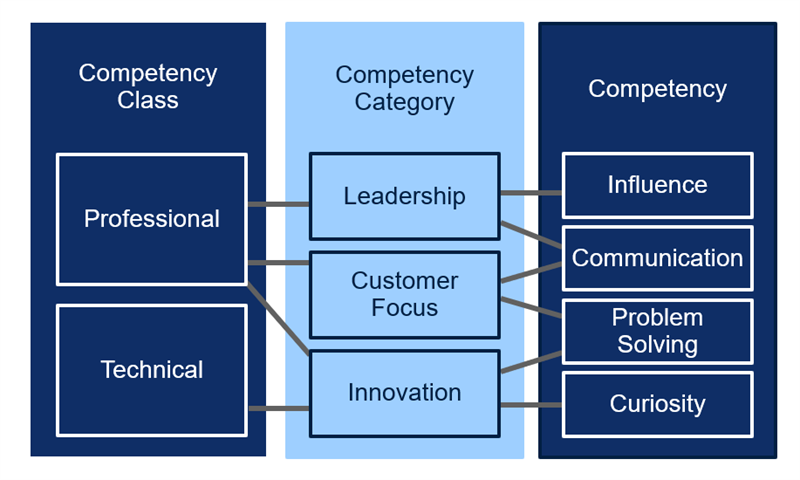
Creating competency categories allows you to group your competencies for organizational purposes. You can do this using the
Maintain Competency Categories
task. You may not delete a competency category if it has a competency tied to it.You can determine if your competency library requires grouping at an additional level. You can do this using the
Maintain Competency Classes
task. You can assign multiple competency categories to a competency class.Proficiency Rating Scales
You can establish proficiency rating scales to associate with your competencies. You can only use proficiency rating scales on the competencies review section type for a performance review template. Use the proficiency ratings to assess workers against a competency.
As with rating scales, you can assign each proficiency rating to a numerical rating value. Begin and end ranges support calculated ratings in a performance review. You can build multiple proficiency scales, providing the ability to assign different proficiency ratings scales with different competencies.
If a proficiency rating scale is already in use, you can only edit the name and description fields.
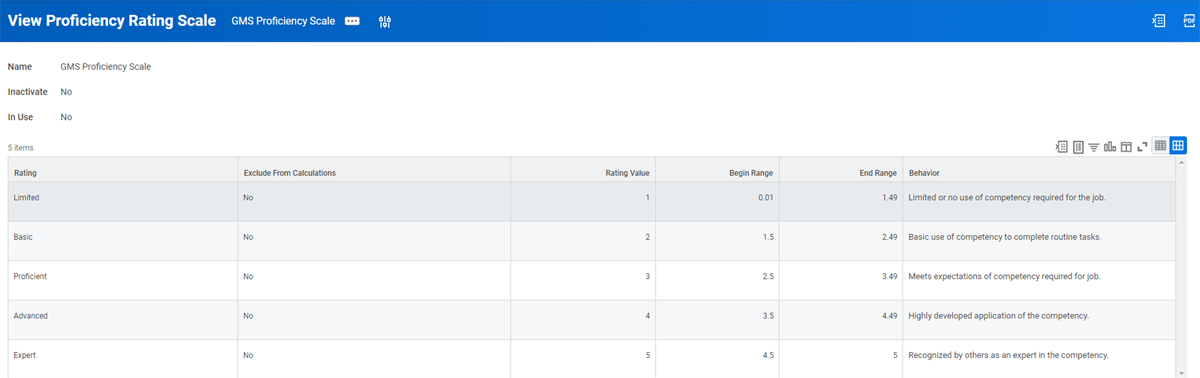
Proficiency Rating Scale
Level-Based Behavioral Indicators
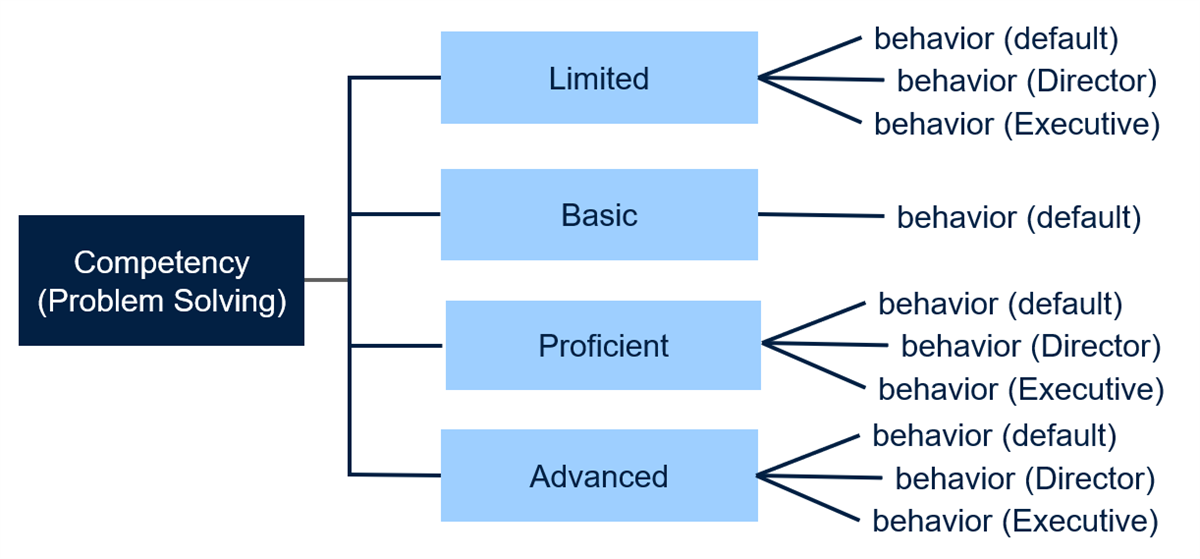
You can define different behaviors for the same competency based on a worker's management level or compensation grade. For example, in the generic proficiency rating scale above, the behaviors may be different for workers in a higher grade level or in a different management level.
To associate level-based competency behaviors, use the
Maintain Skills and Experience Setup
task, and select either the Management Level or Compensation Grade option. You can then define different behaviors for grade level or management level using the Configure Competency
task.The following diagram illustrates how different sets of behaviors for the Problem-Solving competency may vary for various management levels.
Creating Competencies
Use the
Configure Competency
task to edit existing competencies or add a new competency to your library. You can associate a competency to a competency category using this task, if required. You can also associate a proficiency rating scale with the competency, which will populate the competency with the behaviors from the proficiency rating scale. You can modify the behaviors, if needed. When creating competencies, you can capture the following information:Competency Fields | Description |
|---|---|
Category | Associate competencies with a competency category. You can further classify competencies into competency classes by assigning them to a competency category that is in the competency class. You can assign multiple competency categories to a competency class. |
Used for Talent Matrix | Select the Used for Talent Matrix checkbox to specify the competency to use with the Workday-delivered Talent Matrix - Performance Over Time by Competency report.Note : You can only select one competency per tenant. |
Description Applies to All Levels | Select this option to apply descriptions to all levels in your organization. Leaving it blank allows you to define descriptions by either management level or compensation grade. |
Proficiency Rating Scale | Use the Create Proficiency Rating Scale task to create a rating scale that to use to measure an employee's competencies. This scale contains a name for the rating, a numerical value, and a description of the behavior. |
Behaviors Apply to All Levels | Select this option to apply behaviors to all levels in your organization. Leaving it blank allows you to define behaviors by either management level or compensation grade. |
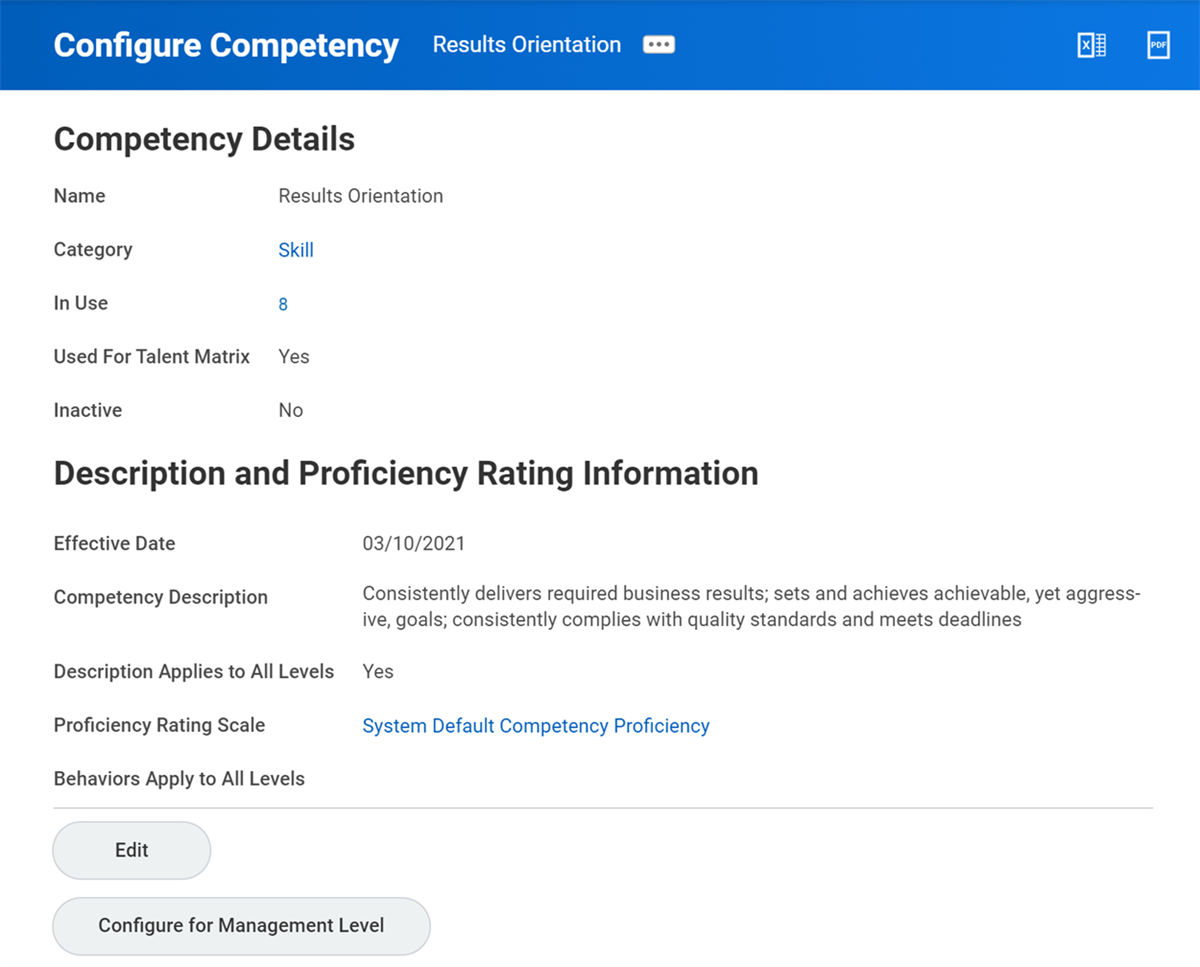
Configure Competency
You can assess workers on their competencies in several different ways. From the worker's Related Actions, select Talent > View Skills and Experience, and then select the Competencies tab to edit a worker's competency rating. You can also assess competencies in a formal performance or talent review.
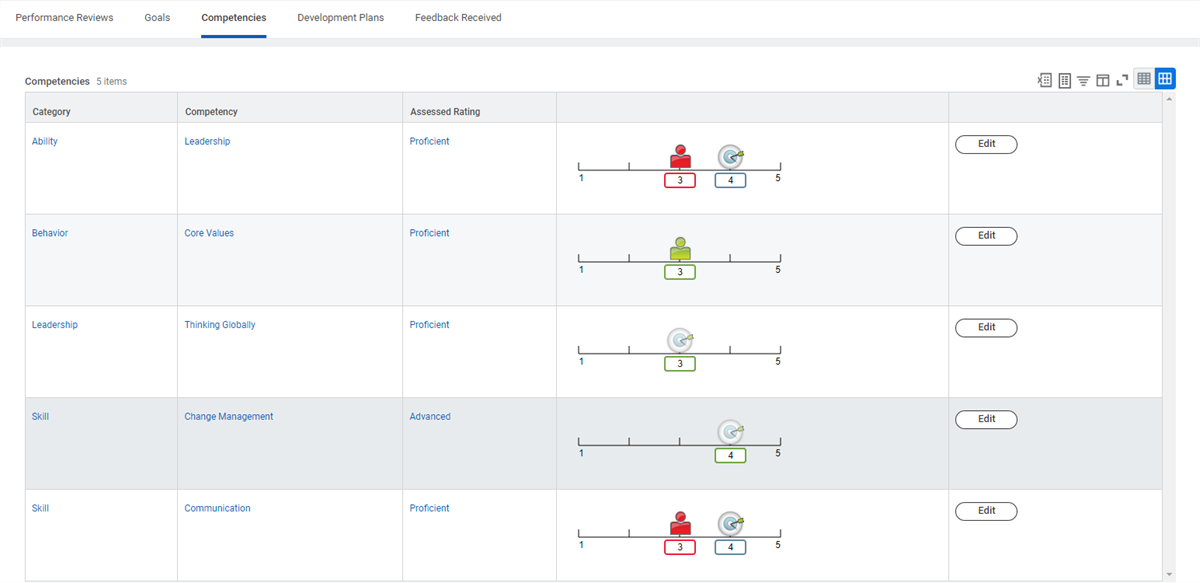
Worker Profile Competencies
Competencies and Job Profiles
When competencies are associated with a job profile, you can optionally assign a proficiency rating to the competency. You can indicate if you want to require the competency on that job profile. Requiring competencies on a job profile sets a standard that workers holding that job will:
- Exhibit that competency.
- Be measured in that competency.
- Be optionally measured against a desired proficiency rating.
Any worker assigned to the job profile will inherit the associated competencies, and if applicable, the desired proficiency rating.
Maintain Competencies for Job Family and Management Level
You can configure the job profile to display a competencies section. The display will include the competencies associated with that job profile, as well as the Competencies from Other Sources section. Competencies you assign to a job family or management level that the job profile is in will populate the Competencies from Other Sources grid.
You can assign competencies to a job profile upon creation or you can add them to the job profile at any time. Use the
Maintain Competencies for Job Family
and Maintain Competencies for Management Level
tasks to assign competencies to those groups.Any competencies on a job family or management level display on the competencies section of the job profile. You can update job profiles with new competencies. Workers previously assigned to the job profile do not automatically inherit any new competencies on their worker record until you process a performance review or manually add competencies. The newly added competencies will be available for the worker to view when they compare their competencies to the competencies of the job.
You can also add competencies to a worker during a talent review process. The competencies defined on a talent review template will assign to all workers eligible for that template.
Note
: When assigning competencies to a job profile, job family, or management level, you can indicate a target rating.Competency Precedence
Use the
Maintain Competency Precedence
task to rank the priority of competency sources. By doing so, Workday can determine which instance of the competency to use when there are multiple sources for the same competency.You can use this precedence in the talent profile, as well as the
Compare Competency to Job
report. If you do not set up a precedence list, Workday uses the most recent occurrence of the competency.Each worker inherits specific competencies and competency ratings from all job levels. If the same competency is assigned to a worker at more than one job level, the competency rating set at the lower job level takes precedence:
- Job Family: Applies to any lower level unless overridden.
- Management Level: Overrides any competency rating for the same competency set at the job family level.
- Job Profile: Overrides any competency rating for the same competency set at the job family or management level.
- Position: Overrides any competency rating for the same competency set at the job family, management level, or job profile.
Archive and Restore Competencies
Workday provides the ability to archive and restore competencies from the worker profile, which includes any ratings associated with the competency. This functionality gives users more control over what displays on their profile so that data remains current and relevant.
Using archive and restore is an opt-in feature and requires initiation on the
Manage Competencies
business process to function. If you activate the feature, it provides workers the ability to both archive and restore previously archived competencies. The feature also enables Workday to automatically restore competencies that are in use in a talent or performance review.Note
: For additional information on this topic, search Archive and Restore Competencies in Workday Community.Competency Security Policies
As you deploy and maintain Workday Talent Optimization, you may need to configure several domain and business process security policies to ensure the appropriate security permissions.
Term Domains |
|---|
Functional Area: Performance Enablement |
|
Functional Area: Talent Pipeline |
Talent Review: Competencies |
Business Processes |
|---|
Functional Area: Performance Enablement |
Manage Competencies |