
Segment-Based Security
Overview
Segmented security offers an additional level of security by limiting access to the values of a given secured item. Segment-based security groups grant membership based on included security groups such as job-based, role-based, or user-based. This chapter covers how to configure segment-based security to restrict access to segmented items, the primary use cases for segmented security, and the available segment types.
Objectives
By the end of this chapter, you will be able to:
- Configure segmented security for expenses.
- Identify use cases for segmented security.
- Identify differences in configuration steps for segmented security across functional areas.
Segment-Based Security Groups
Segmented security allows you to define segments for granular access to the values of a secured item. For example, you can control the values that appear in prompts, such as the expense items available for a user when creating an expense report. Segment-based security groups allow you to configure which security groups can access what segment of values.
Some items available for segmentation are:
| 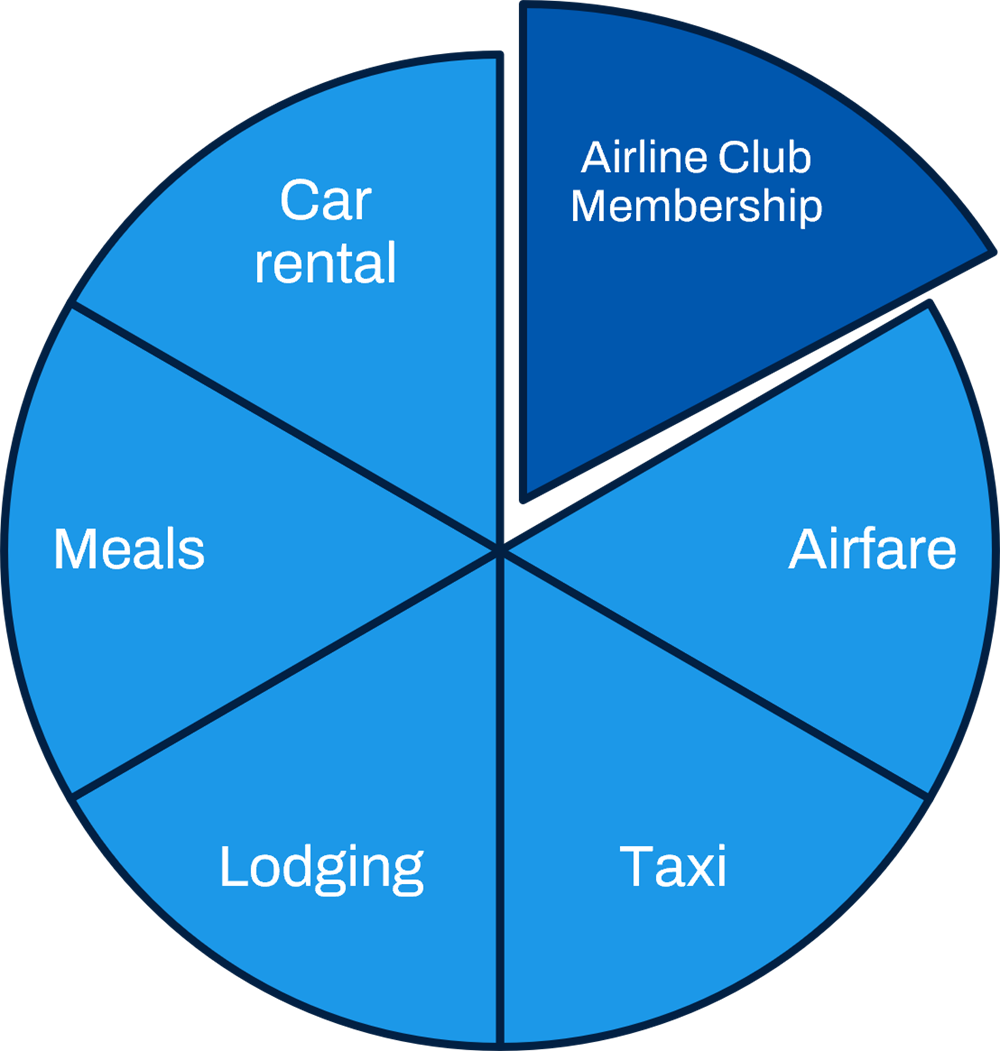
Segment-based security group expense example. |
Segment-based security groups grant membership based on existing security groups, such as job-based, role-based, or user-based. Constraints depend on included security groups.
The configurable security framework answers three questions:
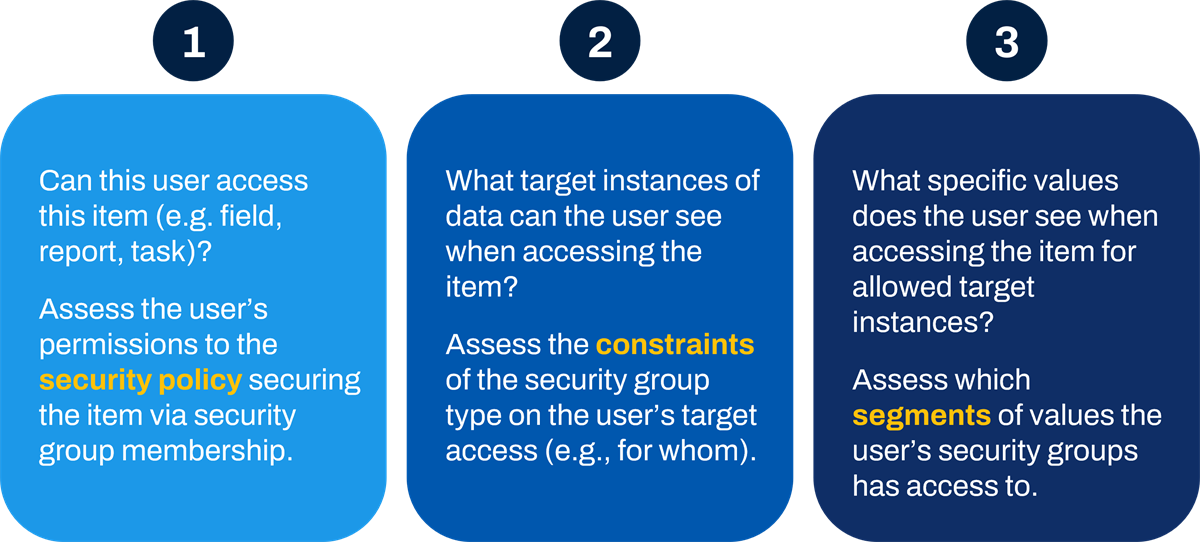
Configurable security asks these three questions.
By placing a segment-based security group in a security policy, members have constrained or unconstrained target access to values defined in permitted segments.
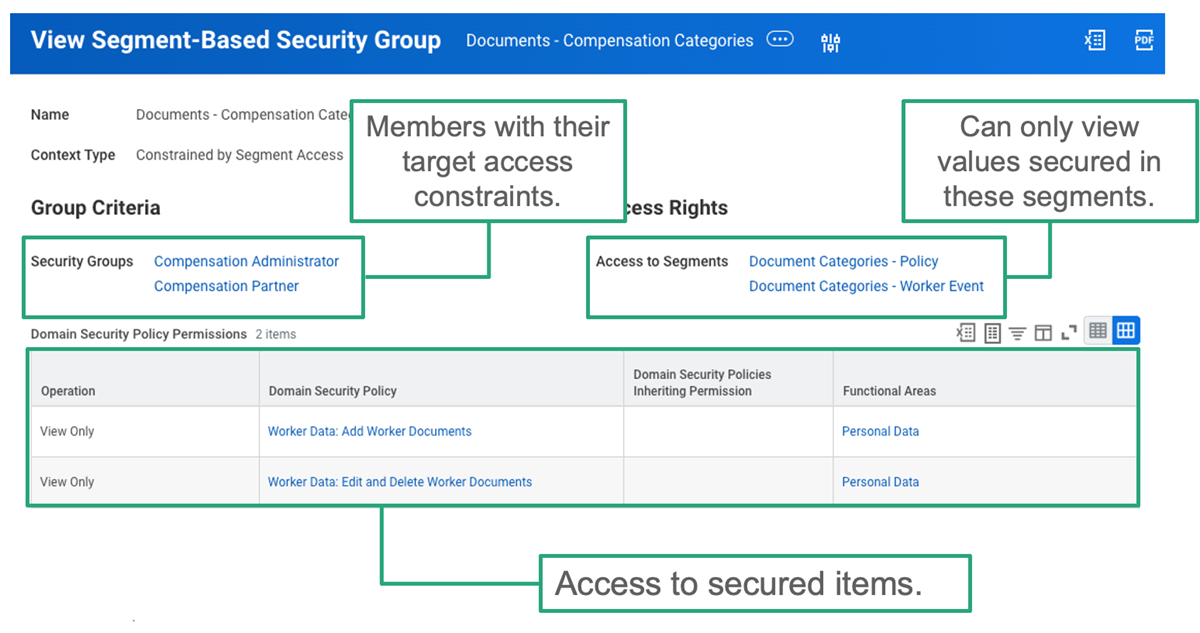
Segment-based security group example.
Configuration
To set up segment-based security groups, you must:
- Determine who needs access to what segment of values. Identify members with existing security groups or create new security groups if needed.
- Determine what values to secure in what segments. Create and maintain the security segments by adding values to needed segments.Note: Define values before adding them to segments (e.g., Expense Items, Document Categories).
- Determine which security groups can access which security segments. Create and maintain the segment-based security groups.
- Configure the segment-based security groups in the necessary domain security policies to enable segmented access.
You may need to complete an additional one-time configuration for certain types of segments. Refer to Workday Documentation for specific steps regarding the type of segmented security you would like to deploy.
Example
: To configure segments for compensation setup data, such as compensation plans, first select the Enable Compensation Setup Segment Security checkbox in the Edit Tenant Setup - HCM
task.In addition, you must maintain your security segments to keep them current with the values configured in Workday. Remember to add any new item values to existing security segments or create new security segments and segment-based security groups for new items you create.
Job-Based Security Groups
Use job-based security groups to identify members based on a single job criterion (e.g., job profile, job family, management level, exempt vs. nonexempt jobs). Target access can be constrained or unconstrained.
Relevant job criteria include:
- Job Profile
- Job Category
- Job Family
- Management Level
- Work Shift
- Include Exempt Jobs
- Include Non-Exempt Jobs
Job-based security groups are common in other security group types such as segment-based and intersection.
Types of Segments
Segmented security is only available in certain areas of Workday. Workday determines the items available to segment.
Securable items often configured with segmented security include:
- Document Categories
- Integration Systems
- Pay Components
- Requisition Spend Categories (Procurement)
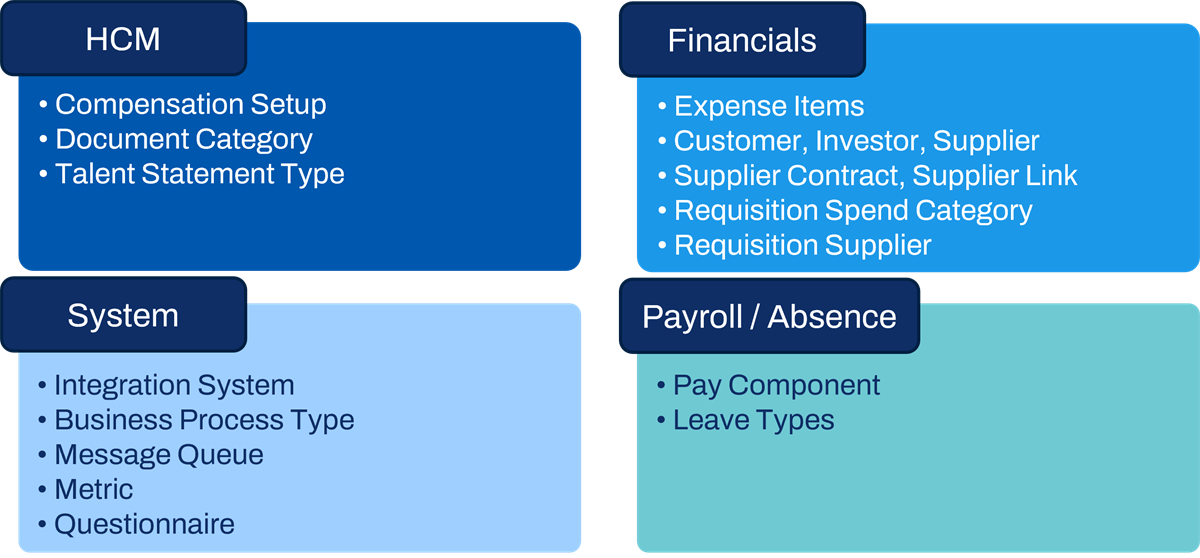
Common types of security segments.
Create Security Segments
Explore the below examples of creating security segments to understand how granular segments can be.
Create Learning Security Segment
Use the
Create Learning Security Segment
task to provide specific users permission to create and access learning content.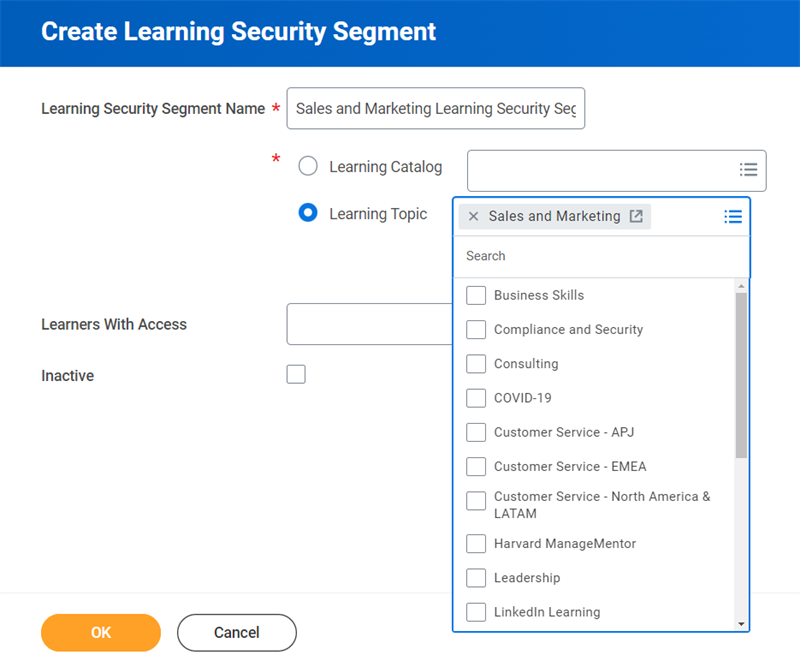
You can secure:
- At the program and course level by associating the content with a security category segment.
- At the topic level.
You can also do a combination of topic and security category-based segmented security. Access to a security category on a program or course takes precedence over access to a topic. If you want to enable learners to select from the complete list of topic preferences, do not restrict access on a topic-by-topic basis.
Create Business Process Security Segment
Use the
Create Business Process Type Security Segment
task to configure security segments for business process definitions. This allows you to control which business processes a business process administrator can access.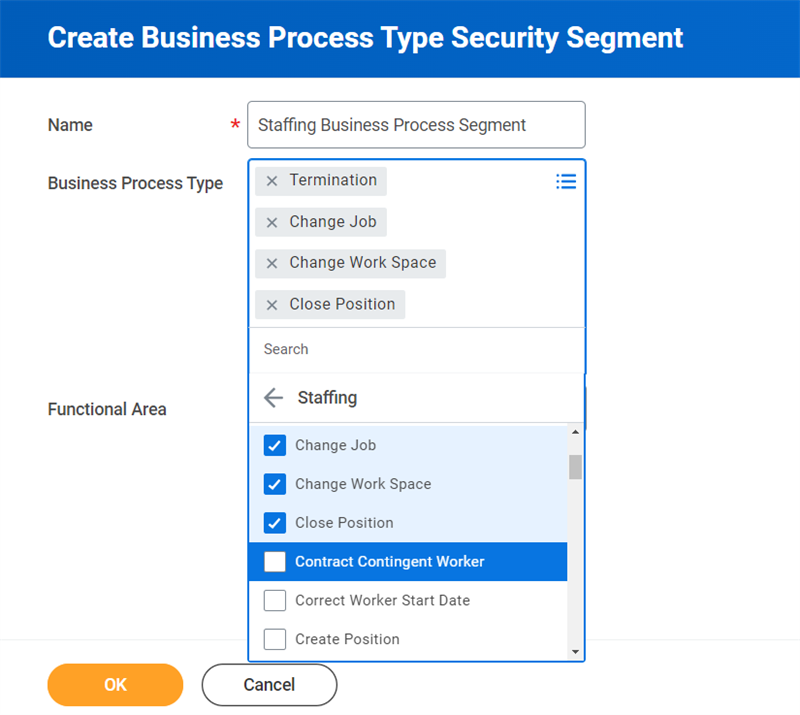
For example, Jordan and Taylor are business process administrators. You want Jordan to have access to only staffing-related business processes and Taylor to have access to only finance-related business processes. You can meet these requirements by creating business process type security segments using functional areas and/or specific business process types.
Access to the following business process components cannot be segmented:
- Rules
- To Dos
- Checklists
- Calculated Dates
Create Integration Security Segment
Use the
Create Integration System Security Segment
task to configure segments based on categories, templates, or specific integration systems. Note that we cover integration system security segments in detail in another chapter.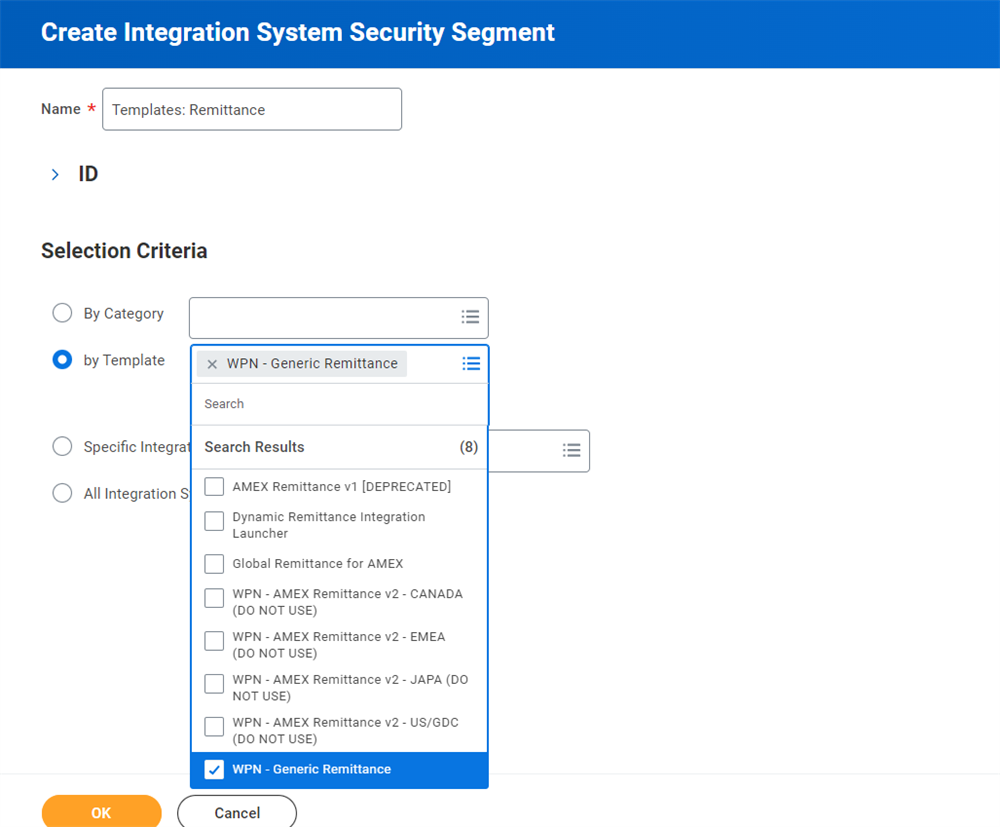
Security Policy Configuration for Segments
The domain security policy configuration requirements for segmented security vary across Workday functional areas. For each type of segmented security, you must configure administrator access to create and edit security segments. Also configure user access to view the designated segments. Place segment-based security groups on the appropriate domain security policy in the relevant functional area.
This table lists many of the different types of segments currently available in Workday. Please follow the latest documentation and release updates for new segment types. To create and manage the security segments for each type, you must have access to the domain listed in the Setup Domain column. To give workers segmented access to values, you must configure the segment-based security groups to the domains listed in the Access Domain column. Remember that the segment-based security group type allows you to specify which included security groups should have access to which security segment of values.
Segment Type | Setup Domain | Access Domain |
|---|---|---|
Ad Hoc Payment Spend Category | Cash Management Segmented Setup | Access Ad Hoc Payment Spend Category (Segmented) |
Audit Tag | Set Up: Audit Tag Security Segments | Set Up: Audit Tags and Assignments - Add Only
Set Up: Audit Tags and Assignments |
Bank Account | Cash Management Segmented Setup | Access Ad Hoc Payment Bank Account (Segmented) |
Benchmark Subcategory | Benchmark Management | Benchmark Values |
Business Process Type | Security Configuration | Manage: Business Process Definitions |
Campaign Category | Set Up: Campaign Type Categories | Administer Campaigns |
Compensation Setup | Set Up: Compensation Security Segments | Varies |
Compensation Plan Assignment | Set Up: Compensation Security Segments | Worker Data: Funded Plan Assignments
Self-Service: Funded Plan Assignments |
Country-Specific Personal Information | Country Segment Setup | Person Data: Personal Data |
Customer | Set Up: Customer Security Segments | Access Customer (Segmented) |
Document Category | Set Up: Document Category Security Segments | Worker Data: Add Worker Documents
Worker Data: Edit and Delete Worker Documents |
Expense Item | Set Up: Expense Item Security Segments | Access Expense Item (Segmented) |
Integration System | Security Configuration / Integration Security | Multiple |
Investor | Investor Segmented Setup | Access Investor (Segmented) |
Learning Security Category | Set Up: Learning Security Segments | Learning Access |
Learning Topic | Set Up: Learning Security Segments | Learning Access |
Leave Type | Set Up: Leave of Absence | Access Leave Type (Segmented) |
Ledger Account | Set Up: Ledger Account Security Segments | Access Ledger Account (Segmented) |
Message Queue | Integration Build | Message Queue (Segmented) |
Metric | Metric Management | Metrics in Review or Metrics Published |
Pay Component | Set Up: Payroll (Calculations - Payroll Specific) | Reports: Pay Calculation Results |
Questionnaire | Set Up: Questionnaire Security Segments | Questionnaire Creation and Distribution
Questionnaire Results
Candidate Data: Questionnaires |
Recruiting Assessment Category | Set Up: Recruiting Assessment Category Security Segments | Candidate Data: Assessment Results |
Reference Letter | Set Up: Reference Letters | Set Up: Reference Letter Segment |
Request Type | Set Up: Request Type Security Segments | View: Requests |
Requisition Spend Category | Set Up: Procurement Security Segments | Access Requisition Spend Category (Segmented) |
Requisition Supplier | Set Up: Procurement Security Segments | Access Requisition Supplier (Segmented) |
Student Holds | Set Up: Hold Reason Segments | Access Hold Reasons
Manage: Apply Holds |
Student Notes | Set Up: Students Notes Security Segment | Manage: Add Student Notes |
Supplier | Set Up: Supplier Security Segments | Access Supplier (Segmented) |
Supplier Contract | Set Up: Procurement Security Segments | Access Requisition Supplier Contract (Segmented) |
Supplier Contract Type | Set Up: Supplier Contract Security Segments | Access Supplier Contract Type (Segmented) |
Supplier Link | Set Up: Procurement Security Segments | Access Requisition Supplier Link (Segmented) |
Talent Statement Type | Set Up: Skills and Experience | Access Talent Statement Type (Segmented) |
Time Off | Set Up: Time Off | Access Time Off (Segmented) |
Important
: When adding a segment-based security group to a domain security policy, remove any references in the security policy to the included security groups.Note
: Workday delivers some additional segments for use in segment-based security groups (e.g., plan types). When selecting segments for the segment-based group, select Security Segments (Workday Owned) to view the available segments.Use Case: Document Categories
Because Workday secures worker documents to a single domain, customers frequently use segmented security with document categories. Without segmentation, security groups with permission to the Worker Data: Add Worker Documents and Worker Data: Edit and Delete Worker Documents domains would be able to view all documents for a given worker. By using document category values to identify the type of document and then using segment-based security, you can configure access to specific document category values.
Example
: Benefits partners and administrators may be able to view and modify worker documents in the Benefits document category via the Documents - Benefits Categories segment-based security group.Use the
Create Document Category Security Segment
and Edit Document Category Security Segment
tasks to define segments of values. Workday secures these tasks to the Set Up: Document Category Security Segments domain. Define document categories using the Maintain Document Categories
task. A given document category security segment can contain one or more document category values and a segment-based security group can give members access to one or more security segments.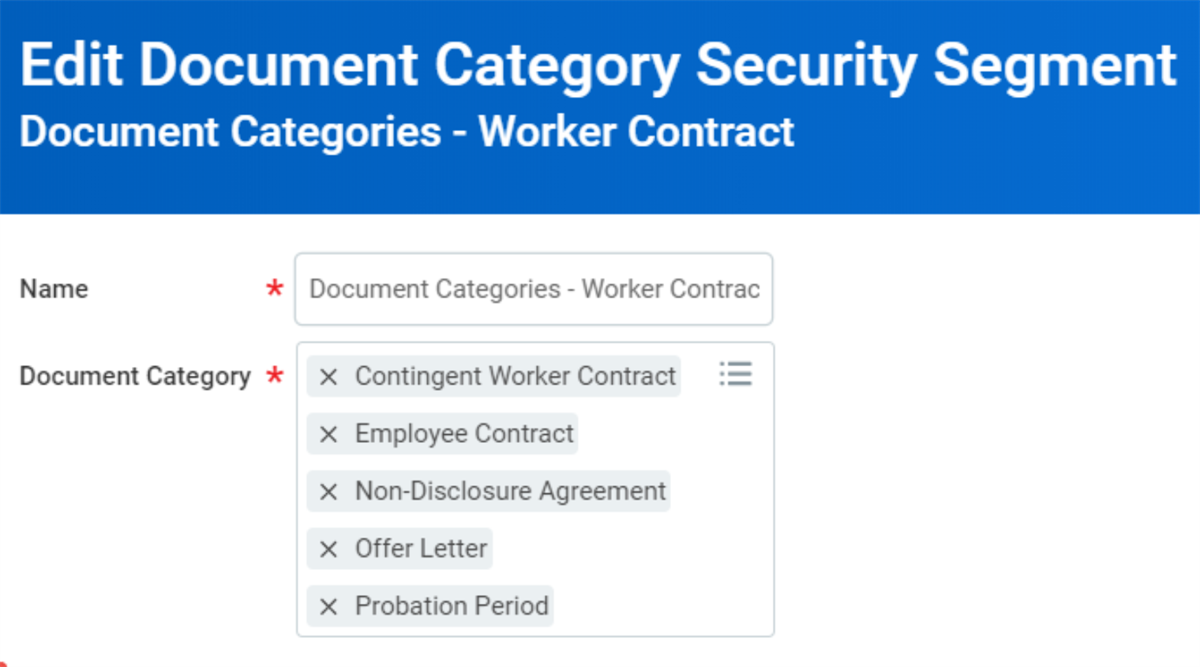
Edit Document Category Security Segment task.
The following example gives the recruiter-related security groups access to view worker contract-related documents, such as offer letters and employment contracts.
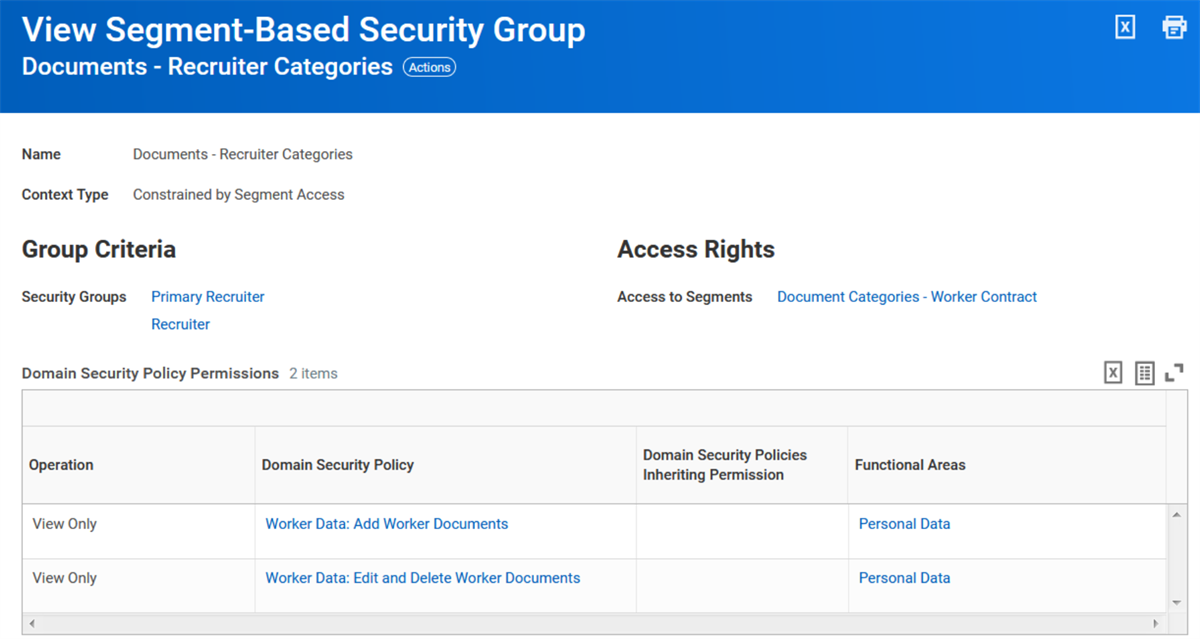
The recruiter-related security groups can view worker contract-related documents.
In addition to domain access for worker documents, also look for worker documents attached as part of a business process event. Security groups with View All access to the business process will be able to access documents associated with the event. You can also configure access to attachments separately.
Chapter 8 Summary
- Segmented security uses defined segments to allow for granular access to the values of a given secured item.
- Segment-based security groups grant members access to defined segments of values.
- The included security groups define the membership.
- Segmented security is only available in certain areas of Workday.