
Aggregation Security
Overview
Aggregation security groups allow you to combine existing security groups such that individuals in any of the specified security groups become members. Included groups retain their target access constraints. This security group type reduces maintenance by serving as the common access point in your security design. This very powerful security group type can help you meet complex access requirements, as well as ease your maintenance over time.
Objectives
By the end of this chapter, you will be able to:
- Reduce maintenance for segmented security using aggregation security groups.
- Use aggregation with service centers for scalability.
- Use aggregation to ease support model changes.
- Combine aggregation and intersection security groups to meet unique requirements.
Aggregation Security Groups
Aggregation security groups allow you to combine existing security groups so that individuals in any of the specified security groups are members. Included groups retain their target access constraints. Optionally, you can also exclude workers in specified security groups from membership.
Use aggregation groups to ease maintenance when several security groups have common access requirements. Aggregation security groups allow you to scale or change your support model without affecting the end security policy configuration.
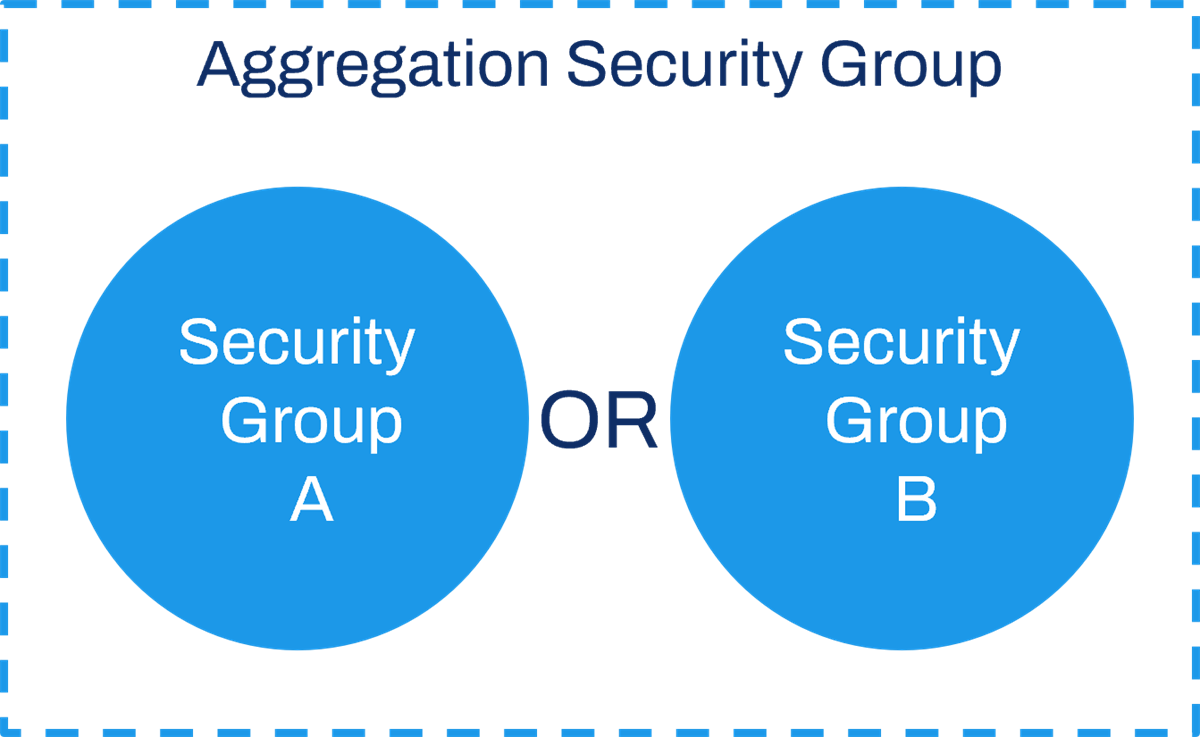
Aggregation security groups combine existing security groups. Members are those in any included group, who are not in an excluded group.
Aggregation Example
Suppose several security groups all need access to a common domain: Landing Page - Workbench.
Without Aggregation:
Without using aggregation, you must configure each security group separately.
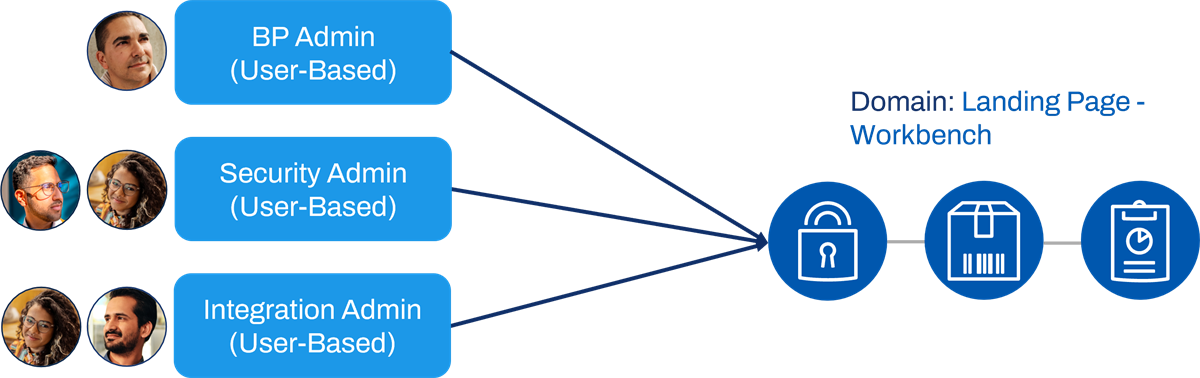
Example with no aggregation. You must configure each security group separately.
If you decide later that another security group also needs access, you must edit the security policy again to add the new security group. Then, remember, you must activate pending security policy changes.
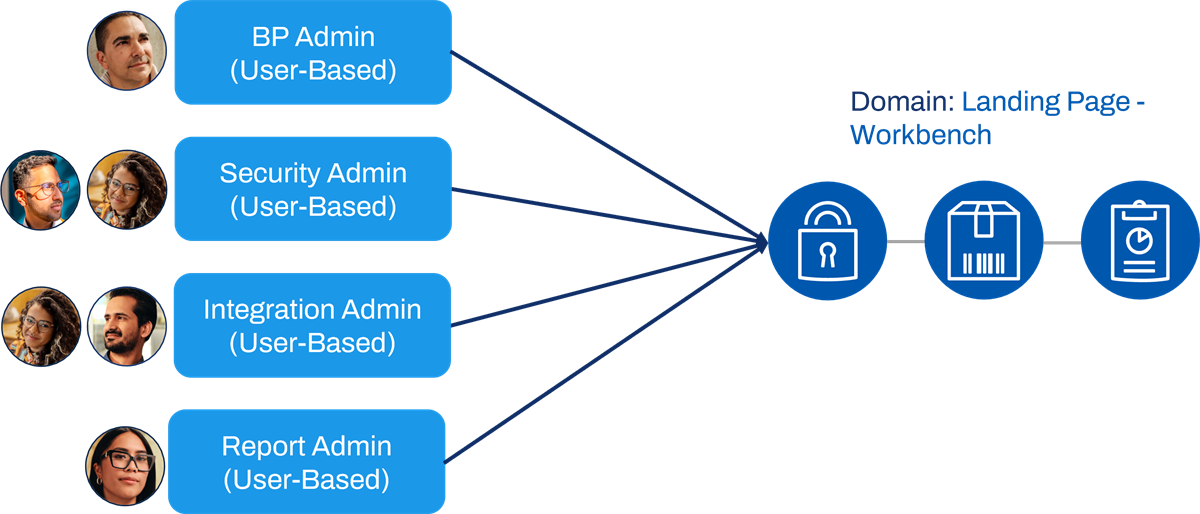
Example with no aggregation and a new security group added.
With Aggregation:
Instead, you can create an aggregation security group that includes all of the security groups that need access to the workbench. Add this one aggregation security group to the domain, remove the others, and activate. Then, in the future, if other groups need access to the workbench, you just add them to this aggregate group. No need to edit security policies or activate changes. Think of aggregation like a "hub" of access to the ultimate domain and business process security policies.
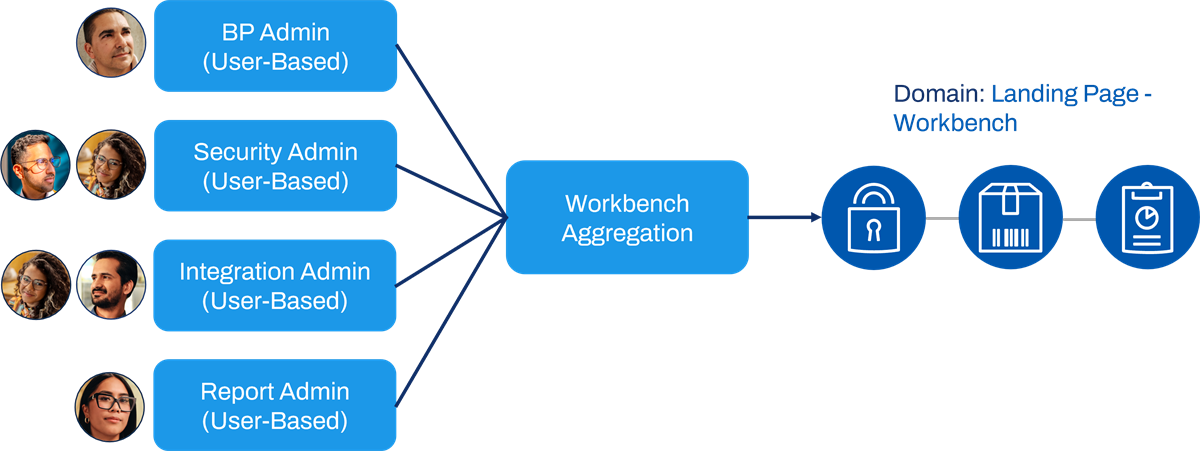
Example with aggregation. Simply add new secure groups to the aggregate group.
Reminder
: The original security groups (that are part of the aggregation security group) may already be on the security policy you intend to add the aggregation group to. Remove the original security groups from the security policy when you add the aggregation group. This ensures that the original security groups can only access the security policy via the aggregation group.In addition to simpler security policy configurations (i.e., fewer security groups), the big advantage of aggregation is around future growth and maintenance. You can scale without affecting the end security policy configuration. When additional security groups need access, you simply add them to the aggregation security group, and make no changes to security policies.
Creating an Aggregation Security Group
When you create an aggregation security group, you may specify security groups to include as well as security groups to exclude. Members are in any of the included groups, as long as they are not in an excluded group.
Aggregation security groups can contain any security group type except for rule-based, integration system, or another aggregation security group.
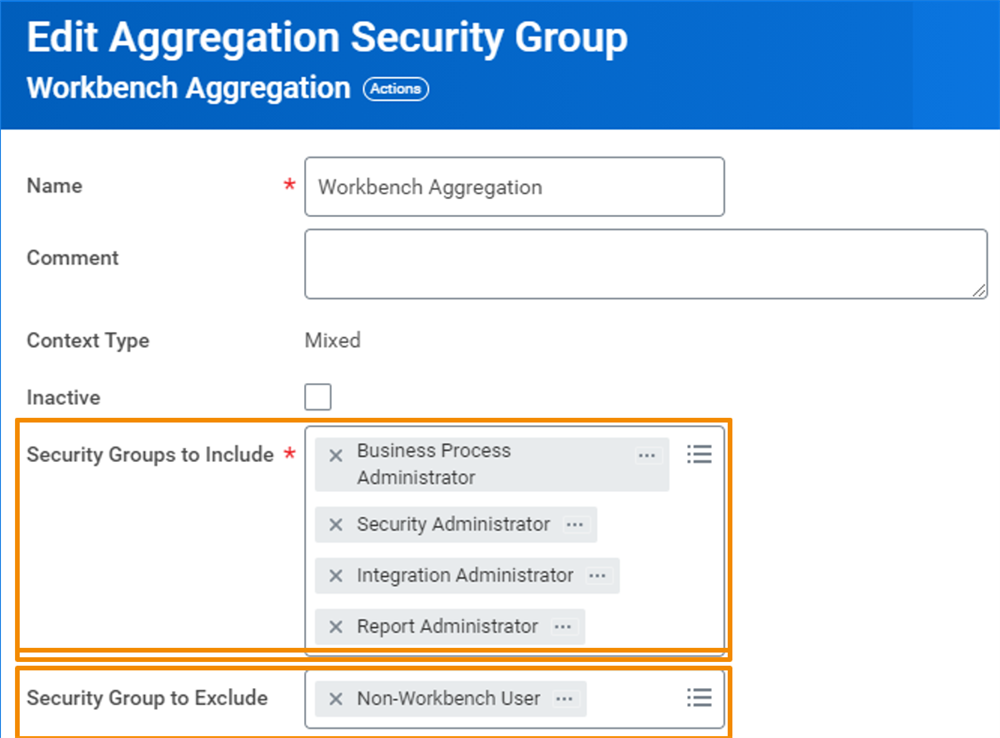
Example of an aggregation security group with included and excluded security groups.
Common Use Cases for Aggregation Security
There are three common use cases in which aggregation security can help meet security requirements with a scalable and maintainable design:
- With segment-based security groups.
- With service center constrained security groups.
- With your support model.
Use Case: Aggregation for a Flexible Support Model
Consider another potential use case for including intersection security groups within an aggregation: a flexible support model. For example, recall the intersection use case of intersecting role-based constraints across organization types. When the support model changes from supervisory organization to the intersection of supervisory and location hierarchy, you must make several changes:
- Create the intersection security group.
- Add it to applicable security policies and business process definitions.
- Remove the old security group from those policies and definitions.
- Activate pending security policy changes.
By using an aggregation security group from the start, that same change (from supervisory to intersection) would simply require the following:
- Create the intersection security group.
- Add it to the aggregation, removing the original security group.
With this method, you would not need to edit security policies or business process definitions, nor activate pending changes. While the diagrams below may look similar, it is typically easier to edit a security group than to edit many security policies.
Support Model without Aggregation
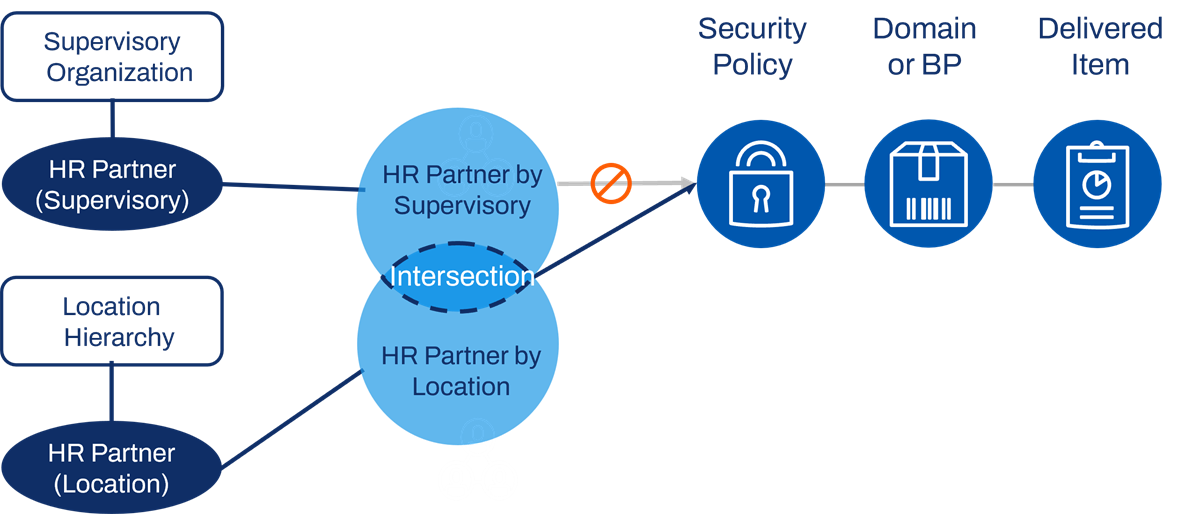
Example of a support model without aggregation.
Support Model with Aggregation
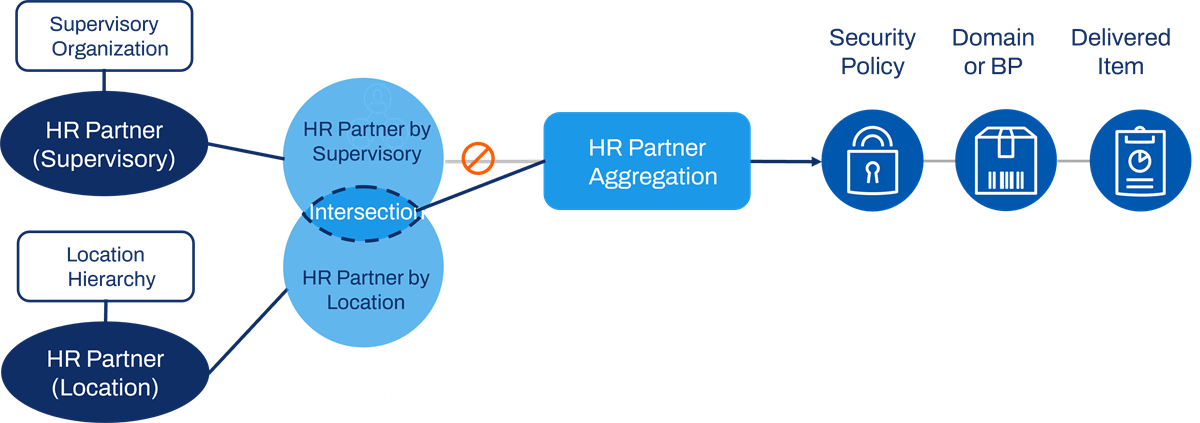
Example of a support model with aggregation.
Aggregation security groups can also support scaling your support model to handle different constraints in different parts of your organization. For example, an aggregation security group can contain multiple intersection security groups, where each intersection handles a different region's support model.
Use Case: Aggregation with Service Centers
Workday enables you to grant third-party users access to Workday to perform allowed tasks using Service Center security groups. You can constrain third-party user access to support specific organizations using service center constrained security groups. Alternatively, you can configure unconstrained service center security groups. Service center security groups require configuration of service centers and service center representatives acting as your third-party users.
Service Center Configuration
- Create a service center.
- Create service center representatives for the service center. There will be one service center representative for each third-party user.
- Create a Workday account for each service center representative so that they can sign in to the tenant.
- Create a service center security group (constrained or unconstrained) for the service center.
- Members of the security group will be all service center representatives in that service center.
- Configure access rights to target instances for defined organizations, if constrained.
- Include the service center security group in needed domain or business process security policies.
- Activate pending security policy changes.
- Test.
Use in Aggregation
Service center security groups are another use case for aggregation. Using an aggregation group that includes multiple service centers makes it easy to add additional service centers. Instead of adding each new service center security group to the needed domain security policies and activating the changes, you simply add them to the aggregation security group.
Aggregation in Business Process Definitions
Consider another advantage of aggregation security groups, beyond alleviating security policy maintenance: you can use them in business process definitions. Aggregation security groups preserve the underlying constraints of each included security group. By routing a business process step to an aggregation security group, Workday routes the step based on the context of the given transaction or event. The member of the included security group that can access the target context of the event will receive the step.
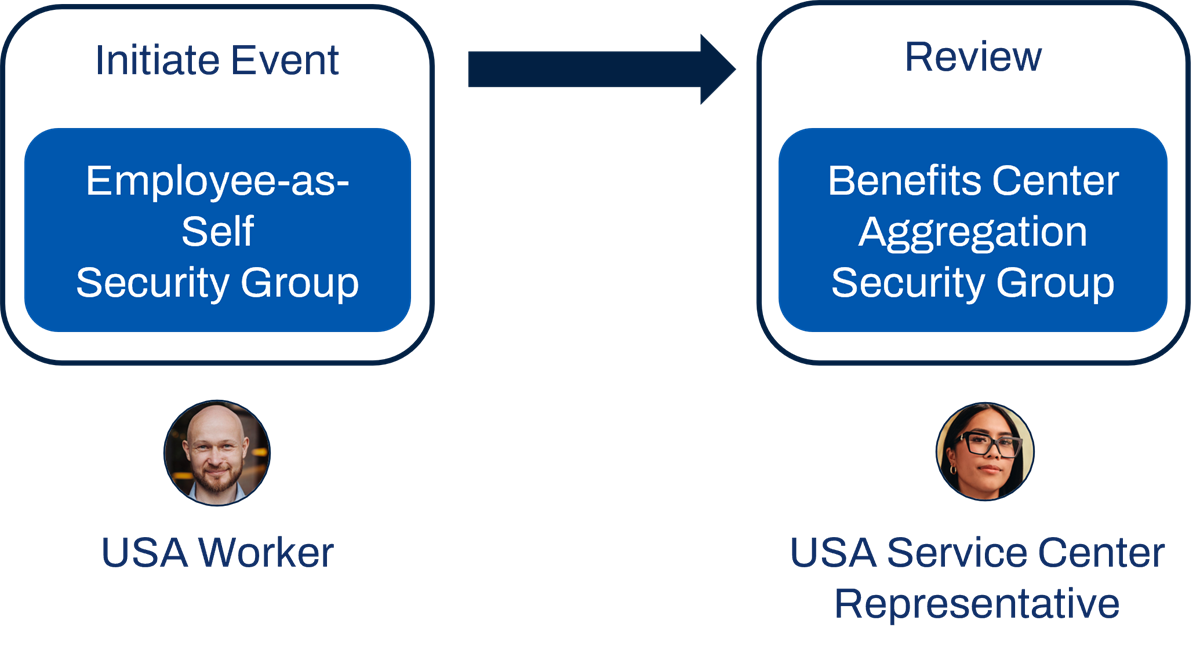
Example of routing a business process step to an aggregation security group.
Adding or Removing Access
The aggregation security group represents the minimum common access required for included security groups. You can then add additional access to the included security groups separately as needed.
Example
: The Mexico service center requires additional access in Workday. You can add the service center security group directly to any additional domain security policies without impacting the access for the aggregation security group.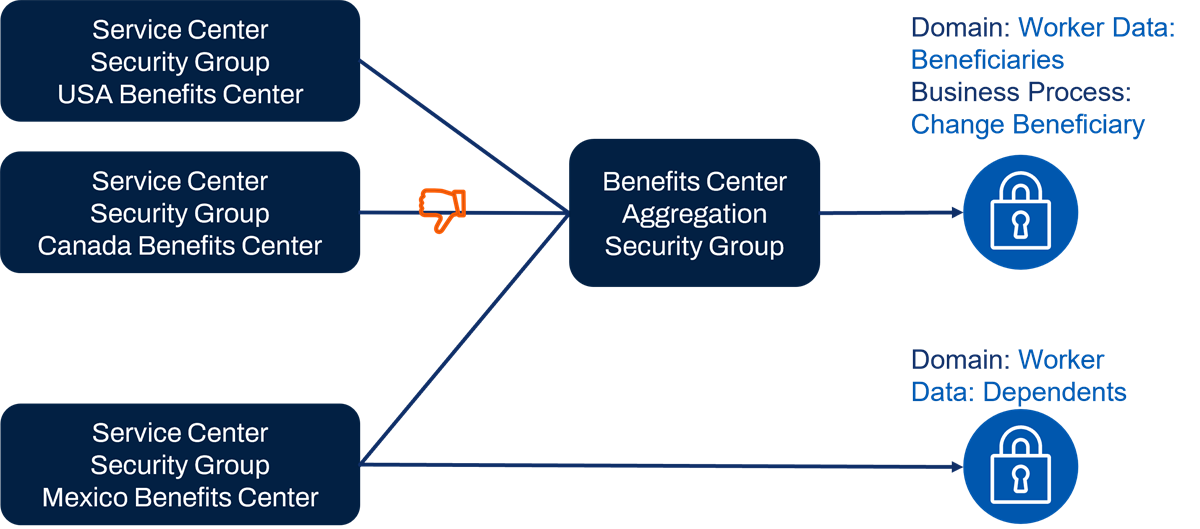
Example of adding a service center security group directly to an additional domain security policy without impacting the aggregation access.
Important
: Once you have configured the aggregation security group, you cannot take away partial access from an included security group. All included security groups will have the full access of the aggregation security group.Considerations
Decide early how much aggregation to use.
- You configure security policies and business process definitions differently based on whether or not you are using aggregation.
- If you decide later that you need additional aggregation, it will cause significant rework and effort.
- Start small with the lowest common denominator of access for the aggregation.
What if I find out later I need my subordinate groups to have different permissions?
- There is a risk of this happening, so be clear on requirements up front.
- Security group access can be "topped off." Place extra permissions on subordinate groups, not on the aggregation.
- The opposite is not possible. Any permission (as opposed to span of control) placed higher in the chain inherits down.
Benefits of Aggregation
Aggregation allows for scaling when configuring combinations of security group types. With a design in which the aggregation security group is closest to the security policies, you remain flexible for changing security requirements downstream. Using aggregation in this way isolates the impact of staffing changes, organizational changes, and acquisitions/divestitures from the end security policies. This approach, in turn, minimizes errors and simplifies maintenance, especially in business process definitions.
Key benefits of aggregation include:
- Ability to grow and scale with additional security groups that need common access without impacting security policies.
- Stable security policies despite broader organizational and staffing changes.
- Capacity to "top off" access for individually for included security groups.
- The option to include intersection security without impacting security policies or business process definitions.
Chapter 9 Summary
- Aggregation security groups allow you to include security groups that need common access in end security policies.
- Common uses for aggregation security groups are segment-based access, support model access, and service-center constrained security models.
- Aggregation security groups allow for scaling and ease of maintenance.