
Intersection Security
Overview
Intersection security groups allow you to combine existing security groups to intersect members and constraints. Use this security group type to meet a variety of use cases, including hiding a certain part of a population from other workers. This chapter focuses on the primary use cases of intersection security and also discusses limitations and considerations when using intersection security.
Objectives
By the end of this chapter, you will be able to:
- Recall the main characteristics of intersection security groups.
- Intersect role-based security groups enabled for different organization types.
- Define intersection target exclusion criteria to hide certain workers.
- Combine intersection security with custom organizations and role-based security groups to hide worker data.
Intersection Security Groups
An intersection security group combines existing security groups to intersect members and constraints. The intersection security group includes only users who are members of all the included security groups and are not members of an excluded security group.
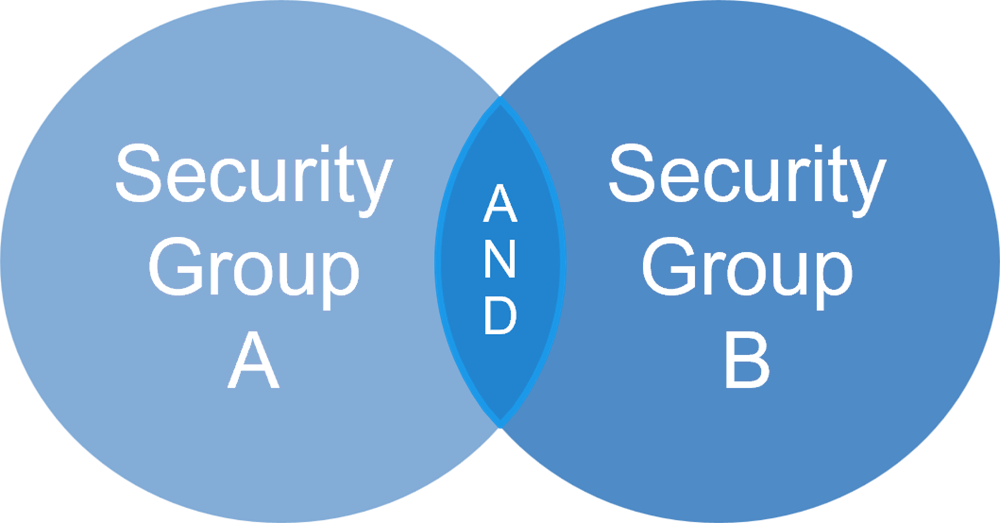
Intersection security groups combine existing security groups to intersect members and constraints.
Intersection security groups:
- Grant access based on user membership in all included security groups.
- Include only users who meet all of the specifications.
- Intersect the constraints of the security groups within.
- Cannot include other intersection security groups in the intersection.
- Cannot include rule-based security groups in the intersection.
- Cannot include integration system security groups in the intersection.
- Can include aggregation security groups in the intersection.
How Do You Configure an Intersection Security Group?
The steps to configure an intersection security group are as follows:
- In the Intersection Criteria section, specify the security groups to include (and intersect) which determine membership and target constraints.
- Optionally, specify a security group to exclude as members. You can only exclude unconstrained security group types.
- Optionally, in the Exclusion criteria section, specify organizations to hide from members' target access. Positions in the organizations listed are not visible to members of the intersection security group.
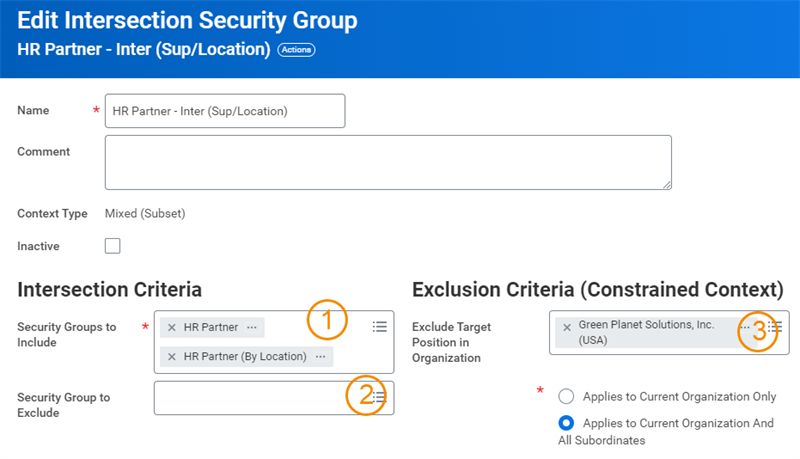
An example of the steps to configure an integration security group.
Note
: Specify either a security group to exclude or organizations to exclude, not both.Intersection Example 1
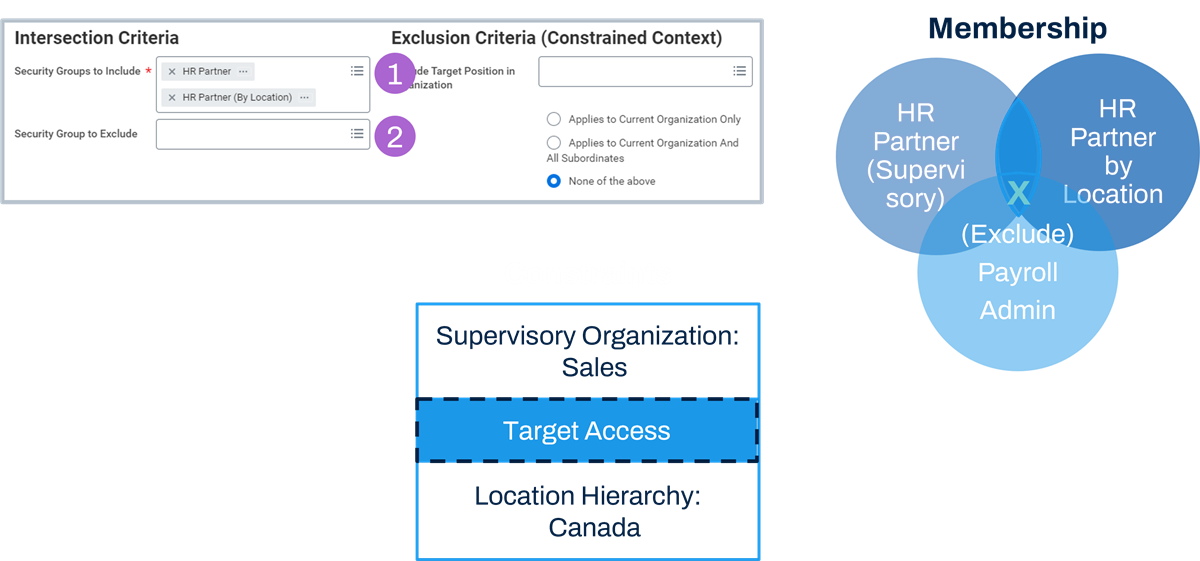
Example of an intersection security group with an excluded security group.
Membership:
Those workers who are in both security groups (HR Partner (Supervisory) and HR Partner by Location), based on role assignments, but who are not payroll administrators.Constraints:
Workday intersects the constraints of the included security groups. Members assigned to both the Sales organization and Canada can access targets who are both in Sales and located in Canada.Intersection Example 2
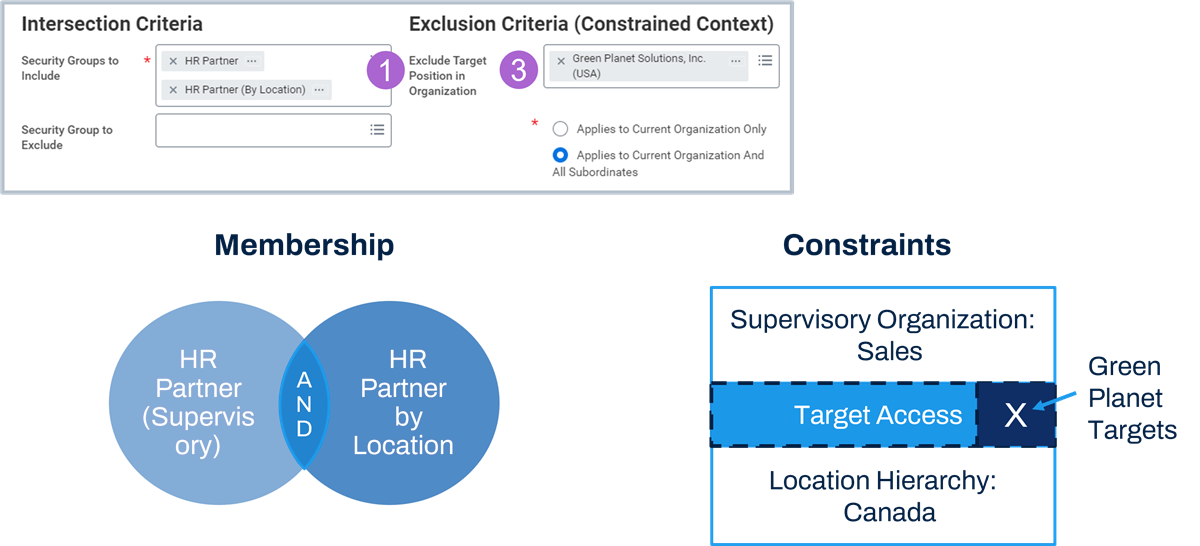
Example of an intersection security group with an excluded target position.
Membership:
Those workers who are in both security groups (HR Partner (Supervisory) and HR Partner by Location), based on role assignments.Constraints:
Members assigned to both the Sales organization and Canada, can access targets who are both in Sales and located in Canada. However, they cannot access targets in the Green Planet Solutions organization.Common Use Cases for Intersection Security
Some common use cases for intersection security are:
- Intersecting role-based constrained security groups enabled for different organization types (e.g., constraining access to workers in a given supervisory organization who are also in a given location hierarchy, such as Canadian workers in the Sales organization).
- Hiding populations and excluding target instances that users would otherwise notice (e.g., to meet student privacy regulations, hide HR from HR, hide sensitive workers).
Use Case 1: Intersecting Role-Based Groups
Review Role-Based Security Groups
Role-based security groups reference an assignable role ("role") as the group criteria.
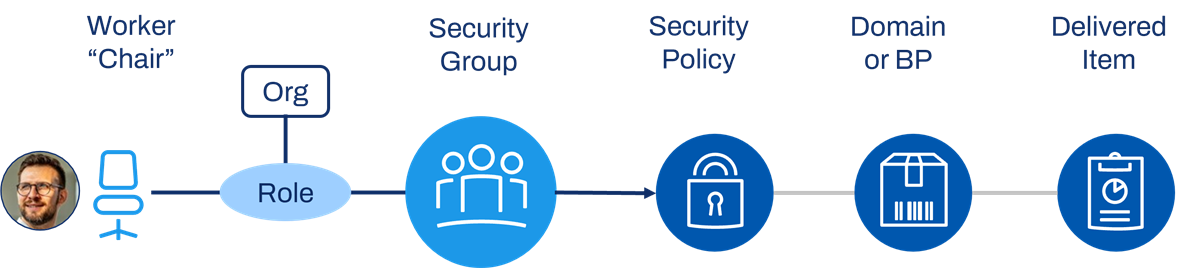
How role-based security groups get access to a secured item.
To configure role-based security:
- Enable assignable roles for organization types.
- Create a role-based security group, specifying the assignable role as the group criteria. If constrained, specify the access to subordinate organizations as needed (e.g., COUS, COAS).
- Assign roles to worker positions or jobs ("chairs") for a given organization instance.
- Edit security policy permissions to include the security group. Activate, and test access.
Reminder
: Role assignments determine membership in a role-based security group. Those workers assigned to the role used in the role-based security group become the members. The role-based security group can then further determine member access rights to subordinate organizations given current organization assignments.Example of a Role-Based Security Group
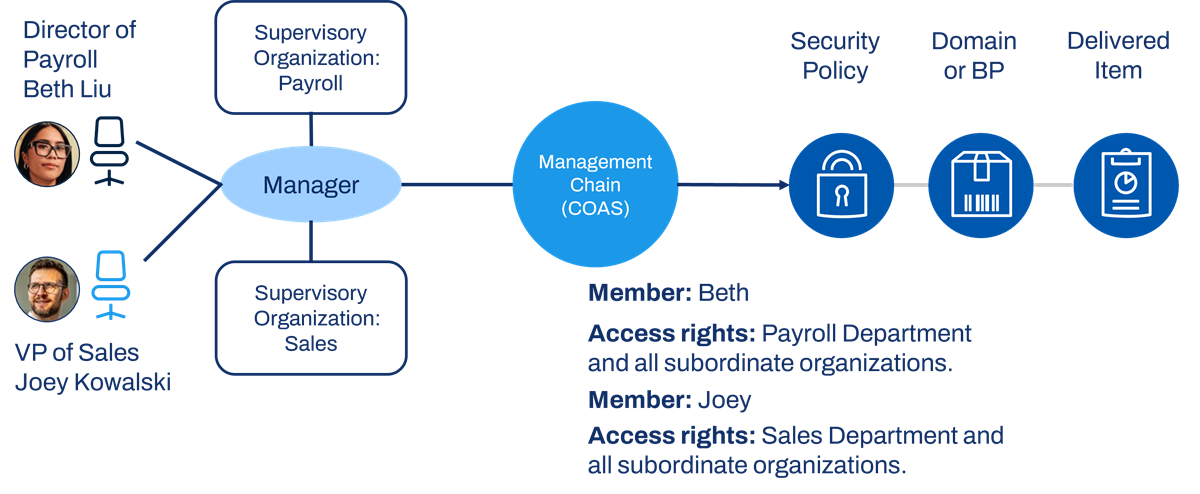
Example of a role-based security group.
In this example, we enabled the Manager role for the supervisory organization type. We hire Beth into the Director of Payroll position ("chair") and Beth manages the Payroll Department. We can assign Beth's chair to the Manager role for the Payroll Department supervisory organization instance. Next, we hire Joey into the VP of Sales chair and Joey manages the Sales Department. We can assign Joey's chair to the Manager role for the Sales Department supervisory organization instance. Beth and Joey are, therefore, both members of the Management Chain role-based security group.
In this example, the Management Chain security group access rights are Current Organization and All Subordinates (COAS). Therefore, Beth can access targets in her assigned organization (Payroll Department) and all subordinate organizations. Joey can access targets in the Sales Department and all subordinate organizations. Beth and Joey have this access only to domain and business process security policies where the Management Chain security group has permissions.
Role-Based Intersection
Role-based security groups can only reference one assignable role, and you enable an assignable role for one organization type. You might have an HR Partner role enabled for supervisory organization and an HR Partner by Location role enabled for location hierarchy. HR Partner and HR Partner by Location are two separate roles with separate role-based security groups.
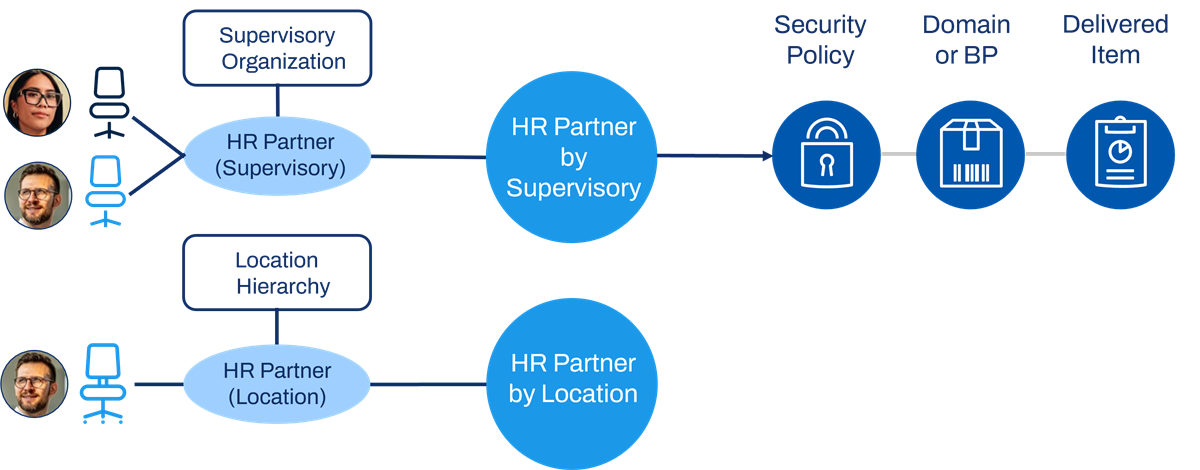
Intersecting role-based security groups - before.
You can intersect these two role-based security groups with an intersection security group. Intersection security group member constraints are targets in a given supervisory organization that are also in a given location hierarchy.
For example, this HR Partner would only support Canadian workers who are in the Sales organization.
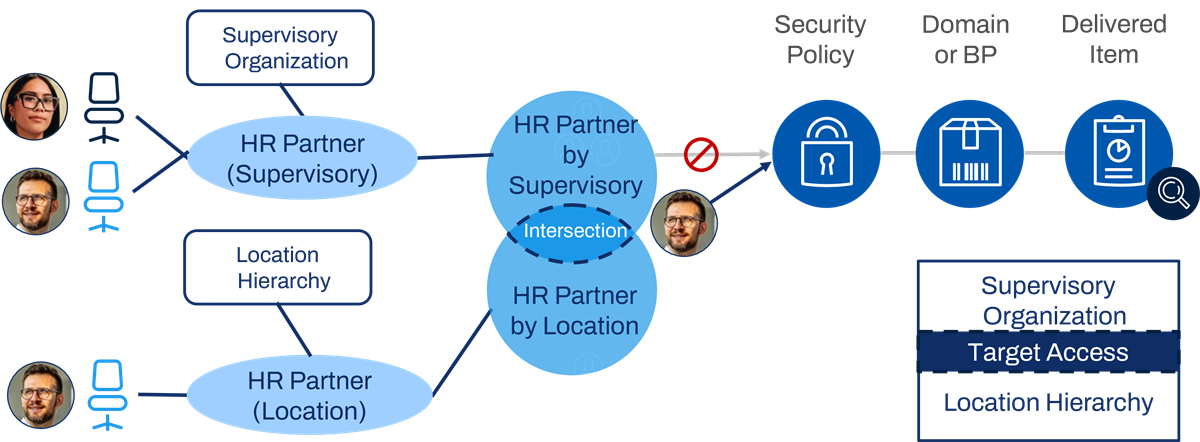
Intersecting role-based security groups - after.
Assign all or most permissions to the intersection security group, not to the component security groups.
Configuration
The following steps outline how to intersect role-based security groups:
- Define assignable roles for needed organization types, if not already done. Use theMaintain Assignable Rolestask.
- Assign roles to worker chairs. Assign the same worker chair to all needed roles to ensure membership in the role-based security groups included in the intersection.
- Create role-based constrained security groups for each assignable role.
- Create an intersection security group that includes the role-based constrained security groups.
- Add the intersection security group to relevant security policies. Be sure to remove any references to the included role-based security groups from the policies.
- Activate security policy changes.
- Test.
Best Practices
Follow these recommended practices when using intersection security to intersect role-based constrained security groups:
- Assign the same worker/position to both roles in the intersection.
- Use delivered reports to audit role assignments.
- Create a custom report to audit gaps in role assignments.
Some useful reports and tasks include:
- Maintain Assignable Roles
- Assign Roles - Add/Remove
- Roles for Organization and Subordinates
- Role Assignments for Worker Position
- Domain Security Policies for Functional Area
- Business Process Security Policies for Functional Area
- Action Summary for Security Group
- Business Process Exception Audit
- Security Exception Audit
- Custom Report Exception Audit
- Maintain Dashboards
- Test Security Group Membership
- Maintain Permissions for Security Group
- View Security Group
- View Security Groups
Use Case 2: Hiding Targets Using Exclusion
A common target constraint mechanism is by organization. However, your configuration may require exceptions. For example, there may be instances in an organization that require exclusion, either due to regulatory or other reasons. Here is another example: With unconstrained security groups, you may need to exclude certain instances. Use intersection security groups to configure target exclusion criteria that omit specified organizations' instances.
Common use cases are:
- To meet student privacy regulations, such as the Family Educational Rights and Privacy Act (FERPA). For example, hiding students who work at education institutions from showing in public directories/views.
- To hide sensitive workers (e.g., political dissidents, famous people, undercover agents) from public directories/views.
Important
: Intersection security with target exclusion is intended for View access requirements only, and not business process routing. If you choose to configure an intersection security group in a business process, test thoroughly to ensure the intersection works as expected.Configuration
You can, optionally, configure intersection exclusion criteria by organization. Select various organization types or use custom organizations. Exclusions will apply to workers whose current positions are in those organizations. Specify whether the exclusion applies to the current organization only or the current organization and all subordinates.
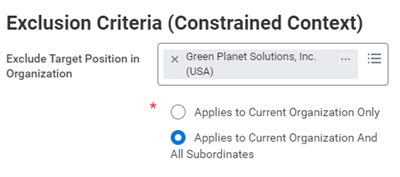
Excluding target positions in an intersection security group.
Use custom organizations if you cannot easily identify hidden workers by an existing organization (e.g., pay group, cost center, supervisory, company). Custom organizations allow you to group workers into logical constructs that Workday has not already defined. Specify the custom organization in the exclusion criteria for the intersection security group.
Important
: Account for all positions a worker may have and exclude all organizations as needed. Target exclusions only apply to current worker positions in configured organizations. Therefore, if a worker is no longer in that excluded organization, their worker history is still viewable.The following steps outline how to use intersection exclusion criteria to hide certain workers:
- Identify the hidden worker positions by organization. Create a custom organization if needed, and place the hidden worker positions in that custom organization.
- Configure the intersection security group with the hidden worker organization specified in the exclusion criteria.
- Remove the original security groups and replace them with the intersection group in security policies that control visibility to other workers.
- Test.
By default, the Workday application assumes that all employees can view public information about all other workers in the tenant. The All Employees security group is an automatically assigned security group when you hire an employee. This security group is unconstrained, meaning that members will not have any constraints applied to their target access when viewing allowed items in Workday.
To exclude certain targets from public view, modify permissions in the following domains:
- Worker Data: Current Staffing Information
- Worker Data: Public Worker Reports
- Worker Data: Worker Summary Reports
- Worker Data: Organizations
- Worker Data: Management Chain
Use Case 3: Hiding Populations Using Custom Organizations
Use role-based constrained security groups and custom organizations as another method to restrict access to workers. Unlike hiding targets using exclusion, this method is intended for intersection security groups used in business process security policies.
Recall the first intersection use case to intersect role-based constrained security groups. Expanding upon this model, you can intersect role-based security groups with roles assigned to custom organizations to control who supports workers in a certain population. This approach is common method for hiding sensitive data about workers in HR positions from other workers in the HR department.
Custom Organizations
You can create custom organizations for each hidden population of workers and one for the nonhidden population. For instance, you may want one organization for human resources staff and one for all other workers. Assign each worker to one of the custom organizations.
Organization Types
You may need to create a new organization type to use for custom organizations in your security configuration. Use the
Maintain Organization Types
task to configure a new organization type.Note
: If you plan to set the organization visibility to Role Assignees only (instead of Everyone), be sure you have an assignable role defined for your custom organization type, such as the organization partner or owner role (and the corresponding role-based constrained security group). That way, you can assign the worker who needs to see and maintain the custom organization to this role.If you plan to use membership rules to dynamically assign workers to the organization, you must configure the organization type with the following settings:
- Set Allow Reorganization Tasks to Yes.
- Set Position Assignment Unique to No.
If there is an Owner assignable role configured to self-assign, you can add the new custom organization type to the Enabled for column for the Owner row. When creating the custom organizations, the Owner will self-assign automatically. Some call this assignable role the Organization Partner.
Next, use the
Maintain Organization Subtypes
report to define a subtype for each custom organization you plan to define for a given worker population.Membership Rules
Membership rules can ease maintenance by automatically assigning workers to custom organizations. Note that you can only use membership rules with custom organization types, not Workday-delivered organization types.
Use the
Create Membership Rule
task to configure the selection criteria Workday should use to evaluate workers. You can base membership rules on a variety of criteria such as organizations and subtypes, job families, job profiles, management levels, and locations.For job family, job profile, and management level fields, Workday selects members based on a union of the fields matching the conditions specified in the rule. For all other fields, membership is based on an intersection of fields that match the specified conditions.
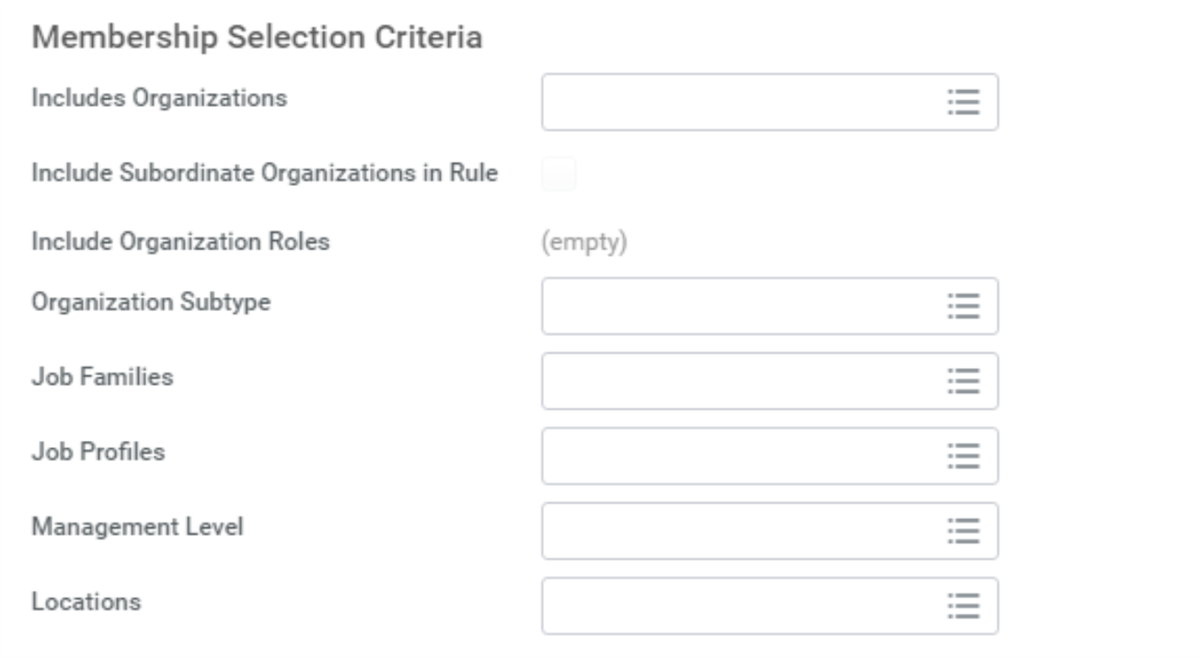
Membership selection criteria in the Create Membership Rule task.
There are three options for configuring the assignment of workers using membership rules:
Type | Process | Configuration |
|---|---|---|
Dynamic | Workday evaluates membership in real time and updates on an ongoing basis. | From the organization's Related Actions, select Reorganization > Assign Workers and choose the membership rule. |
Semi-dynamic | Workday evaluates membership and updates every four hours. | From the organization's Related Actions, select Reorganization > Assign Workers and choose the membership rule. Edit the membership rule and select Semi-dynamic Membership Evaluation. |
Static | The rule must be rerun to add new members who meet the rule criteria. | From the organization's Related Actions, select Reorganization > Assign Members Using Rule and choose the membership rule. |
The semi-dynamic configuration option improves performance compared to the dynamic option when evaluating large populations of workers.
Note
: Instead of using membership rules to assign workers, you can add a To Do step to the Hire
and Change Job
business processes for assigning workers to a custom organization.Assignable Roles
Use the
Maintain Assignable Roles
task to create a new assignable role enabled for the custom organization type. Indicate that the role is supporting, and specify a security group in the Assigned by Security Groups field.For this scenario, you will use the existing Compensation Partner supervisory role and role-based security group. You will create a new role-based security group for the new Compensation Partner - Custom Security role.
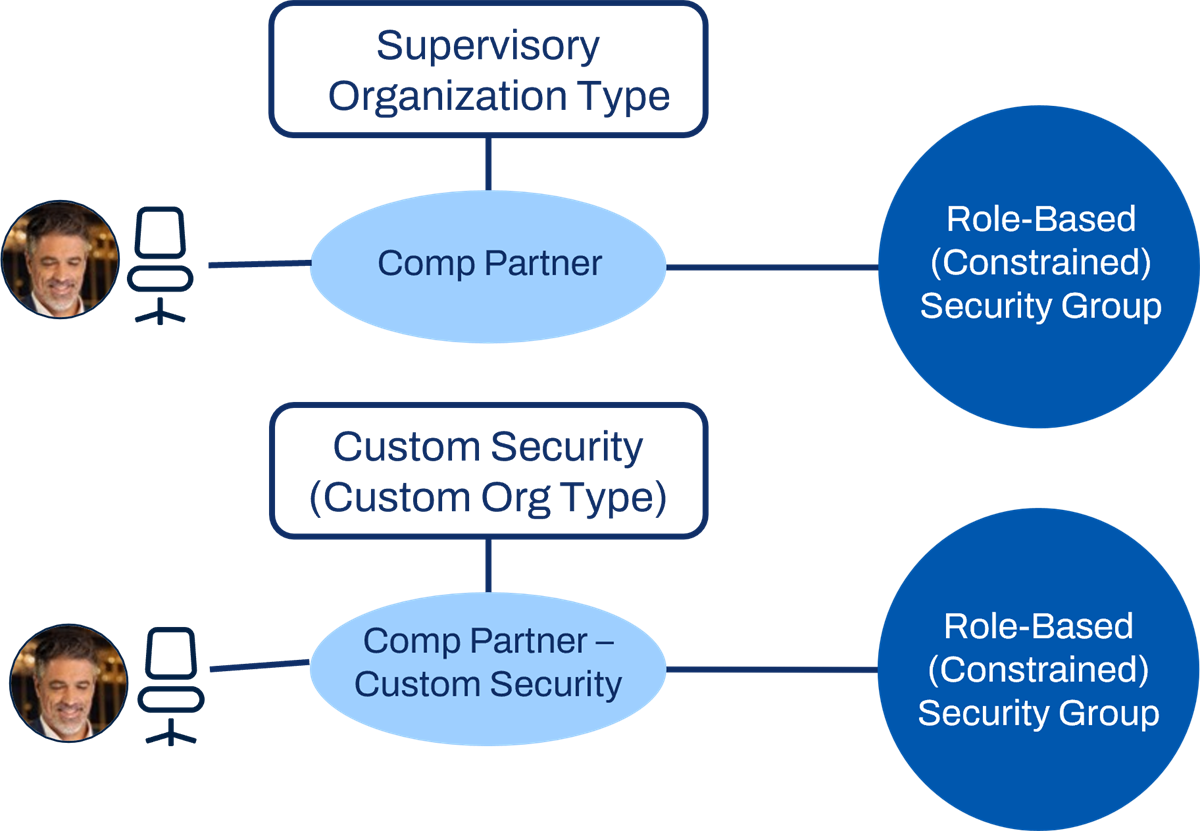
New role-based security group, Comp Partner - Custom Security.
Assign Brian's position to the Compensation Partner - Custom Security role for the Non-Hidden Staff organization. Assign Robert's position to the Hidden Staff custom security organization and the same set of supervisory organizations.
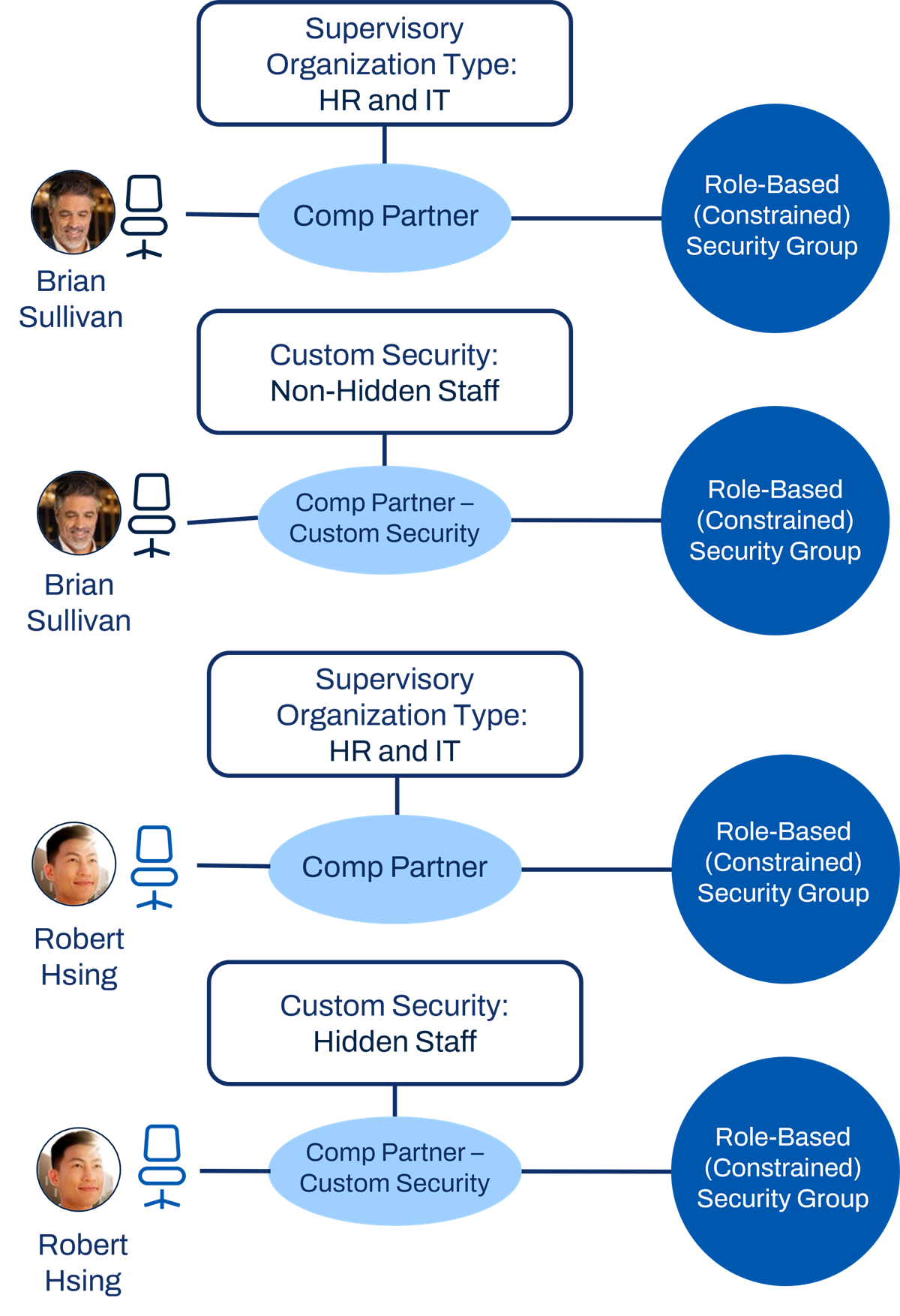
Comp Partner - Custom Security role assignments.
Considerations
Best Practices
Follow these recommended practices when using intersection security:
- If intersecting role-based constrained security groups, remember to:
- Maintain the additional role assignments.
- Assign the same worker/position to both roles in the intersection.
- Create a custom report to audit gaps in role assignments.
- When replacing security groups with the intersection security group in business process security policies, you can impact existing business process definitions that may still be routing a step to the removed security group. Run theBusiness Process Exception Auditreport to identify errors and resolve them.
- When changing access to worklets (e.g., self-service worklets), be sure to run theSecurity Exception Auditreport to resolve any permissions issues with landing page worklet configurations.
- Verify all needed removals and replacements with the intersection security group by running the following reports:
- Action Summary for Security Group
- Domain Security Policies for Functional Area
- Business Process Security Policies for Functional Area
- TEST, TEST, TEST!
Tip
: Use the Maintain Permissions for Security Group
task to ease removals and replacements in domain security policies.Intersection Limitations
Not all areas of Workday support intersection security. Some areas include:
- Areas where the entire organization is assumed (e.g., Move Workers, Create Position, Create Job Requisition, Compensation Review).
- Talent: Employee Review, calibration, cascading goals processes.
- Reporting: Results may not reflect the intersection. Some prompts may not include organizations for intersection groups.
- Compensation: Certain compensation components may not honor intersection security and display in other groups the intersection user has context through.
Note
: Review weekly service update notes for resolved intersection security issues.Chapter 7 Summary
- Workers who are in ALL included security groups (and not in an excluded security group) become members of the intersection security group.
- Workday intersects the target constraints of the included security groups.
- Intersection security groups can also apply exception requirements to exclude (or hide) certain targets.
- Intersection security can be useful for meeting complex support models where one role-based constrained security group is not enough.