
Integrations
Overview
This chapter introduces the Workday integration architecture, revisits the Workday configurable security framework, and lays the foundation for their overlap. You will learn: the types of integration systems available in Workday, common integration security domains, and the tools you can use to identify an integration system's unique security requirements.
Objectives
By the end of this chapter, you will be able to:
- Identify the types of Workday integrations.
- Distinguish View/Modify permissions from Get/Put permissions.
- Use delivered security reports to analyze permissions to integration-related reports and tasks.
- Match the integration security domain with the access it provides.
Integration Systems
Integration systems allow you to insert and retrieve data, acting as a bridge between Workday and other systems. Outbound integrations output data from Workday; inbound integrations input data into Workday.
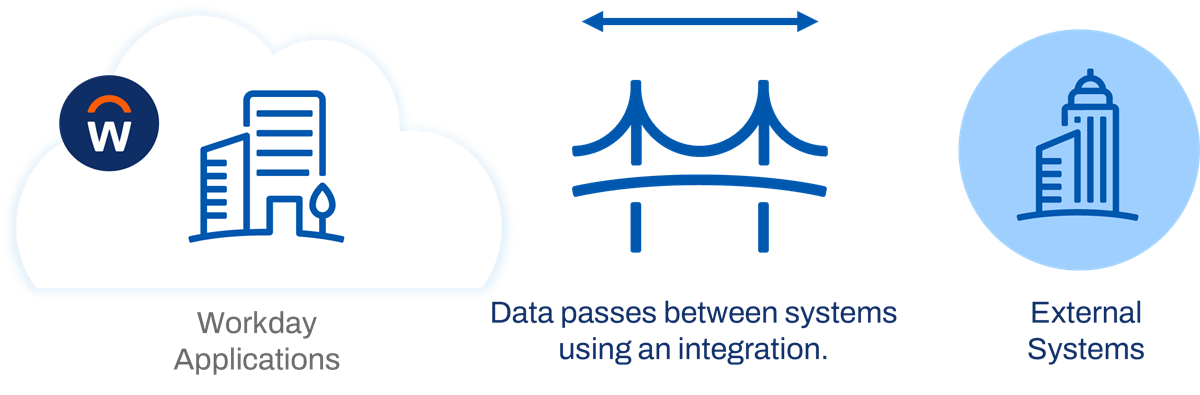
An integration is like a bridge connecting two systems.
Workday Integration Architecture
Workday stores all customer data as objects. Web service requests are the primary way to access Workday object data. Web services are one of the central components of the Workday architecture and enable other applications to integrate with Workday, and vice versa.
Web Services
A web service allows a user or system and a server to communicate over the web. In a web service transaction, a user or system sends a request. A server processes the request and sends back a response.
Note
: Some web service requests must adhere to a set of rules for that specific web service, defined by the corresponding Web Service Description Language (WSDL) document.Example
: A user accessing a task in the UI, an integration system calling a custom report, or an external system requesting access to Workday data are all examples of using a web service.Workday APIs
An Application Programming Interface (API) is a set of functions and procedures that allow internet applications to interact with each other. A web service is one type of API.
There are three APIs you can use to access Workday data via an integration system.
- Workday Web Services (WWS) Simple Object Access Protocol (SOAP) API
- Workday Representational State Transfer (REST) API
- Report as a Service (RaaS), or a custom report enabled as a web service.
Both WWS and the REST API are public APIs that you can access through traditional web service requests. A RaaS is a custom API that you can configure completely in the Workday UI.
SOAP API
The Workday Web Services SOAP API allows you to access data using XML. Most integration systems with a web service request use the SOAP API.
Resource
: View the Workday Web Services Directory on Workday Community for a list of SOAP API operations.REST API
Use the Workday REST API to quickly return a small set of frequently used information, like self-service mobile applications, custom objects, and authentication. Use XML or JSON to access REST web service operations.
Resource
: View the REST API Reference on Workday Community.RaaS
Reports in Workday have an easy-to-use interface and allow users to take actions on report output directly. To use a report in an outbound integration system, enable it as a web service through the report settings. A web-service-enabled custom report is also referred to as a Report-as-a-Service, or RaaS.
Workday Integration Cloud
The Workday Integration Cloud allows a third party to access the Workday APIs.
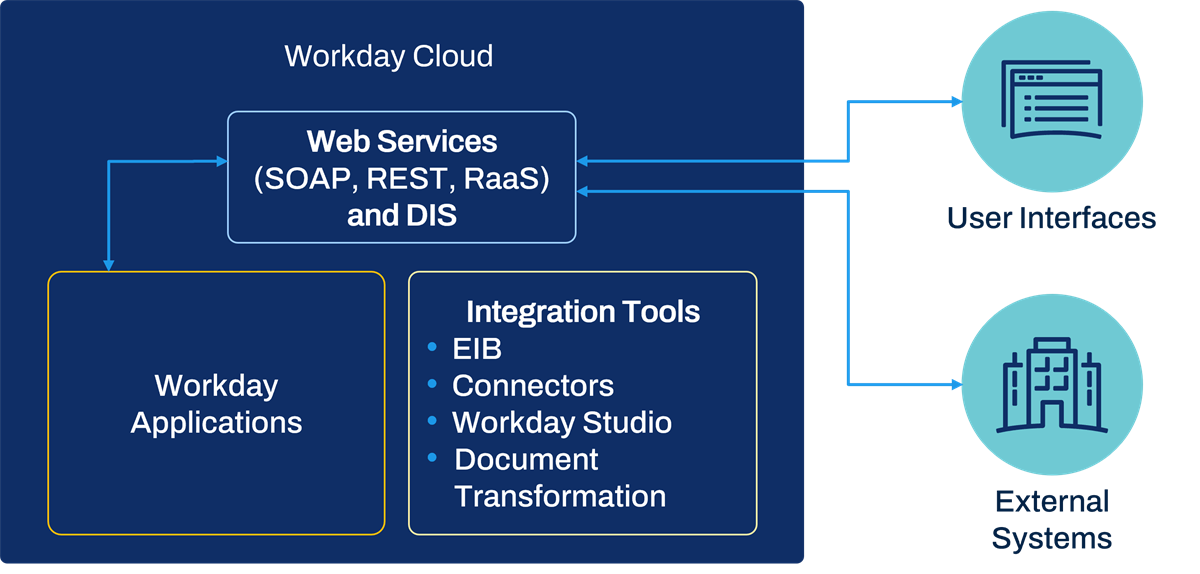
Workday integration cloud.
Workday integration architecture includes three data source types:
- Public APIs (Workday Web Services SOAP and REST)
- Custom APIs (Reports as a Service)
- Data Initialization Service
Workday Integration Tools
You can access the Workday APIs directly, or you can use tools that Workday provides. Workday Integration tools vary from easily configurable to highly customizable:
- Enterprise Interface Builder (EIB) is an easy-to-use, graphical, guided interface. EIB is the most common integration tool used by most Workday customers. The EIB wizard guides you through initiating simple inbound and outbound integrations, without requiring programming.
- Cloud Connect is a catalog of prebuilt integration templates. Workday builds and supports these connectors. A connector is a template on top of a more complex integration, giving you the ability to configure such things as output fields, destination, file names, data mapping, and data transformations.
- Document Transformation is a connector template that transforms data output from another connector (or input to another connector).
- Workday Studio is a full Java-based development environment for the most customizable integration systems. It can apply maps, integrate with one or more systems, split, and aggregate.
You can create a Report as a Service (RaaS) by enabling the web service option on a custom report. The RaaS report will also be available to use as a data source for outbound integrations (such as EIB and Studio).
You can also ignore our integration tools entirely and build your own web service calls.
Launching an Integration System
After creating a new EIB, Workday displays the
View Integration System
report. Use the integration system's Related Actions to launch an integration.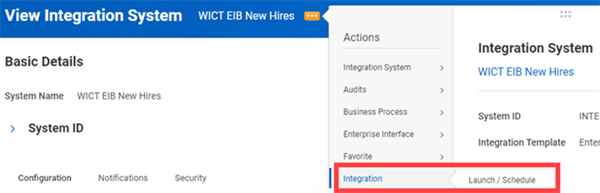
Launch / Schedule an integration from its Related Actions.
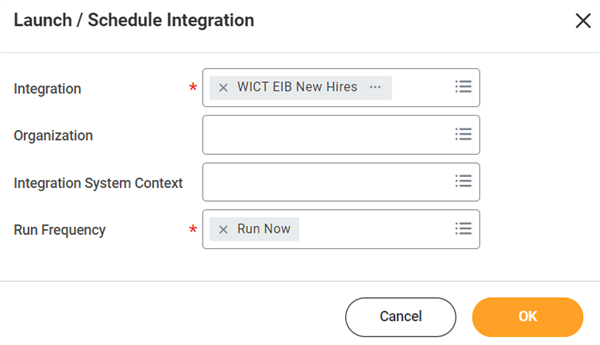
From Launch / Schedule Integration, use the Run Frequency field to specify when you want to run the integration. You can run the integration immediately or configure a schedule.
The optional Organization and Integration System Context prompts enable you to limit your integration to a specific organization or academic unit.
To find an integration system after its initial creation, use the intsys: prefix in the search box:
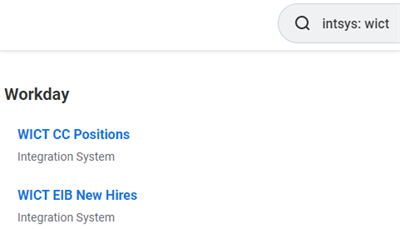
Example of search results using the intsys: prefix.
Launch Parameters
During launch, some integrations require input values. We call these values launch parameters. For example, you can run an integration for only one supervisory organization, or just to get data for the last month.
The integration design dictates the available launch parameters. In this case, the integration is using a custom report, which has two report prompts.
During the launch, Workday displays the
Schedule an Integration
screen, which is where you input the launch parameters.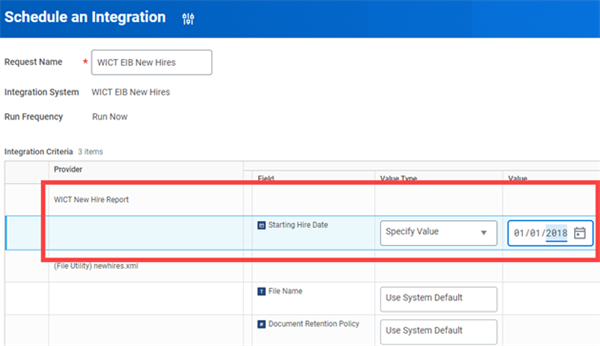
The launch parameter values seen above are static. When the value type is Specify Value, you enter static values.
There are three choices for Value Type:
- Determine Value at Runtime
- Specify Value
- Use System Default
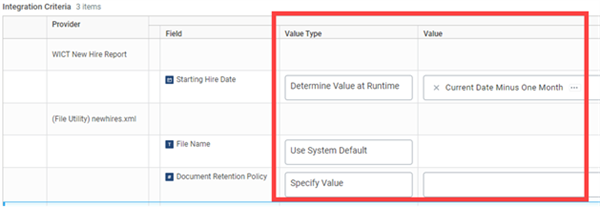
When the value type is Determine Value at Runtime, your values will be dynamic. For example, you could set the Starting Hire Date launch parameter to Current Date Minus One Month. Current Date Minus One Month is a Workday delivered report field on the Global object. It returns the current date based on the user's location.
The value type can also be Use System Default. For example, the use system default for File Name tells the EIB to use the file name configured in the EIB.
Integration Security Overview
Domain Security Policies
Domain security policies allow you to configure which security groups can access the items in a domain. You can also determine what type of access each security group has to those items (e.g., view-only vs. modify permission).
View a Domain Security Policy
View a domain security policy by selecting Domain > View Security Policy from the domain's Related Actions.
Workday groups the domain items into categories:
- Securable Actions:Include items such as delivered reports and tasks.
- Securable Reporting Items:Include items needed for custom reporting such as data sources, data source filters, and report fields.
- Securable Integrations:Include web service operations secured in the given domain.
Select each count of securable items to view the details of each item and the permission a user needs to access it.
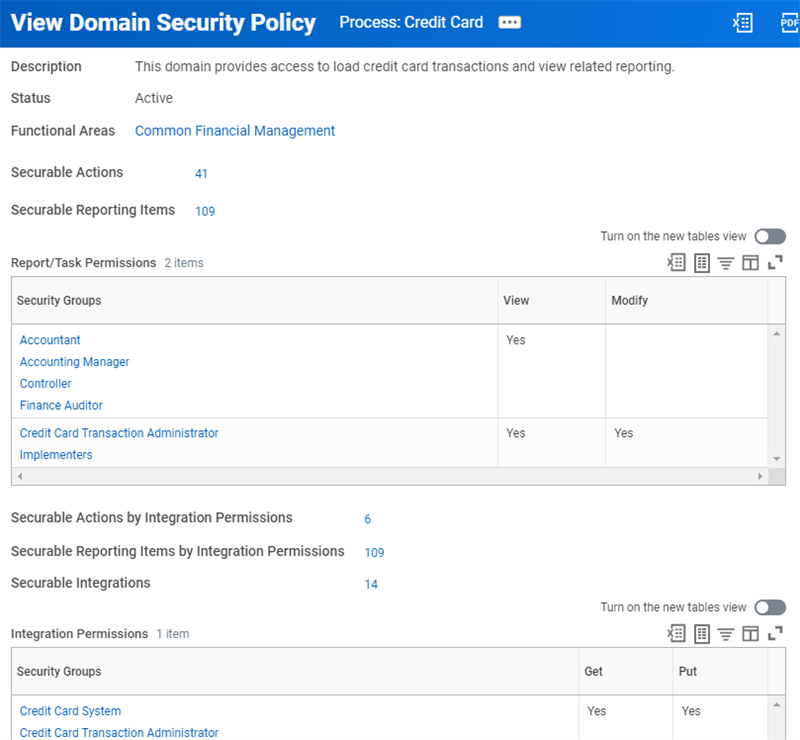
The Process: Credit Card domain security policy with the counts of secured actions, reporting items, and integrations.
Permissions on Domain Security Policies
View vs. Modify Permission
You can configure two levels of security group permissions in a domain security policy for reports and tasks:
- View permission: Provides access only to domain items that require View permissions, such as report fields and data sources. View permission does not provide access to domain items that require Modify permissions.
- Modify permission: Provides access to the domain items that require Modify permissions, as well as the items requiring View permissions. Members of security groups with Modify permissions, therefore, can access all of the domain items that require View or Modify permissions.
Example
: Suppose there are 10 items in a domain (3 requiring Modify permissions and 7 requiring View permissions). If you assign a security group View permission to the domain, members of that security group can only access 7 of the items. If you assign another security group Modify permission to the domain, members of that security group can access all 10 items.Get vs. Put Permission
Integration permissions are different from report and task permissions. You can configure two levels of security group permissions in a domain security policy for integrations and other web service operations:
- Get permission:Provides access only to domain items that require Get permissions (e.g., access to extract data from Workday via a web service operation).
- Put permission:Provides access to integration domain items with Put permission (e.g., access to load data into Workday via a web service operation) as well as items with Get permissions. Members of security groups with Put permission, therefore, can access all integrations in the domain.
Note
: Some domain actions and reporting items will show a permission of View Get. This permission indicates that security groups with Get permission can also access actions and reporting items requiring View permission, via integrations.Common Integration Domains
Within the Integration functional area, these are some come common domains and permissions.
Domain | Modify Permission | View Permission |
|---|---|---|
Integration Build | Create or edit an integration system. Deploy a Workday Studio integration. | View an integration system. |
Integration Configure | Configure integration services. Configure an EIB. | View integration system details. |
Integration Debug | Debug a Workday Studio integration. | |
Integration Event | Launch or schedule an integration. | View integration events, including integration output documents. |
Integration Reports | View integration reports, including reports for integration events, exception audits, messages, and integration IDs. | |
Integrations: EIB | Set up an EIB. | View template models. |
Integration Security | Maintain integration system security segments. Maintain integration system users. | View integration system security segments. |
Integration Subscriptions | Edit integration subscriptions. | View integration subscriptions. |
Security Note
: To launch an integration, business users must have Modify access to the Integration: Integration Event domain.Business Process Security
Business process security policies allow you to configure the following types of permissions for the business process type:
- Who can start the business process (including what actions initiate the business process).
- Who can do action steps in the business process.
- Who can delegate an action to others.
- Who can do actions on an entire business process.
- Who can view all.
- Who can approve.
- Who can cancel.
- Who can rescind.
- Who can manually advance.
- Who can deny.
There are two scenarios where an integration system requires access to a business process security policy.
Scenario | Security Requirement |
|---|---|
The integration calls a web service that initiates a business process, like the Hire or Assign Roles business processes. | Permission to Initiating Action (Web Service) in the business process security policy. |
A related business process triggers the integration, like the Background Check business process. The integration may require access to files or values from the event. | Permission to View All for the business process security policy. |
Integration Process Event Business Process
Launching an integration triggers the
Integration Process Event
business process type. If an integration system does not have a configured business process, it uses the default definition for the Integration Process Event
. The default definition contains two steps: Initiation and Service - Fire Integration.You can configure a unique business process for each integration system. This business process type enables you to:
- Add additional steps between the integration launch and delivery or retrieval.
- Add multiple retrieval or delivery actions.
- Launch several integration systems in sequence.
- Use integration files produced by integration events earlier in the process.
Important
: EIBs do not require a custom Integration Process Event
business process. EIB configuration mimics the business process, so you do not need to configure a separate definition in all cases.The
Integration Process Event
business process separates the initiation of an integration from the act of retrieving or delivering files. Users require View access in the Integration Process Event business process security policy to view details about an integration event.An integration system business process can include the initiation of other integration systems. Such is the case for connector integrations that fire a document transformation (DT) or Workday Studio integration as a business process step in order to transform data. In this scenario, the connector integration business process event is the parent integration event.
Chapter 12 Summary
- Web services are the framework for all transactions in Workday. Integration systems either use SOAP WWS or the REST API, while a select few use DIS.
- Workday offers several integration tools: EIB, Connector, DT, and Studio.
- To access an item in Workday, a user must be a member of a security group with permissions to the domain or business process security policy containing the item.
- The securable integrations section of a domain security policy lists web service tasks and background processes, and required Get or Put permissions.
- The integration functional area contains both integration domains and the Integration Process Event business process type.