
User Access to Integrations
Overview
The integration-related domains, such as Integration Build and Integration Event, allow you to divide user access to integrations to a degree. However, members of unconstrained security groups can access the tasks in each domain for all integrations. Use segmented security to restrict user access to a specific set of integrations in relevant functional areas.
Objectives
By the end of this chapter, you will be able to:
- Identify the components of segmented security.
- Create a segment-based security group, and configure access to launch an integration system identified by a security segment.
- Modify segmented security to integrations to further restrict user access.
- Troubleshoot common segment-based security group access issues.
- Grant access to launch an inbound EIB by configuring the business process security policy.
Segmented Access to Integrations
The Integration functional area domains secure all integration systems in Workday. Therefore, members of security groups with permissions to configure integrations or view integration events have that access for all integration systems. Use segmented security to give users access only to a specific set of integration systems, such as those in their functional area.
Segment-Based Security Groups
Segmented security allows you to define segments for granular access to the values of a secured item. For example, you can control the values that appear in prompts, such as the expense items available for a user when creating an expense report. Segment-based security groups allow you to configure which security groups can access what segment of values.
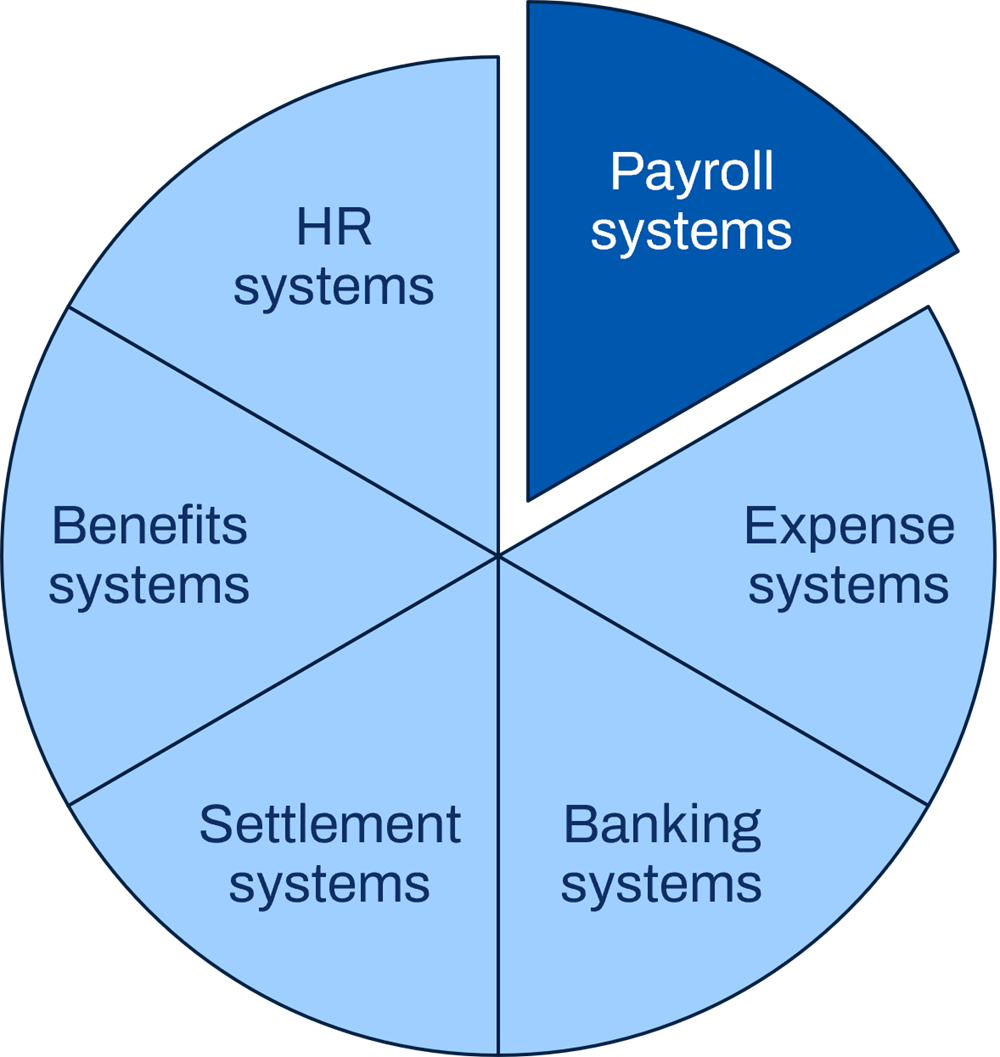
Segment-based security integration example.
Segment-based security groups grant membership based on existing security groups, such as job-based, role-based, or user-based. Constraints depend on included security groups.
The configurable security framework answers three questions:
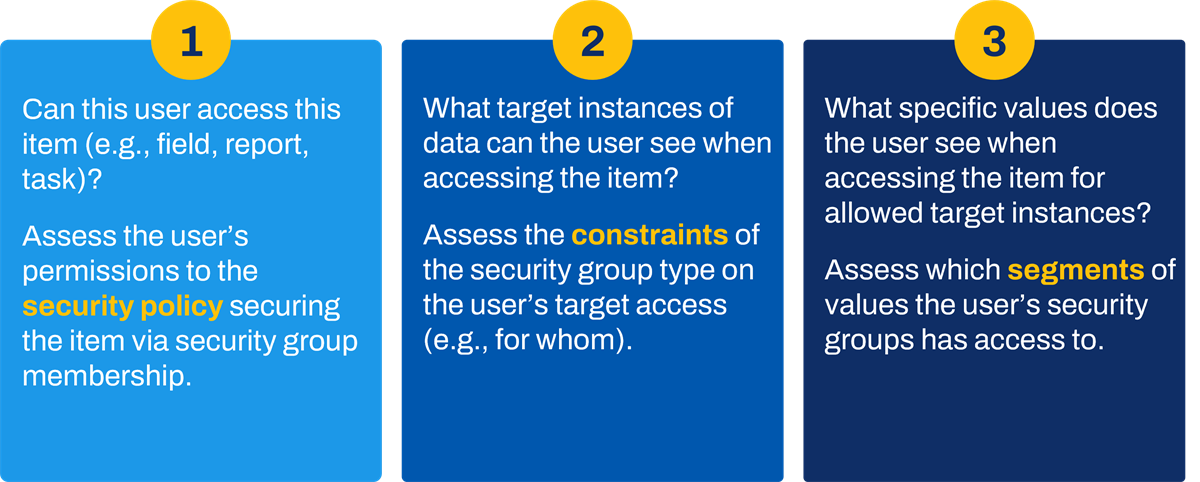
Configurable security asks these three questions.
By placing a segment-based security group in a security policy, members have constrained or unconstrained target access to values defined in permitted segments.
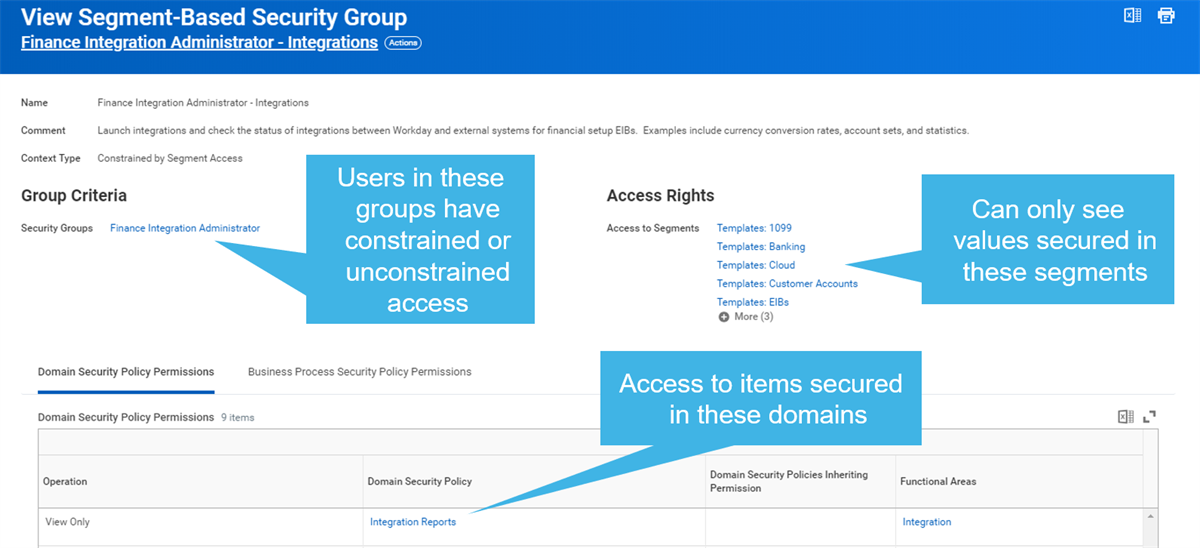
Segment-based security group example.
Integration Security Segments
Use the
Create Integration System Security Segment
task to define segments based on available selection criteria. You can configure segments based on categories, templates, or specific integration systems.After creating an integration security segment, you can modify or delete it using the
Edit Integration System Security Segment
and Delete Integration System Security Segment
tasks. Provide your security administrator with Modify permission to the Integration Security domain to grant access to the tasks to create, edit, and delete integration system security segments.Configure Segment-Based Security
To set up segmented security for integrations, you must:
- Determine how to group integration systems into segments. Create and maintain the integration security segments.
- Determine who needs access to which integration segments. Identify members using existing security groups or create new security groups if needed.
- Create and maintain the segment-based security groups.
- Configure the segment-based security groups in the necessary domain and business process security policies.
- Activate pending security policy changes to enable segmented security.
Maintenance
Plan ahead for maintenance of your integration system security segments. Remember to add any new integration systems to existing segments, or create new segments and segment-based security groups for new integration systems.
Troubleshoot Segment-Based Security
Duplicate Access
Keep in mind that a user's access is the union of all their security group assignments. Therefore, if a user has unconstrained access to an integration domain via a user-based security group, then they can access all integrations, regardless of any segmented access.
Role-Based Security
To avoid access issues, use unconstrained security groups, such as user-based or unconstrained role-based, in your segment-based groups for integrations. Using unconstrained groups ensures integration events will be visible to all applicable users, even if someone launches an integration without organization context.
Integration Tool: Inbound EIB
Use Case: Use inbound EIBs for simple integrations to bulk load data into Workday using WWS.
Details:
- EIBs support WWS operations as the target for inbound integrations.
- Load data using Workday-delivered template models and corresponding spreadsheet templates.
- Some spreadsheet templates load data into Workday business processes.
Security Requirements
Inbound EIB security requirements are different from other integration types. Unless the integration loads data on a regular basis, via a schedule, an inbound EIB integration does not use an integration system user and integration system security group. Instead, Workday assesses the security of the business user running the integration. When troubleshooting issues with inbound EIB integrations, remember that the business user may not have access to the web service task.
The security requirements for inbound EIBs are:
Security Requirement | Inbound EIB |
|---|---|
What is the data source? Grant domain access. | Web service (Put) |
Does it use a business process? Grant business process access. | Possibly Initiating Action |
A web service called by an integration may initiate a business process. If so, the user launching the integration requires permission to the Initiating Action (Web Service) in the business process security policy. If the inbound EIB uses a web service that does not initiate a business process, the user requires Put permission to the domain containing the web service task.
Integrations: EIBS Domain
In addition to the Integration Event domain, needed to launch an integration and view the output, there is also a domain specific to EIBs. Grant business users who need to configure EIBs Modify permission to the Integrations: EIBs domain.
Chapter 13 Summary
- Segment-based security groups allow for granular access to the values contained in the segment.
- You can configure an integration segment based on category, template, or a specific integration system or systems.
- When granting a user segmented access to a domain, remove their unconstrained access.
- Inbound EIB integrations rarely use an integration system user. Unless they load data regularly, via a schedule, they use the security of the business user running the integration.