
Choosing the Right Security Group Type
Overview
This chapter covers additional security group types and explores scenarios for the many available security group types. You will review a decision tree to help determine the security group type that can meet a given requirement.
Objectives
By the end of this chapter, you will be able to:
- Review various security group types and how each identifies members and determines target access constraints.
- Determine which security group type to consider for a given use case.
Choosing the Right Security Group Type
As you now know, a user's membership in security groups and security group permissions to security policies determine access to secured items. A given user's access is the union of all their security group assignments. User-based and role-based security groups are the most common, but there are many other types of security groups that can meet specific access requirements.
As you consider which security group to use, it is important to consider two main factors:
- How users become members.
- Whether the security group type enforces the needed constraint on what target data members see.
We will explore several of these additional security group types, starting with groups derived based on worker characteristics.
Resource
: Refer to the Chapter 2 Security Group Types table for a review of the various security group types.Security Group Types Based on Worker Characteristics
The following security group types automatically identify members based on worker characteristics, such as aspects of their job details, their organization assignments, location, management level, or compensation grade. If the worker meets the defined criteria, they are automatically a member. If they do not meet the criteria, they will no longer be a member.
- Job-Based (Constrained)
- Job-Based (Unconstrained)
- Organization Membership (Constrained)
- Organization Membership (Unconstrained)
- Location Membership
- Manager Level-Based
- Compensation Level-Based
Job-Based
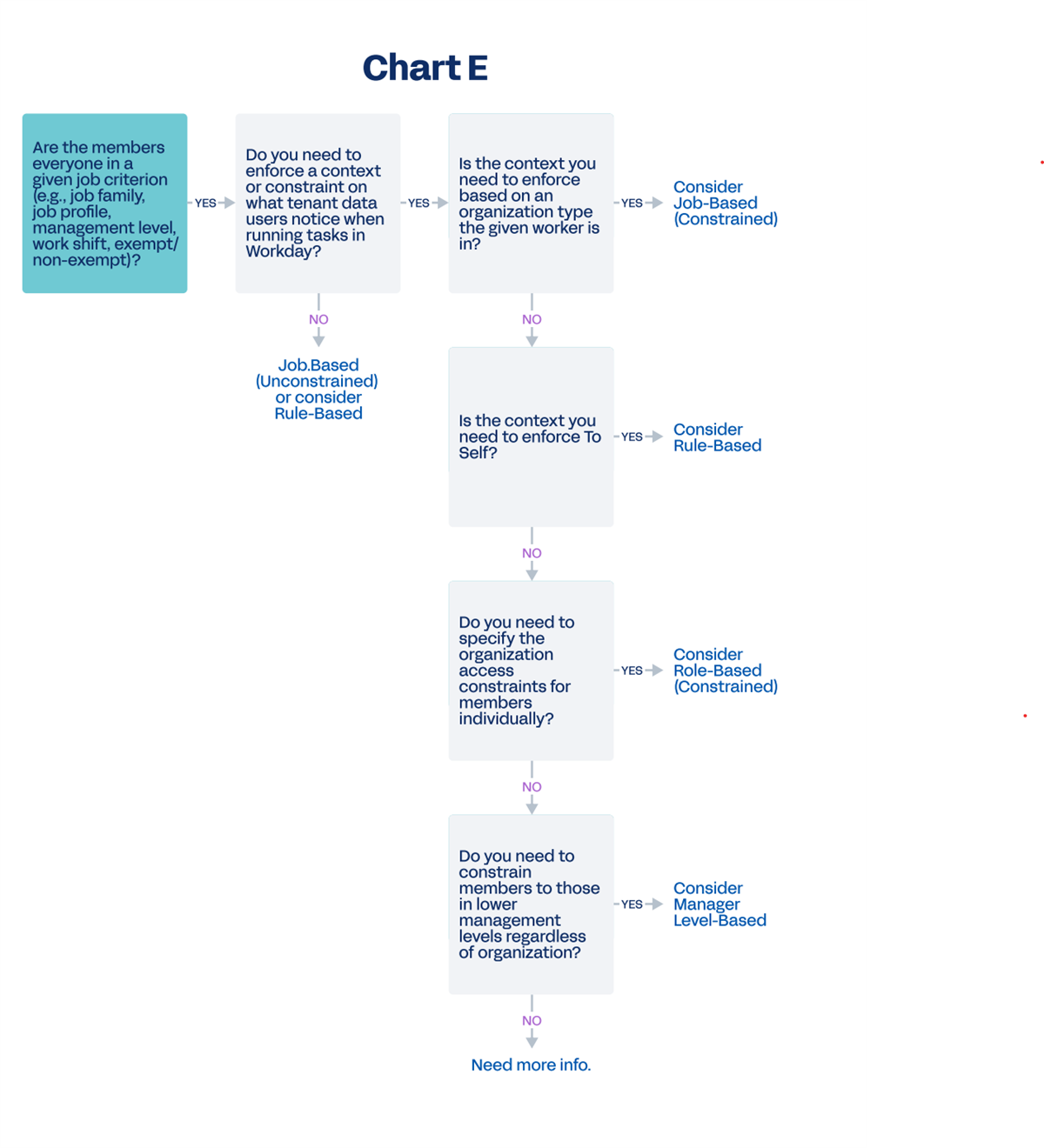
Job-based security groups identify members based on a single job criterion (e.g., job profile, exempt jobs, management level). Workday derives membership in job-based groups from currently active workers who match the defined job criterion.
Relevant job criteria include:
|
|
You can define job-based security groups as either constrained or unconstrained. When configuring a constrained job-based group, specify an organization type and whether or not to include subordinate organizations. Members can then access target instances based on the organization they are currently in.
Example
: You can create a job-based constrained security group to identify anyone in the top four management levels (VP and above). Then, you can constrain access to the organizations they are in, including subordinate organizations.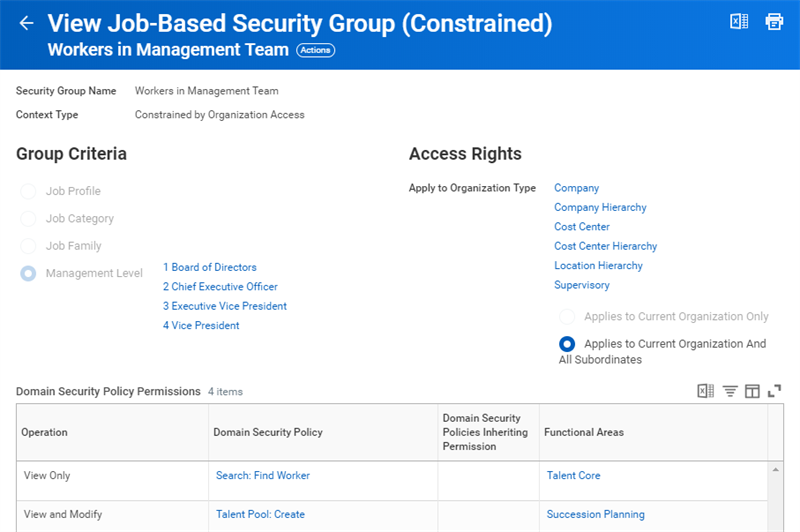
Example of a job-based security group constrained by management levels.
Location Membership
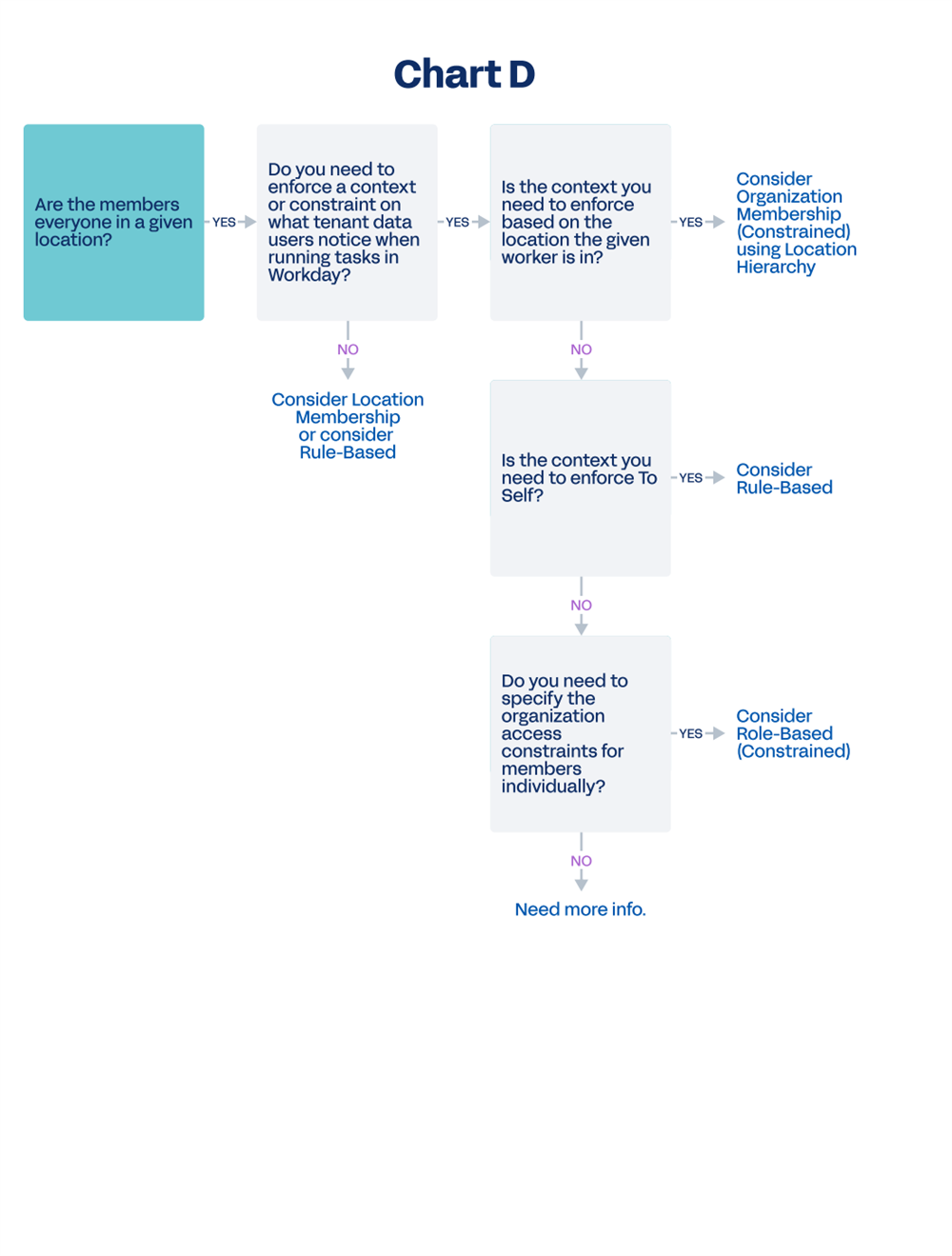
Location membership security groups can include one or more locations. Workers in any of the included locations are automatically considered members of the security group and can access items in permitted security policies.
Location-based groups are unconstrained; Workday does not attempt to match the worker's location to the location of the secured item.
Examples include:
- Workers in Amsterdam location
- Workers in U.S. locations
- Workers in San Francisco location
Organization Membership
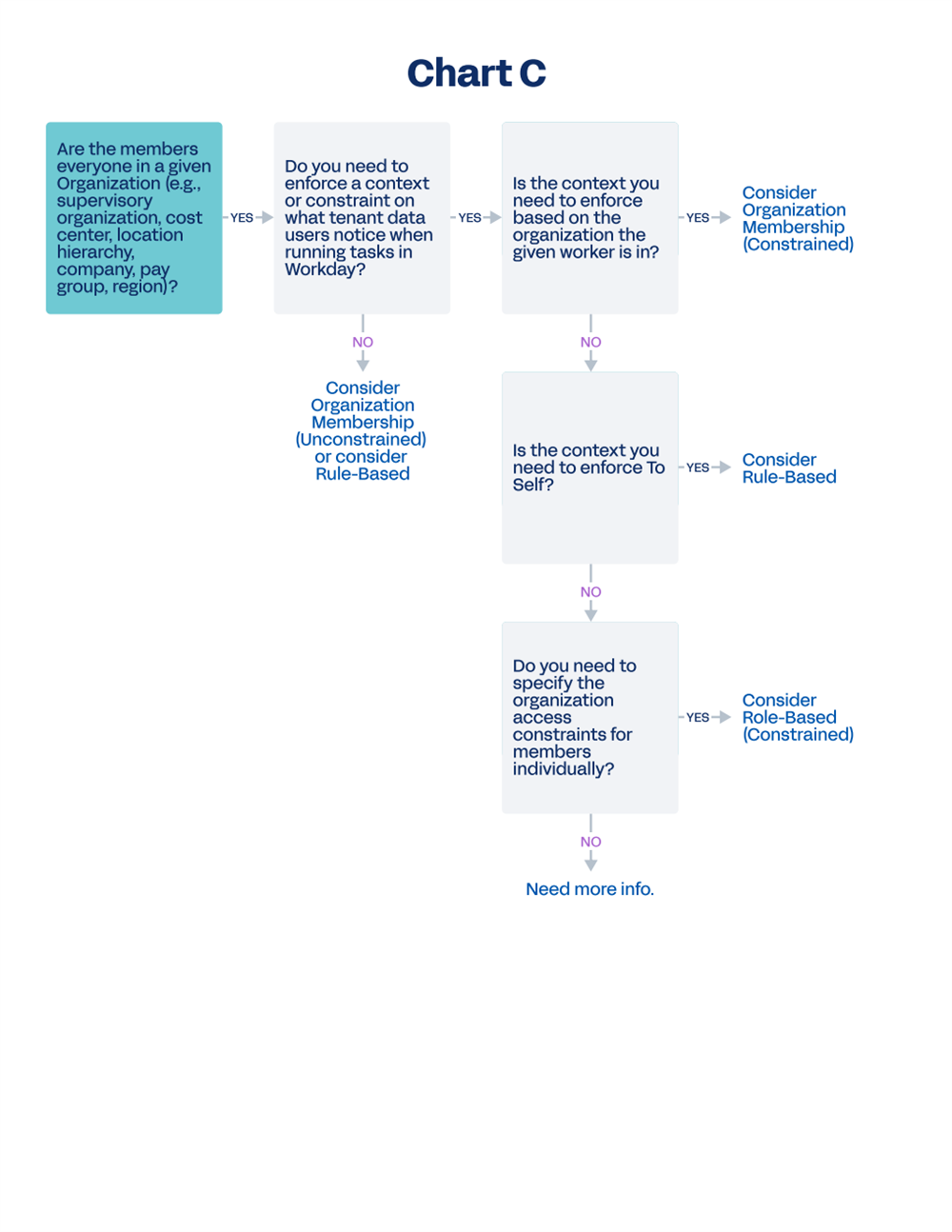
Organization membership security groups can include organizations of any type (e.g., Company, Cost Center, Location Hierarchy, Pay Group) and, optionally, subordinate organizations. Workers in any of the included organizations are automatically considered members of the security group and can access items secured in permitted security policies.
You can define organization membership security groups as either constrained or unconstrained. Unconstrained groups are often used in other security groups, such as intersection or aggregation.
Tip
: Consider using organization membership instead of location membership, as long as you can access your location hierarchy in an organization membership security group. This configuration reduces maintenance because you do not have to manually add new locations to the security group.Level-Based
Level-based security groups are a niche type of security group needed in certain areas of Workday, like Workday Talent Management. Level-based security groups identify members based on level and constrain members' target access to those workers in lower levels, regardless of organization.
To use level-based security groups and identify and constrain workers based on levels, you must define and maintain a leveling mechanism or hierarchy in the tenant. Supported leveling mechanisms include:
- Compensation Grade Hierarchy: Workers belong to a level based on their compensation grade.
- Management-Level Hierarchy: Workers belong to a level based on their job profile.
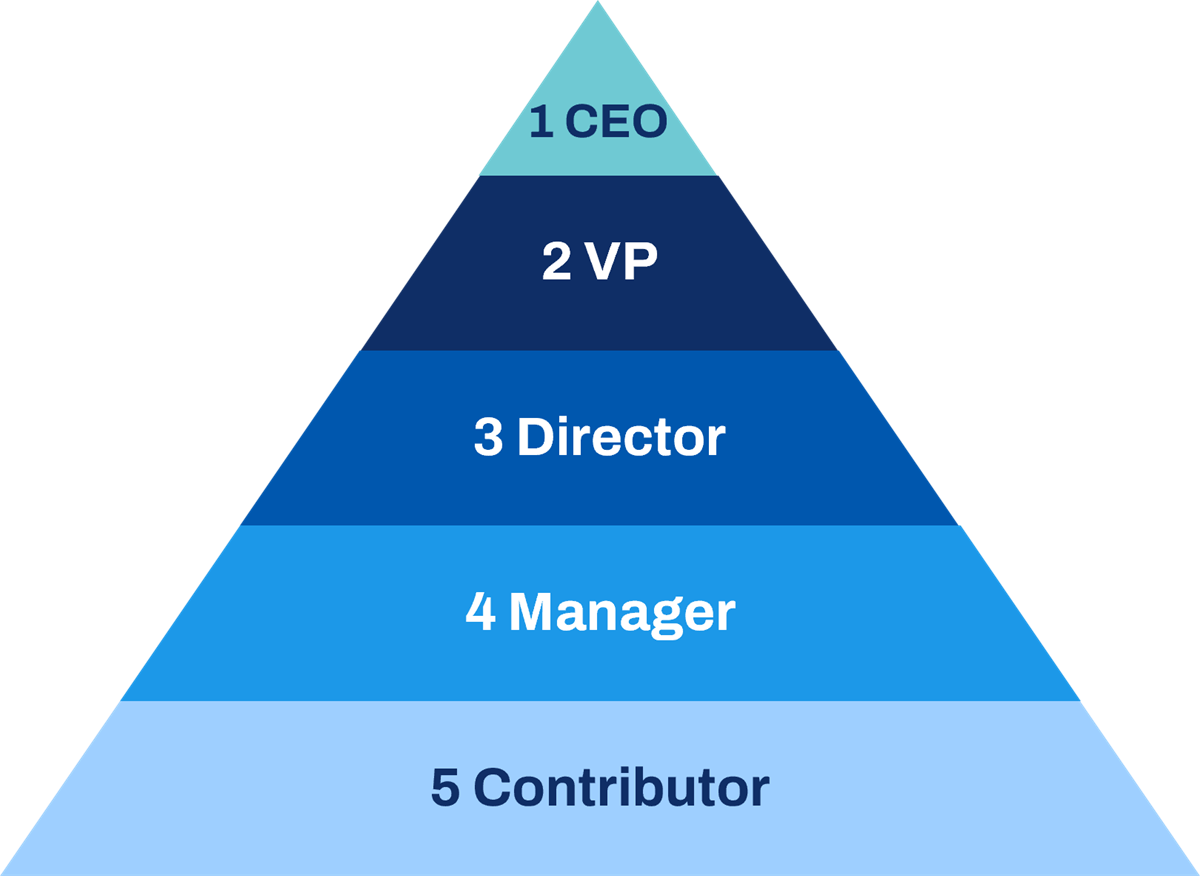
Management-level hierarchy.
Example
: Create a management level-based security group that includes workers in the top four management levels. This group can give each member access to target instances in lower management levels. So, a member in management level 3 can access any target in management level 4+.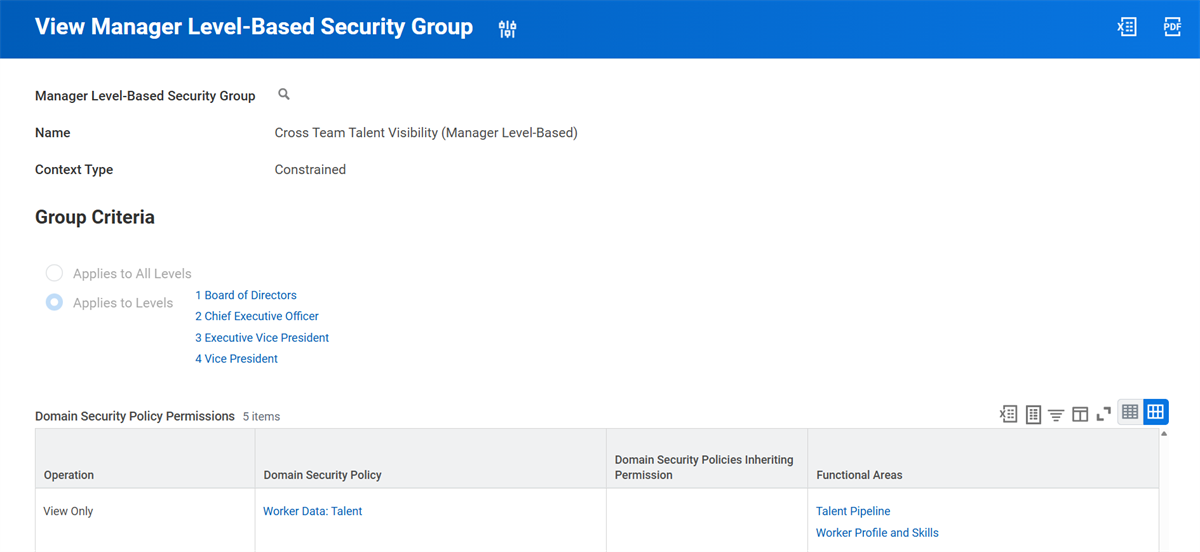
Example of a management level-based security group.
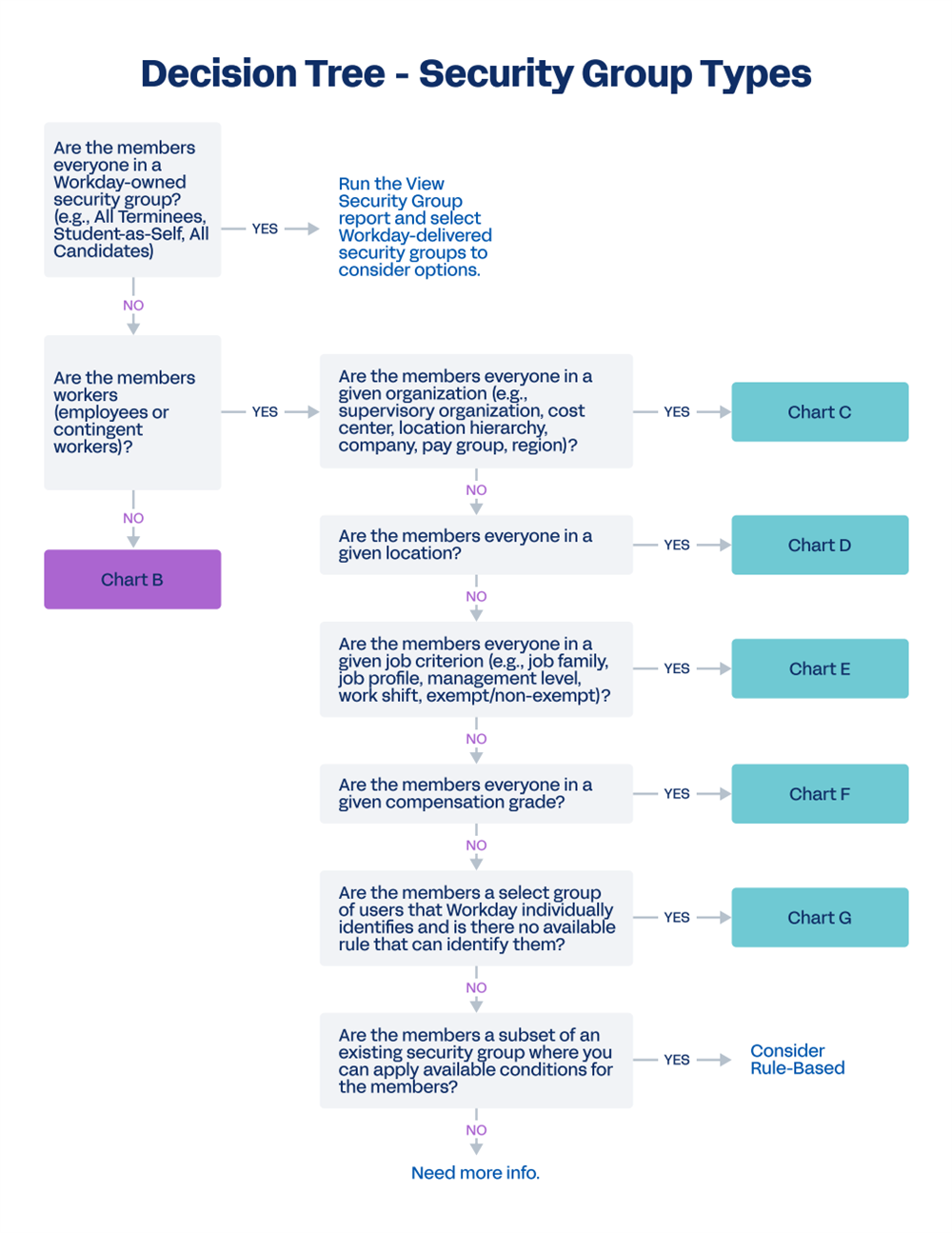
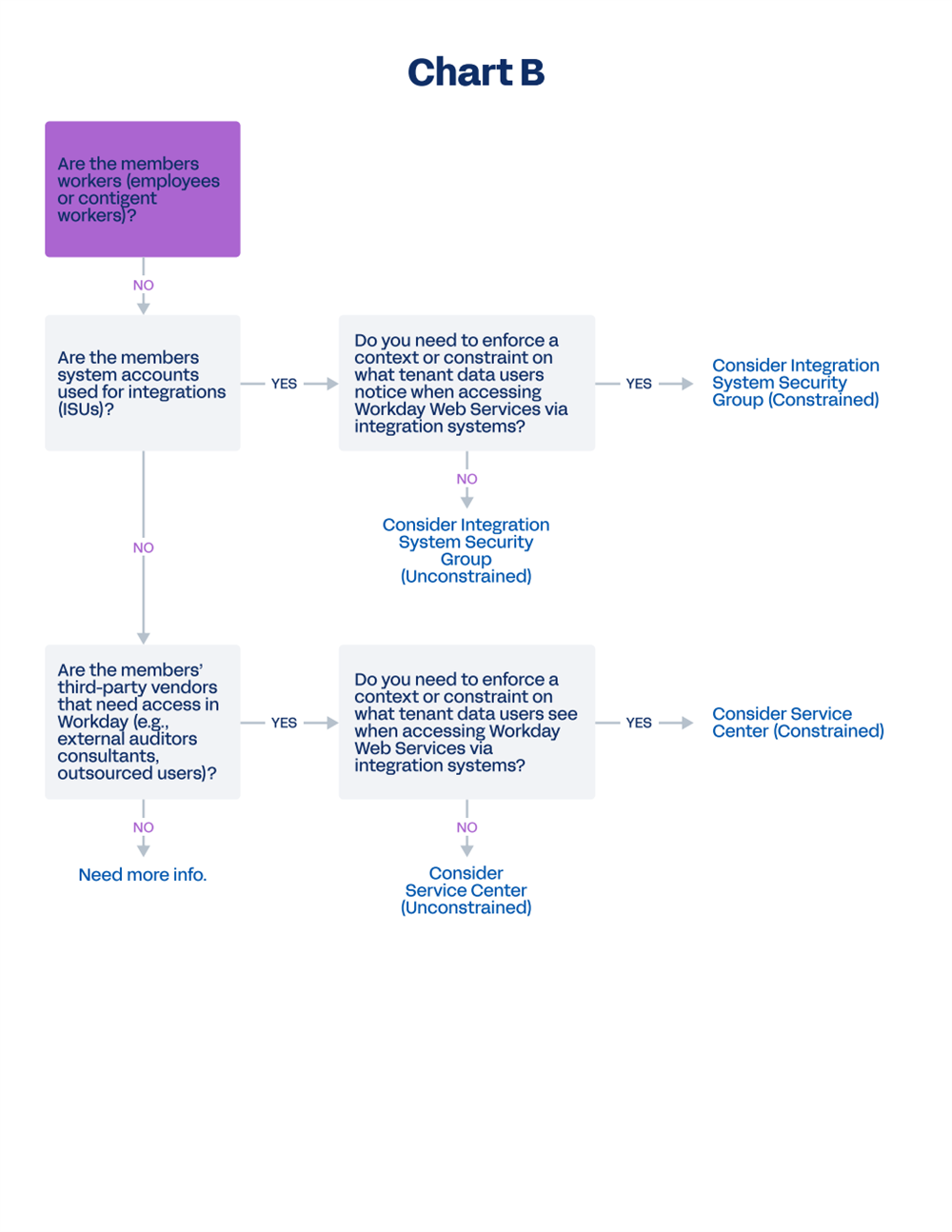
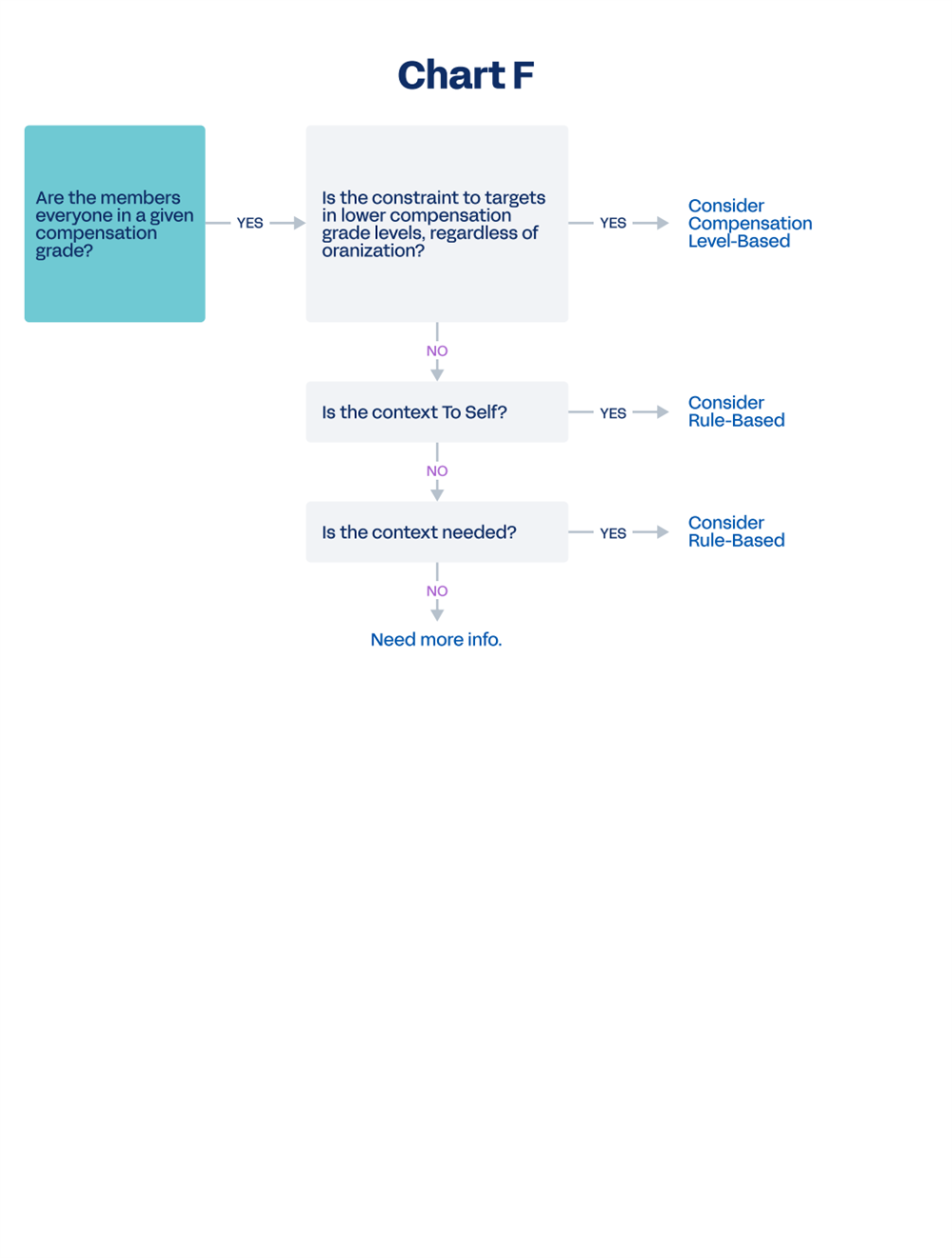
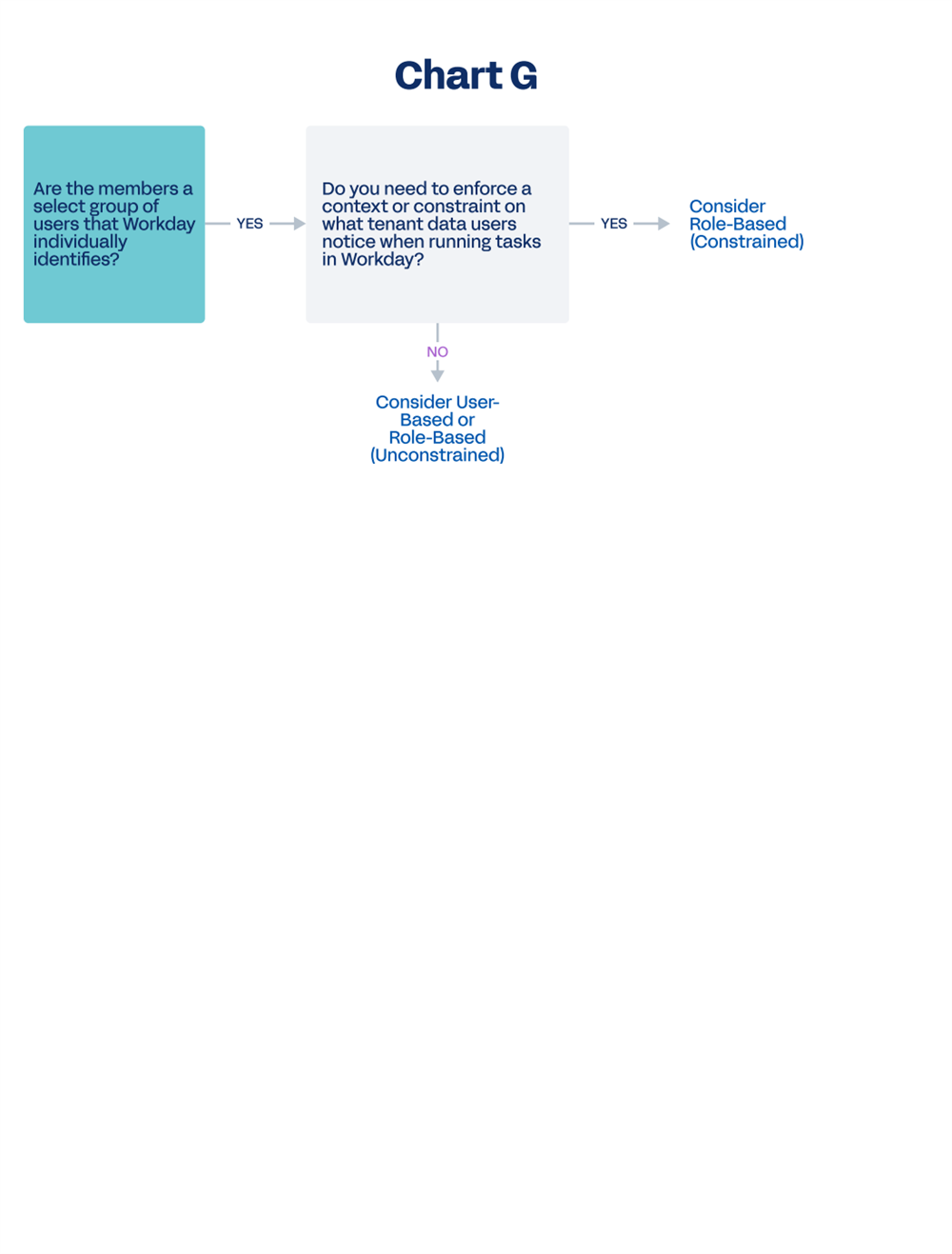
Security Group Type Decision Tree
Use the following security group type decision tree to determine which security group type can help meet your requirements.
Workday-Delivered Reports
Workday-delivered reports can help you answer security-related questions. The tables below list reports that help answer commonly asked questions in different security-related areas.
Tip
: Run the Workday Standard Reports
delivered report and select Security Administration, Security Configuration, System: Data Access (Audits), and System: Security (Audits) in the Report Categories field to display a list of available delivered reports.Security Groups and Users
Question | Report |
|---|---|
What can a security group do? What does it have access to? | View Security Group
View Security Groups
Security Analysis for Security Group
Action Summary for Security Group
|
How can I tell what security policy to update for a given item? | View Security for Securable Item |
How can I tell what security groups a worker is a member of? | View Security Groups for User |
How can I compare access between workers? | Compare Security of Two Worker Accounts |
How can I compare security groups? | Compare Permissions of Two Security Groups |
Who are the members of a security group? | If user-based, use View Security Group .
If not, write a custom report (PBO: Security Group, Report Field: Members).
|
How can I find out if a worker is a member of a given security group? | Test Security Group Membership |
How can I tell if a worker can access a given target using a given security group? | Test Security Group Membership |
How did this worker get to this task or item? What security group allowed it? | Security Analysis for Securable Item and Account |
Given a worker's security groups, what is their cumulative access in the tenant? | Security Analysis for Workday Account |
How do I add or remove a security group from multiple domain security policies at once? | Maintain Permissions for Security Group
Note
: This is a task. |
How can I tell who can access a given task or item? | View Security for Securable Item |
Roles
Question | Report |
|---|---|
How can I display all the defined roles in tenant? | View Assignable Roles |
What if I need to add new roles? | Maintain Assignable Roles Note : This is a task. |
How can I find unassigned roles? | Unassigned Organization Roles Audit
Unassigned Roles Audit
Unfilled Assigned Roles Audit
|
How can I tell what role assignments exist for a given worker? | Role Assignments for Worker Position |
How can I tell what role assignments exist for a given organization? | Roles for Organization and Subordinates Worker Roles Audit |
How can I tell which security groups can assign workers to each role? | Role Assignment Permissions |
Big Picture
Question | Report |
|---|---|
How can I display all the domains and business processes available for a given functional area? | Functional Areas |
How can I display the current security configuration for a given functional area? | Domain Security Policies for Functional Area Business Process Security Policies for Functional Area |
How can I display all the security groups in the tenant? | View Security Groups |
How can I display a full list of reports around security? | Run Workday Standard Reports for security-related categories. You can also write custom reports using security-related data sources. |
Change Control
Question | Report |
|---|---|
How can I display an audit trail of changes to security policies? Who did what, and when? | Domain Security Policy History
Business Process Security Policy History
Domain Security Policies Changed within Time Range
Business Process Security Policies Changed within Time Range
Audit Trial - Security
|
How can I audit a given Workday Account? | View User or Task or Object Audit Trail |
How can I audit what a worker viewed or changed? | View User Activity
Note
: You can turn off User Activity Logging using the Edit Tenant Setup - System task. |
How can I display a history of security changes for either an organization (e.g., role assignments) or for a worker? | Security History
Security History for User
Security History for Users Audit Report
|
How can I activate changes to security policies? | Activate Pending Security Policy Changes
Note
: This is a task. |
Can I select which pending security policies to activate? | No - The Activate Security Policy Changes task activates all pending security policy changes in the tenant since the last activation. |
When someone activates pending security policy changes, will it only activate that person's changes? For instance, if there are multiple people making security policy changes in the tenant. | No - the Activate Pending Security Policy Changes task will activate all pending security policy changes in the tenant since the last activation, regardless of who made the change. |
How can I check what security policy edits are pending activation? | Domain Security Policies with Pending Changes
Business Process Security Policies with Pending Changes
|
How can I revert back to a previous security configuration in the tenant? | Activate Previous Security Timestamp
Note
: This is a task. |
When I activate a previous timestamp, are my changes since that timestamp removed or deleted? | No - your changes will still be there but will be in a pending state. Edit the security policy manually to correct or remove the changes, and then run the Activate Pending Security Policy Changes task again. |
How can I check how many times security has been activated in the tenant? | View All Security Timestamps |
How can I check if there are issues with the security configuration? | Security Exception Audit |
Chapter 10 Summary
- The security group type you choose will depend on the members you need and the target constraints you need to enforce.
- Some security group types automatically identify workers as members given defined criteria about the worker, such as their organization or a job-related criterion.