
Workday Recruiting Security
Overview
In this chapter, you will learn about tenant settings that impact Workday Recruiting functionality, domain security policies, and ad hoc security.
Objectives
After completing this chapter, you should be able to assign recruiting roles to job requisitions.
Configurable Security
The data in Workday is only accessible through security. Workday grants access to data or business processes through security group assignments.
Components of Configurable Security
- Security Groups: Groups of users who need to perform actions or access data.
- Domains: Defined tasks and reports that are functionally similar.
- Domain Security Policies: Rules that dictate which security group can view or modify data within the domains.
- Business Processes: Workday-delivered workflows with configured steps that allow your enterprise to complete a business objective.
- Business Process Policies: Rules that dictate which security groups can participate in the business process and in what ways they can participate.
Constrained vs Unconstrained Security Groups
Constrained security groups enforce a context on members' target access. If you add a constrained security group to a security policy, members can access secured items in those policies. Once there, Workday applies context to the target data. The constraints are by organization typically.
Alternatively, unconstrained security groups do not enforce a context. If you add an unconstrained security group to a security policy, members can access secured items in those policies with no context or constraint applied.
Workday HCM activities rely on constrained security groups. This means recruiters can only manage candidates on job requisitions they own. Workday requires unconstrained, role-based security groups for some domains.
These unconstrained security groups are:
- Recruiter (Unconstrained)
- Manager (Unconstrained)
- Recruiting Coordinator (Unconstrained)
- Recruiting Sourcer (Unconstrained)
- Primary Recruiter (Unconstrained)
Assignable Roles and Security Groups
You may encounter new roles and security groups when defining Workday Recruiting security policies and business processes.
Below are suggestions of workers who you may assign to these security groups:
Security Group | Description |
|---|---|
Recruiter | Works candidates through the recruiting lifecycle. |
Recruiting Coordinator | Coordinates interview scheduling, offer paperwork, and other recruiting administrative tasks. |
Recruiting Sourcer | Locates candidates for open positions. |
Recruiting Administrator | Administers the recruiting system. |
Primary Recruiter | Manages assigned job requisitions. |
Important
: Define and enable assignable roles for organization types before you create a role-based security group. Use the Maintain Assignable Roles
task.Workday Recruiting Business Process Security Groups
When you configure security groups on business processes, review the
Job Application
business process and the individual subprocess to ensure the appropriate security group receives the task. While different members of the hiring team (e.g., recruiter, hiring manager, HR partner) may participate in the recruiting process, best practice is to assign a designated security group for step assignments.Note
: You may encounter the Initiator role, a versatile security group, listed on subprocesses. A best practice is to assign the designated recruiting user as the security group instead of using the Initiator role.Ad Hoc Role Assignment
Two ways you can assign tasks to recruiters or recruiting users include:
- Assign the Recruiter constrained role to an organization.
- Assign roles to the job requisition.
Workers participate in business processes based on their assigned roles. To configure roles for a business process, add the appropriate role-based security groups to the business process security policy. The Recruiter then receives the business process tasks based on the role assignments at the organization and specific business process steps.
When you assign the Primary Recruiter role or other ad hoc roles to the job requisition, these roles manage specific job requisitions and recruiting tasks. You can assign multiple roles to a job requisition.
Configuring Ad Hoc Roles
To create a Recruiter Assistant ad hoc role, you must configure security and business processes.
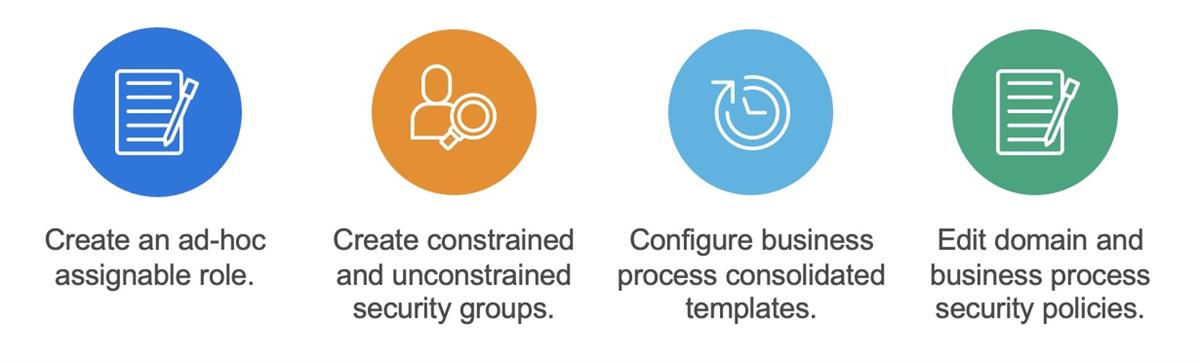
Step 1: Maintain Assignable Roles
- Create a new assignable role and link it to the security groups.
- Use theMaintain Assignable Rolestask to create a new ad hoc role.
- Enable the new role for Job Requisition.
Step 2: Create Security Groups
- Create two security groups for each ad hoc role (constrained and unconstrained).
- Use theCreate Security Grouptask to create a role-based security group (constrained).
- Connect the new security groups to the assignable role.
Note
: You can use the Maintain Permissions for Security Group
task to copy existing security permissions to your newly created security group.Reminder
: Activate your security policy changes.Step 3: Configure Business Process Consolidated Template
Add the
Assign Roles
business process to the consolidated templates for the following business processes:- Job Requisition
- Job Requisition Change
- Evergreen Requisition
- Evergreen Requisition Change
To add the
Assign Roles
business process to the consolidated templates follow these steps:- Use theView Business Process Templatereport to locate the specific business process type.
- On the Business Process Type row, for the business process type, select the Related Actions > Business Process >Configure Consolidated Template.
- Add Assign Roles to the template.
- Configure the security policy for the Staffing Actions: Job Requisition Role Assignment domain in the Staffing functional area.
- Initiate theActivate Pending Security Policy Changestask.
- Assign your new ad hoc role to job requisitions.
Step 4: Edit Domain and Business Process Security Policies
- Assign security groups to recruiting domains and business process security policies.
- Replace Recruiter with your new ad hoc security group.
- Add the new ad hoc security group to business process definitions.
- Initiate theActivate Pending Security Policy Changes.
Assigning Ad Hoc Roles to Job Requisitions
When creating or editing a job requisition, you can enter roles and the worker assigned to them in the Assign Roles tab. If you manually assign a Primary Recruiter to a job requisition, Workday displays them as the recruiter for the job requisition. If you do not assign a Primary Recruiter role to the job requisition, Workday uses the supervisory organization to determine the recruiter.
Default Recruiting Roles
If you use the Job Requisition Workspace, you can assign a default recruiting role and add up to four additional recruiting role filters. Use the
Maintain Job Requisition Workspace
task to configure the roles.Note
: It can take up to an hour for the changes to display.Domains
Domains are a collection of items that share the same security, including:
- Tasks
- Reports and report fields
- Web service operations
Domain security policies control which security groups can access data in the domain.
Domain Security Policies
Domain security policies allow you to configure which security groups can access the items in a domain. You can also determine what type of access each security group has to those items (e.g., view-only vs. modify permission).
By default, the child security policies inherit permissions granted at the parent level. To remove inheritance, edit the child security policy. You can change the inheritance for each child policy individually without affecting the other child policies. To restore the default inheritance, select the Use Parent Permissions button.
When you view a domain security policy or security domain, Workday displays which security group types you can add. You can enable or suspend security policies for each parent and child domain.
Note
: Enabling the parent domain does not automatically enable the child domain.Enabling Domain Security Policies
Workday occasionally adds new domains. Enable a new domain and edit security groups before you can use the new functionality.
Whenever you change a security policy or its permissions, initiate the
Activate Pending Security Policy Changes
task.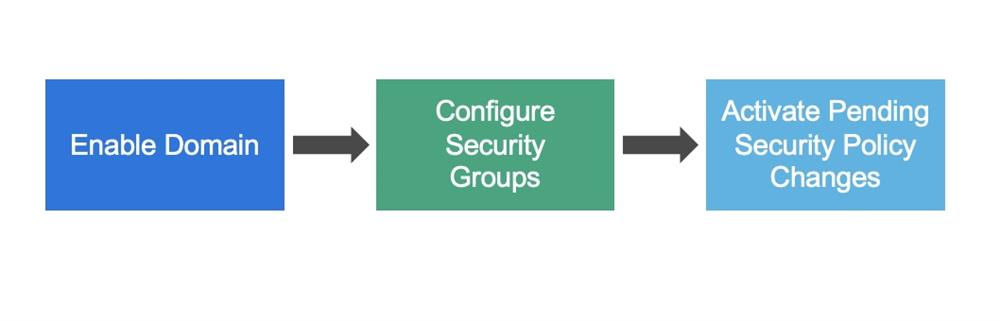
Domain Security Policies for Workday Recruiting
In Workday Recruiting, you will configure domain security policies to access the Recruiting Hub, candidate data, questions, and questionnaires, to name a few. Locate security policies in the following domains and corresponding functional areas:
Functional Area | Domain | Description |
|---|---|---|
Recruiting | Recruiting Hub | Who can access the Recruiting Hub Navigation Pane and workspace? |
Organizations and Roles | Manage: Location | Who can create job posting locations? |
System | Grid Management | Who can create and modify candidate grids? |
Recruiting, Talent Pipeline
| Set Up: Recruiting | Who can access information about recruiting setup, such as job application templates, job requisition defaults, recruiting statuses, etc.? |
Recruiting | Staffing Actions: Job Requisition Positions | Who can have access to create job requisitions for multiple existing positions? |
Recruiting, Talent Pipeline
| Set Up: Career Sites | Who can create, edit, inactivate, or delete career sites? This domain shares career site setup for both internal and external career sites. |
System | Questionnaire | Who can write the questions? |
Staffing | Staffing Actions | Who can put the questions on a job or evergreen requisition? |
Recruiting | Candidate Data: Questionnaires | Who can view candidates' answers? |
Recruiting | Candidate Data: Questionnaire Total Score | Who can view the scores of the questionnaires? |
Recruiting, Talent Pipeline
| Prospects | Who can create prospects? |
Recruiting, Talent Pipeline
| Prospect Sharing | Who can share a prospect? |
Recruiting | Manage: Prospect Consent | Who can send prospect consent collection emails manually? |
Customers | Reports: Prospect | Who can view a candidate's job application? |
Recruiting | Candidate Data: Job Application | Who can view a candidate's job application? |
Recruiting | Find Candidates: Internal and External | Who can access the Find Candidates report and data related to internal and external candidates? |
Recruiting | Manage: Evergreen Requisitions | Who can manage all tasks and reporting for evergreen requisitions? |
Important
: Enable security policies for the above domains and add the required security groups.Business Process Definition Overview
Business process definitions include many different characteristics. The header section displays the effective date, security groups allowed to initiate the process, and a button to view a visual representation of the process flow. The body of the business process definition includes the following tabs of information:
Tab | Definition |
|---|---|
Business Process Steps | This tab defines the order of steps that will execute. Use alphabetical ordering for ease of maintenance. Steps can be sequential or happen in parallel. |
Notifications | You can send notifications to participants specified in the definition or other system users and security groups based on configuration. This tab displays both system and custom notifications for the business process. You can configure notifications to trigger on process status changes, or upon entry or exit of a step in the workflow. Notifications can also send to the user's email, or within Workday, based on configurations and preference settings. |
Allowed Actions by Role | This tab lists the actions (e.g., review, subprocesses) allowed in the business process. |
Allowed Services | This tab lists the services (e.g., create or reset Workday accounts) allowed in the business process. |
Related Links | Related links reference to external web pages. This tab lists the external links. |
Available Rules & Fields | This tab lists the condition rules and fields that you can use in conditional rule logic on the business process. |
Below is an example:
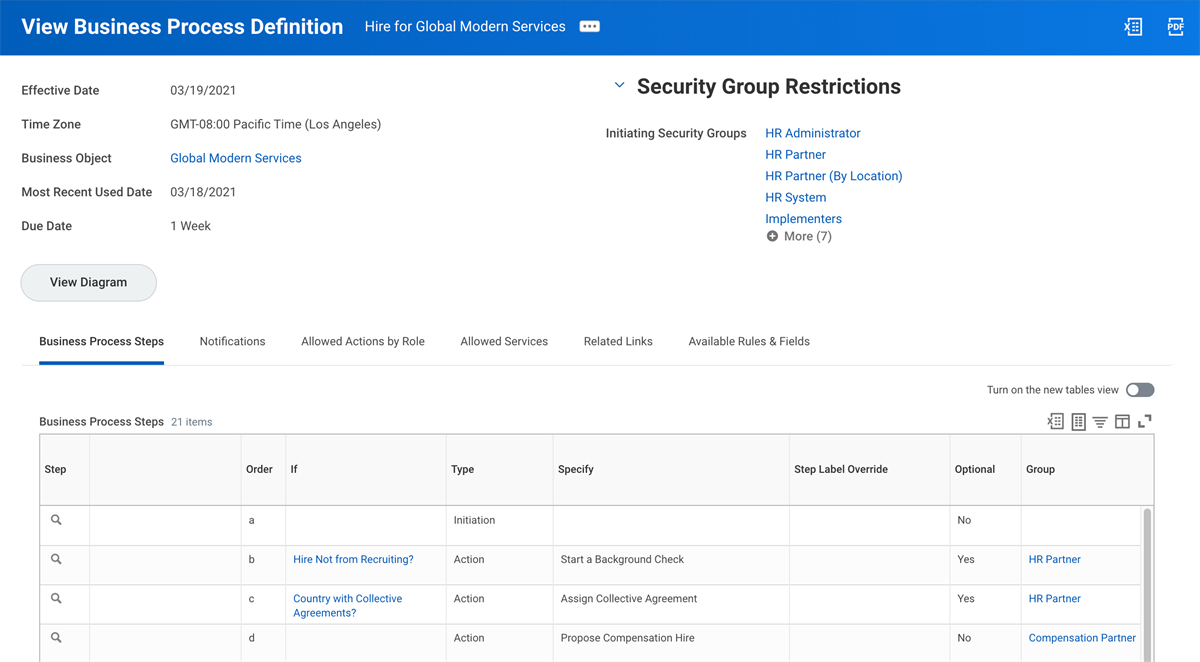
An example of the Hire for Global Modern Services Business Process Definition.
Business Process Security Policies
Workday defines the business process types delivered in each functional area. Every business process type has its own business process security policy. The business process security policies secure the permissions that members of security groups have for a specific business process type. Some examples of these permissions include initiating, approving, delegating, and canceling business processes. Each business process type has a single security policy that secures all business process definitions of its type.
In Workday Recruitng, there are several common business process types that you must configure in order to hire a candidate. You can have multiple business process definitions for a given business process type, but they will share a single security policy. You can configure each definition to route steps to different security groups, as long as you include those groups in the security policy for the business process type.
The Business
Process Security Policies for Functional Area
report provides the description of a business process type and all business processes and sub-processes for that functional area.To edit a business process security policy, use the definition's Related Actions, then select Business Process Policy > Edit. Before any security policy changes take effect, you must run the
Activate Pending Security Policy Changes
task. Once the security policy updates, you can then edit a business process definition. To edit a business process definition, use the definition's Related Actions, then select Business Process > Edit Definition.