
The Calculation Engine
Overview
The calculation engine is a powerful in-system utility used to derive various Payroll-related values, such as hourly rates, varying deductions, and eligibility in Workday.
Objectives
After completing this chapter, you should be able to:
- Identify the types of calculations.
- Identify payroll-specific calculations.
- Create various types of payroll calculations.
The Calculation Engine
The calculation engine is a core system utility that enables you to define payroll calculations and the business logic and rules governing those calculations. Consider the following points about calculations:
- Calculations are Workday-owned or customer-owned.
- Calculations can include other calculations.
- Workday sequences calculations automatically.
- Workday categorizes calculations as payroll, absence, or common.
Types of Calculations
You can think of calculations based on the value they return: numeric, date, or Boolean.
Calculation | Definition |
|---|---|
Numeric | Numeric calculations return a number value, such as PTO balances or union fees. |
Date | Date calculations return date values, such as eligibility rules based on hire date or years of service. |
Boolean | Boolean calculations return a value of true or false depending on whether the conditions specified in the calculation are met. Examples include: Worker location, pay rate type, or employee type. |
Numeric Calculations
The following table describes each type of
numeric
value calculation.Calculation Name | Calculation Descriptions and Examples |
|---|---|
Aggregate | These calculations return the sum, average, minimum, or maximum of two or more values. Examples include:
|
Arithmetic | These calculations add, subtract, multiply, or divide two (and only two) values. However, one of those values could itself be another calculation. Examples include:
|
Conditional | Returns a value based on "if" statements, or conditions. Examples include:
|
Constant value | Returns a value based on a constant, such as the overtime multiplier of 1.5. Examples include:
|
Date difference | Returns the number of days, months, or years (the interval) between two dates. Examples include:
|
Date extract | Uses data in the system to extract a portion of a date (day, month, or year). Examples include:
|
Instance value | Retrieves values from Workday Human Capital Management (Workday HCM), Workday Payroll, Workday Absence, and Workday Benefits. In addition to numeric values, these calculations can also return currency, date attributes, and Boolean attributes. |
Lookup table Advanced lookup table | Locates and returns a value based on another value. An advanced lookup table provides a single place to update data and can handle high volumes during payroll calculation. Advanced functionality includes:
Tip : Workday enables you to mass update advanced lookup table data. This helps you save time and manual effort when managing complex lookup tables that calculate values such as benefit rates, tuition charges, and union dues. |
Step-based | Returns one numeric value that is the result of a series of steps. You can use step-based calculations in scenarios involving complex logic such as nested calculation flows. |
Date Calculations
The following table describes each type of
date
value calculation.Calculation Name | Calculation Descriptions and Examples |
|---|---|
Build date | Returns a date: year, month, and day. You can use a build date to define a pension earning calculation that determines whether an employee was hired as of January 1 of the current year. |
Conditional | Returns a date based on "if" statements, or conditions. Example:
|
Constant date | Returns a specific date. Examples include a constant date for the start of a plan year. |
Date Increment/Decrement | Starts with a date and adds or subtracts years, months, or days to return another date. Example:
|
Boolean Calculations
The following table describes each type of
Boolean (true/false)
value calculation.Calculation Name | Calculation Descriptions and Examples |
|---|---|
Instance set comparison | You can set up a comparison between a source field and a value using a relational operator such as:
|
Logic | Build true/false calculations using and/or logic. You can use logic calculations to build conditional calculations. For example, return true/false that payroll input exists for a worker and the worker was terminated as of the period start date. |
Value comparison | Use value comparison to set up a comparison between one operand and another using a relational operator, such as greater than, less than, and equal to. |
Payroll-Specific Calculations
The following are types of calculations that are specific to payroll:
- Earnings and deductions
- Pay component related calculations
- Pay component groups
- Pay accumulations
- Pay balances
Pay Components
Earnings and deductions, also called pay components, are essential building blocks of payroll.
Earnings
You can set up earnings to retrieve values such as:
- Base pay.
- Hours from Workday Time Tracking.
- Values entered through payroll input.
- Allowances, such as car, housing, and mobile.
- Paid time off.
- Benefits, such as employer contributions to health care or insurance.
Deductions
You can set up deductions to retrieve values that Workday withholds from earnings, such as:
- Taxes
- Pension contributions
- Medical premiums
Pay Component Related Calculations
Related calculations help define how Workday calculates the value of an earning or deduction. Related calculations pull in values that are commonly used for more complex calculations. They can use Workday-owned related calculation, such as Rate and Amount, or you can create your own.
When you associate a related calculation with an earning or deduction, Workday creates a pay component related calculation. You can use the same related calculation in multiple earnings and deductions.
Related calculations can also be non-numeric data, including text, date, and boolean.
Pay Component Groups
We introduced the concept of pay component groups (PCGs) earlier in the course. Review the following points about PCGs:
- A PCG sums the values of all pay components in the group and returns a single value.
- Workday calculates the value of a PCG for the period or subperiod that you process.
- A PCG can contain a combination of earnings, deductions, and pay component-related calculations.
Tip
: Pay component groups only sum values. If you need to perform subtraction, use pay accumulations or arithmetic calculations instead.PCGs do not represent:
- Multiple periods of time (such as month-to-date or quarter-to-date).
- Multiple results for the same period.
Workday delivers commonly used PCGs for calculating taxes, withholding orders, gross pay, and employer-paid benefits. You can create additional PCGs, as needed.
Examples
: Common PCGs include:- Adds to Gross
- Pre Tax Deductions
- Employer Paid Benefits
Pay Accumulations
We introduced pay accumulations in the Payroll Processing Framework chapter. Review the following points about pay accumulations:
- A pay accumulation is a set of earnings, deductions, pay component-related calculations, pay component groups, or other pay accumulations for which Workday can calculate a total.
- Accumulations return values used in payroll calculations. They support both addition and subtraction; some pay components can add to the value and others can subtract.
- Pay accumulations return a single value based on the pay period you are calculating.
Tip
: Use a pay balance, not a pay accumulation, when you want a value that represents multiple periods of time or multiple results for the same period.Examples of pay accumulations include gross and net. You include gross and net pay accumulations in your run categories.
Other examples of pay accumulations include:
- Compensation Tax Wages by Company [CAN]
- Advance and Repayment on Negative Net Pay [FRA]
- 401(k) Total Contributions: EE + ER [USA]
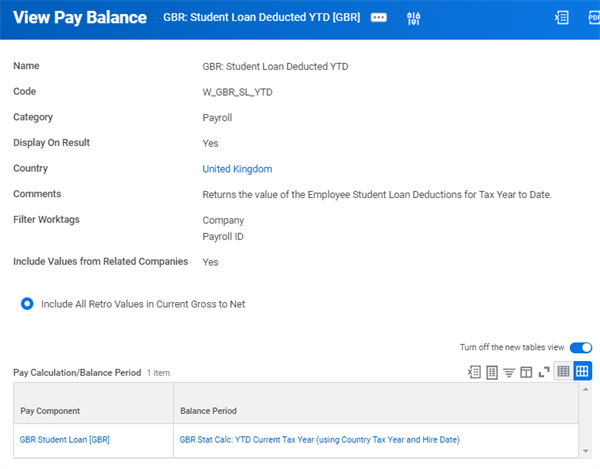
Pay Balances
You can set up pay balances to calculate values for earnings, deductions, pay component-related calculations, pay component groups, or pay accumulations. These calculations can extend over a balance period that includes multiple gross-to-net results. The example below shows the calculation of the year-to-date balance of a student loan in the current fiscal year.
Examples
:- Month-to-date
- Quarter-to-date
- Year-to-date
- Fiscal periods
Pay Component Groups, Pay Accumulations, and Pay Balances Compared
The table below outlines the differences between Pay Component Groups (PCG), Pay Accumulations (PA), and Pay Balances (PB).
Description | PCG | PA | PB |
|---|---|---|---|
Can include only earnings, deductions, and PCRCs. | X | ||
Sums the values of all pay components in the group. | X | ||
Returns a single value. | X | X | |
Does not represent multiple time periods or multiple results for same period. | X | X | |
Can include earnings, deductions, PCRCs, PCGs, and pay accumulations. | X | X | |
Supports addition and subtraction. | X | ||
Can display results on Pay Accumulations/Balances tab (Payroll Result page). | X | X | |
Returns a value for a balance period. | X |