
Tax Setup Overview
Overview
This chapter provides an overview of tax setup, worker tax details, and the Payroll Compliance Updates dashboard. You will learn more about tax setup in the country-specific Learn Independent payroll courses.
Objectives
By the end of this chapter, you will be able to:
- Identify tax setup tasks.
- Describe the Workday-delivered tax data.
- Describe the Payroll Compliance Updates dashboard.
- Explore worker tax elections.
Tax Setup Steps
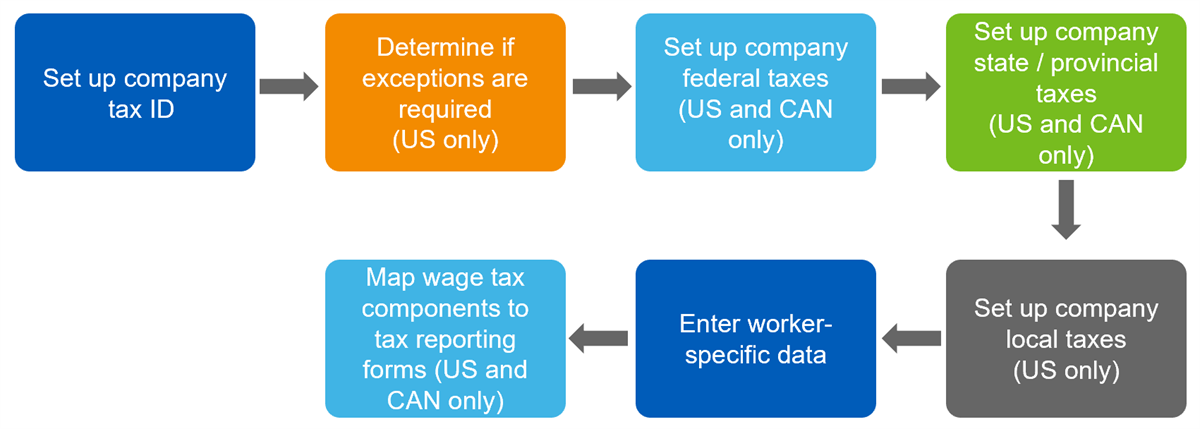
Tax setup differs by country, but generally involves the following tasks:
Tip
: The following web services enable you to add or delete tax IDs and tax statuses for specific companies. These are secured to the Setup: Tax domain.- Get Company Tax Details web service.
- Put Company Tax Details web service.
Workday-Delivered Tax Data
Workday provides and maintains the following:
- Information on default tax values, delivered as Payroll Tax Authority Defaults. Workday uses these values for any workers that have not previously entered their tax withholding elections.
- Deductions and pay component groups associated with payroll tax data according to country tax authorities.
- Federal, state/province, and local tax data for payroll tax processing.
Start dates indicate when values go into effect and determine which fields to display for which time frame for various tax reporting pages. Workday only accepts valid values for the associated tax authority.
Note
: These tax values may not be available in your actual tenant, based on your security setup and permissions.Payroll Compliance Updates Dashboard
Workday delivers and maintains tax data required for payroll tax processing, including rates, limits, and calculations. Weekly service updates deliver compliance-related changes.
To manage compliance changes, use the
Payroll Compliance Updates
dashboard, which provides visualization of critical compliance changes and access to important details. The dashboard helps you answer the following questions:- How can I tell what compliance updates Workday delivered in the last service update?
- How do I remember compliance updates that may impact upcoming payrolls when Workday delivered them weeks or months ago?
- What specific rates, limits, and calculations are used?
The
Payroll Compliance Updates
dashboard displays worklets and a menu listing related tasks and reports, providing a single point of access for managing payroll compliance updates.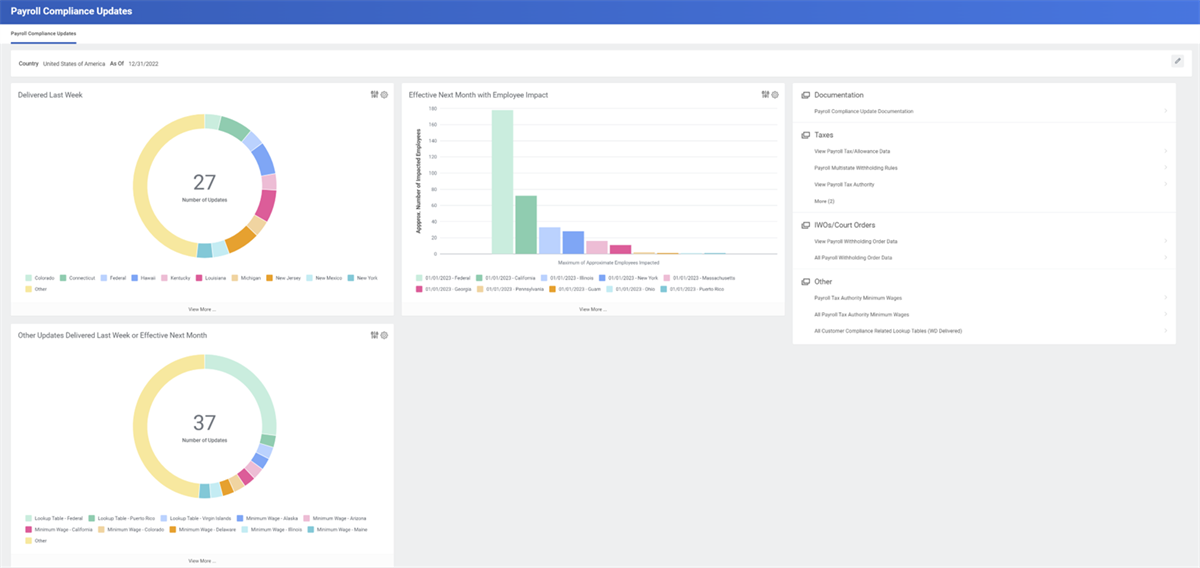
The dashboard displays three worklets. You can select any within a worklet to access details. Dashboards are configurable. You can add or remove reports and tasks on this dashboard, as needed.
The Delivered Last Week Worklet
- Provides visualization to updates delivered in the last seven days (As Of date - seven).
- Counts the number of updates delivered, summarized by update group (such as federal or province for Canada).
- Allows you to drill down into details to identify the approximate number of workers who may be impacted by the update.
The Effective Next Month with Employee Impact Worklet
- Provides visualization to updates effective in the next month (As Of date + one month) that will impact one or more workers.
- Allows you to drill into details for information on all updates, including those with an estimate of zero workers affected.
The Other Updates Delivered Last Week or Effective Next Month Worklet
- Identifies minimum wage and lookup table updates.
- Provides visualization to the types of updates that were delivered in the last seven days (As Of date - seven), or that are effective in the next month (As Of date + one month).
- Allows you to drill into details.
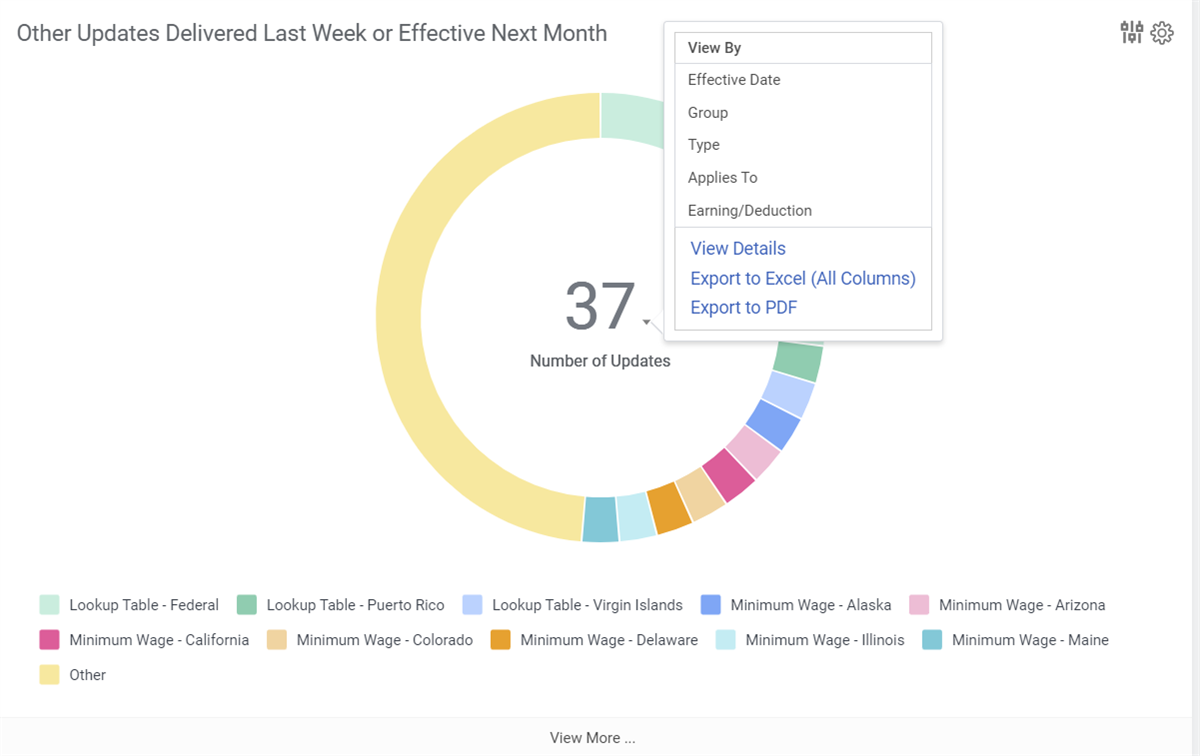
The Other Updates Delivered Last Week or Effective Next Month Worklet (The dashboard also includes a navigation menu with access to common compliance tasks and reports. You can configure the menu by accessing
Maintain Dashboards
> Configure Menu.)Tip
: For more compliance information, access the Global Library
report, which provides access to rates, limits, and calculation logic descriptions for rules maintained by Workday for supported countries.Worker Tax Details
You will load worker tax details during deployment. Assign all workers to a company and pay group before adding their tax details.
Ongoing management of worker tax details varies by country. For example:
- Workers in the U.S., Canada and Australia can maintain their own tax withholding elections through the Employee Self-Service (ESS) Withholding Elections page.
- Workers in the UK and France do not have an option to elect tax withholdings through ESS. The government assigns these values.
Resource: Search the Workday Administrator Guide for the following topics:
- Worker Tax Elections (CAN)
- Worker Tax Elections (FRA)
- Set Up Worker Taxes (UK)
- Worker Tax Elections (USA)
- Set Up Worker Taxes (AUS)
The following assist with auditing and maintaining worker tax setup:
- View Workers with Missing US Tax Electionsreport: Lists workers in a company who are missing federal or state tax elections at the end of the selected period.
- Copy Tax Elections for Workerstask: Copies the tax elections for workers from one company to another, for events such as acquisitions.
- Workers by Employee / Contingent Worker Typereport: Lists primary home and work addresses for workers.