
Staffing Models
Overview
When setting up supervisory organizations, you need to consider the staffing strategy and budget needs. In this chapter, you will learn about staffing models. Staffing models determine how jobs are defined and filled, provide different levels of control over staffing, and support different staffing goals. Every supervisory organization must have a staffing model set up. This chapter provides specific information about the different types of staffing models available within Workday. Activities in this chapter will help you learn how to use a hybrid of both staffing models to meet business requirements.
Objectives
By the end of this chapter, you will be able to:
- Identify the differences between the position management and job management staffing models.
- Summarize hiring restrictions and how they apply to each staffing model.
- Recognize the impacts of changing a staffing model.
- Maintain staffing models for supervisory organizations.
Defining Staffing Models
Every supervisory organization must have a staffing model. A staffing model determines how to define and fill jobs and positions, provides various levels of control and flexibility over staffing, and supports different staffing goals. You can select either job management or position management as the staffing model.
Staffing Models
Staffing Models
Workday supports two types of staffing models: position management and job management. Every supervisory organization in Workday has a staffing model.
The staffing models differ most greatly in staffing control and flexibility:

Use scale for Position Management and Job Management staffing models.
Differentiating Staffing Models
Compare the following staffing model features for position and job management:
Feature | Position Management | Job Management |
|---|---|---|
Capability to report on open and filled positions | Yes | No |
Assign cost center, company, and region to an unfilled position | Yes | No |
Assign default compensation | Yes | Yes |
Track position history | Yes | No |
Capability to move position with transfer, promotion, demotion | Yes | Yes |
Capability to move individual positions as part of a reorganization | Yes | Yes |
No hiring limits (e.g., no open position required to hire) | No | Yes |
Allows job requisition functionality | Yes | Yes |
Position Management
The position management staffing model gives you the most control over staffing. With position management:
- You must have an open, approved position in the supervisory organization to hire, promote, demote, or transfer a worker.
- You define separate hiring rules and restrictions on each position.
- A position remains open until you fill or manually close the position.
- You can move positions from one supervisory organization to another as part of a job change.
- You can report on open and filled positions, track position history, and more.
Job Management
The job management staffing model gives you the most speed and flexibility over staffing. With job management:
- You establish hiring restrictions on the supervisory organization level. The same hiring restrictions apply to all workers in the organization.
- There is no system-imposed limit on the number of available jobs in the supervisory organization.
- After a worker leaves the supervisory organization, the job no longer exists.
- You can only report on current headcount in the supervisory organization.
Hybrid Staffing Model Approach
Although Workday restricts one staffing model per supervisory organization, you can use different staffing models within a single supervisory organization hierarchy. This hybrid approach gives you flexibility in hiring.
For example, you might have a supervisory organization with upper-management positions, like Chief Technology Officer. This supervisory organization uses the position management staffing model, because you want more control over hiring restrictions, budgets, and reporting. Within this supervisory organization hierarchy, you also have other subordinate organizations that need to hire workers in higher volume, like a customer support department. Therefore, these organizations use the job management staffing model.
Hiring Restrictions
Hiring restrictions define the hiring rules and conditions, giving you control over who is hired into a supervisory organization or position.
You can use the following criteria to set hiring restrictions on any staffing model:
- Job family or families
- Job profiles
- Locations
- Worker type (e.g., employee, contingent worker)
- Worker subtypes (e.g., casual, fixed term contract, seasonal, regular, intern)
- Time type (e.g., full time, part time)
- No job restrictions
Hiring restrictions apply to each staffing model in a different manner:
Staffing Model | Restrictions |
|---|---|
Position Management | Restrictions apply to a single, unfilled position. |
Job Management | Restrictions apply to every job created within the supervisory organization. |
Important
: You can relax hiring restriction enforcement from the Edit Tenant Setup - HCM
task. From this task, scroll to the Staffing section, and select the Allow Override of Restrictions on Staffing Events checkbox.If you select this checkbox, predetermined hiring restrictions will still default into the corresponding fields during staffing events. However, you will also have the option to select an alternative value outside of the specified hiring restrictions.
Assign Staffing Models
You can assign a staffing model to a supervisory organization:
- When you create the supervisory organization.
- After you create the supervisory organization using theEdit Staffing Modeltask.
You can also use the
Edit Staffing Model
task to change an organization's staffing model after assignment. Navigate to the task from the supervisory organization's Related Actions > Organization > Edit Staffing Model. The Edit Staffing Model
task is no longer available after you create positions and set hiring restrictions.Important
: Once you create a position (position management) or set hiring restrictions (job management), you can no longer change the supervisory organization's staffing model.Maintain Staffing Models
The
Maintain Staffing Models
task lets you view all supervisory organizations that have the staffing model selected but do not yet have any positions created or hiring restrictions set. This report finds all the supervisory organizations that are still editable and lets you select a different staffing model.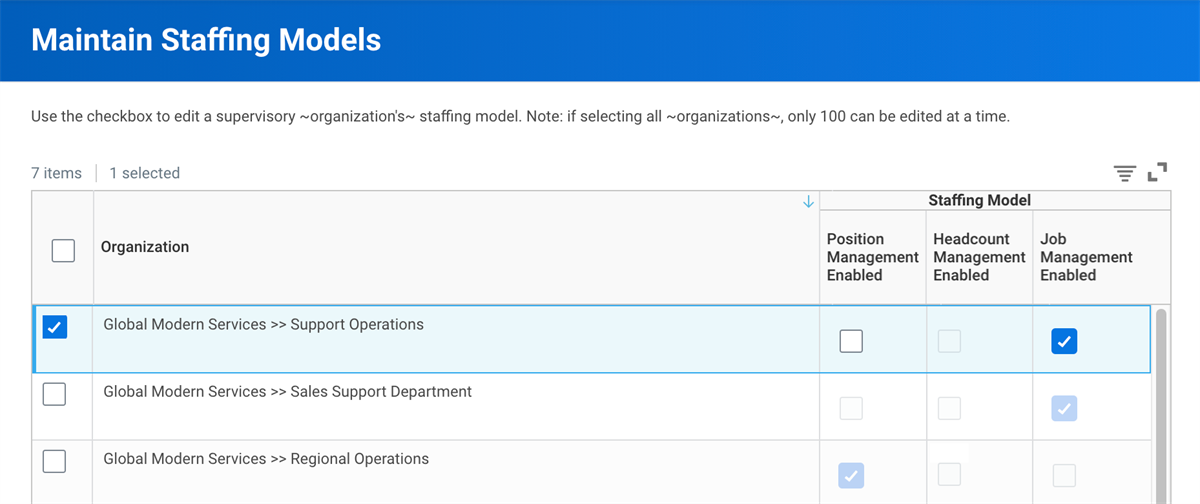
Maintain Staffing Models task
Chapter Summary
Staffing models establish how jobs are defined and filled. Selecting staffing models is a critical decision point because changing models after hiring workers, setting hiring restrictions, or creating positions in a supervisory organization is difficult.
Each supervisory organization has a staffing model. Staffing model assignments inherit to subordinate organizations, but you can change them and use a hybrid model approach to meet business needs.
Workday provides two staffing models: job management and position management. Each model provides different levels of control over staffing.
Position management offers greater control on each individual position open in an organization. Job management offers more flexibility because the number of jobs is unlimited. Job management organizations rely on hire, contract, and transfer workflows to control the number of workers within them. Additional differences between the staffing models include reporting capabilities and the ability to assign organizational roles to unfilled positions.