
Organizations and Hierarchies
Overview
An organization groups resources, workers, and costs to support a particular business function. Workday delivers different organization types and enables you to create custom organizations to meet unique business requirements.
In this chapter, you will learn about common organization types, such as company, cost center, and supervisory organizations. Additionally, you will define and explore the purpose of organization hierarchies, organization types and subtypes, and reorganization events. You will also learn how to set up default and allowed organization assignments.
Objectives
By the end of this chapter, you will be able to:
- Define the common organization types in Workday.
- Maintain organization types.
- Use reorganization events.
- Create companies, cost centers, locations, and supervisory organizations.
- Assign organizations in organization hierarchies.
- Set up allowed and default organization assignments.
- Assign leadership and support roles on different organization types.
Organizations
Organizations group together resources, workers, and costs to support a particular business function. Workday defines and delivers the most common types of organizations.
Each organization type tracks different information. For example, supervisory organizations track workers. In contrast, cost center organizations track financial transactions, and company organizations provide a vehicle for statutory reporting. You can create an unlimited number of each organization type to use for your different reporting needs.
Every worker belongs to a supervisory organization. Typically, a worker also belongs to various other organization types such as a company, cost center, and region. Each organization type serves a different business function for that worker.
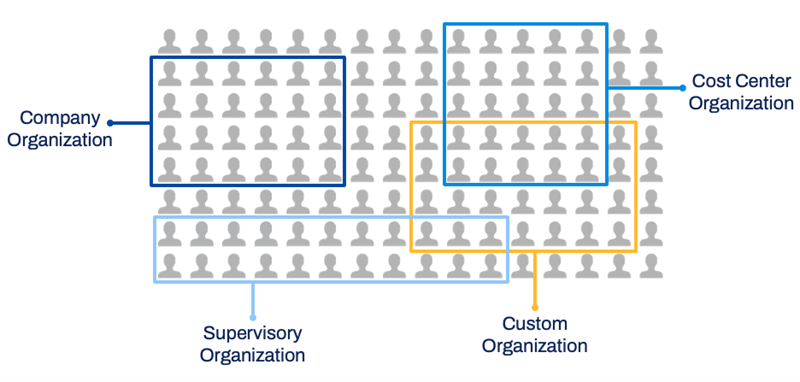
Organization Types
You can define each organization type to reflect your business requirements. Use the
Maintain Organization Types
task to establish each organization's functionality, such as:- Assigning organizations to positions.
- Relating organizations to existing organization subtypes.
- Configuring worktag options.
You can also use the
Maintain Organization Types
task to create new custom organizations.The following table lists common HR, finance, and payroll organization types:
Organization Types | Definition and Usage |
|---|---|
Supervisory | Groups workers into a management hierarchy. A supervisory organization has assigned manager and support roles. By hiring, contracting, or transferring a worker into a supervisory organization, you are also assigning the worker a manager and including the worker in a management hierarchy. |
Matrix | Establishes an indirect manager relationship. A matrix organization typically contains workers from different supervisory organizations that work together in some capacity. Each matrix organization has an assigned matrix manager who has a dotted-line relationship to all the members of the matrix organization. |
Company | Represents a legal entity and ties to all financial transactions. A primary organization type for Workday Financial Management, you can use company organizations to generate most financial reports, such as balance sheets and income statements. Workday recommends that you create a separate company for each internal entity with a separate tax ID. |
Cost Center | Used to track and report on revenue and expense-related financial transactions. Cost center organization also track and report on Workday HCM transactions with financial impacts, such as hiring and terminations. |
Region | Used to reflect a worker's area of responsibility instead of the worker's physical work location. Region organizations are customer-specific. |
Location | Used to group workers by their physical work location rather than an area of responsibility. Locations are an attribute that you can associate with a worker, supervisory organization, or position. You can also use location organizations to track assets. |
Pay Group | Groups workers with similar payroll processing parameters and aggregates workers and the rules that govern pay calculation. Workers in the United States, Canada, and France who receive pay through Workday Payroll must be members of exactly one pay group, unless you use multiple jobs functionality. Note : You may require Pay Group organizations if deploying Workday HCM with payroll integrations to third-party vendors. |
Custom Organization | Used to group workers into logical constructs, if an existing Workday-delivered organization type does not meet your needs. Custom organizations are configurable and customer-defined. |
Resource
: Reference the Organization Types and Subtypes topic in the Workday Community Administrator Guide for a complete list of Workday-delivered organization types and descriptions.Organization Attributes
The following fields are available when creating an organization:
Field | Description |
|---|---|
Availability Date | Controls when the organization displays in prompts and is fully viewable in reports. |
Name | Name of the organization. |
Code | Optional field is often used for additional or short-hand identification. |
Subtype | Use to distinguish between multiple instances of the same organization type or as a unique identifier to create and enforce a hierarchical structure for reporting. Organization subtypes are tenanted data. |
Visibility | Determines who can view the organization. |
Roles (tab) | Identifies the leader and other support personnel. |
Organization Visibility
An organization's visibility determines who can view the organization. Review the following visibility options:
Visibility | Definition |
|---|---|
Everyone | Anyone can view this organization. |
Role Assignees | Only a worker assigned to a role in the organization can view the organization. Workers can only view subordinate organizations if the subordinate organizations inherit their role. If you are no longer the role assignee, the organization is no longer visible to you - even if the role's role-based security group has "Applies to Current Organization and All Subordinates" access rights. Example : Use this option when planning a reorganization. When the reorganization goes live, change the organization's visibility to Everyone. |
Role Assignees and Members | Only members and workers assigned to a role can view the organization. |
Role Assignees of Current and Superiors | Only workers assigned to a role in the organization or a superior organization can view the organization. Workers who can view the organization can also view all subordinate organizations. |
Leadership and Support Roles
Assignable Roles
Assignable roles manage the security permissions of tasks, access to workers, and business process involvement. All organization types (e.g., supervisory, location hierarchy, cost center) have assignable roles. Role assignments and their associated security groups are critical for business process routing and notifications.
Assignable roles are either:
- Inherited from a superior organization,
- Specifically assigned to an organization, or
- Assigned by default.
Depending on your security permissions, you can assign roles to an organization from its Related Actions > Roles > Assign Roles. You can also assign roles directly to a worker from the worker's Related Actions > Security Profile.
Multiple Managers
You can assign multiple managers to a supervisory organization. This functionality is a common requirement in industries where shift workers report to more than one manager. When a supervisory organization has multiple managers:
- More than one position has the Manager role assigned or inherited.
- Two or more managers share equal responsibility for workers in an organization.
- All managers have the same abilities to initiate, view, and approve transactions on a group of workers.
- All managers display as equals on organization charts.
- All managers have the assigned role of Manager for the supervisory organization.
- Multiple managers display on their workers' profiles and in reports.
- You can select one Manager as the main manager for reporting fields and integrations using the assigned roles Single Assignment functionality.
Touchpoint
: Workday uses assignable roles for security, business process routing, and business process approvals. The same role can have access to multiple functional areas across Workday HCM and Workday Financial Management. For this reason, ensure that all teams review how your organization uses roles across all Workday applications.Maintain Organization Types and Subtypes
Organization Subtypes
Organizations can have organization subtypes such division or department. You define each organization subtype (managed with the
Maintain Organization Subtypes
task) for your specific needs. All organization subtypes are tenanted data.If you have the business need to do so, you can also set up and enforce the hierarchy of your organization subtypes.
Organization Subtype Hierarchies
You can also use organization subtypes to set up and enforce a hierarchical structure for reporting. The subtypes define the levels of the hierarchical structure.
Example
: For example, you might have three organization subtypes of department, division, and team. In your organization, departments are always superior to divisions, and divisions are always superior to teams. Using organization subtypes, you can create and enforce this hierarchical structure. As a result, no one in your organization can create a division superior to a department, or a team superior to a division. To configure a subtype hierarchy, open an organization's Related Actions, then select Hierarchy Structure >
Create
or Create Top Level Hierarchy Structure
. After you create the subtype hierarchy, use the same Related Actions path to view the structure. From the View page of the hierarchy structure, use the Related Actions to correct and enforce exceptions.The Levels grid dictates the hierarchy. Note that you have the option to allow for skipping levels, which lets a subordinate organization subtype report to any superior organization subtype. If you do not select the Allow for Skipping Levels checkbox, the subordinate organization subtype must always report to the superior organization subtype immediately above its level.
Maintain Organization Types Task
Workday organization types are associated with the following categories:
- Costing
- Hierarchy
- HR
- Pay
- Custom
Supervisory organizations are within the HR category. To access these categories, use the
Maintain Organization Types
report. 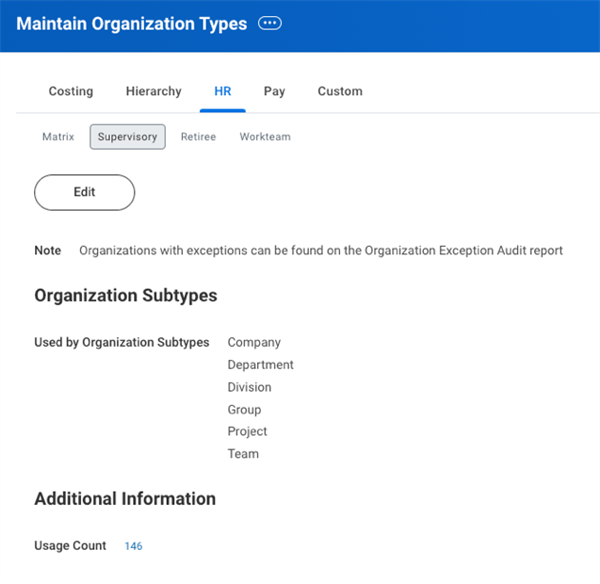
An example of the Maintain Organization Types task for HR supervisory organizations.
Reorganization Events
When creating new organization hierarchies (e.g., supervisory organizations, companies, cost centers, regions), you also need to create a reorganization event. A reorganization event groups reorganization activities into an event that you can track in Workday. You can apply a common effective date to the reorganization activities and view and manage those activities in delivered reports and queries.
A reorganization event might include only one change to an organization's structure. Reorganization events can also group multiple reorganization activities for various organizations. Track reorganization events and activities using the
Reorganizations
report.Before creating a reorganization event, consider the following points:
- Logical Relationships: Reorganization events should group together logically related activities. Avoid grouping unrelated activities or breaking apart activities that are part of a single, coherent event.
- Effective Date: Reorganization events should group together activities that take place at the same time. This is because the effective date of a reorganization event becomes the effective date of all changes grouped in the reorganization.
- Staffing Activities: If you perform staffing activities (e.g., Move Workers, Assign Workers) periodically, and these changes are not related to an organization's larger structural changes, consider creating separate reorganization events by period with an effective date equal to the beginning of each period.
Note
: Matrix organization creation and changes do not require a reorganization event.Company
Companies are organizations within Workday that represent the internal business entities within your enterprise. In Workday Financial Management, companies are the primary organization for all business processes.
For each company created in Workday, you will be able to:
- Record business transactions.
- Produce financial statements.
- Create other statutory reports.
Note
: For Organization Name, Workday recommends using the official legal name for the company name. You can configure a phonetic name for a company or business entity in both a local language and in English to comply with local government regulations. For example, in Japan, Company Name must be in Kanji for government documents. Workday will display both the Japanese company phonetic name and Kanji name.You can also specify a base currency for each company, which enables you to use multiple currencies across your Workday deployment. Companies can post transactions in a foreign currency, which Workday also records in their base currency at the rate stored in Workday.
It is important to use the correct currency. After you enter the first transaction for a company, you cannot change the base currency. If you enter an incorrect currency, you will need to inactivate your company and create a new one with the correct currency.
Tip
: If you deploy Workday HCM, or Workday HCM and Workday Payroll first, then companies will already exist in the Workday HCM deployment. Verify that the company is based on the legal entity name and the correct company base currency during setup.Cost Centers
Use cost centers to hold financial transactions, budgets, and workers. Often, cost centers are departments within a legacy system. As a general guideline to defining cost centers, they should have:
- A manager
- A financial impact
- A budget
Use cost centers to track financial transactions from both spend and revenue, as well as Workday HCM transactions with a financial impact, such as hiring or terminations. Assign employees and contingent workers to a cost center when hired. You can roll up cost centers into cost center hierarchies, which can only store cost centers for reporting purposes.
Touchpoint
: You may need to assign workers to cost center and company organizations as part of the Workday HCM deployment. The Workday HCM deployment team should consult with the finance organization to define these organizations correctly.Locations
In Workday, you configure loncations to define, track, and report on the geographic attributes of Workday objects. For example, workers inherit relevant time zones and locales automatically. Another example is how you use geographic regions for job postings.
Locations have these characteristics:
- Locations often include a phycial address or a designated location (e.g., remote workers). You can also include additional details like an email and phone number.
- You can set up postal code validations to validate or require codes. You can also set country-specific postal code validations. Use theMaintain Localization Settingstask, and select Contact Information.
- A location's time profile defines the standard number of hours worked in that location each week.
- A location's locale controls the format for dates, times, and currency. If you specify a locale for a location, workers in that location inherit the locale. If you do not set a locale on the location level, workers inherit the tenant's locale. Workers can override any inherited locale using theChange Preferencestask.
- Locations roll up to location hierarchies and must be configured in Workday.
Additionally, every location has a location usage. Example location usages include business site, business asset, inventory, housing, and more. By configuring locations, you can manage and report on business facilities, equipment, and workers. Location usages determine the location attributes available to configure. For example, a business site is the physical location of a business. You can use this location usage to:
- Assign workers.
- Configure time zones.
- Define work hours.
- Manage organizations and positions.
- Provide contact information.
- Track and assign resources.
While business sites have these previously listed usages, you cannot use this location for work spaces or job posting locations. Therefore, it is important to review and configure appropriate locations and usages in Workday.
Reminder
: Since the Primary Location field is required during supervisory organization creation, you must have at least one location in your system before creating a supervisory organization.Touchpoint
: If you use Workday Recruiting, locations may be visible to all candidates, both internal and external. Consider following a naming convention that is meaningful and easily understood.Global Address Lookup Service allows you to use third-party map providers to perform real-time address searching. The address data fields can automatically populate by selecting from a suggested list. This functionality is available for address lookup in France, Australia, and the United Kingdom.
To use this functionality, customers must sign the Innovation Services Addendum (ISA) and access the
Innovation Services Opt-In
task. Innovation Services are opt-in features that go beyond the Workday core offerings.Resource
: To find additional information on this functionality, search for "Steps: Set up Global Address Lookup" in the Administrator Guide.You can also learn more about the Workday Innovation Services Agreement and Innovation Service Opt-in Features on Workday Community.
Organization Hierarchies
Organization hierarchies reflect different organizational rollups for reporting purposes. You can change how you roll up organizations at any point. Hierarchical organization types support security and inheritance of organizational roles down the hierarchy. Note that an organization hierarchy can only include organizations (or organization hierarchies) of its associated type. For example, cost center hierarchies store cost centers; company hierarchies store companies; location hierarchies store locations, and regional hierarchies store regions.
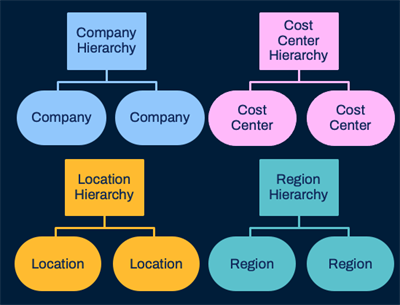
Examples of organization hierarchies.
Review the following organization hierarchy key points:
- The organization administrator or the hierarchy owner assigns included organizations to a hierarchy.
- Multiple hierarchies can include the same organizations, allowing for multiple views of your data.
- Hierarchies can include other hierarchies for more detailed reporting and grouping.
Workday stores specific transactions within organizations, not organization hierarchies. For example, consider the cost center hierarchy below. The system records financial transactions directly to the IT HelpDesk, Information Analysis, and Workstation Support cost center organizations. The system cannot record financial transactions to IT Services, the cost center hierarchy organization. Any costs assigned to the cost center automatically roll up to the cost center hierarchy.
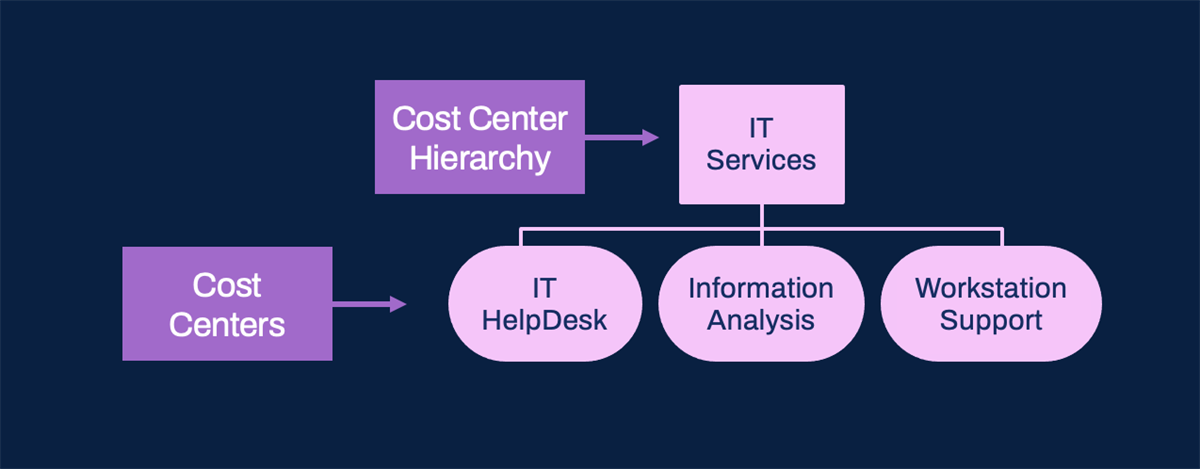
An example of the IT Services cost center hierarchy.
In Workday, a company hierarchy groups related companies for role assignment, multicompany processing, and consolidated reporting. Workday requires company hierarchies for consolidations, and all companies in the hierarchy must have the same account set. However, they can have different company currencies and fiscal schedules if they share a common primary or alternate schedule.
Location hierarchies define locations within a multi-level structure and often represent geographical areas. For example, a location hierarchy of Northern Europe could include locations such as London and Dublin. Furthermore, a larger Europe location hierarchy could include subordinate location hierarchies of Northern and Southern Europe.
You can assign roles at the location hierarchy level, but not to locations directly. The HR Partner (by location) and Compensation Partner (by location) roles let you assign these types of support roles by geographical location, rather than supervisory organization.
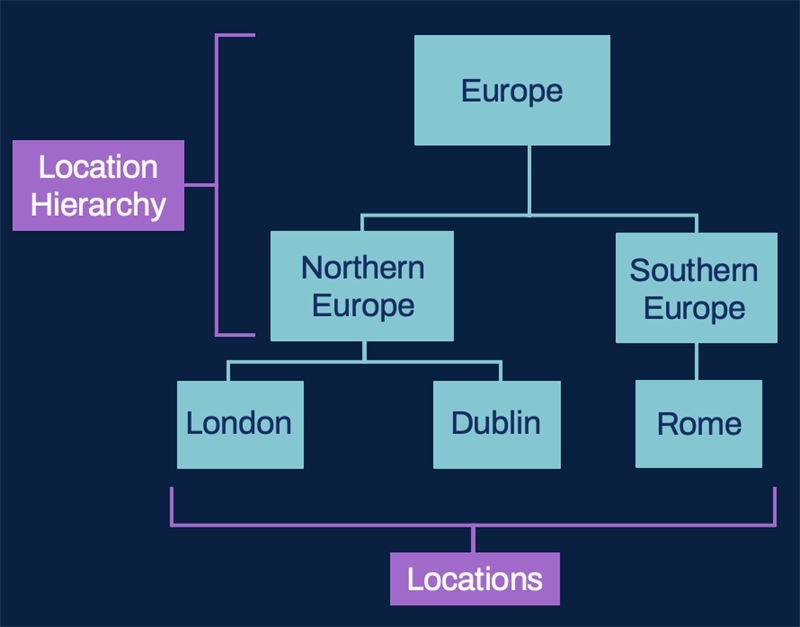
An example of a multiple tiered location hierarchy.
Supervisory Organizations
As the foundation of Workday HCM, supervisory organizations group workers into a reporting structure. Supervisory organizations house all positions and job restrictions, so every worker you hire belongs to a supervisory organization. You can specify individual supervisory organizations as particular subtypes (e.g., department, division, group) to distinguish between multiple instances of that supervisory organization. You can also associate supervisory organizations with certain compensation, security, and business processes. For example, you can configure a business process definition for a supervisory organization hierarchy, with variations of that definition for particular organizations within that hierarchy.
Review the following example of a management hierarchy in Global Modern Services:
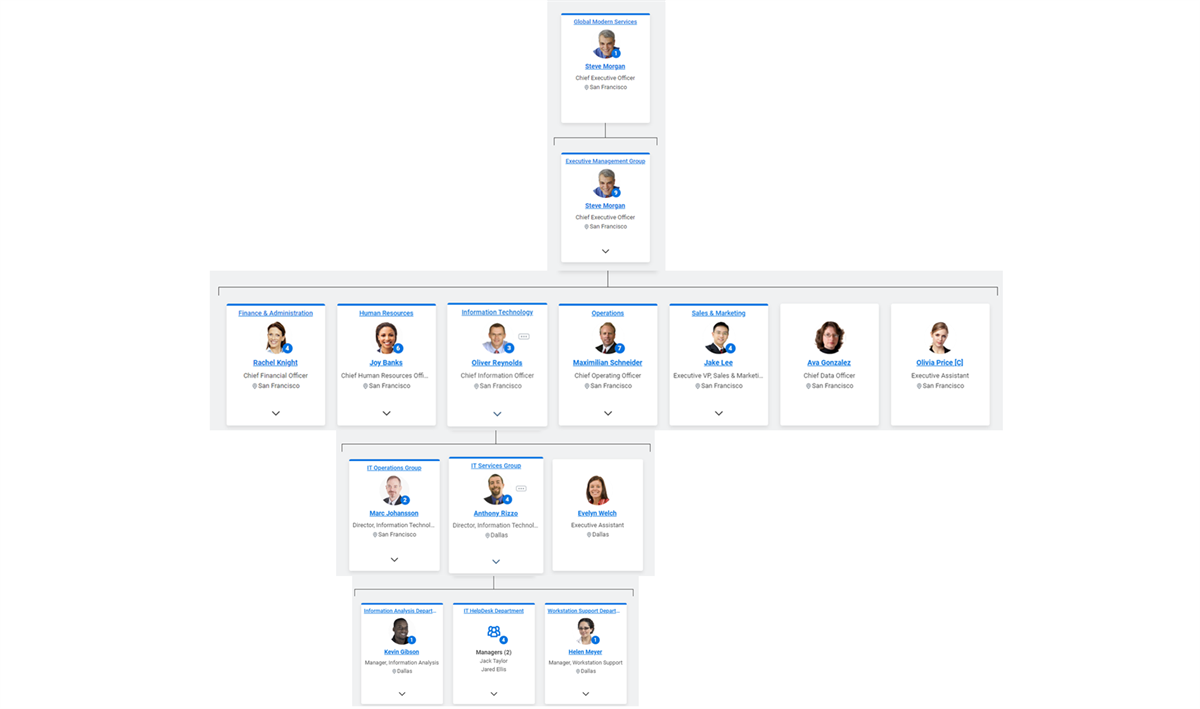
The Global Modern Services hierarchy from the top to the IT Services Group's subordinate supervisory organizations.
Managing Supervisory Organizations
As your reporting structure changes, you will use reorganization tasks to manage your supervisory organizations. Workday provides the following reorganization options:
Reorganization Activity | Description |
|---|---|
Assign Superior | Move a supervisory organization by making it subordinate to a different supervisory organization. |
Create Subordinate | Create a new supervisory organization and include it in an organization hierarchy as a subordinate. The new supervisory organization inherits the same staffing model, assignable roles, and organizational assignments as its superior, if configured to do so. |
Divide Organization | Create a new supervisory organization by dividing an existing organization into two. You can also select which subordinate organizations to move into it. Dividing an organization does not assume as much inheritance and requires field population (e.g., location). |
Inactivate Organization | Inactivate a supervisory organization. Remove the individual positions (for position management organizations) and workers (for job management organization) before inactivating the organization. |
Move Workers (By Organization) | Move workers in or out of a supervisory organization. The current and proposed supervisory organization must use the same staffing model. |
Note
: Keep in mind that when you create subordinate organizations, the organization subtypes allowed depend on whether you enforce an organization subtype hierarchy structure.These reorganization tasks use the business process framework, so you can route organizational changes to the relevant parties for approval. You can also rescind and cancel a reorganization activity, if needed.
Available and Required Fields
The following fields are available when creating a supervisory organization:
Table Key
:**Subordinate organizations inherit this field value from the superior supervisory organizations.
Field | Description |
|---|---|
Availability Date | Controls when the organization appears in prompts and is fully viewable using the View Supervisory Organization report. |
Name | Name of the supervisory organization. |
Code | Optional field is often used for additional or short-hand identification. |
Subtype | Use to distinguish between multiple instances of the same organization type, or as a unique identifier to create and enforce a hierarchical structure for reporting. Organization subtypes are tenanted data. |
Visibility** | Determines who can view the organization. |
External URL | Associates a web address with the supervisory organization. |
Primary Location** | Used for security routing and reporting purposes. A primary location is required, and inherits from the superior supervisory organization if you do not enter a value. |
Staffing Model (tab)** | Choose which Workday-delivered staffing model to use for the supervisory organization. The staffing models provide different levels of control over staffing to support staffing goals. |
Roles (tab)** | Identifies the leader and other support personnel. |
Identifiers (tab) | Add government identifiers. |
Organization Assignments
Organization Assignments on Supervisory Organization
Workers hired or transferred into a supervisory organization automatically become members of that supervisory organization's organization assignments, such as companies and cost centers. You can set up default organization assignments for each supervisory organization or for an individual position. You can also edit organization assignments for individual employees. Subordinate supervisory organizations inherit the assignments of their superior unless overridden.
Navigate to a supervisory organization's Organization Assignments tab to identify other organization types you can assign as defaults during staffing changes.
- Allowed Organizations: The organizations that you can select from during staffing events. These values drive what values are available to choose from in the Default Organizations prompt.
- Default Organizations: The organization that the position or worker automatically inherits from the supervisory organization. You can change the default value during the staffing event by selecting from the prompt list of allowed organizations.
Note that you can enter more than one organization in the Allowed Organizations field, but only one organization in the Default Organizations field.
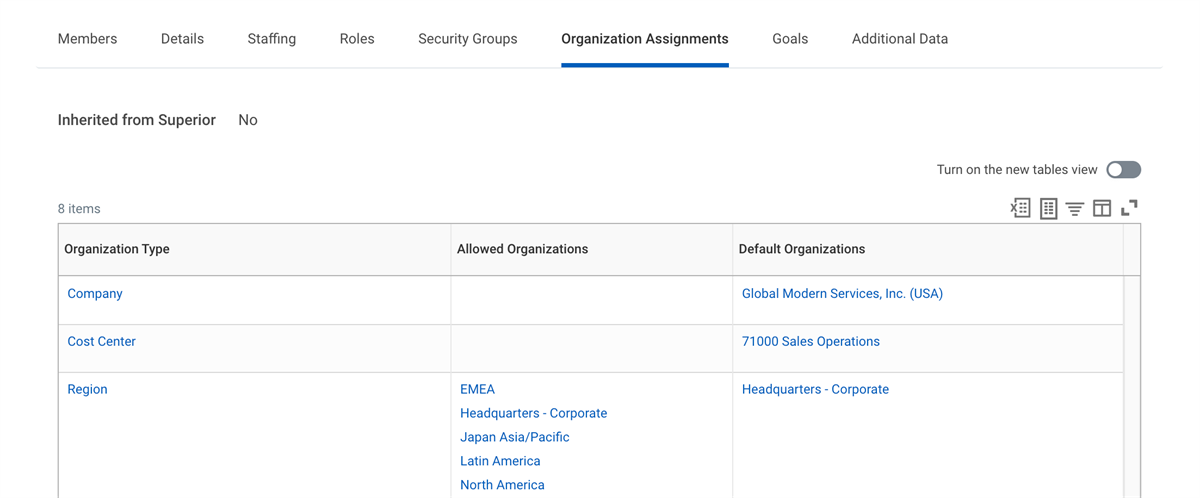
The organization assignments for a supervisory organization.
Use the
Change Organization Assignments
task to change the organization assignments for one or more workers in a supervisory organization. Since Change Organization Assignments
is a template-driven business process, each organization can be secured using its own domain.Organization Assignments on Locations
When creating or editing a location hierarchy, you can also restrict other organization types that can be assigned during staffing changes, based on the location of a worker's position. Navigate to the Organization Assignments tab of a location hierarchy to view its assignments.
When using the
Change Organization Assignments
task, the organization prompt list displays the location hierarchy's allowed values intersected with the supervisory organization's allowed values. If you do not specify values on the Organization Assignments tab, all values are assignable for that organization type.Matrix Organizations
Matrix organizations represent indirect reporting relationships between workers and managers. While workers can belong to only one supervisory organization, they can belong to multiple matrix organizations.
Example
: Imagine you have a marketing specialist and a software engineer, who each report to their own manager. You might assign these workers to a matrix organization that reports to one product manager. The workers have a direct reporting relationship with their managers in the marketing and software development supervisory organizations. The workers also have an indirect reporting relationship with their product manager in the matrix organization.Review the following reports related to managing matrix organizations:
Reports | Description |
|---|---|
Matrix Assignments | View all matrix assignments for workers based on selected organizations. |
Matrix Organization | View the details of a matrix organization including visibility, members, and supporting assignable roles. |
Review the following tasks related to creating and managing matrix organizations:
Tasks | Description |
|---|---|
Assign Matrix Member | Add members to an existing matrix organization by worker name or position as of an effective date. |
Assign Matrix Organization | Assign a worker to a matrix organization. You can add the Assign Matrix Organization business process as a subprocess to business processes such as Hire Employee and Job Change . |
Create Matrix Organization | Create a new matrix organization. |
Remove From Matrix Organization | Remove a worker from a matrix organization of which they are currently a member. |
Remove Matrix Member | Select a matrix organization and remove a member. |
Remove Multiple Matrix Members | Remove multiple matrix members and their corresponding positions in bulk. |
Custom Organizations
Workday recommends that you use Workday-delivered organization types when possible. However, if you need an organization type that Workday does not deliver, you can also create your own custom organization type.
Use custom organizations to:
- Aggregate data for reports.
- Use roles for the custom organization for business process routing.
- Configure compensation (e.g., special allowances based on organization membership).
- Configure security (e.g., special security based on organization membership).
Use the
Maintain Organization Types
task to define custom organization types. Custom organizations cannot be subordinate to Workday-delivered organization types.When creating a custom organization, consider the following steps:
- Maintain Organization Subtypes
- Maintain Organization Types
- Create Custom Organization
- Create Subordinates (optional)
- Assign Members
Chapter Summary
Workday delivers several types of organizations, which group resources, workers, and costs to support a particular business function. For example:
- Company is the primary organization used by Finance. A company includes a Tax ID (e.g., FEIN in the United States), which is essential for payroll and governmental reporting purposes.
- Cost centers track revenue and expenses.
- Locations group workers by their physical work location.
- Supervisory organizations track workers and the management hierarchy.
- Region identifies a territory.
- Matrix organization establishes indirect reporting relationships.
- Workday Payroll uses the Pay Group as the primary organization type and supports payroll processing.
Other than Matrix and Pay Group, these additional organization types can roll up into hierarchies. Organization hierarchies are critical for effective reporting across the Workday system. You can include an organization into more than one hierarchy. For example, you may include a single cost center into two different cost center hierarchies that focus on a different view of the reporting data.
As with each organization type, you can assign roles to organization hierarchies. For example, you can assign roles on a cost center hierarchy rather than on each cost center organization. This approach allows for role inheritance.
For supervisory organizations, you can identify and assign other organization types default organizations during staffing changes. Workers hired or transferred into a supervisory organization become members of that supervisory organization's default organization assignments (e.g., companies and cost centers) automatically. Use the supervisory organization's Organization Assignments tab to identify and assign organization types.
If these delivered organization types do not meet business needs, you can create custom organizations to align with unique requirements. You can create an unlimited number of organizations to reflect the customer enterprise's requirements.
Lastly, Workday requires a reorganization event when creating or modifying organizations and hierarchies. Reorganization events group activities and events with a common effective date. Reorganization tasks include inactivating, dividing, creating subordinate, assigning superior, and moving workers. You initiate these tasks from an organization's Related Actions menu. While reorganization events do not use the business process framework, these reorganization tasks are business process types, allowing you to require approvals and cancel or rescind the process when necessary. You can track and report on reorganization changes by running the Workday-delivered
Reorganization
report.