
Job Profiles
Overview
In this chapter, you will explore the job catalog and job profile. You can populate job profiles with data, such as management level, skills, experience, and other qualifications. You will also discuss how to organize job profiles into job families and job family groups.
Objectives
By the end of this chapter, you will be able to:
- Recognize the function and use of the job catalog and job profile.
- Identify and define job profile attributes and touchpoints.
- Create new job profiles.
Job Catalog
The Job Catalog represents the hierarchical structure of jobs and positions within an organization. Before filling jobs or positions in a supervisory organization, you should define the jobs and positions with job profiles. Job profiles are a major component of the Job Catalog because they provide organizing attributes, such as management levels, titles, classification, compensation, and other attributes. Once you create the job profiles, you can use Job Family and Job Family Groups to categorize and structure the job profiles into a hierarchy, or job catalog.
The Job Catalog also streamlines reporting and analytics. Workday delivers a
Job Catalog
report that displays a consolidated view of the job family groups, job families, and job profiles.Job Profiles
A job profile is the foundation of all jobs or positions in your organization. Job profiles identify and define general job and position characteristics, such as the job title, job description, compensation, and more. Job profiles can also describe recommendations around qualifications such as languages, training, or work experience.
You can assign a job profile to multiple positions or workers. Job profiles might have a one-to-one relationship with a position (e.g., CEO) or a one-to-many relationship with multiple positions (e.g., executive assistant):
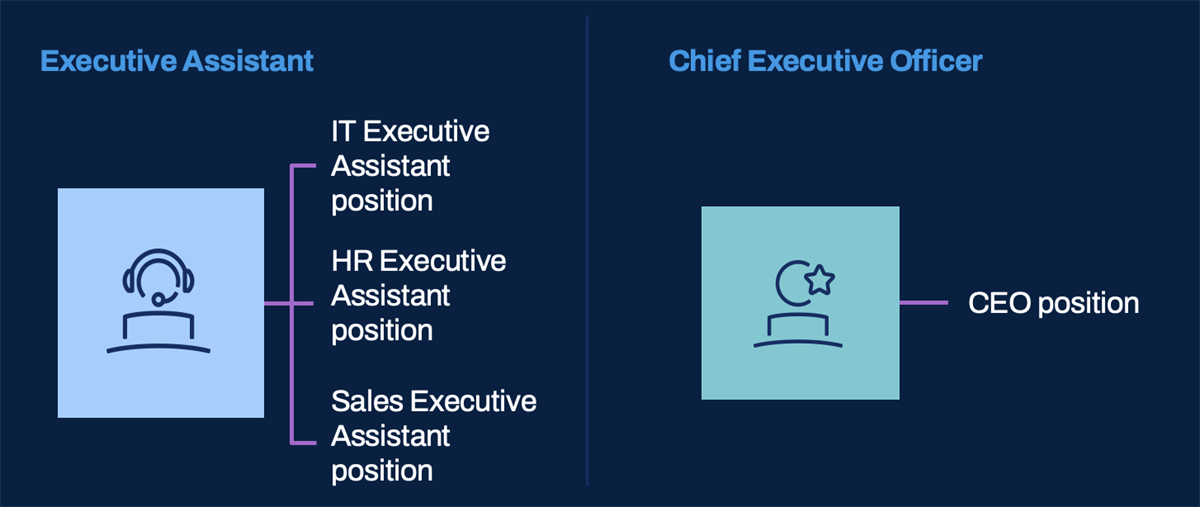
Comparative example of two job profiles associated with positions.
A job profile consists of many optional fields that you can track and report on, depending on your business needs. Some values, such as management level and job classification, are customer-defined. Of the many fields available during job profile creation, the only required fields are job profile name, job code, and effective date.
Review the following list of job profile definition fields:
|
|
Job Families and Job Family Groups
A job profile can belong to one or more job families, and a job family can belong to a job family group. Using job families and job family groups is optional, but they can help organize and group your job profiles. Additionally, job families and family groups display as filters when locating a specific job profile in a prompt list or when writing reports related to your job profiles.
Touchpoint
: If you use Workday Recruiting, job families and job family groups display on career sites as job/position categories. Therefore, make sure you choose job family and family group names that external candidates can easily understand.You can also use job families and family groups as criteria in condition rules and compensation eligibility rules. Keep in mind that if you use job families or family groups in an eligibility rule when creating a new job profile, it is important that you also add the job profile to the appropriate job family. For example, you might use a job family as the criteria for a compensation eligibility rule that is associated with a compensation package. If you hire a worker into a job profile that is not included in that job family, the compensation package will not default during the hire process.
Create and Maintain Job Profiles
Job Codes
You can configure the Job Code field to auto-populate when creating a job profile. Based on a set of rules and criteria, you can also specify the job code's format. Note that you can override the auto-generated code by manually entering the job code during job profile creation.
Enable job code auto-population by configuring the ID Definition for Job Code in the ID Sequence Generator section of the
Edit Tenant Setup - HCM
task.If you enable the ID Sequence Generator for Job Code, you do not need to manually enter the job code. The system removes the red asterisk indicating it is a required field and generates the job code once you save the job profile.
Job Profiles and Localizations
The Restrict to Country field lets you restrict job profiles by country. Country restrictions make it easier for managers to select the appropriate job profile during the
Change Job
business process. You can limit a job profile to one or more countries or leave this field clear to make a job profile available for all countries.In other staffing business processes, you can create an exit rule, using either the
Countries for Job Profile
or Job Profile Valid for Location
report field. The rule enables you to verify that a job profile is valid for a worker's location.Management Levels
A management level hierarchy defines your management reporting structure (e.g., manager, director, vice president). You define your organization's management levels and load them into Workday during deployment.
Use management level for reporting, business process condition rules, and eligibility rules. For example, you might create a compensation eligibility rule stating that any worker with a management level of Vice President or above is eligible for a certain salary grade.
Touchpoint
: Many areas in Workday use management levels for business process routing and approval. Make sure you consider benefits, compensation, time tracking, and expense processing when creating your management levels.Here is an example management level hierarchy:
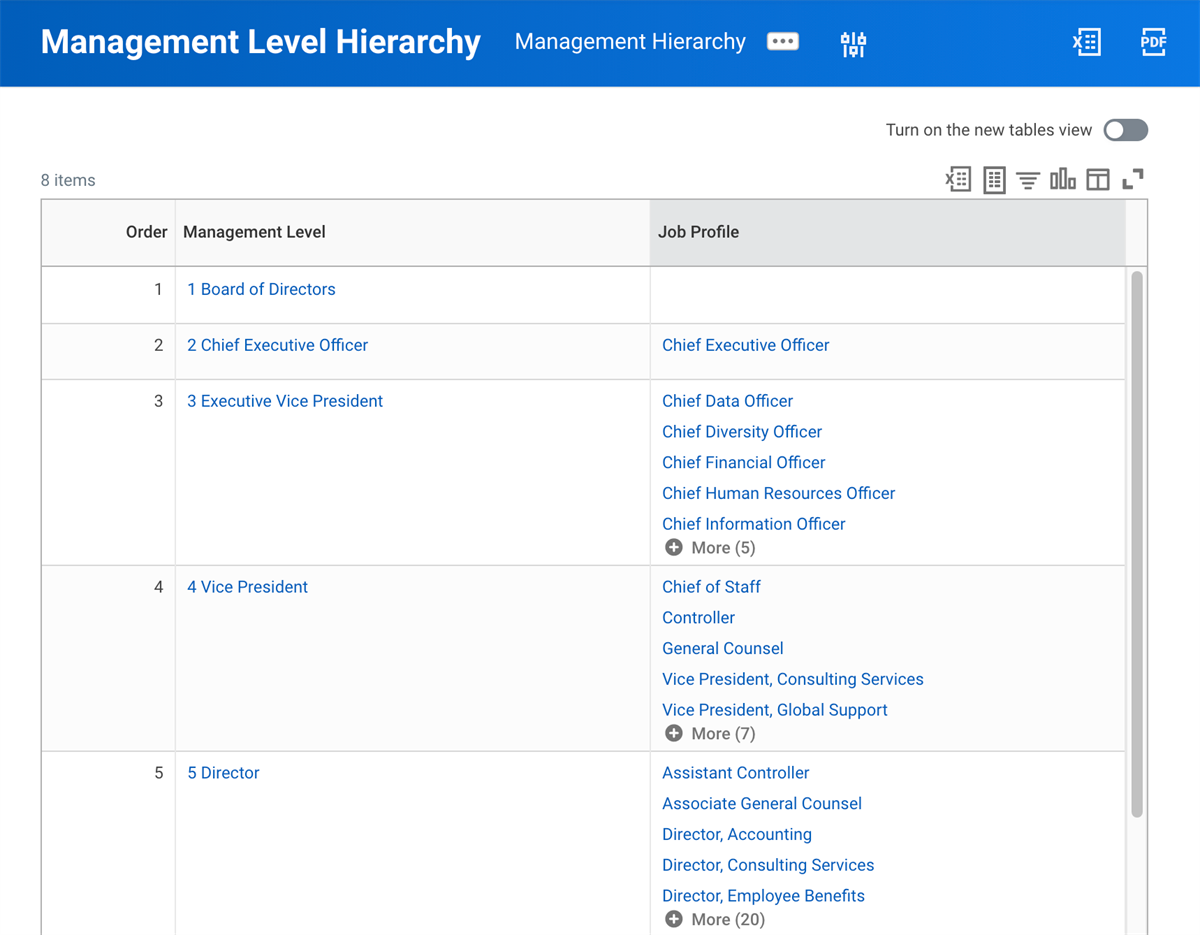
Management Level Hierarchy report
Use the
Edit Tenant Setup - HCM
task under the Staffing section to configure management level hierarchies.Job Profiles and Compensation Grades
You may have a 1:1 relationship between job profiles and compensation grades. When creating a job profile, the Compensation Grade and Compensation Grade Profile fields let you assign a compensation grade or grade profile directly to the job profile. The Impacted Eligibility Rules field lists eligibility rules that include the job profile. You can drill into the listed rules to identify if any changes are necessary.
Touchpoint
: Consider populating any worker-indicative data on the job profile that other areas of the system may use. For example, use pay rate type to determine eligibility for a pay group or a compensation component (e.g., compensation grade).Chapter Summary
Job profiles describe a job or position's general characteristics, such as job classifications, special skills, training, or qualifications. Most fields on the job profile, such as job family, management level, union membership, and compensation grade, are optional. You can use these fields in other parts of the system such as in business process condition rules, compensation eligibility rules, and reporting.
Job families organize job profiles. You can associate a job family with a job family group. Management level and management level hierarchies identify the levels of management within the organization.
Job profiles allow for country-specific information. These localizations allow a job profile to meet requirements of multiple countries.
Compensation grade provides guidance on rate ranges. Workday recommends associating a compensation grade to each job profile.