
Account Posting Rules
Overview
Account posting rules tell the system how to determine what ledger account to post the journal to based on the results of an operational transaction. Each posting rule is specific to an operational transaction. Edit these rules to specify the conditions and the ledger accounts to instruct Workday where to post debits and credits.
Objectives
By the end of this chapter, you will be able to:
- Explain the difference between default ledger accounts and determining accounts based on account posting condition rules.
- Explain how Account Posting Rules dynamically determine ledger accounts based on information in a given transaction.
- Articulate why the order of the condition rules matter.
- Analyze how Workday determines which Account Posting Rule will get used for the credit and debit side of each transaction.
Account Posting Rule Set
There are two types of journals in Workday:
- Accounting journals: The journals that accountants create manually for accounting purposes, not tied to transactions.
- Operational journals: The journals that Workday creates automatically for operational transactions that you enter through the various Workday transaction tasks.
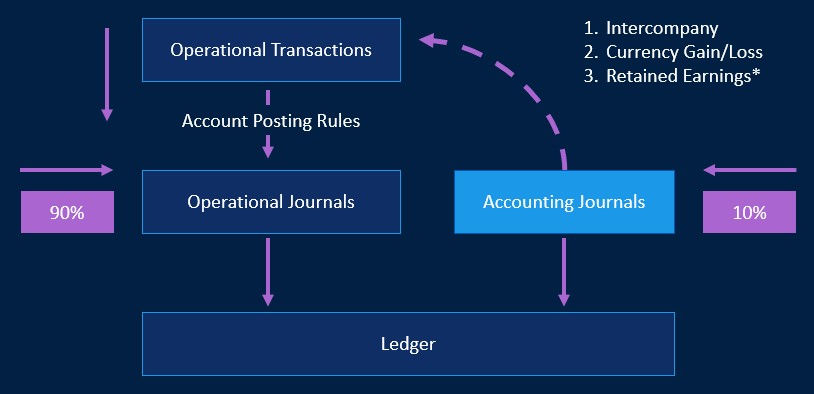
Workday automates the accounting resulting from business operations. Workday creates journals behind the scenes for operational transactions, and uses posting rules to interpret the business events into debits and credits and in specific accounts. Operational journals use account posting rules to determine which ledger account to use for a specific operational journal. Each posting rule is for a specific operational transaction. Edit these rules to specify the conditions and the ledger accounts to instruct Workday where to post debits and credits.
When you build posting rules, you either assign the rule to a default ledger account or create conditions that transactions must meet to post to a specified account. If no conditions match, Workday posts the transaction to the rule's Default Ledger Account. If there is no default ledger account and a transaction does not meet any conditions, Workday flags the operational journal as having an error.
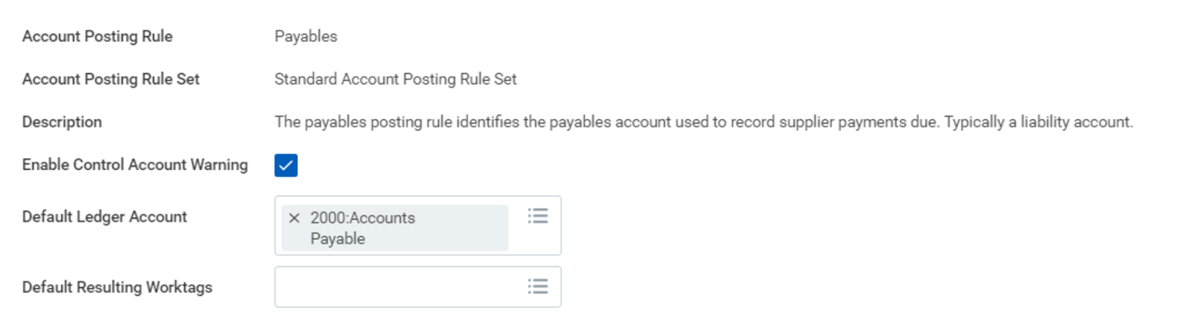
Payable posting rule screen shot
Conditions
Define Posting Rule Conditions to have Workday evaluate and post transactions' journals to specific ledger accounts based on whether the transaction meets select criteria.
For each condition, you select from a predefined list of dimensions that make sense for the transaction type. For certain dimensions, such as various types of groups and accounting categories, you are able to select from a list of values that you have defined.
Dimensions and Values
For a posting rule type, you set up which selections can affect the choice of the ledger account for a journal. These selections are called dimensions or account posting rule dimensions. There can be just one or there can be many. For example, for the Payables posting rule, we may say that only Company affects it. Meanwhile, for Spend posting rule, there are 20+ dimensions - such as Accounting Treatment, Company, Expense Item Group, Spend Category, etc.
Workday limits the allowable dimensions for any posting rule to ones that make sense for each specific type of transaction. The available values depend on the selected dimension. Many of the dimensions display values that you have defined, such as values for companies, types of groups, and accounting categories.
Accounting categories are a way to logically group similar account-related objects or people together for posting, searching, and reporting purposes. You can establish accounting categories for many Workday objects. For example, Customers, Suppliers, Revenue, and Spend.
The values that are available are based on the dimension chosen and you may add as many dimensions or values as necessary to establish the posting rule condition.
For example, in the Spend posting rule you can create a rule condition that requires posting to the Facilities expense account for any transaction with a Spend Category of Flowers OR Gas & Electric, OR Postage & Delivery, OR Rent.
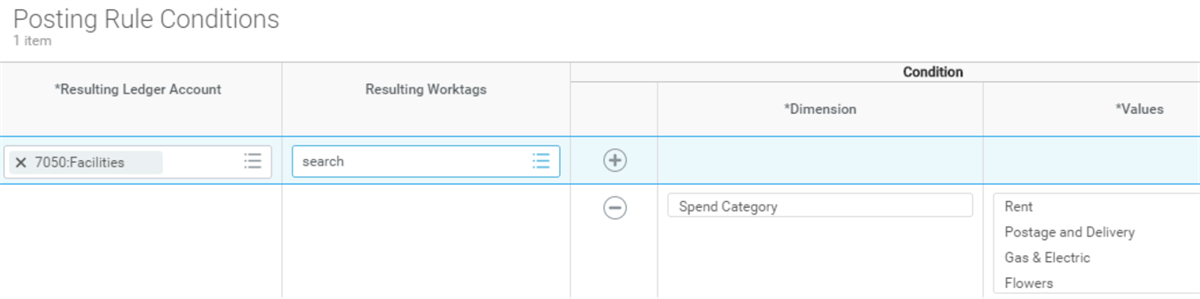
post rule conditions 7050 facilities screen shot
In the above example, there is one dimension with multiple values. Workday always treats multiple values as an "OR." What if you have multiple dimensions? If you have multiple dimensions in the condition, the transaction must meet all of the dimensions.
In the example, transactions where Company dimension is "Global Modern Services, Inc. (USA)" AND Cost Center dimension is either "Recruiting" OR "Marketing Management" will post to 2400: Employee Expense Payable.
Workday treats dimensions as an "AND" and values as an "OR."
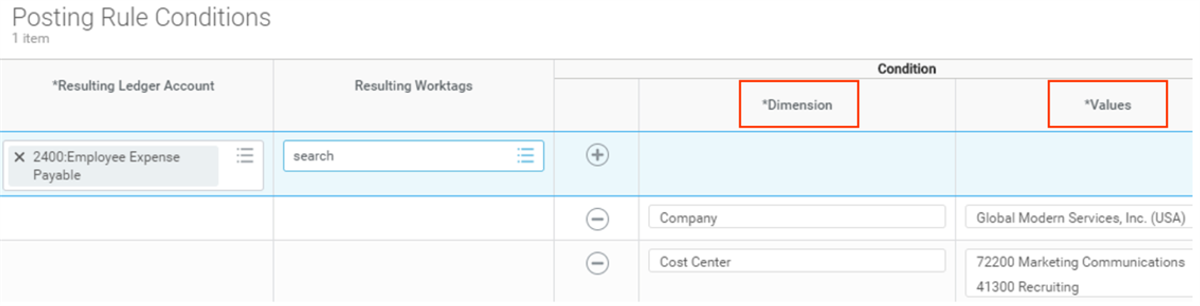
dimensions and values in a condition screen shot
Condition Sequence
Place posting rule conditions in order from most to least restrictive by using the Evaluation Order. Workday evaluates conditions from the top down, posting transactions to the ledger account associated with the first matching condition that it finds. For example, let us say you post transactions to:
- 2400: Employee Expenses based on company and cost center
- 2410: Employee Expenses for Emerging Market based on the same company, the same cost center, and a region.
Place the latter, more restrictive condition first. Otherwise, Workday will post matching transactions to 2400: Employee Expenses because that is the first match it finds.
Accounting Journals
Specify default ledger accounts for the Intercompany Payable, Intercompany Receivable, and Retained Earnings account posting rules so that Workday can process the accounting journals without error.
Control Accounts
For each posting rule, you have the option of selecting the Enable Control Account Warning box. Selecting this box will give users a warning to notify them when they are using control accounts in an accounting journal. If you want to prevent posting to these accounts from accounting journals, you can use this indicator in custom validation rules. You can use it as a condition in a business process to route for an approval when you use a control account in a journal.
Errors
Workday flags an error for operational journals that do not meet any conditions and do not have a default ledger account. Doing so is advantageous because it indicates when to create a new condition to capture a transaction. Workday makes it easier to find and fix such errors than to discover them and reclassify the journal entries.
Fix Operational Journals with Errors
To identify what operational journals are in "error" status and have not yet posted to the ledger, access the
Fix Operational Journals With Error
s report.- Fix Operational Journals With Errors(report).
- Identify the journals with errors.
- Resolve the issue that caused the errors. You must have the Accounting Manager or other authorized role to fix journal errors.
- Select the single select or select all button on a row to regenerate the accounting results for a specific journal after correcting the problem.
Retained Earnings Rule
Retained earnings are the remaining earnings a company earns (net income) after they pay dividends to shareholders at the end of each year. It is a balance sheet account. When balance sheet and income statement accounts are both impacted during the same transaction, Workday determines retained earnings by transaction. For example, the operational journal from a supplier invoice generates accounting with a liabilities account (balance sheet) and expense account (income statement). Workday calculates the retained earnings, linking together the income statement and balance sheet accounts to keep the balance sheet equation in balance.
Account Posting Rules
Below is a list of the account posting rules. Workday categorizes the rules based on rule types and provides a short description for each posting rule. The list below is a tool to better understand the account posting rules.
Multipurpose Rules
Posting Rule | Description |
|---|---|
Cash | The cash posting rule identifies the cash account used to record transactions impacting cash. Typically, an asset account. |
Intercompany Payables | The intercompany payables posting rule identifies the account used to record the amounts due to another company. Typically, a liability account. |
Intercompany Receivables | The intercompany receivables posting rule identifies the account used to record the amounts due from another company. Typically, an asset account. |
Interworktag Payables | The Interworktag payables posting rule identifies the account used to record the amounts due to another "Balancing Worktag". Typically, a liability account. |
Interworktag Receivables | The Interworktag receivables posting rule identifies the account used to record the amounts due from another "Balancing Worktag". Typically, an asset account. |
Investment in Pool | The investment in pool posting rule identifies the account used to store a gift's book value. Use the investment in pool account for pool share purchases and sales. |
Investment Pool Activity | The investment pool activity posting rule identifies the account where Workday stores the FMV of an investment pool. |
Realized Currency Gain | The realized currency gain posting rule identifies the account used to record the gain calculated when posting a multicurrency transaction that results in a realized gain. Typically, a revenue account. |
Realized Currency Loss | The realized currency loss posting rule identifies the account used to record the loss calculated when posting a multicurrency transaction that results in a realized loss. Typically, an expense account. |
Retained Earnings | The retained earnings posting rule identifies the account used to record the earnings retained by the company. Typically, an equity account. |
Transaction Tax | The sales tax posting rule identifies the account used to record tax on sales and purchase transactions. Depending on whether you are collecting or paying, and whether the taxes are recoverable or not, it may be a liability, asset, or expense account. |
Transaction Tax on Payment | The transaction tax on payment posting rule identifies the account used to record tax on the payment of sales and purchase transactions. Depending on whether you are collecting or paying, and whether the taxes are recoverable or not, it may be a liability, asset, or expense account. |
Translation Gain | The translation gain posting rule identifies the account used to display the gain calculated when creating a report that includes multicurrency translation. Typically, an equity account. |
Translation Loss | The translation loss posting rule identifies the account used to display the loss calculated when creating a report that includes multicurrency translation. Typically, an equity account. |
Unrealized Currency Gain | The unrealized currency gain posting rule identifies the account used to display the gain calculated when running a report that includes multicurrency revaluation. Typically, an equity account or revenue account depending upon local GAAP. |
Unrealized Currency Loss | The unrealized currency loss posting rule identifies the account used to display the loss calculated when running a report that includes multicurrency revaluation. Typically, an equity account or expense account depending upon local GAAP. |
Supplier Accounts and Spend Rules
Posting Rule | Description |
|---|---|
Discounts Taken | The discounts taken posting rule identifies the account used to record discounts taken when paying a supplier. Typically, an income account or contra expense account. |
Payables | The payables posting rule identifies the payables account used to record supplier payments due. Typically, a liability account. |
Prepaid Spend | The Prepaid posting rule identifies the account used to record any expense prepaid to the supplier for an item. Typically, an asset account. |
Receipt Accrual | The receipt accrual posting rule identifies the account used to record the accrual for approved receipts not invoiced by the supplier yet. Typically, a liability account. |
Spend | The Spend posting rule identifies the account used to record the purchase of an item. Typically, an asset account or expense account. |
Spend Commitment | The spend commitment account posting rule identifies the account used to record the reservation for a spend commitment. Typically, an equity account. |
Spend Obligation | The spend obligation posting rule identifies the account used to record the reservation for a spend obligation. Typically, an equity account. |
Withholding Tax Payable | The Withholding Tax Payable posting rule identifies the account used to record Withholding tax deducted at the moment of supplier invoice payment. Depending on your needs, you may select different ledger accounts for different tax codes. |
Work in Progress | The work in progress posting rule identifies the accounts used to record the costs of in progress projects. Typically, an asset account. |
Business Asset Rules
Posting Rule | Description |
|---|---|
Accumulated Depreciation | The accumulated depreciation posting rule identifies the contra account used to record depreciation. Typically, an asset account. |
Business Asset Accrued Liability | The business asset accrued liability posting rule identifies the control account used to record the accrued liability on registration of an asset sourced from a contract receipt. Typically, a liability account. |
Business Asset Disposal Donation | The business asset disposal donation posting rule identifies the account used to record the donation of a disposed asset. Typically, an expense account. |
Business Asset Disposal Gain | The business asset disposal gain posting rule identifies the account used to record the gain on a disposal of an asset. Typically, an income account. |
Business Asset Disposal Loss | The business asset disposal loss posting rule identifies the account used to record the loss on a disposal of an asset. Typically, an expense account. |
Business Asset Disposal Sale | The business asset disposal sale posting rule identifies the account used to record the consideration received (typically cash or a receivable) for the sale of a disposed asset. Typically, an asset account. |
Business Asset multi-book Settlement | Settle asset transactions that are multi-book or sourced in common book and have destinations in specific book codes. Typically, an asset account. |
Depreciation Expense | The depreciation expense posting rule identifies the account used to record depreciation. Typically, an expense account. |
Impairment | The impairment posting rule identifies the expense account used to record asset impairment. |
Customer Accounts and Revenue Rules
Posting Rule | Description |
|---|---|
Deferred Revenue | The deferred revenue posting rule identifies the account used to record the amount for goods and services billed but recognized later. Typically, a liability account. |
Discounts Given | The discounts given posting rule identifies the account used to record discounts given a customer when accepting payment. Typically, an expense account or contra income account. |
Receivables | The receivables posting rule identifies the receivables account used to record customer payments due. Typically, an asset account. |
Receivable Write-off | The receivables write-off posting rule identifies the account used to record customer write-offs taken. Typically, an expense account. |
Revenue | The revenue posting rule identifies the account used to record the sale of an item. Typically, an income account. |
Unapplied On-Account Payments | The unapplied payments posting rule identifies the account used to record customer payments put on account. Typically, a liability account. |
Unapplied Recorded Payments | The unapplied payments posting rule identifies the account used to record customer payments. Workday records but does not yet apply these payments, so they do not appear as part of the customer account balance. Typically, a liability account. |
Unbilled Receivables | The unbilled receivables rule identifies the account used to record the value of receivables before billing. Typically, an asset account. |
Undeposited Payments | The undeposited payments posting rule identifies the account used to record customer payments not yet deposited into a bank account. Typically, an asset account. |
Credit Card and Expense Report Rules
Posting Rule | Description |
|---|---|
Credit Card Payable | The credit card accrual posting rule identifies the account used to record worker expenses charged to a company credit card with corporate liability. Typically, a liability account. |
Expenses Advance | The expenses advance posting rule identifies the account used to record expenses advances paid out to workers and require future offsetting expense report or repayment. Typically, an asset account. |
Expenses Payable | The expense payable posting rule identifies the payables account used to record expense payments due. Typically, a liability account. |
Expenses Payable to Supplier | The expense payable to supplier posting rule identifies the account used to record an expense report payable to a supplier as opposed to a worker. Typically, a liability account. |
Payroll Rules
Posting Rule | Description |
|---|---|
Payroll Commitment | The payroll commitment posting rule identifies the account used to record the reservation for a vacant position's compensation. Typically, an equity account. |
Payroll Deduction | The payroll deduction posting rule identifies the account used to record the deductions portion of Gross-to-Net payroll as well as deductions not impacting net pay. Typically, a liability account. |
Payroll Earnings | The payroll earnings posting rule identifies the account used to record the earnings portion of Gross-to-Net payroll. Typically, an expense account. |
Payroll Expense | The payroll expense posting rule identifies the account used to record the payroll expenses not impacting net pay. Typically, an expense account. |
Payroll Forward Accrual | The payroll forward accrual posting rule identifies the account used to offset the accrual of earnings and employer paid expenses. This accrual occurs when a pay period spans financial reporting periods. Typically, a liability account. |
Payroll Net Pay | The payroll net pay posting rule identifies the payables account used to record the net accumulation of Gross-to-Net payroll due to the employee. Typically, a liability account. |
Payroll Obligation | The payroll obligation posting rule identifies the account used to record the reservation for a filled position's compensation. Typically, an equity account. |
Facilities and Administration, Fringe Benefit, Labor Cost, and Inventory Rules
Posting Rule | Description |
|---|---|
Facilities and Administration Cost Expense | The facilities and administration cost expense posting rule identifies the account used to record facilities and administration expense. Typically, an expense account. |
Facilities and Administration Cost Revenue | The facilities and administration cost revenue posting rule identifies the account used to record facilities and administration revenue. Typically, a revenue account. |
Fringe Benefit Commitment | The fringe benefit commitment posting rule identifies the account used to record the reservation for a vacant position's fringe benefits. Typically, an equity account. |
Fringe Benefit Expense | The fringe benefit expense posting rule identifies the account used to record fringe benefit charges to a worker's organization. Typically, an expense account. |
Fringe Benefit Obligation | The fringe benefit obligation posting rule identifies the account used to record the reservation for a filled position's fringe benefits. Typically, an equity account. |
Fringe Benefit Recovery | The fringe benefit recovery posting rule identifies the account used to record the recovery of fringe benefits. Typically, a revenue account. |
Inventory Adjustment | The Inventory Adjustment posting rule identifies the account to charge with the change in inventory value when you make an adjustment to on-hand quantities. Typically, an adjustment expense account |
Inventory Cost Adjustment | The Inventory Cost Adjustment posting rule identifies the account used when you do a manual cost adjustment or when you write off invoice price variance. Typically, an expense account. |
Inventory Markup | The Inventory Markup posting rule identifies the account used by the sending entity when they add a markup on issued inventory. Typically, an expense offset account. |
Inventory Markup Expense | The Inventory Markup Expense posting rule identifies the account used by the receiving site for the item markup charged by the source inventory site. |
Labor Cost Capitalization | The labor cost capitalization posting rule identifies the accounts used to record the capitalization of labor costs. Typically, a contra-expense account. |
Pool Holding | The pool holding rule identifies the account used for activity awaiting action in a pool. |