
Compensation Basis
Overview
How do you calculate compensation? Do you define it the same way across your entire population or does it vary? In this chapter, we will explain the details of compensation basis. Compensation basis allows you to create different definitions of estimated earnings for multiple populations across a country and the globe.
Objectives
By the end of this chapter, you will be able to:
- Define compensation basis and map usage in reports and analytics.
- Configure a compensation basis.
Compensation Basis Overview
The compensation basis feature allows you to define a unique estimation to use as:
- The basis for bonus, stock, allowances, and period salary.
- The amount for merit increases.
You can also use compensation basis to view on reports.
There are three compensation bases that Workday delivers:
Action | Definition |
|---|---|
Total Base Pay | The sum of any compensation components using the Base Pay Elements field of the employee's compensation grade or compensation grade profile. |
Total Salary and Allowances | The sum of all the salary and allowance plans on a position. |
Eligible Earnings Override | A field enables you to define a currency amount used for bonus calculations and percent-based stock plans. You can use an inbound Enterprise Interface Builder (EIB) to import employee eligible earnings amounts during compensation review processing. |
Configurable Compensation Basis
There are four steps to creating and managing compensation basis in Workday:
- Access theCreate Configurable Compensation Basistask.
- Select compensation plans to include in the compensation basis.
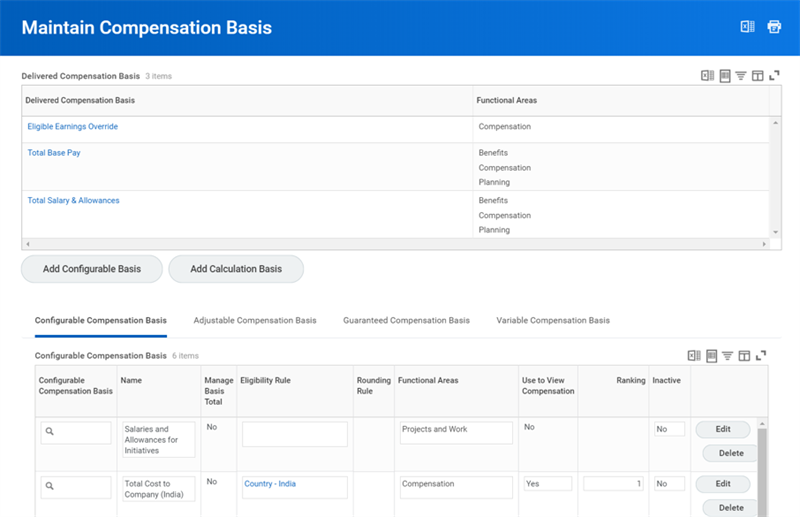
- Adjust the compensation basis on the Maintain Compensation Basis page. Evaluate the rankings in relationship to other compensation bases.
- Run theEmployees Missing a Compensation Basisreport to determine if there are employees without an eligible compensation basis.
You can easily edit a compensation basis from the Maintain Compensation Basis page. The fields you can change include: Name, Eligibility Rule, Functional Area, Use to View Compensation, and Ranking. In addition, you can delete a compensation basis.
When configuring a compensation basis, the following compensation plans are available:
|
|
|
The following fields are available when configuring a compensation basis:
Action | Definition |
|---|---|
Eligibility Rule | There are a few configuration options:
|
Functional Area | There are four functional areas to choose from:
You can select more than one functional area. |
Use to View Compensation | Select this checkbox if using this basis in reports and analytics. If a compensation basis has a specific purpose, such as calculating a percent-based bonus, clear this box. |
Ranking | Employees may be eligible for more than one compensation basis, but only the highest-ranked basis is the employee's primary basis. |
Salary Plans Maximum | Enter a maximum percentage amount for salary plan allocation. You cannot enter a value greater than 100. For example, if you enter 80%, then the amount allocated to salary plans cannot be greater than 80% of the employee's total compensation basis. You must disperse the remaining 20% between plans allowing override, such as allowance, bonus, and commission plans. |
Retain Basis Total | Workday retains the compensation basis total even when a staffing transaction changes compensation plan assignment. |
Compensation Plan Option: | All : Includes all compensation plans of one type. |
Base Pay Only : Includes all compensation plans of one type only if the compensation element selected. | |
Select Plans : Includes only specific compensation plans of one type. | |
None of the Above : Excludes the plan type from the calculation. |
Configurable Compensation Basis Examples
- On Target Earnings Example
- Who is eligible? Sales employee in U.S.
- What does it include? Salary Plan + Cell Phone Allowance + All Commissions
- Cost to Company Example
- Who is eligible? Employee in India
- What does it include? Salary Plan + All Bonuses + All Allowances + Pension
- Total Cash Example
- Who is eligible? Employee in UK
- What does it include? Salary Plan + All Bonuses + All Allowance
Compensation Grades and the Compensation Basis
In addition to total base pay, you can set up unique pay ranges for each compensation basis. The unique pay ranges provide more insight when initiating a compensation change. Only two compensation bases will display for an employee:
- Total Base Pay
- The highest-ranked basis for which the employee is eligible.
Retirement Savings and Compensation Basis
Use retirement savings plans to show an employer contribution percentage requires an additional step. The savings plan maps to the correct compensation basis to identify the designated percent. This uses the
Map Retirement Savings Plans to Compensation Basis
task. If you use a percentage of the salary plan to calculate an employer contribution amount, define salary in payroll for your retirement savings plans. This mapping only controls how salary is defined on the compensation basis.