
Default Compensation
Overview
Proper understanding of defaulting behavior and compensation framework is crucial to successfully process compensation transactions. Allowing compensation to default reduces data entry error and allows flexibility for exceptions. There are many options available to configure defaulting behavior. You can use compensation eligibility rules on components, but you can also default from a position, job management supervisory organization, job requisition, or the offer process.
Objectives
By the end of this chapter, you will be able to:
- Compare position compensation, requisition compensation, and offer compensation transactions.
- Identify the differences of defaulting behavior during a hire and a job change.
- Summarize the importance of order precedence between the different compensation defaulting methods.
Defaulting Compensation
For compensation components to accurately default, you must assign eligibility rules to the compensation package, compensation grades, grade profiles, and all plans within the compensation package. The rules on a compensation package can be different from the rules on plans and grades within the package.
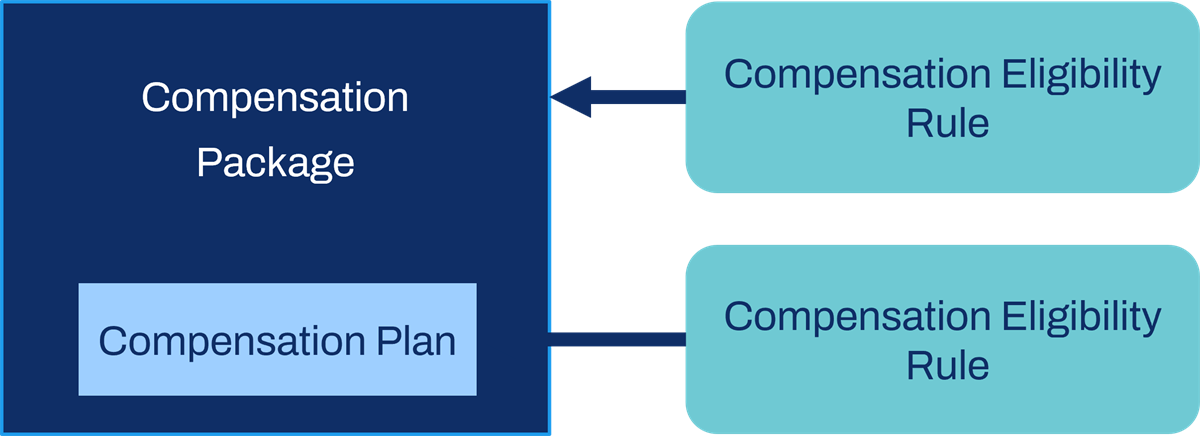
Defaulting provides guidance to the partner or manager completing the transaction. Typically, when managers enter compensation data they can only select eligible compensation components for employees. However, you can configure security to allow compensation partners and administrators to override default compensation.
Based on the configuration, several behaviors can occur during a staffing event:
- If a worker is eligible for a package, and eligible for a plan in the package, defaulting occurs.
- If a worker is eligible for a plan that is NOT in a compensation package, defaulting does not occur, but the plan is available to select.
- If a worker is NOT eligible for a plan, even though the plan is in the compensation package, defaulting does NOT occur.
- If a worker is eligible for more than one compensation package or compensation grade, these components and plans do NOT default. The package, grade, and plans are available to select, but do not default.
Note
: There is a difference between compensation component eligibility and participation in a plan. For example, you can be eligible for a cell phone allowance, but you may not receive or participate in the plan.Having compensation components default as part of a staffing activity reduces data entry errors and maintains flexibility for exceptions. When completing compensation staffing transactions, the following components often default:
- Package
- Grade and grade profile
- Salary and hourly plans
- Allowance plans
- Stock, merit, and bonus plans
Compensation can default using the following methods:
- Eligibility rules
- Grades on job profiles
- Default compensation on position
- Default compensation on job requisition
- Default compensation on offer
Associating Compensation Grades with Job Profiles
There are two methods to default the compensation grade.
- First, the compensation grade can default using the eligibility rule framework.
- Second, you can attach the compensation grade directly to a job profile.
Administrators commonly attach the grade to the job profile to ensure eligibility for all employees in a compensation grade.
Your organization may require more criteria to accurately define which employees are eligible for a compensation grade. If so, defining the compensation eligibility rules framework is the better option. If you use the eligibility rule framework, leave the Compensation Grade Profile field blank on the job profile. This configuration allows eligibility rules to determine which grade profile populates for an employee during a compensation event. This approach is common if you base job profile eligibility on location-related data, where you can only select one grade profile.
Defaulting from Position Compensation
In addition to eligibility rules, you can define default compensation on a position. Both methods have the same goal, which is to accurately populate compensation during a staffing transaction. If you set up compensation eligibility rules, and you use default compensation from position, then you get the advantage of both defaulting methods.
Important
: If you use both compensation eligibility rules and default compensation from a position, the default compensation from position overrides the eligibility rules.When entering the default compensation on a position, the compensation eligibility rules populate the compensation components. You then have an opportunity to edit this information. When using default position compensation, a default salary plan requires you to enter an amount, currency, and frequency.
Common reasons to use position compensation include:
- Provide guidance to users, such as a manager or partner, entering compensation data.
- Use position budgets.
- Track actual compensation and compare to budget. This tracking method allows you to use default compensation as budgeted and approved by management. First, identify all compensation components and define actual salary amounts, then you can create reports to compare this information.
- Send target or approved compensation to an external applicant tracking system.
If you use the staffing model of:
- Position Management, you can assign position compensation directly to an unfilled position.
- Job Management, the default compensation populates for anyone hired into the supervisory organization. Since the system only creates positions during the hire, no reporting is available for unfilled positions.
You need to assign position compensation for each position created using the
Change Default Compensation
business process. This standalone business process helps you assign or change default compensation to a position. To initiate the Change Default Compensation
business process, use the unfilled or filled position's Related Actions, and navigate to Compensation > Request Default Compensation Change. The Change Default Compensation
appears as Request Default Compensation for Position Event when viewing it within the overall process.You can also use the
Change Default Compensation
business process as a subprocess in the following business processes:- Create Position,Edit Position, andEdit Position Restrictionsprocesses.
- Set Hiring RestrictionsandEdit Hiring Restrictionsprocesses.
- Terminationprocess.
Position Compensation Defaulting – What Happens?
If you use position compensation with compensation eligibility rules, here is what you can expect:
- Compensation Eligibility Rule Framework: Defaults compensation during staffing or compensation events.
- Job Profile: If you link a job profile to a compensation grade, it overrides the compensation rule.
- Position Compensation: Compensation eligibility rules and the job profile encompassing the compensation grade populates position compensation. Then the position compensation populates the compensation staffing events.
The following table details defaulting behavior during staffing transactions:
Using Eligibility Rules and Using Job Profiles | Position Compensation | During Staffing Transactions |
|---|---|---|
Eligibility Rule - Yes Job Profile - No | No position compensation. | All components default using eligibility rules.
|
Eligibility Rule - Yes Job Profile - Yes | No position compensation. | Most components default using eligibility rules.
|
Eligibility Rule - Yes Job Profile - No | All components default into position compensation using eligibility rules.
| All components default from the position.
|
Eligibility Rule - Yes Job Profile - Yes | Most components default using eligibility rules.
| All components default from the position.
|
Compensation and Job Requisitions
You can create job requisitions with or without requisition compensation. The system assigns requisition compensation for each open requisition created with the
Requisition Compensation
business process. This business process helps you assign or change default compensation on a job requisition. You can use it as a standalone process or a subprocess in the Job Requisition
or Job Requisition Change
business processes.- To initiate the standaloneRequisition Compensationbusiness process, use the open requisition's Related Actions, and select Compensation > Request Default Compensation Change.
- TheRequisition Compensationsubprocess is referred to asRequest Requisition Compensationwhen viewing it within the parent process. The person responsible for assigning this default compensation should be familiar with your organization's policies and compensation.
Defaulting from Job Requisition Compensation
The option of defining requisition compensation is similar to position compensation. If you use the
Request Requisition Compensation
subprocess, the compensation components default into the job requisition and are editable. One difference is that when using job requisition compensation, there is more required data to enter. This data provides more information for the eligibility rules to reference and more accurate defaulting.In contrast, when creating a position, only job family, job profile, location, time type, worker type, and worker subtype can populate. These fields are all optional. If left blank, the eligibility rules may not have enough data to evaluate. In this case, defaulting does not occur and position compensation requires manual entry.
To take advantage of both the position and requisition defaulting methods, set up compensation eligibility rules and also default compensation on the position. When entering the default compensation on a position, the compensation eligibility rules populate the compensation components and then you have an opportunity to edit this information.
Note
: If you use compensation eligibility rules and position compensation, the default compensation from the position overrides the eligibility rules when you enter requisition compensation.Requisition Compensation Defaulting – What Happens?
You can use requisition compensation with compensation eligibility rules or position compensation. If you use this method, you can expect the following behavior:
Eligibility Rules and Job Profile | Position | Job Requisition | Staffing Transaction |
|---|---|---|---|
Eligibility Rules - Yes Job Profile - Yes | No position compensation. | Most components default using eligibility rules:
| All components default from job requisition:
|
Eligibility Rules - Yes Job Profile - Yes | Most components default using eligibility rules:
| No requisition compensation. | All components default from position:
|
Eligibility Rules - Yes Job Profile - Yes | Most components default using eligibility rules:
| All components default from position:
| All components default from requisition:
|
Note
: Workday does not recommend you use position compensation and requisition compensation. Assigned compensation is easier to maintain over time if you populate it with the requisition compensation.Defaulting from Offer Compensation (Requires Workday Recruiting)
Configuring offer compensation is a complex process. Approved offer compensation overrides eligibility rules, position compensation, and requisition compensation. Ideally, the pre-hire agrees to the offer compensation, which then automatically populates during the hire process.
If you include the
Propose Compensation Offer/Employment Agreement
subprocess in the overall Offer
or Hire
business process, then the compensation components default and are editable.For offer compensation, you can use the compensation eligibility rules framework and default compensation from a job requisition. This configuration provides you with the advantage of both defaulting methods to account for more unique scenarios. When entering default compensation on a job requisition, you can use either the compensation eligibility rules or the default position compensation.
Note
: Offer compensation defaulting takes precedent over position compensation. If there is no requisition compensation, this process uses compensation eligibility rules to default compensation components.Autocomplete Compensation with Offer/Employment Agreement
It may be unnecessary to enter or edit compensation that has already been agreed upon. There is an option to autocomplete compensation during the
Propose Compensation Hire
and the Propose Compensation Change
process. The screenshot below demonstrates the Propose Compensation Change for Global Modern Services business process definition set to Enable Autocomplete.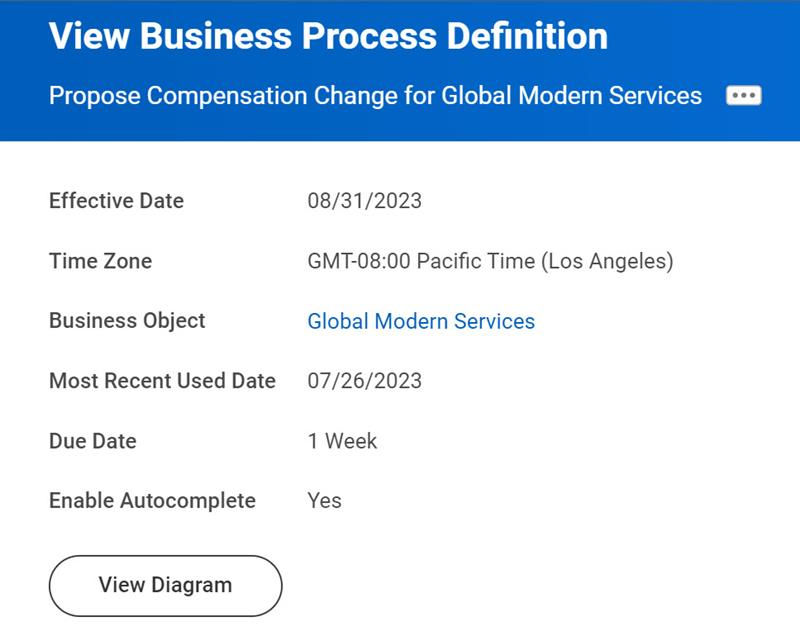
Offer Compensation Defaulting – What Happens?
If you use offer compensation with compensation eligibility rules, position compensation, or requisition compensation, the following behavior will occur:
Position | Job Requisition | Offer | Hire |
|---|---|---|---|
No position compensation. | Most components default using eligibility rules:
| All components defaulted from job requisition and are editable. | All components default from offer and are editable. |
Most components default using eligibility rules:
| All components default from position:
| All components defaulted from job requisition and are editable. | All components default from offer:
|
Most components default using eligibility rules:
| No job requisition. | Most components default using eligibility rules:
| All components default from Offer:
|
Order of Precedence
In addition to defaulting behavior, compensation uses an order of precedence. Correct configuration means:
- Employees are eligible for only one compensation package.
- Employees are eligible for only one compensation grade, and one compensation grade profile within the grade.
- Any plans that should default need to be in a package.
- Any plans that should be selectable for a specific group of employees, but not default, should be outside of a package.
If you are using compensation eligibility rules and decide to set up an alternative method, the following default behaviors will occur:
Defaulting Method | Result during Hire |
|---|---|
Compensation Eligibility Rule | All compensation components will default using compensation eligibility rules. |
Position Compensation | Eligibility rules default compensation components into the position compensation. During hire, compensation defaults from the position. |
Requisition Compensation | If position compensation exists, it will default into requisition compensation. If there is no position compensation, eligibility rules will default compensation components. During hire, compensation defaults from the requisition. |
Offer Compensation | If requisition compensation exists, it will default into the offer compensation. If there is no requisition compensation, eligibility rules will default compensation components. Position compensation takes no action. During a hire, the offer is king! All plans and salary amount are editable. |
Profile / Compensation Grade | If you link a job profile to a compensation grade, it overrides the compensation eligibility rule on the grade. |