
Evidence of Insurability
Overview
Evidence of Insurability (EOI) determines eligibility for insurance coverage that exceeds a guaranteed issue amount. Workday enables you to define EOI requirements for a benefits group, enrollment event, and coverage type by specifying the maximum amount of coverage workers can elect without EOI.
Additionally, Workday provides a process outside of the benefits enrollment to track a worker's EOI status, record approval or denial statuses, and automatically apply the appropriate coverage level when finalized.
When an employee elects a coverage amount that requires EOI review, the benefits system automatically sets their EOI status to Pending.You can keep track of worker's EOI statuses by running the
Manage Evidence of Insurability Status
task.Objectives
By the end of this chapter, you will be able to:
- Illustrate how Evidence of Insurability (EOI) triggers.
- Use theManage Evidence of Insurability Statustask.
- Identify how to update, manage, and email workers EOI statuses.
Evidence of Insurability Processing
When an enrollment triggers evidence of insurability, the employee must complete the next step. This must be approved by the insurance carrier's underwriter before the elected coverage goes into effect. Based on the enrollment event rules configuration, the employee's coverage could default to the elected amount, the guaranteed issue amount, or their current coverage amount while pending approval.
The following diagram illustrates the steps in this process:
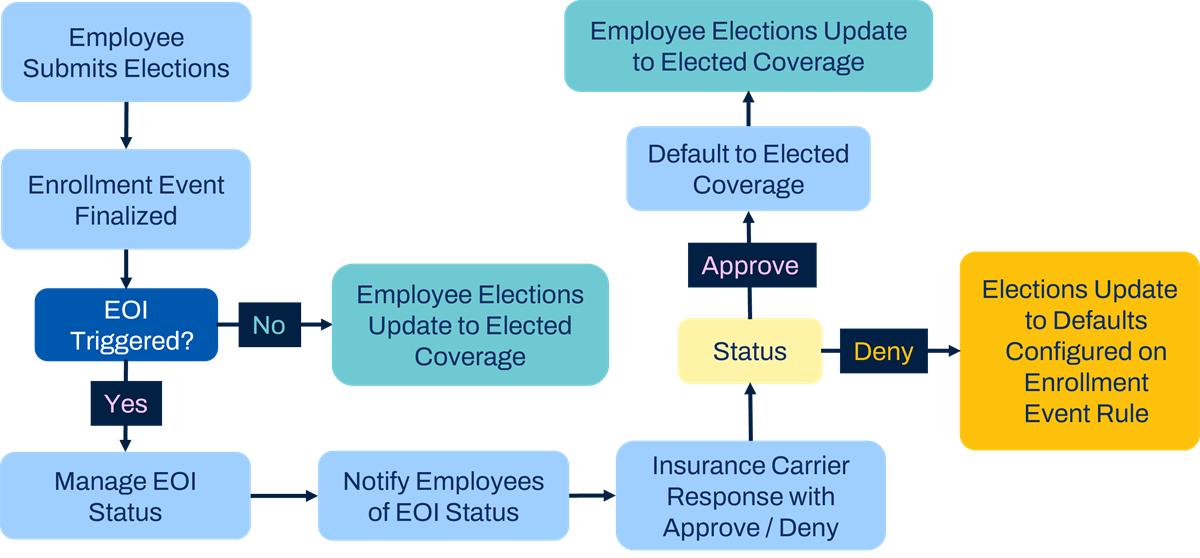
Once the carrier approves or denies the employee's elected coverage, it can go into effect as of the original event date or the approval/denial date. Both the Default Coverage If Pending EOI rule (located on the Enrollment Event Rule) and the EOI Takes Effect on Date (located on the Benefit Group) should be configured to work together.
For example, if the event is configured to default coverage to the guaranteed issue amount and EOI takes effect on the approval/denial date, the following will occur:
- Pending EOI: The employee's coverage defaults to the guaranteed issue amount.
- Once the elected coverage is approved, the employee receives the elected benefit as of the approval date.
- If the employee's request is denied, then they would remain with the guaranteed issue amount.
You can configure the
Change Benefits for Life Event
business process to include notifications or to do steps that route to the employee or benefits partner when EOI triggers.Workday provides a process outside of the benefits enrollment to track workers' EOI status, record approval or denial of EOI claims, and automatically apply the appropriate coverage level when a worker's EOI status is finalized.
When an employee selects a coverage amount that requires EOI review, the benefits system automatically sets their EOI review status to Pending and tracks them on the Manage Evidence of Insurability Status page.
Use the Manage Evidence of Insurability Status page to:
- View employees with EOI status of Pending and the details of the election.
- Update the status of employees from Pending to Approved or Denied depending on the results of the insurance provider's EOI review.
- Notify employees of their EOI status through the email functionality.
- To accept or deny the worker's elected amount based on the insurance provider's final determination of an employee's eligibility for coverage. You do not have the ability to apply any coverage amount that the insurance provider may approve.