
Participation Rules and Event Coordination
Overview
The compensation review process can span days or weeks depending on the organization or company. Organization, staffing, or other parallel events may still need to occur while a compensation review is in progress. You can configure Workday to manage and coordinate the parallel events that might conflict. Using participation rule sets, Workday automatically coordinates and manages awards during staffing transactions and other compensation parallel events.
Before the initiation of a compensation review, you must configure automation of staffing events or other parallel events. If you do not configure these steps, then the parallel event locks down and you will not be able to initiate events.
Objectives
By the end of this chapter, you will be able to:
- Explain the participation rule set functionality that coordinates events for termination, parallel events, and organization assignments.
- Define various effective date impacts to event rules.
- Create a compensation participation rule set.
Compensation Participation Rule Sets and Event Coordination
Workday enables you to initiate organization changes, terminations, and other parallel compensation events during an in-progress compensation review that may result in potentially conflicting data.
You can configure event coordination for
Termination
, Request Compensation
, Propose Compensation
, Change Job
, Request Grade Change
, Leave of Absence
, Move Worker
, and Change Organization Assignment
.To coordinate these events, configure participation rule sets taking into the following into consideration:
- The effective date and date ranges relative to the parallel events and in progress compensation review.
- The type of events (organization assignment, compensation parallel event, or termination) you allow or prevent system users to initiate during an in-progress compensation review.
- The employee, pool, and award options that inform Workday what to do with employee's, compensation data, pool contributions, and awards.
In addition to creating participation rule sets, you must also map the rules in the
Compensation Review Options
task.In the
Compensation Review Options
task, you can establish participation rules and allow or restrict specific business processes to initiate as parallel events. This configuration informs Workday how to reconcile any conflicting transactions.The Manage Impacted Employees step of the business process workflow is the last step before participation rules evaluate. Once the Configure Pools step of the business process triggers, the rules engage to help manage employee awards.
These key dates, along with the participation rule set employee, pool, and award options, inform Workday how to process parallel events.
Configuration for Events During Compensation Review
Use the
Maintain Compensation Review Participation Rule Set
report to create and manage rules for organization assignments, compensation parallel event, and termination. Based on the date range, and plan type, you can select different participation options.Participation Rule Types
When creating or configuring rule sets, there are three rule types available:
Rule Type | Definition |
|---|---|
Organization Assignment | Includes actions such as reorganizations and parallel events effective before the Organization Snapshot Date. |
Compensation Parallel Event | Includes parallel events on or before the Compensation Snapshot Date, between the Compensation Snapshot Date and effective date, and after the effective date. |
Termination | Effective terminations before the effective date. |
Termination Rule Sets
For employee terminations, you need to determine what will happen to the employee and the employee's pool. These rules are based on award type and there are different options you can select.
For Employee Options, you can choose to:
- Keep Employee in Merit, Bonus, or Stock
- Remove Employee from Merit, Bonus, or Stock
For each award type's Pool Options, you can choose to:
- Keep Pool Fixed
- Remove Pool Contributions
Within participation rule sets, you can create one or more Rule Profiles to apply different employee, pool, and award options to specific employee populations using eligibility rules. Sort the profiles in the order that you want Workday to evaluate them. The first matching rule profile is what Workday will apply to the transaction.
Example
: You can decide to use the Remove Employee from Review Process and Remove Employee Pool Amount options. However, you cannot select Remove Employee from Review Process and Keep Employee in Review Process. This will produce a critical error message.Organization Assignment Rule Sets
Select options you want Workday to apply to reorganizations or parallel organization assignment change events that take effective before the Organization Snapshot Date set on a compensation review. There are two employee options for the organization assignment rule set:
- Move Employee to New Organization
- Keep Employee in Current Organization
Depending on the pool option you select, Workday can automatically move the employee's contribution from the old organization pool to the new organization pool. You can control the pool options for each award type. For example, you can configure the employee's Bonus pool to move to the new organization but leave the Merit and Stock pools with the old organization. If you do not select the award type in the Pool Options, then Workday keeps the pool in the old organization during the compensation review process. Organization rule set Pool Options are available for:
- Merit
- Bonus
- Stock
Workday refreshes new organizations added to compensation review periodically throughout the day. However, you can run the
Compensation Review Update New Organization Data
task to manually refresh the data in real. If an organization is already part of the pool, then the employee and the budget will move immediately. If the organization is new, then you need to add the organization to the pool using the batch process.Workday also enables you to add Rule Profiles to apply different options to specific employee populations.
Resource
: For additional information, refer to the Administrator Guide documentation Troubleshooting: Compensation Review Participation Rule Sets
topic.Compensation Parallel Event Rule Sets
During a compensation review, there maybe employee transfers, promotions, employees put on leave of absence, and other transaction events. The parallel event rule sets determine how the employee data, pools, and award calculations.
Workday enables you to select from different participation options for each type of event so you can have greater control over how Workday manages these transactions. The options you select run automatically upon the completion of a parallel transaction. These rules may affect the employee's target, compensation basis, award amounts and proposals, and the organization's pool during a compensation review process.
When you create a new, or configure an existing participation rule set, you can select the behavior you want Workday to automatically apply.
To configure the behavior you want Workday to automatically apply, use the
Create Compensation Review Participation Rule Set
task for Compensation Parallel Event. Then, select from one of three Award Types: Merit, Bonus, Stock.The following options are available for the compensation parallel event rule sets:
Participation Option | Employee Options | Pools Options | Award Options |
|---|---|---|---|
On or Before Compensation Snapshot Date | Remove Employee from Merit/Bonus/Stock | Remove Pool Contributions | Clear Award |
Update Employee to Latest Data | Keep Pool Fixed | Keep Award Fixed | |
Keep Employee Data Fixed | Update Pool per Latest Data | Update Award To: Previously Entered Percent, Previously Entered Factor, and New Employee Target | |
Between Compensation Snapshot Date and Effective Date | Remove Employee from Merit/Bonus/Stock | Remove Pool Contributions | Apply Merit Increase Percent Apply Merit Increase Amount Keep New Pay Amount Fixed |
Keep Employee in Merit/Bonus/Stock | Keep Pool Fixed | ||
After Effective Date | Keep Employee in Merit/Bonus/Stock | Keep Pool Fixed | |
Remove Employee from Merit/Bonus/Stock | Remove Pool Contributions |
Compensation Review Options Task
The
Compensation Review Options
Task enables you to establish whether a system user can submit events while Compensation Reviews are in progress. In the Business Process Parallel Events section, you can allow all instances of a business process type, such as Change Job, to initiate during a compensation review event.You can select from one or multiple date range options, including:
- On or Before Compensation Snapshot Date
- Between Compensation Snapshot Date and Effective Date
- After Effective Date
Alternatively, you can use rules to allow events to trigger only under target circumstances while a compensation review event is in progress.
Compensation Review Options Rule Assignments
You can select rule sets for Organization Assignments and Reorganizations, Compensation Parallel Events, and Terminations to govern processing events that trigger in parallel to Compensation Reviews.
Organization Assignments and Reorganizations
If an organization assignment or reorganization event uses the same organization type as in the compensation review, then the rule set you populate in this task will apply. Workday will use the rule set to determine how to process the organization event depending on the rule set options. For example, your rule may inform Workday to move the employee and pools to the new organization in the compensation review that the organization change event impacts.
Compensation Parallel Events
The rule sets you populate in this section of the task apply to events that directly affect compensation. This includes the creation of proration segments. Workday will use the rule set to determine how to process compensation-related events that initiate in parallel to a compensation review depending on the rule set options. For example, if a compensation change occurs outside of the compensation review process, your rule set may inform Workday to remove the employee merit award and contributions from the merit pool. Alternatively, your rule set may inform Workday to keep the employee and pool contributions for bonus, merit, and stock plans in the parallel process event.
Terminations
If an eligible termination event initiates while a compensation review is in progress, Workday will use the rule set to determine how to process the parallel termination event. For example, your rule set may inform Workday to remove the employee and pool contributions from the organization in the compensation review that the termination event impacts.
Leave of Absence
Using the
Compensation Review Options
task, in the Business Process Parallel Events section, there is a configuration for Request and Return from Leave of Absence. This row is not editable. Workday does not block a leave of absence during a compensation review. For employees on a leave of absence, you can place merit, bonus, and stock awards on hold.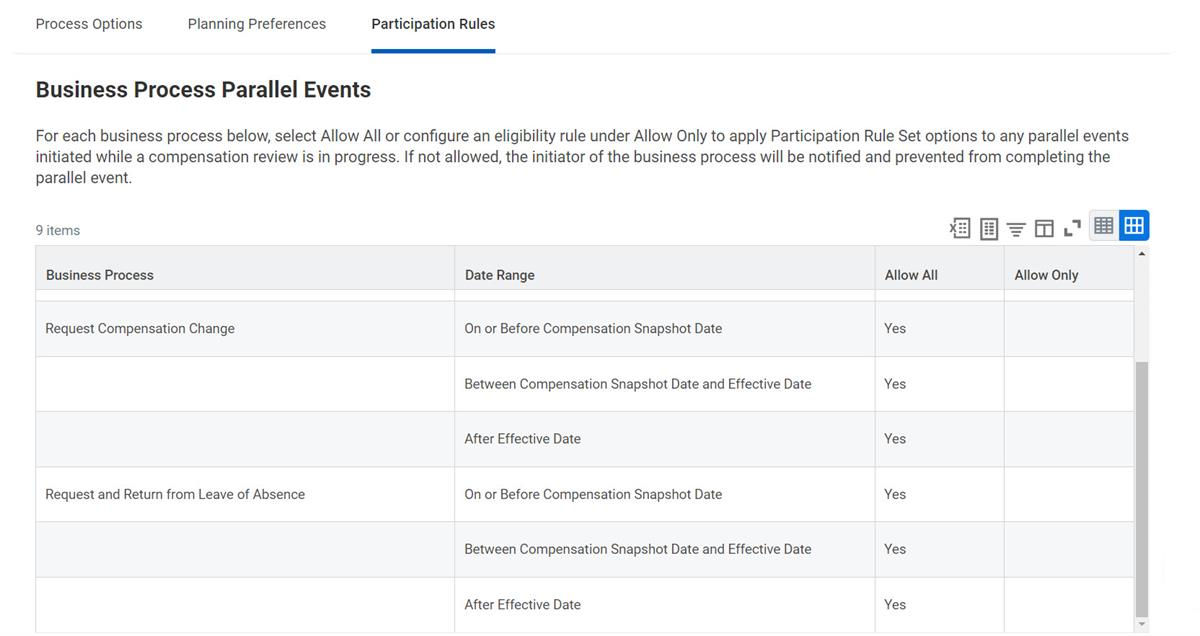
Use the
Manage Compensation Review On Hold Events
task to manually release awards on hold due to an employee being on leave. Workday does not release awards automatically when the employee returns from leave. Additionally, you can only release employee awards if they do not have any in-progress parallel events.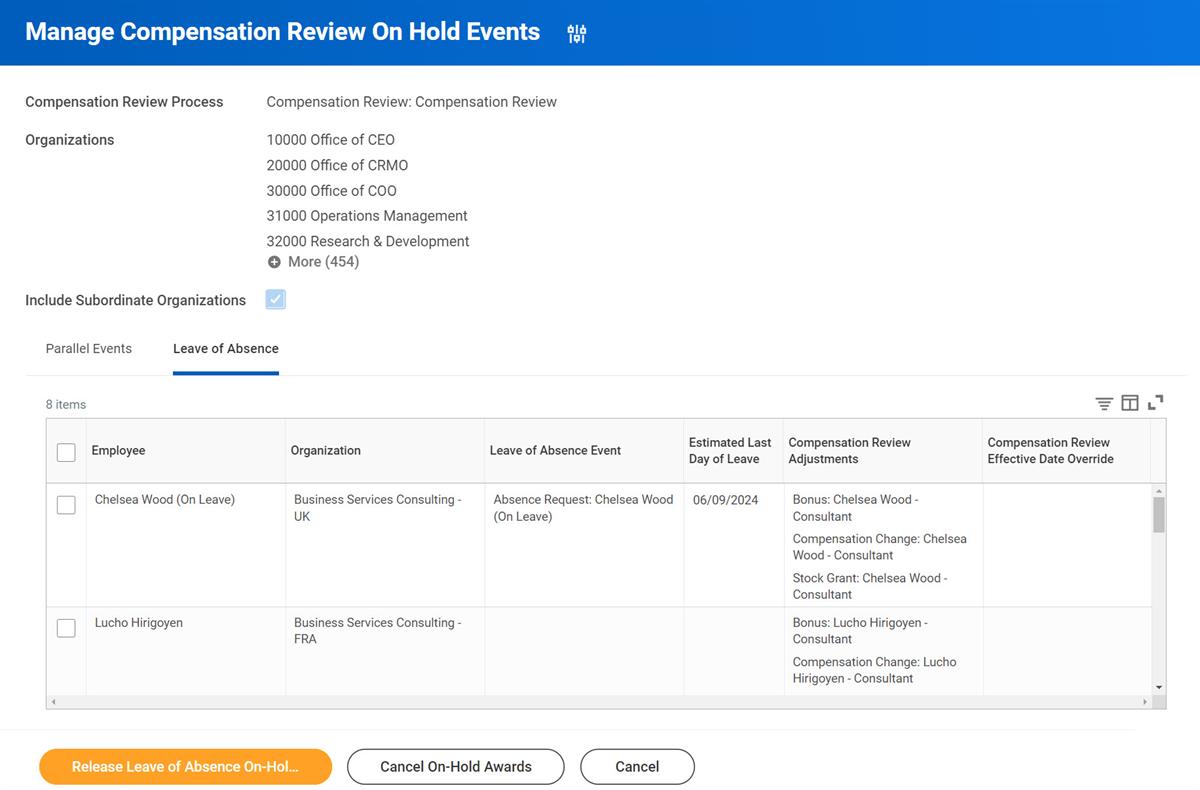
Tip
: Workday delivers a report field called Has On-Hold Compensation Review Event due to Leave on the Worker business object. Additionally, you can use this report field to create To-Do tasks.Chapter Summary
Participation rule sets enable Workday Compensation to manage and coordinate parallel events to process correctly during an in progress compensation review. You can use participation rules to automate processing termination, organization assignment, or parallel compensation events such a request compensation. To coordinate these events, you must configure participation rule sets and compensation review options before initiating a compensation review process.