Compensation Matrix
Overview
A compensation matrix is a calculation configuration feature that can generate targets and/or guidelines for merit, bonus, and stock. There are three types of compensation matrices: percent, amount, and weighted. The compensation matrix is part of the compensation review and you can use it to calculate the pool amount and employee target. You can also use a matrix as reference only.
Objectives
By the end of this chapter, you will be able to:
- Define the different types of matrices.
- Create a compensation matrix.
Compensation Matrix
A compensation matrix can calculate targets for merit, bonus, and stock plans. The matrix can calculate the employee target and pool amounts using the midpoint of the matrix range. The
Create Compensation Matrix
task enables you to create an amount, percent, or weighted matrix.- An amount matrix is for amount-based stock, bonus, or merit plans. Enter an exact amount or a negative amount.
- A percent matrix is for a percent-based merit, bonus, and plan. Enter the exact percent. The percent in this matrix represents the percent of compensation basis. In some countries, such as Japan, an employee can have a decrease in their pay based on poor performance. In this case, the merit matrix may have negative percent values to decrease the employee's base pay.
- A weighted compensation matrix allows you to create minimum and maximum target range based on the target percentage. Amount and percent plans can use a weighted matrix. The percent in this matrix represents the percent of the target.
A matrix can include the options below:
- Rating scale
- Potential rating
- Compa-ratio
- Retention rating
- Pay range segments
If the compensation matrix is marked reference only, it will not generate targets. Calculations will only appear on reports and as reference.
Percent Matrix Example
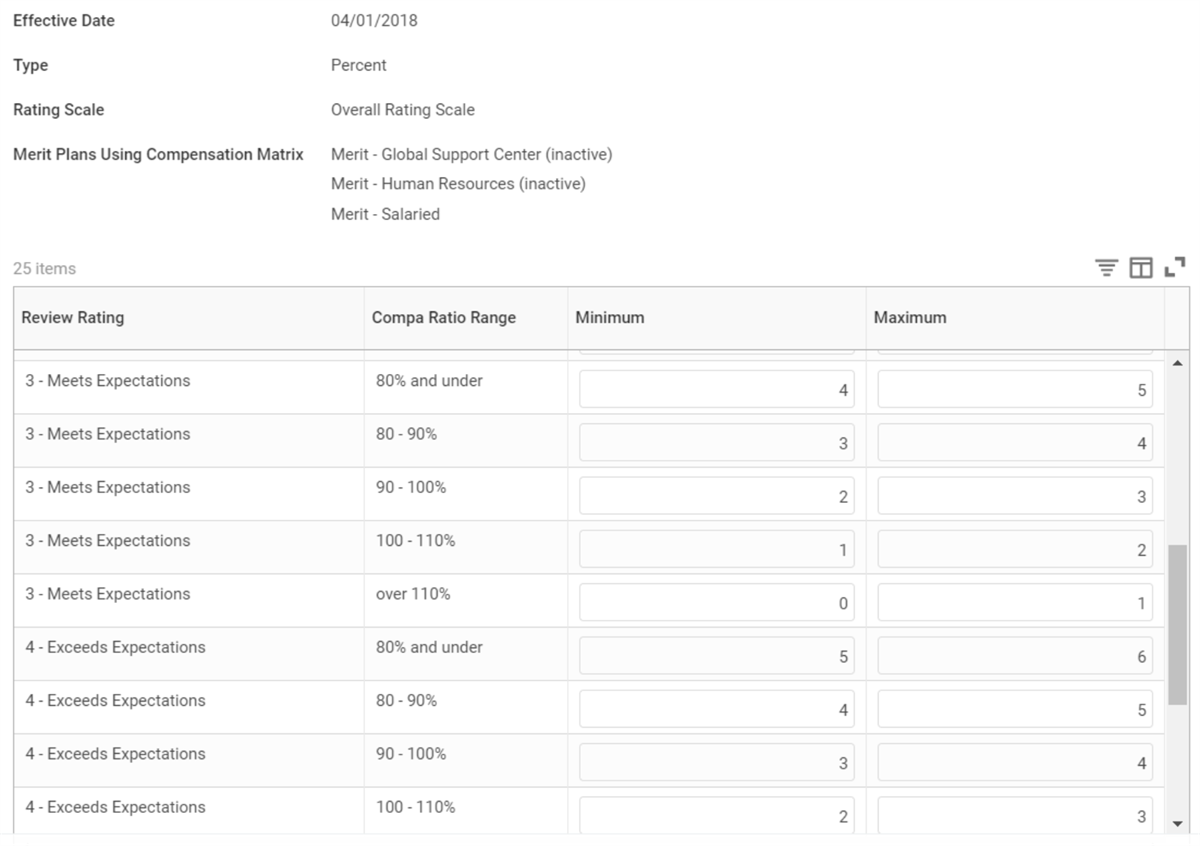
Example: An employee in France has a base salary of 100,000€. He has a performance review of 3-Meets Expectations and a compa-ratio of 93%. His increase is between 2-3%, based on the above percent compensation matrix. His increase will be 2,500, which is (100,000€ × 2.5%) = 2,500€. His new base salary will be 102,500€ with the merit increase.
Weighted Matrix Example
An amount or percent-based plan can use a weighted matrix to calculate merit or bonus targets. All types of stock plans can use a compensation matrix. Use a weighted matrix if you want the minimum and maximum target ranges to calculate the plan target using an additional factor.
Example
: An employee participates in a percent bonus plan with a target of 6%. The employee's base pay is $100,000, and they receive a review rating of 3-Meets Expectations. The employee's target would be ((100,000 × 6%) × 62.5%) = $3,750. The 62.5% is halfway between 50-75%.Total Value Compensation Matrix
Total Value Compensation Matrix allows you to implement a skills-based reward structure using the Workday calculation engine. You can use this in addition to, or in stead of a classic compensation matrix.
Total Value Compensation Matrix can provide unique targets, pools, and guidelines in a Compensation Review process. When you process the plan, Workday uses the compensation matrix factors and associated plan targets to calculate the pool and provide managers with target ranges. You can also assign the matrix to a merit plan as reference only. During compensation reviews, managers can see a suggested range that uses performance, talent, and market data to determine the award.
Some example use cases for using a Total Value Compensation Matrix may include:
- Defaulting a target and range for workers with no performance review.
- Giving high-performing employees paid within the lower quartile of their grade range a larger bonus or pay increase.
- Planning relative increases, bonus awards, or stock grants in order to reward performance, encourage retention, or equalize pay within a grade.
- Allowing for flexible targets and pre-fill/auto-fill based on a value other than the mathematical midpoint.
- Enabling multiple matrices for a single compensation plan.
- Driving matrix values based on skills from the job profile.
You configure a Total Value Compensation Matrix based on custom conditional calculations that incorporate skills from the job profile, performance, or other worker attributes. The conditional calculations will determine:
- Under what conditions should the Workday Calculation engine use a default response, such as a classic compensation matrix.
- Under what conditions should the Workday Calculation engine apply the total value compensation matrix.
Resource
: Before using a Total Value Compensation Matrix, refer to Workday Community Administrator Documentation to learn about the Workday Calculation Engine. Use the search terms: Total Value Compensation Matrix
or Steps: Create a Compensation Matrix
.Chapter Summary
A compensation matrix can generate targets for merit, bonus, and stock. There are three types of compensation matrices: percent, amount, and weighted. During compensation review, the matrix will calculate the pool amount and employee target. You can also use a matrix as a reference only. The
Create Compensation Matrix
task enables you to create an amount, percent, or weighted matrix.Merit with Compensation Matrix