Bonus Plans
Overview
Bonus plans define a flat amount or a percent. A bonus plan can have multiple targets, which enable you to create a single budget. The bonus plan can include employee performance, company performance, and other data and defaults to guide managers and planners to enter awards.
Eligible earnings provide values for an employee's estimated earnings to then calculate a percent of salary-based bonuses. You can associate eligible earnings overrides for bonus awards. You can also associate percent-based stock plans with the Workday-delivered Eligible Earnings Override compensation basis.
Objectives
By the end of this chapter, you will be able to:
- Describe the components of a bonus plan.
- Configure a bonus plan.
- Create waiting periods and proration rules.
Bonus Plan
Bonus plans allow you to have multiple bonus targets. A bonus plan can have a reference currency, bonus plan profiles, scorecards, rounding rules, and performance factors.
When setting up a bonus plan, there are several configuration options:
Configuration Options | Description |
|---|---|
Reference Frequency | The period is defined by using the Process Period End Date and the reference frequency. The three reference frequency options are:
|
Time Proration Rule | The proration of bonus awards is based on:
|
Waiting Period | When an employee becomes eligible for a bonus plan, they may not be immediately eligible to receive a bonus. The waiting period unit can be days, weeks, months, years, or calculated based on:
|
Percent-Based Bonus
If you create a bonus plan with a percent-based calculation, you will need to define which pay components to include in the calculation. You can use a delivered compensation basis or create a custom compensation basis. The Workday delivered compensation:
Term | Definition |
|---|---|
Total Base Pay | The sum of all the salary and allowance plans defined as a base pay compensation element. |
Compensation Basis | A configurable definition of an employee's estimated pretax earnings comprised of regular fixed or base pay plus estimated variable pay or allowances. |
Eligible Earnings Override | Defines eligible earnings from payroll for your employees and uses these earnings as the basis for calculating their bonuses in percent-based bonus plans. Run the Employees without Eligible Earnings report before initiating the bonus event. |
Bonus Plan Profiles
Bonus plan profiles allow a different default bonus amount and currency based on an additional compensation eligibility rule. The table below provides a general example of how each profile has varying amounts and currencies for different employee populations.
Target Amount | Currency | Eligibility Rule |
|---|---|---|
5,000 | EUR | Current Business Site - Paris |
8,000 | USD | Current Business Site - Dallas |
10,000 | USD | Current JFJP - Management |
Eligibility Waiting Period and Time Proration with Bonus
Customer-defined rules impact the bonus pool calculation and determine which employees participate in the compensation review. The eligibility waiting period defines the rule for whether employees are eligible for a bonus award. The time proration rule evaluates the employee's target compensation in a bonus event using time-based criteria such as leave of absence or time since hire. In the context of a bonus, the proration reasons may be different than reasons for merit awards.
Eligibility Waiting Periods
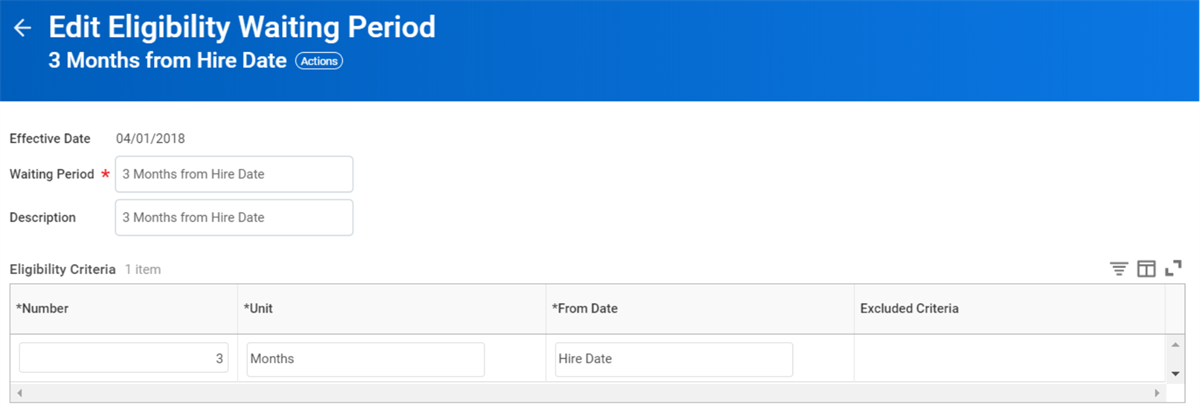
Employees in the waiting period do not receive the bonus award during the waiting period. You can create and edit eligibility waiting periods. The illustration below displays the Edit Eligibility Waiting Period task with the example of 3 Months from Hire Date.
Time Proration Rule
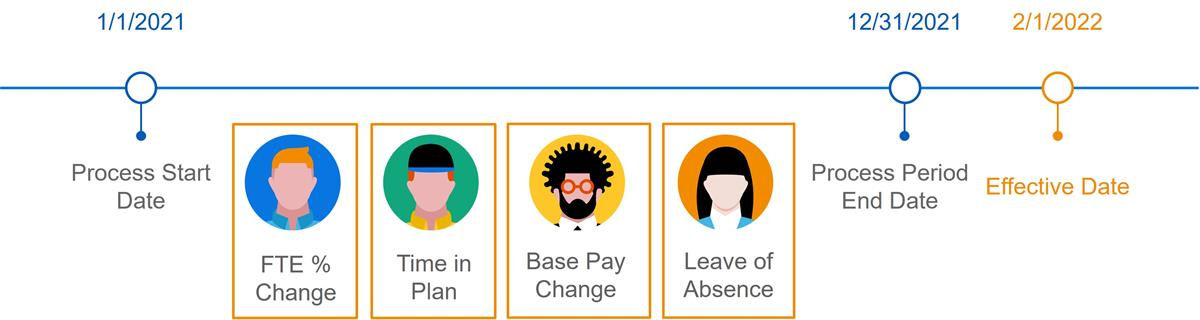
The time proration rules calculate the bonus target amounts. They calculate a percentage of time during the process period, determine the bonus amount for each segment of time, and then sum the value for each segment. This new calculation becomes part of the award pool during the bonus pool configuration step. The following are configuration options:
Option | Description |
|---|---|
Base Pay Changes in Period | Select if you want to calculate the employee's target and pool contribution based on different base pay amounts. For example, for a process period of 01/01/2020 to 06/01/2020 if an employee had a salary change on 04/01/2020, Workday will run two calculations. The first is for the salary between 01/01/2020 and 03/31/2020. The second is for the salary amount between 04/01/2020 and 06/01/2020. |
Leave of Absence | Select if you want any leave of absence removed from the process period. This calculation will use this new amount to calculate the employee's individual target amount and contribution to the award pool. |
Target Changes in Period | Select if you want to calculate the employee's target and pool contribution using different target amounts. For changes in the middle of a period, Workday runs two calculations. For example, you may have a process period of January 01, 2020 to June 1, 2020 with a target percent on bonus plan changed from 5% to 10% on May 1, 2020. The first calculation is for the amount between January 01, 2020 and April 30, 2020 at 5%. Then a second calculation runs for the amount between May 1, 2020 and June 1, 2020 at 10%. |
Time in Plan | Select if you want to use only the time the employee was in the plan to calculate the employee's target amount and pool contribution. For example, an employee has Plan A and changes to Plan B half way through the year. If a compensation review runs only for Plan B, Workday only calculates contributions to Plan B for time the worker was in Plan B. |
Time in Position | Select if you want to use only the time the employee was in the position to calculate the employee's target amount and pool contribution. |
Time since Company Service Date | Select if you want to use the employee's company service date to calculate the employee's target amount and pool contribution. |
Time Since Continuous Service Date | Select if you want to use the employee's continuous service date to calculate the employee's target amount and pool contribution. |
Time since Hire | Select if you want to use the employee's hire date to calculate the employee's target amount and pool contribution. |
Time Since Last Base Pay Increase | Select if you want to use the date on which the employee had their last pay increase to calculate the employee's target amount and pool contribution. For example, if an employee has a base pay increase on 05/01/2020 with a process period is 01/01/2020 to 06/01/2020. Then, Workday only calculates the contribution from 05/01/2020 to 06/01/2020. |
Time Since Last Merit Increase | Select if you want to use the date on which the employee had their last merit increase to calculate the employee's target amount and pool contribution. |
Scorecard Profile Changes | The Process Period End Date and the plan frequency determine the period for review. In a compensation review, this rule evaluates scorecard profile changes for participating employees. |
FTE Changes in Period | The Process Period End Date and the plan frequency determine the period for review. In a compensation review with bonus or merit, this rule will evaluate FTE changes for participating employees during this time and will affect the resulting award. |
Examples of Proration
Each proration segment uses the number of days in that segment, divides it by the number of days in the year, then calculates the percentage. Additionally, proration criteria can calculate targets or pools. If you are not using a proration rule, the process will use the employee's compensation plan defaults and profiles.
In comparison, if you select the Time since Hire proration, the employee's hire date will calculate the employee's target amount and pool contribution.
Example
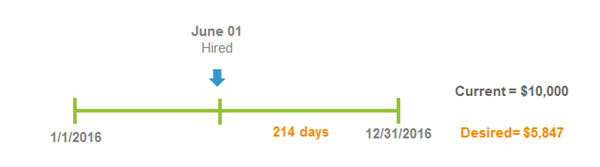
: On June 01, 2020, an employee was hired with a base pay of $100,000 and a bonus target of 10%. If we do not use Time since Hire in the proration rule, the calculation will not consider the employee's hire date. The calculation will be: $100,000 × 10%=$10,000.0 If we prorate for Time since Hire, the following calculates: (($100,000 × 10%) × 214) = $5,847.In this example, the prorated bonus target will display to the manager and they can enter in the employee's bonus amount. Keep in mind the proration calculation is only a suggestion. As long as the bonus amount is discretionary, and manager can enter any value.
Using delivered advanced fields you can drill in and review the calculation using days since hired. These fields include:
- Bonus Target Change Percent
- Actual Bonus Amount
- Rounded Total Bonus Target Amount
Another example of a proration criterion is scorecard profile changes. This criterion will prorate on changes to the scorecard profiles during compensation and staffing events. Transactions such as
Edit Position
, Move Workers
, and Assign Superior Organization
cause a scorecard profile change, but is not included with the proration calculation.Important
: The Change Job
or Request Compensation Change
events must have an effective date on or before the compensation snapshot date will impact profile proration.Workday prorates bonus awards based on changes in scorecard profiles when the bonus plan has a scorecard with profiles and will evaluate:
- Plan Modifier
- Performance Factor Scorecard
- Performance Factor Scorecard Modifier
- Compensation Matrix Modifier
Example
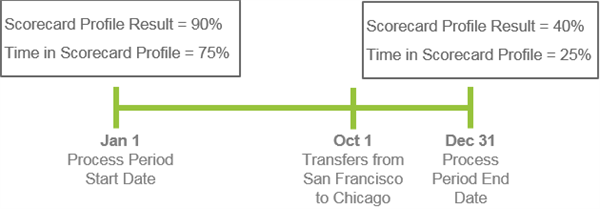
: An employee transfers from San Francisco to Chicago on October 1. This transfer causes a scorecard profile change on his bonus. The employee has a base pay of $100,000 with a 10% target.If we do not use scorecard profile changes in period in the proration rule, the calculation will not consider the scorecard profile changes. The calculation will be: $10,000 × 40%=$4,000.00.
If we use the scorecard profile changes in period in the proration, the calculation will consider the scorecard profile changes. The calculation will be: ($10,000 × 75% × 90%) + ($10,000 × 25% × 40%) =$7,750.00.
FTE Changes in Period prorates on FTE changes for both merit and bonus. The target calculates based on a prorated compensation basis for each period. The
Edit Position
or Change Job
business processes make FTE updates and changes.Example
: On January 01, 2020, an employee was hired with an FTE at 50% and a base pay of $100,000. On July 01, 2019, the employee has a Change Job event with an FTE at 100% and a base pay of $100,000.If we do not use the FTE Changes in Period in the proration rule, the compensation basis will use $100,000 for the calculation. If we prorate for FTE changes in period, the following calculates:

Eligible Earnings Override
An eligible earnings override is a delivered compensation basis. This basis allows you to define an employee's eligible earnings. Typically you want to base bonuses on actual earnings. Actual earnings may include actual hours worked, overtime, and additional payments not captured in compensation.
The
Create Eligible Earnings Override Period
task defines the eligible earnings period in which an employee's earnings are eligible for a bonus. Create the eligible earnings override period if you plan to load or manually create the eligible earnings override. If you are using eligible earnings override to calculate the employee's bonus, then you would load in the amount before running the bonus process.Steps to Create Eligible Earnings Override
- Create a bonus plan that uses a compensation basis of eligible earning override.
- Access theCreate Eligible Earnings Overridetask.
- Enter the employee and select the eligible earnings override period. If the employee has multiple jobs, you will need to select the position associated with the bonus plan.
- Select the bonus plans to associate the employee's eligible earnings with for the given period or select Apply to All Bonus Plans. You can assign only one eligible earning to a worker for a given plan and period.
- Enter the exact amount and currency for the employee's eligible earnings override that calculates the bonus.
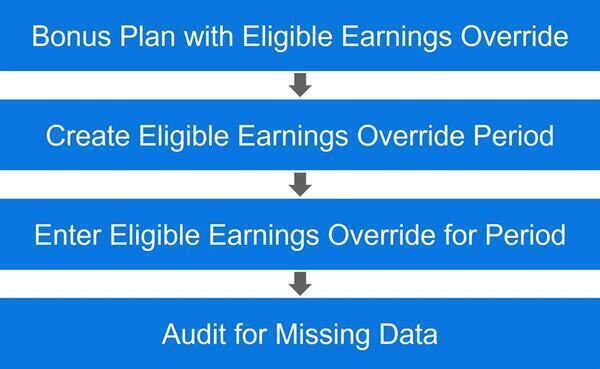
Lastly, use the
Employees without Eligible Earning Override
audit to list all employees with a zero value.Chapter Summary
A bonus plan defines a flat amount or a percent with multiple targets. The bonus plan can include employee performance, company performance, or serve as guidance for the managers entering the awards.
An eligible earnings override is a delivered compensation basis that allows you to define an employee's eligible earnings. This allows you to use a specific value for an employee's estimated earnings to calculate salary-based bonuses. You can also associate eligible earnings overrides with percent-based stock plans.
Simple Annual Bonus