
Bonus Plan with Individual Performance Factors
Overview
Workday bonus plans include options to use factors such as employee or company performance in the calculation of the pool or as guidance for entering the awards.
Objectives
By the end of this chapter, you will be able to:
- Create a weighted compensation matrix.
- Initiate and run a bonus plan with performance factors.
Compensation Matrix
- For an amount or percent-based plan, the compensation matrix can support the bonus plan structure.
- For an amount-based bonus plans, an amount based or weighted compensation matrix is appropriate.
- For a percent-based plan, a percent-based or weighted compensation matrix is appropriate.
If you use compensation matrices and include performance ratings, Workday recommends that you complete performance ratings before the process period end date.
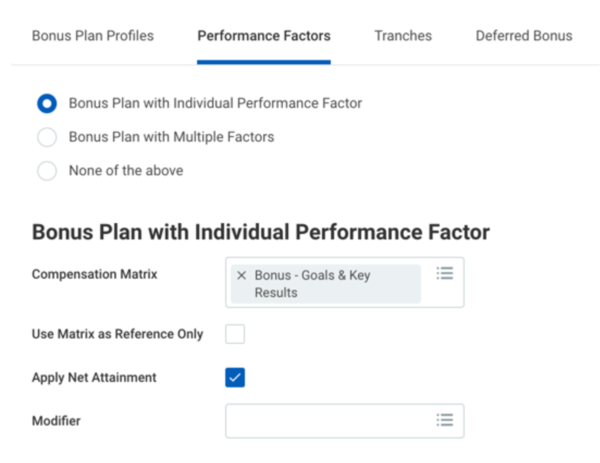
Performance Factors Tab
Configuration Options | Description |
|---|---|
Compensation Matrix | Identifies the compensation matrix that can calculate the employee's target amount during compensation review. Only available when you select a bonus plan with individual performance factors. |
Use Matrix as Reference Only | Select this checkbox if you do not want an employee's target or the calculated pool to use the compensation matrix. It will only display the guidelines on the grid during the compensation process. Only available when you select bonus plan using a compensation matrix. |
Apply Net Attainment | Select this checkbox to include a worker's net attainment in a bonus calculation using the net attainment percentage. If there is no net attainment, the system will default to 100% net attainment. |
Weighting (Matrix) | The total weight between all compensation matrices and scorecards must equal 100 percent. Only available when using Bonus Plan with Multiple Performance Factors. |
Compensation Scorecards | Identifies the scorecards used to calculate the employee's bonus award during the bonus process. Requires using at least one scorecard. Only available when using the Bonus Plan with Multiple Performance Factors checkbox. |
Weighting (Scorecards) | The total weight between all compensation matrices and scorecards must equal 100 percent. Only available when using Bonus Plan with Multiple Performance Factors. |
Modifier | If you want to modify an employee's individual performance or performance scorecard award amount, select a scorecard. |
Talent and Performance in a Compensation Review Process
Timing is crucial when using talent and performance data in a compensation review. If you are using a rating scale, the performance review should have all manager ratings completed before initiating the compensation review process. The Compensation Review Performance Rating field is a common field to include in the individual columns of the grid. It provides the manager's overall rating from the performance reviews selected during the compensation review process initiation.
If you have completed performance reviews, but your compensation review process is not pulling this information into the grid, it may be due to a date issue. The performance review period end date must be within the compensation review process period.
Note
: If you pull performance ratings from a completed performance review into an editable field on the grid, rating changes will not update the rating in the performance review. If you pull talent data into the performance tab of the grid, this information updates in the Workday system after the compensation review process is complete.Net Attainment
When using employee reviews, you can gather net goal attainment percentages to track performance and compensation according to goal accomplishment. Minimum, target, and maximum values are part of employee reviews and goal setting. When configuring net goal attainment, you can determine the goal payout band and the method of generating net attainment.
Net attainment populates using a calculation, manual entry, or EIB upload.
Apply Net Attainment is the only checkbox or configuration in advanced compensation. If you select the Apply Net Attainment checkbox, Workday uses net attainment as a multiplier for the bonus target during the compensation reviews business process.
Target Only
Includes target and actual payouts. For example:
- If an employee has an individual goal to increase revenue by 20%, and the goal is achieved, net attainment is 100%.
- If revenue increases by 10% then half the goal is achieved and net attainment is 50%.
- If revenue increases by 45%, double the goal, then net attainment is 225%.
Single Slope with Minimum and Maximum Bands and No Target.
Includes minimum, maximum, and actual payouts. Examples include utilization goals. For example, you could have a goal of 80% utilization with a goal pay-out band of 50% - 150%. With this example, the following could occur.
- If you had a utilization of 80%, your net attainment is 100%.
- If your utilization was 65%, your net attainment would be 0% because the minimum was not achieved.
- If your utilization is 115%, your net attainment would be 150%.
Dual Slope with Minimum, Maximum, and Target
Includes minimum, maximum, and actual payouts. Examples include sales goals and commission bonuses. You will have minimum and maximum goal payout bands using percentages. For example:
- If your goal is $100,000 of sales, and you reach your goal, net attainment is 100%.
- If you meet your goal with $110,000 in revenue, your net attainment would be 120%.
Security Note
: To configure goal payout bands for net attainment, ensure security is properly setup using the domain Setup: Employees Reviews in the Performance and Goals functional area.Chapter Summary
Workday bonus plans can include individual factors to calculate pools or provide guidance for entering the awards.