Bonus Plan with Scorecard
Overview
Bonus plans use scorecards for company or divisional goals to calculate an employee's bonus target or payout.
Objectives
By the end of this chapter, you will be able to:
- Summarize the purpose of scorecards.
- Configure a bonus plan using a company funding scorecard.
- Identify different bonus configurations using scorecards.
- Run the bonus process using initial scorecard results, then using updated scorecard results.
Scorecard and Modifiers
Workday allows you to customize targets for each assigned employee. In addition, bonus plans provide the options of a bonus plan profile, scorecards, rounding rules, and performance factors. When setting up a bonus, there are several configurations for scorecards and modifiers you can include:
Configuration Options | Description |
|---|---|
Company Funding Scorecard | A compensation scorecard assists in adjusting the overall bonus pool based on company performance. The company funding scorecard includes:
|
Plan Modifier Scorecard | You can add modifiers to the:
|
Compensation Scorecards | Identifies the scorecards that calculate the employee's non-discretionary bonus award during the compensation review. Enter at least one scorecard. Only available when using Bonus Plan with Multiple Performance Factors. |
Compensation Scorecard
The compensation scorecard provides a list of weighted criteria used to evaluate company performance or another performance factor. Compensation scorecards track company performance as standalone information. This information can fund a bonus plan and adjust the funding amount after bonus approvals. The
Create Compensation Scorecard
task defines criteria for rating the performance of the company, division, or business unit. You can rate these performances at any time during the bonus plan process, but when you rate performance, it affects bonus funding results.Workday uses the default scorecard goals for all employees unless there is a scorecard goals profile.
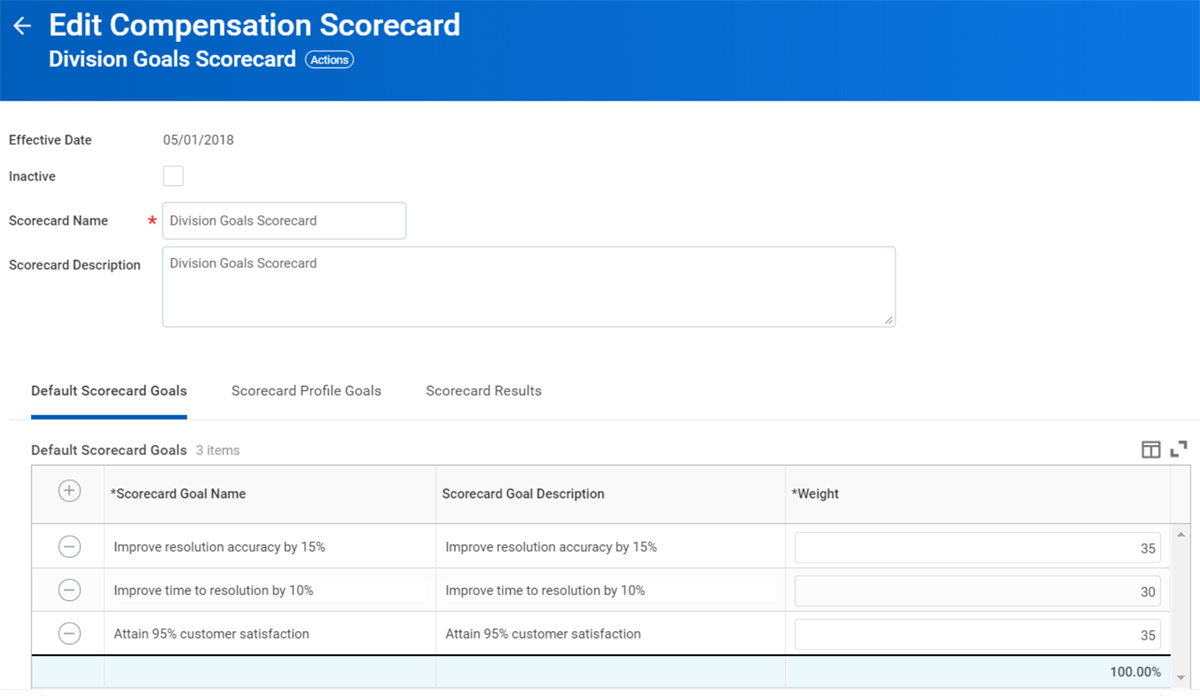
Create one or more scorecard profile goals for employees with a different goal than the default scorecard goals. The scorecard profile goals use the eligibility rules to default the scorecard goal and weight of the goals. To use compensation scorecard data in the compensation review, you must add the scorecard to the bonus plan, and enter the qualifying performance results.
Company Funding Scorecard
Workday provides options to fund bonuses using company performance. You can apply company performance results that fund the bonus pool when you set up the compensation review. Assign the compensation scorecard to the bonus plan, and then rate the company performance before you initiate the process.
Note:
Company Funding Scorecards cannot have scorecard profile goals. Alternatively, all other scorecards can have profile goals.Bonus Funding Based on Compensation Scorecards
Workday provides several options for funding bonuses to factor in company performance.
If You | And You Rate Performance Before Bonus Process Initiation,
then | And You Rate Performance After Bonus Approval,
then |
|---|---|---|
Apply company performance to the initial bonus funding pool only. | Workday factors company performance results into the bonus funding pool calculation to determine defaults. | The performance results have no impact because you have not added the Manage Bonus Process Funding business process step to the organization's Initiate Compensation Review Process . |
Apply funding to approved bonuses, you must add the Manage Bonus Process Funding step. | Workday assumes 100% funding. | Workday provides you with a step that enables you to use the new rating or revise the funding percent to whatever you want. |
Apply company performance to the initial bonus funding pool and apply funding to approved bonuses. | Workday factors company performance results into the bonus funding pool calculation to determine defaults. | Workday factors company performance results into the approved bonus. |
Use the company performance scorecard only (not assigned to any bonus plan). | Performance results have no impact bonus funding calculations. The scorecard is for tracking purposes only. | Performance results have no impact bonus funding calculations. The scorecard is for tracking purposes only. |
Process bonuses without accounting for company performance (not assigned to any bonus plan). | There is no impact to existing bonus processing. You are not using compensation scorecards or the Manage Bonus Process Funding business process step. | There is no impact to existing bonus processing. You are not using compensation scorecards or the Manage Bonus Process Funding business process step. |
View Bonus Calculation and Audits
The
View Bonus Calculation
report displays calculations for:- Total Target Amount
- Actual Bonus Amount
- Base Target Amount
- Discretionary Target Amount
- Nondiscretionary Target Amount
This report provides transparency and sets expectations when testing your compensation review. This report is for in-progress or completed bonus awards using the shared participation step.
Compensation Review Audit Report
In addition to the
View Bonus Calculations
report, there are compensation review audit reports to provide a better understanding of available data. These audit reports are secured in the domain Worker Data: Compensation Management by Organization.Manage Bonus Process Funding
The
Manage Bonus Process Funding
task is an optional step that you can add to the compensation review. The Manage Bonus Process Funding
task allows the compensation administrator to revise the funding percent. If they revise the funding, the amount added or deleted will impact the employee's bonus payout.Performance Factors
When creating a bonus plan, you can include multiple targets and target profiles to calculate bonus awards. Employee performance ratings and company metrics become part of the compensation review by using a compensation matrix, compensation scorecard, and modifiers.
The three configuration options are:
- Bonus Plan with Individual Performance Factor
- Bonus Plan with Multiple Factors
- None of the Above
Bonus Plan with Individual Performance Factor
If you only want to use a compensation matrix, select Bonus Plan with Individual Performance Factor, and then select a compensation matrix. Note that you can include only one compensation matrix.
Bonus Plan with Multiple Factors
If you select the Bonus Plan with Multiple Factors option, you can:
- Use a combination of the compensation matrix and one or more compensation scorecards.
- Use a weighted compensation matrix.
- Use the compensation scorecards without a compensation matrix. The total weighting must add up to 100%.
- You can add a modifier to the compensation matrix or compensation scorecard to drive bonus calculation based on matrix or scorecard results.
Bonus Plan Modifiers
Bonus plan modifiers allow you to modify the bonus award at the plan, matrix only, individual performance, or compensation scorecard level. Bonus plan modifiers impact the pool and employee payout calculation. The results apply to the total bonus awards and includes the estimated cost calculations.
Modifiers On | Impact |
|---|---|
Company Funding Scorecard Modifier | The plan modifier scorecard results apply to the total bonus award pool and employee payout. |
Scorecard Modifier with Compensation Matrix | The calculated target impacts the bonus modifier scorecard results. The modifier scorecard results apply to the individual target amount. |
Scorecard Modifier with Compensation Matrix for Individual Performance Factor | The bonus modifier scorecard results apply to the individual target amount. |
Scorecard Modifier with Compensation Scorecard | The bonus modifier scorecard results apply to the compensation scorecard. |
Scorecard Results
The
Create Compensation Scorecard Results
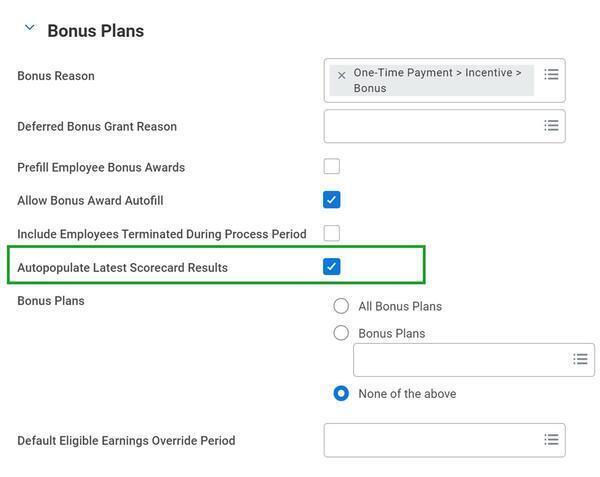
task rates the performance level for each goal. If you set up the scorecard results to calculate employee bonuses, then Workday uses the weighted results percent in the compensation review.The scorecard profile results are in a second tab. If you are using a scorecard with multiple profiles, Workday recommends using a compensation process template and selecting the Autopopulate Latest Scorecard Results checkbox. Create the scorecard results and be sure they have the latest effective date. The system will automatically select those results when using the template to initiate a compensation review.
Update Scorecard Results After Launch
You can update scorecard results after launching a compensation review. If the manager is in the process of entering a bonus increase, you can only update the pool. Once the managers have entered the bonus awards, you can update the pool and bonus amount.
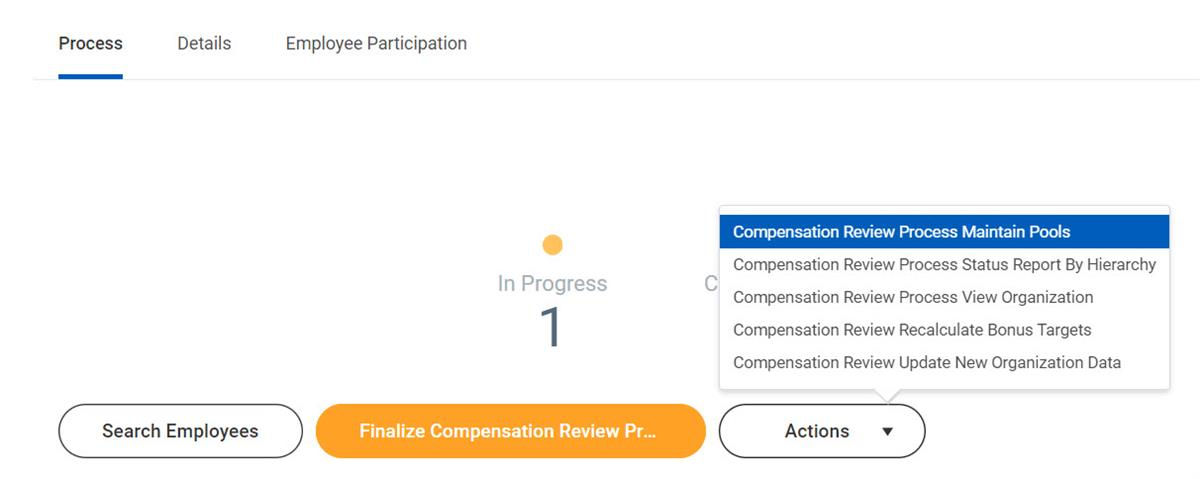
After the launch of compensation, the compensation administrator can update the scorecard results using the control page or enter the task name in the search box. You have options to either update the pool only or update the pool and awards. These options are available, depending on when you recalculate the pool and awards.
- Update Pool and Keep Bonus Amount Fixed: Available when managers are in the process of entering bonuses.
- Update Pool and Keep Bonus Factor % Fixed: Available when managers complete entering the bonuses.
The Compensation Review Process Actions Menu lists the options that are available, as illustrated below.
Bonus Scorecard & Proration Calculation Scenarios
Scenario 1: Simple Bonus Plan Only
A basic scenario where the employee has a $100,000 Salary and a 10% bonus. There are no scorecards, modifiers, or compensation matrix to amend the final budget allocation.
Bonus Calculation
The salary for the employee is $100,000, which makes up the Total Base Pay. The bonus plan takes 10% of that number with no other factors.
The result is a simple bonus pay-out of $10,000.
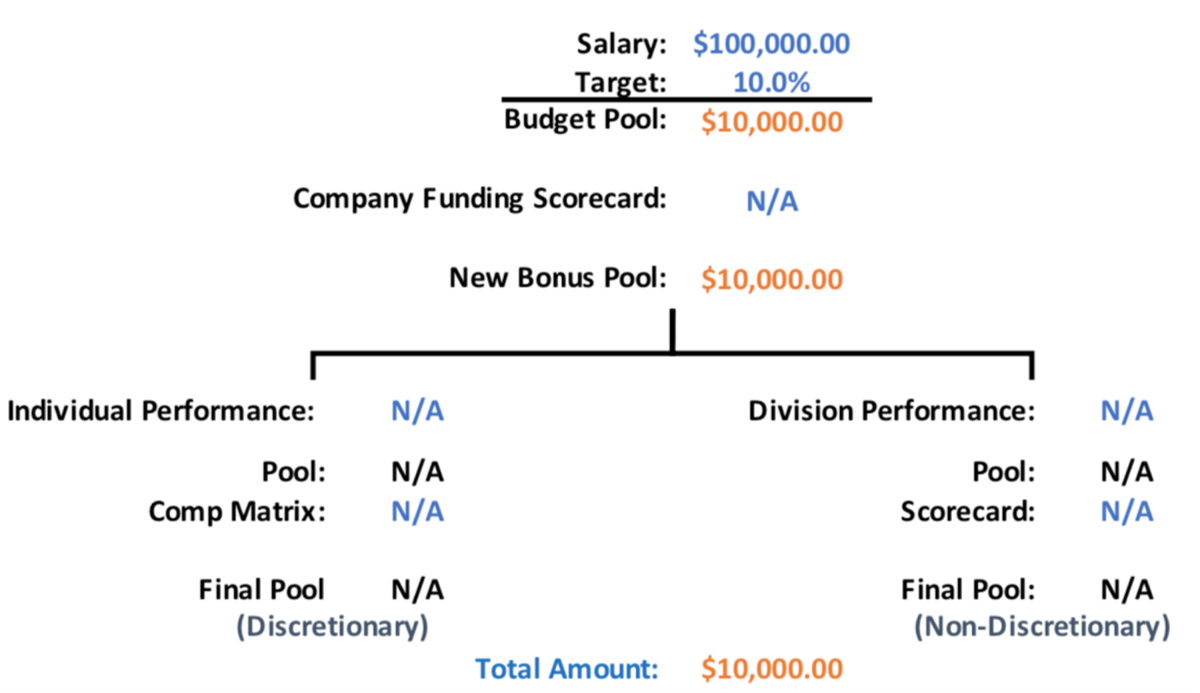
Workday Bonus Plan
A simple percent-based bonus plan that has no other factors. The bonus is only a percentage of Total Base Pay.
Workday Bonus Pool
Basic calculation of the overall pool with no other influencing factors.
Scenario 2: Company Funding Scorecard Factor Only for Bonus
This scenario has an employee at $100,000 Salary and a 10% bonus. A single company funding scorecard uses the final budget allocation with no other factors.
Bonus Calculation
The salary for the employee is $100,000, which is the total base pay. The bonus plan takes 10% of that number, which leaves the estimated budget at $10,000.
The company funding scorecard now applies its modification to the resulting amount, taking 97% of the $10,000 amount.
The result is a bonus pay-out of $9,700.
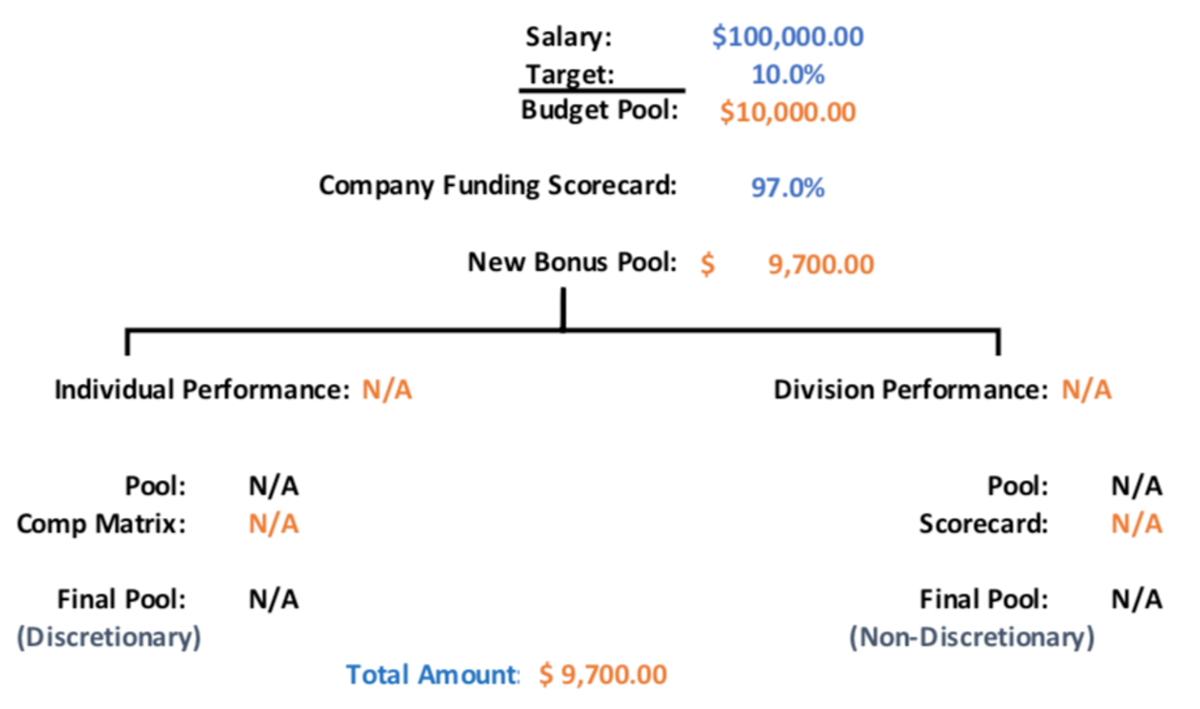
Workday Bonus Plan
A percent-based bonus plan that uses the company funding scorecard to modify the overall budget. The company funding scorecard will modify the result of the bonus percent of Total Base Pay.
Workday Bonus Pool
The overall estimated budget was $10,000, but because of the company funding scorecard, it lowers the pool amount to $9,700.
Scenario 3: Bonus Plan Using Compensation Matrix and Division Scorecard
This scenario has an employee with a $100,000 salary and a 10% bonus. There are no company funding scorecards, but the employee's performance review will use a compensation matrix to amend the final budget allocation. In addition, the employee's division scorecard will impact the overall bonus allocation. Performance and division goals are equally weighted.
Bonus Calculation
The salary for the employee is $100,000, which is the total base pay. The bonus plan takes 10% of that number. This leaves the estimated budget at $10,000. The result splits in half, allocating $5,000 to the performance component and $5,000 to the division scorecard component.
The performance component uses a compensation matrix to determine the percentage. In this example, the employee's rating is a 4, which falls into the minimum and maximum value on the matrix of 75% - 100%. To apply a percentage, Workday uses the midpoint of 87.5%, which results in $4,375. This is a discretionary amount and any changes to the bonus plan use this number.
The division scorecard calculates goals for each division. Each goal has its own weight to further define the correct half, in this case, an overachievement of 105.10% resulting in $5,255. This is a nondiscretionary amount and is committed money to the employee and is not editable.
The results of each scorecard total the final bonus amount of $9,630.
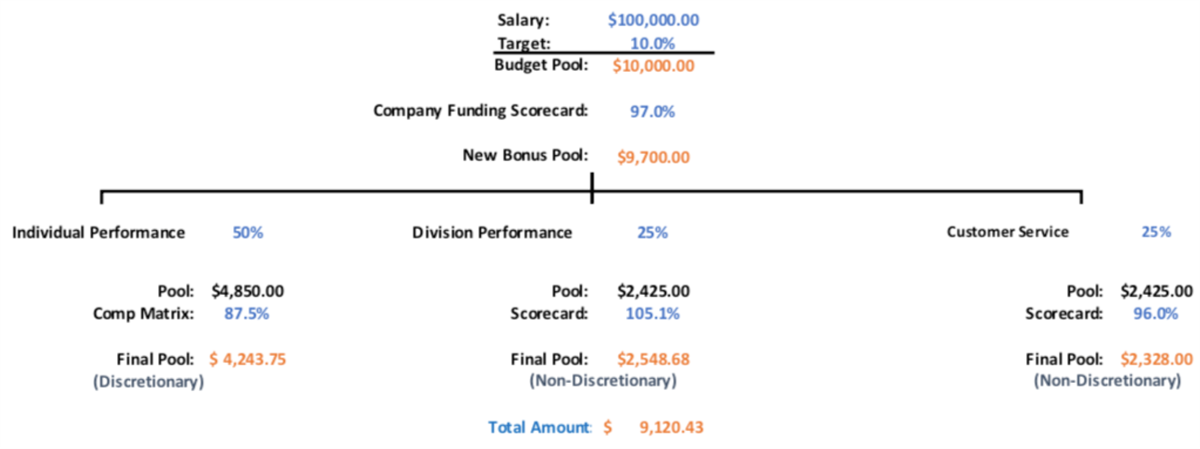
Workday Bonus Plan
A percent-based plan that uses multiple factors to influence the overall budget. There are no company scorecards, but the two factors are each weighted 50%.
Workday Bonus Pool
The estimated budget was $10,000, but it was split between discretionary and nondiscretionary. As a result, is lowered to a pool amount of $9,630.
Scenario 4: Bonus Plan with Multiple Factors
This scenario uses multiple factors to impact, Assume the employee's base salary of $100,000 with a 10% bonus. The company funding scorecard modifies using a financial metric scorecard. Additionally, the bonus is divided three ways:
- Employee performance 50%
- Division scorecard 25%
- Customer satisfaction scorecard 25%
Bonus Calculation
The Salary for the employee is $100,000, which is the Total Base Pay. The bonus plan takes 10% of that number. This leaves the estimated budget at $10,000. The company funding scorecard now applies its 97% modification to the value, resulting in $9,700.
The performance side uses a compensation matrix to determine its percentage. In this example, the employee was rated a 4, which falls into the min/max value on the matrix of 75% - 100%. To apply a percentage, Workday uses the midpoint, which is 87.5%, and results in $4,243.75. This is a discretionary amount.
The division scorecard makes up 25% of the individual target. Each goal entered has its own weight to further define the correct percentage that should be used by the bonus plan. The result of the division scorecard is applied to the division portion, which is an overachievement of 105.10% resulting in $2,548.68. This is a nondiscretionary amount and is committed money to the employee and cannot be changed.
The customer service scorecard comprises 25% of the individual target. The 96% result of this scorecard is applied to the customer service portion, which results in $2,328. This is a nondiscretionary amount, is committed money to the employee, and cannot be changed.
Finally, the overall plan modifier of the financial metric scorecard is used to place a percentage factor across all the various performance factors to deduct each portion by 97.5% resulting in a total bonus value of $8,892.41.
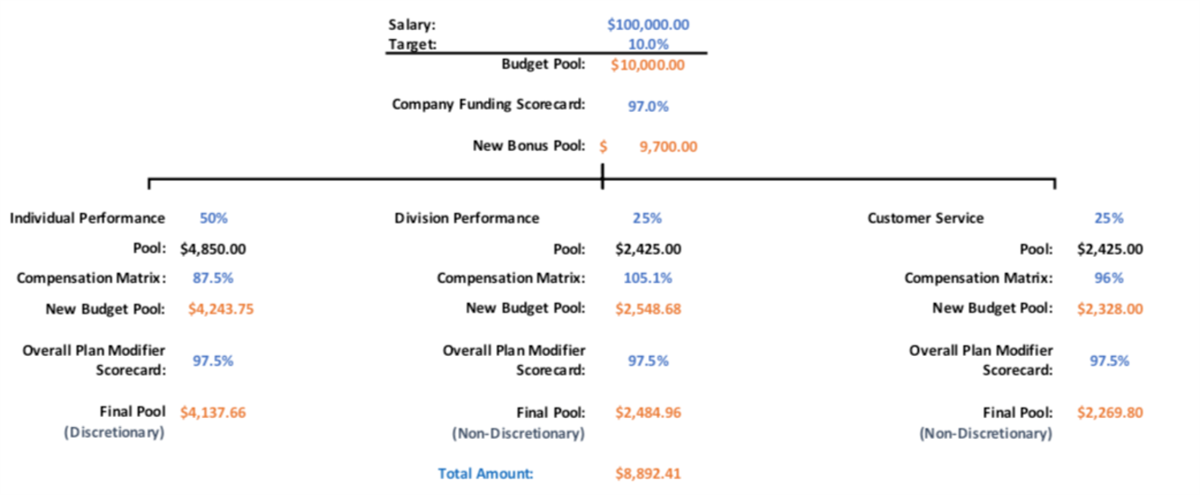
Workday Bonus Plan
This complex bonus plan has a company funding scorecard as well as a modifier to figure out the overall funding level. After that calculation is complete, the result is split among a performance review adjustment as well as multiple other scorecards for the division and the customer satisfaction achievement.
Workday Bonus Pool
The overall estimated budget was $10,000, but it was then split between discretionary (compensation matrix portion) and nondiscretionary (division and customer satisfaction scorecard portion) and was lowered to a pool amount of $8,892.42.
The estimated cost of $9,167.44 is the amount of the target after all the individual performance factors and modifiers are calculated without the company funding scorecard being factored in.
Employee Rewards
The target values are displayed for each portion that makes up the total bonus figure of $8,892.42.
The dollar figure listed as a factor target is used as the baseline for the additional calculations for each section. Examples include a compensation matrix, scorecards, and modifiers.
The resulting dollar figure is listed for each portion in the Amount column.
Scenario 5: Bonus Plan Using Compensation Matrix and Division Scorecard as Modifier
This scenario has an employee with a $100,000 salary and a 10% bonus. There are no company funding scorecards, but the employee's performance review will use a compensation matrix to amend the final budget allocation. In addition, the employee's division scorecard will impact the overall bonus allocation, but unlike using multiple factors, you want to keep all awards as discretionary.
Bonus Calculation
The salary for the employee is $100,000, which makes up the Total Base Pay. The bonus plan takes 10% of that number. This leaves the estimated budget at $10,000. The result is then modified by the employee's performance and the division scorecard is then used as an additional modifier.
The performance factor uses a compensation matrix to figure out its percentage. In this example, the employee was rated a 4, which falls into the minimum or maximum value on the matrix of 75% - 100% (these ranges are defined by the customer). To apply a percentage, Workday uses the midpoint of the minimum or maximum numbers to get the 87.5%. The $10,000 budgeted bonus becomes $8,750 after the compensation matrix percentage is applied.
Remember, there is an option to use the compensation matrix as "Reference Only," in which case 100% of the budget for the bonus will be allocated leaving it at $10,000.
The division scorecard is used as a modifier to further affect the result of the budget. The scorecard tallies up all the goals for each division determined by a compensation eligibility rule. In this case, it is based on the organization they are in. Each goal entered has its own weight to further define the correct percentage that should be used by the bonus plan. The result of the division scorecard is applied to the bonus budget, in this case is an overachievement of 105.10% resulting in $9,196.25.
The results are fully discretionary funds of $9,196.25 that consider an employee's individual performance and the division goal achievement.
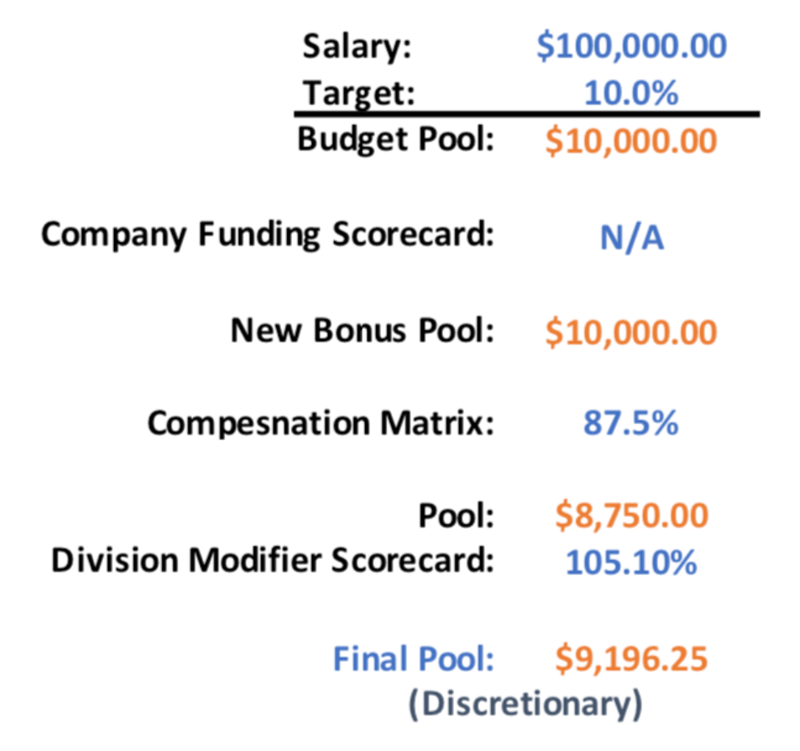
Workday Bonus Plan
A percent-based plan that uses a compensation matrix with a modifier that uses the division scorecard to influence the overall budget. There are no company scorecards being used and the global modifier is not necessary. Even though you are using both the compensation matrix and division scorecard, the bonus plan with compensation matrix option is used rather than multiple factors because the division scorecard is being used as a modifier.
Workday Bonus Pool
The overall estimated budget was $10,000, but the compensation matrix applies its impact first and then the division scorecard as a modifier applies its percentage adjustment. Thus, the budget in this example is lowered to a pool amount of $9,196.25.
Employee Rewards
Two factors impacted this bonus, but the resulting budget is entirely discretionary. Even though a scorecard was used, because it has been used as a modifier to a compensation matrix, there are no funds that are nondiscretionary and the entire amount of $9,196.25 is editable.
Scenario 6: Bonus Plan with Modifier to Remove Non-Discretionary Funds
This scenario uses multiple factors to impact the employee's base salary of $100,000 with a 10% bonus. A company funding scorecard is used to take away all bonuses if a department has an accident. Additionally, the bonus is broken down three ways:
- Performance from the employee 50%
- Division scorecards 25%
- Customer satisfaction scorecards 25%
Bonus Calculation
The salary for the employee is $100,000, which makes up the Total Base Pay. The bonus plan takes 10% of that number. This leaves the estimated budget at $10,000. The company funding scorecard now applies its 97% modification to the resulting amount, making it $9,700.
The performance side uses a compensation matrix to determine its percentage. In this example, the employee was rated a 4, which falls into the minimum or maximum value on the matrix of 75% - 100%. To apply a percentage, Workday uses the midpoint of those Min/Max numbers to get the 87.5%, which results in $4,243.75. This is a discretionary amount and any changes to the bonus plan are made to this figure.
The division scorecard makes up 25% of the individual target. Each goal has a weight to further define the correct percentage that should be used by the bonus plan. The result of the division scorecard is applied to the division portion, which is an overachievement of 105.10% resulting in $2,548.68. This is a nondiscretionary amount and is committed money to the employee and cannot be changed.
The customer service scorecard makes up 25% of the individual target. The 96% result of this scorecard is applied to the customer service portion, which results in $2,328. This is a nondiscretionary amount to the employee and cannot be changed.
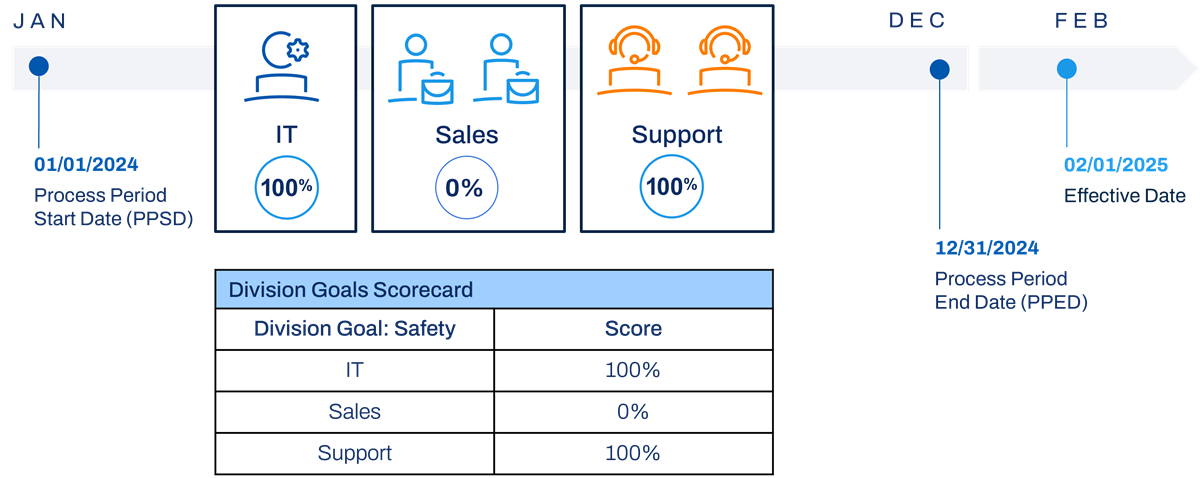
Finally, the overall plan modifier of safety scorecard is used to place a percentage factor (100% or 0%) across all the various performance factors to fully fund or remove the entire bonus based on whether or not a department had an accident. In this example, all portions of the bonus are eliminated by using a 0% resulting in a total bonus value of $0.
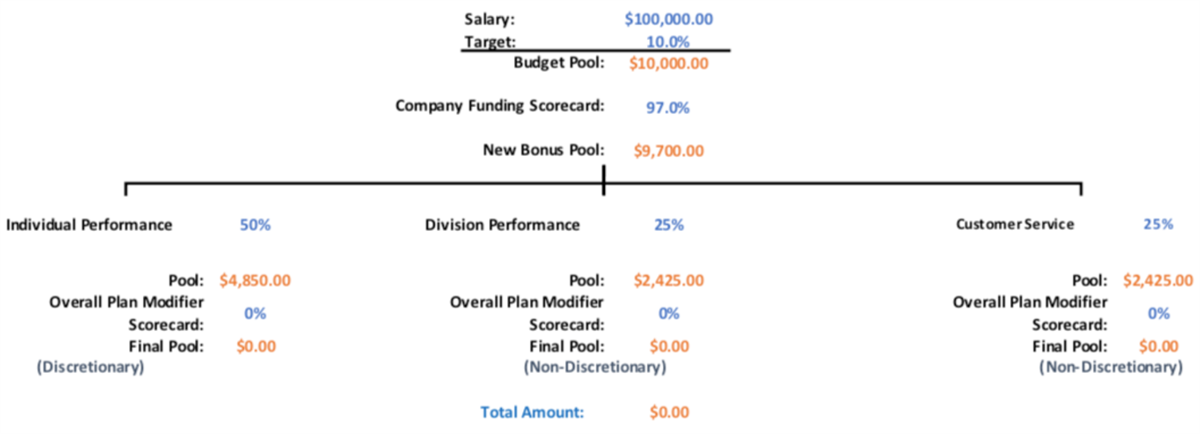
Workday Bonus Plan
This complex bonus plan has a Company Funding scorecard as well as a Safety Modifier to figure out the overall funding level. After that calculation is done, the result is split among a performance review adjustment as well as multiple other scorecards for the division and the customer satisfaction achievement.
Workday Bonus Pool
The overall estimated budget was $0, even though based on the bonus plan, performance, and division scorecard there was funding for a bonus. However, the Safety Scorecard is used as a global modifier and applied the 0% to all the various targets to take the entire bonus away.
Employee Awards
All awards have been zeroed out because of the global safety scorecard modifier. In this example, the discretionary (compensation matrix portion) and nondiscretionary (division and customer satisfaction scorecard) portions are now $0. Each portion calculated to an amount, but the final modifier of 0% took it all away.
Scenario 7: Bonus Plan Using Time Since Hire Proration with Scorecards and Matrix
This scenario has an employee with a $100,000 Salary and a 10% bonus. The employee has not been with the company the entire year. The plan uses a time since hire proration rule to pay for the days employed only. The company has decided to fund the entire bonus at 97% using a company funding scorecard and the employee's performance review will use a compensation matrix to amend the final budget allocation. In addition, the employee's division scorecard will impact the overall bonus allocation. Performance and division goals are equally weighted.
Bonus Calculation
Workday calculates the daily rate for the employee. The annual salary of $100,000/365 days is a daily rate of $274. The number of days that qualify are calculated using the process period end date and counting back to the day the employee was hired. There are 184 days between July 1 and December 31. The number of days multiplied by the daily rate provides a new amount to base the bonus plan on. Instead of $100,000, the 10% bonus uses the prorated amount of $50,416 to derive a final bonus target amount of $5,041.
The new bonus target amount is then adjusted by the company funding scorecard, which is 97% of the $5,041, leaving the new pool for the employee at $4,889.77. The result is split in half, allocating $2,444.89 to the performance side and the division scorecard side equally.
The performance side uses a compensation matrix to determine its percentage. In this example, the employee was rated a 4, which falls into the minimum or maximum value on the matrix of 75% - 100%. To apply a percentage, Workday uses the midpoint of those minimum or maximum numbers to get the 87.5%, which results in $2,139.27. This is a discretionary amount and any changes to the bonus plan are made to this figure.
The result of the division scorecard is applied to the division half, in this case is an overachievement of 105.10% resulting in $2,569.58. This is a nondiscretionary amount and is committed money to the employee and cannot be changed.
The results of each side are added together for a total bonus amount of $4,708.85.
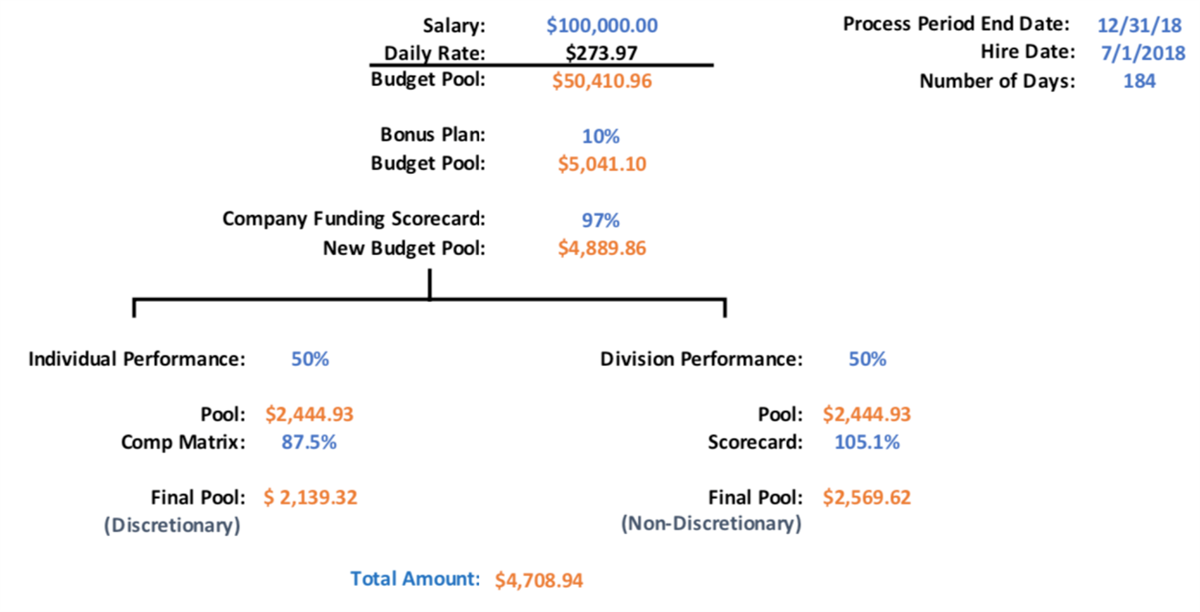
Workday Bonus Plan
A percent-based plan that uses multiple factors to influence the overall budget. There is a company scorecard influencing the overall funding and the time since hire proration rule counting only the days employed. In addition, two factors (compensation matrix and division scorecards) are used at 50% weight each.
Workday Bonus Pool
After the proration rules take effect, the original salary target of $100,000 is now $50,416. This is the figure used by the company funding scorecard to set the overall budget of $4,489.77. The other performance factors the weigh in to get the discretionary and nondiscretionary figures for the total bonus pool amount of $4,708.85.
Non-Discretionary Target
The nondiscretionary target uses the division scorecard to come up with a bonus amount that cannot be changed. Since this performance factor is weighted 50%, the starting amount is $2,444.89, half of the company funded bonus pool. After the 105.10% division score is applied, the total nondiscretionary bonus amount is $2,569.58.
Discretionary Target
The discretionary target uses the compensation matrix to come up with a bonus amount that can be changed. Since this performance factor is weighted 50%, the starting amount is $2,444.89, half of the company funded bonus pool. After the 87.5% compensation matrix score is applied, the total discretionary bonus amount is $2,139.27.
Chapter Summary
Scorecards define company goals, divisional goals, or other goals, to then use as a factor when calculating bonus targets.
Bonus with Scorecard
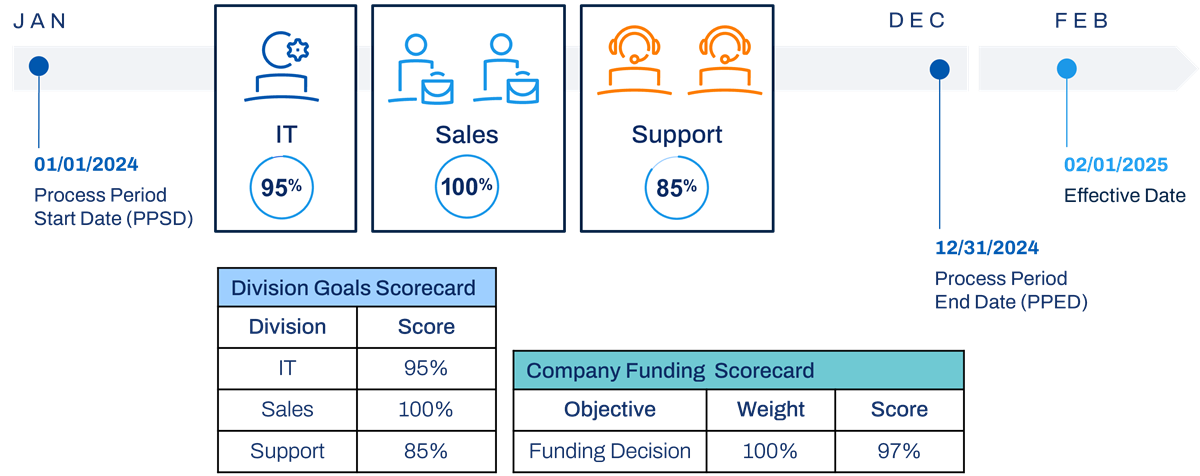
Bonus with a Division Scorecard