
Use Case: Create Learning Engagements
Audience
Professionals responsible for the initial configuration and ongoing management of creating learning engagements, including these roles:
- Learning Administrator
- System Administrator
Prerequisites
A system administrator must complete these steps before the learning administrator can create a learning engagement:
- Create an Integration System User (ISU). See Create an Integration System User (ISU) for Engagements.
- Configure Media Cloud. See Setup Considerations: Workday Media Cloud.
- Set up Drive. See Steps: Set Up Security for Drive.
- Set up Workday Notifications. See:
- Set up Notification Designer. See Steps: Set Up Security for Notification Designer.
- Set up Message Builder. See Steps: Set Up Message Builder.
- Set up Learning Instructors. See Steps: Set Up Learning Instructors.
- Set up Engagement Builder. See Set Up Security for Engagement Builder.
Overview
Engagements are groups of messages, called engagement items, that Workday delivers to target audiences based on a delivery schedule that you define. You can use Engagement Builder to create engagements for distributing learning assignments.
This use case provides an example of the process flow and the areas in Workday where you carry out each step. Your process might consist of different tasks or workflows.
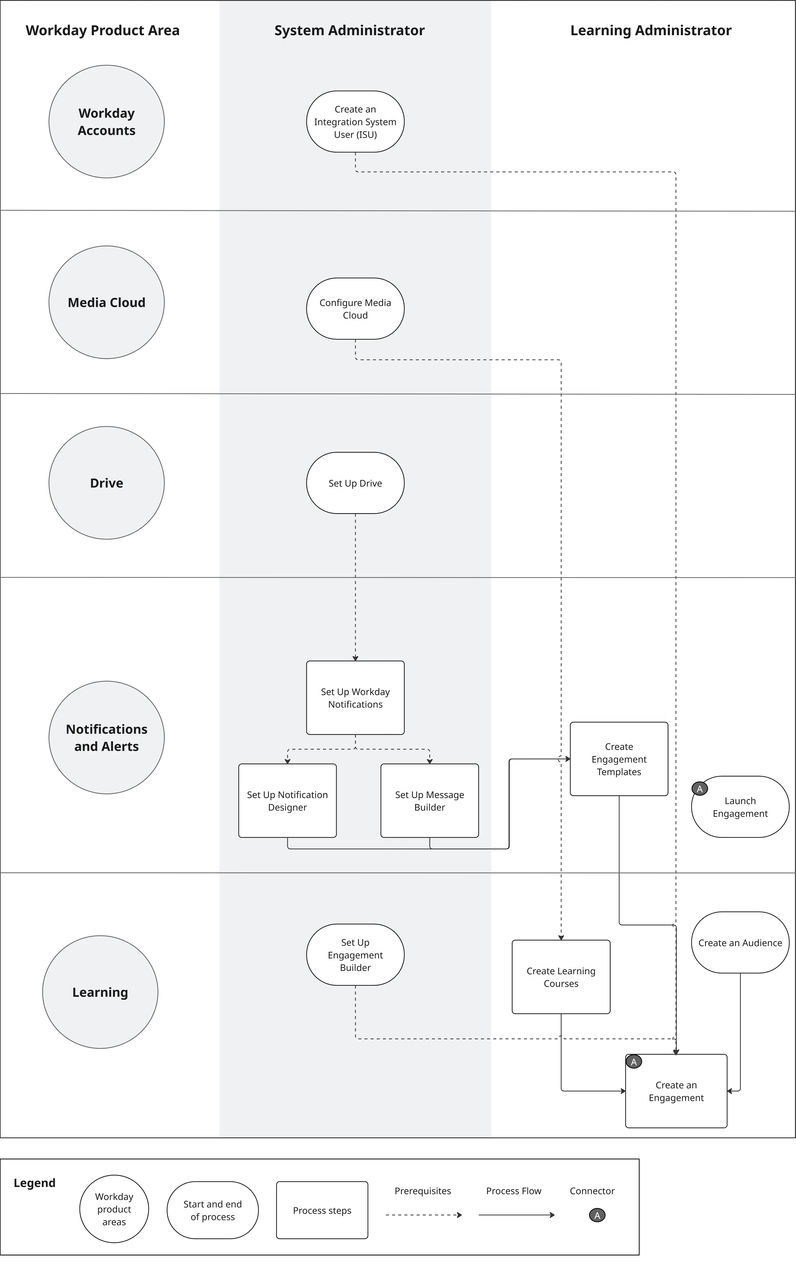
Impacted Product Areas
- Workday Accounts
- Media Cloud
- Drive
- Notifications and Alerts
- Learning
Workday Documentation Resources
For detailed information see Create a Learning Engagement.