
Use Case: Configure Security Groups and Data Access in Workday
Audience
Administrators in these roles who are responsible for carrying out each step of the process for configuring and maintaining security group membership in Workday:
- Security Administrators
- Security Configurators
Prerequisites
Security: The
Security Configuration
domain in the System functional area.Overview
You can organize security groups around shared characteristics like user types, roles, organizations, and other factors. You then use security policies to grant those groups access to domains and business processes, which secure and organize various items, including tasks, data sources, reports, and business process steps. At the highest level, domains and business processes are organized by functional area.
While you can edit domain or business process security policies to assign different groups and change their item access, many domains only allow specific groups to be secured to related policies.
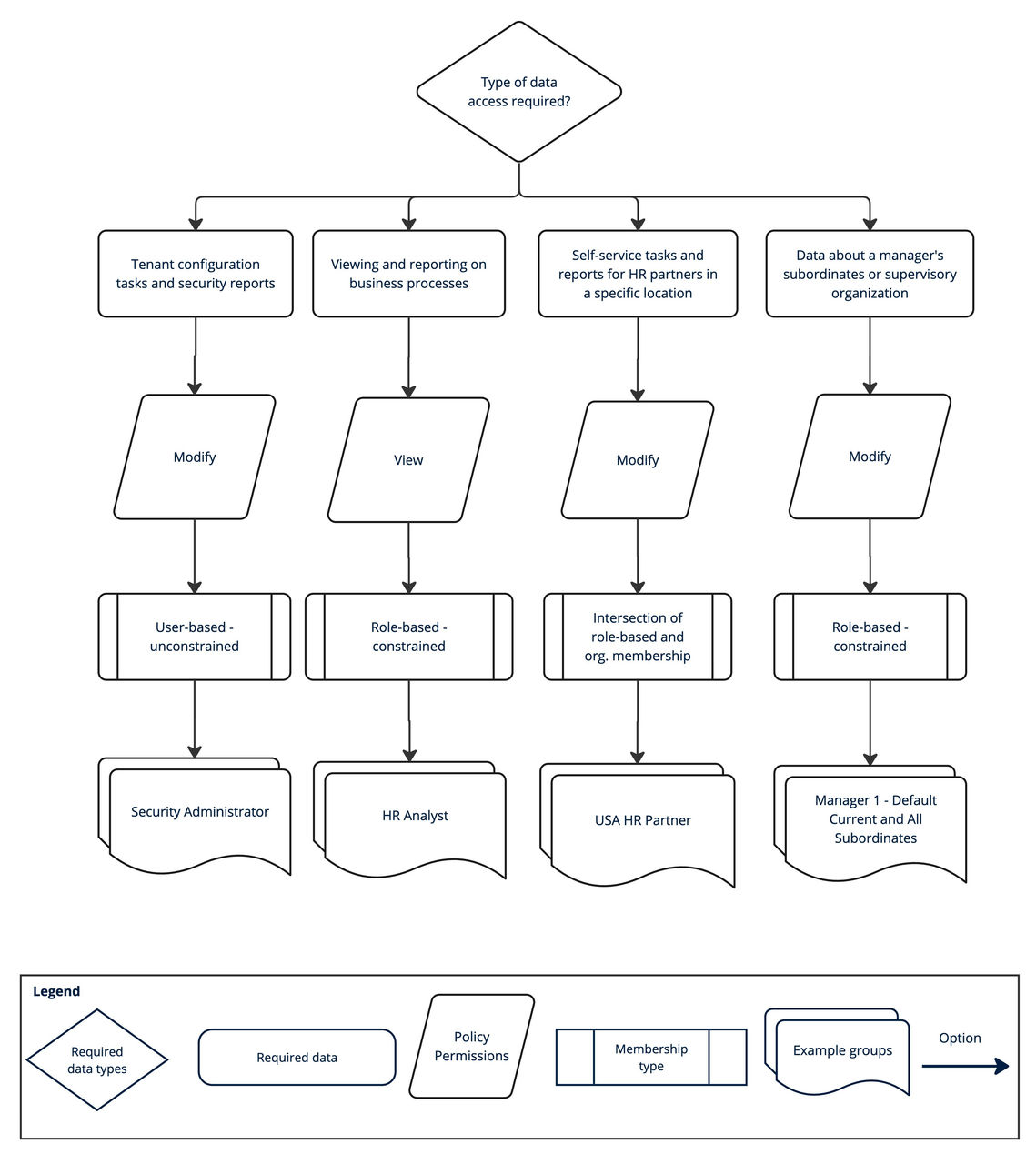
Before you create a security group, consider the type of data you want the underlying group to access and any related constraints on permissions. These factors can shape which type of group you select.
This use case provides an example of how to decide which security group meets your business needs. While your process might look different from the one outlined here, this use case offers guidance for security group selection and configuration.
Impacted Product Areas
Data Access Security (also known as Configurable Security)
Workday Documentation Resources
For more information about security group configuration, see: