
Concept: Financial Accounting in AP&C
Workday Financial Accounting in Adaptive Planning and Consolidation (AP&C) enables you to satisfy the information requirements of investors, creditors, and regulatory authorities in the post-Sarbanes-Oxley business environment.
Workday Financial Accounting in AP&C combines a unique, event-driven accounting approach with a built-in control framework. It enables you to use a robust multicompany, multicurrency model for delivering financial records and reports with speed, accuracy, and complete auditability.
The architecture also enables you to adapt to changes in your business as well as new rules and regulations. With Workday Financial Accounting in AP&C, you’re able to manage all of your accounting activity and report on that activity anytime.
This diagram illustrates the flow of financial accounting activities in Workday across a period. It displays common solutions that you can use throughout the fiscal year to enable your work.
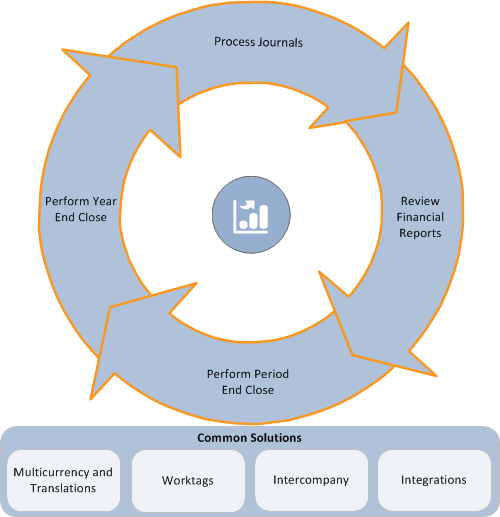
Within a given period, you can use Workday Financial Accounting in AP&C to process:
- Manual accounting journalsto record accounting data not associated with operational transactions.
- Recurring journalsto create recurring journals to automate the generation of accounting journals that you create on a repetitive basis.
- Pro Forma allocationsto see the impact of allocations when you view your financial results. The operational journals that the allocation processing creates have a status of pro forma (rather than posted). You can include the pro forma operational journals in reporting throughout the period to see the allocation impact.
You can use Workday Financial Accounting in AP&C to review:
- Activity reportsthat provide visibility into your financial activity.
- Trial balancesfor either an individual company basis or a consolidated entities basis.
- Interim financial statementsthat you can also define to meet your reporting needs. You can run and review your financial statements at any time. Workday financial statements also enable you to perform comparative reporting with other time periods or with financial plans.
While performing period close, you can:
- Record depreciation and decide how often to post that information. When you record depreciation, you can view all unposted depreciation up to that period and decide what to post.
- Finalize and post allocations you've processed in the period. You can include or exclude finalized allocations when you run financial statements.
- Run equity pickup to calculate equity earnings of a wholly or partially owned consolidated subsidiary onto the books of the parent.
- Run revaluations to revalue the foreign currency balances at period end and analyze their impact. You can create the revaluation journal manually, or use the report to create it automatically using revaluation rules.
- Update ledger period status to control activities that are available for update.
- Create adjusting journals to mark journals as adjustments and post these adjusting journals to the period in which they apply. You can include or exclude adjustments when you run financial statements.
- Close the ledger period to control journal entry and journal posting, and compute actual and budget account balances. After you close a period, you can no longer post anything to it.
- Produce consolidated financial statements to report consolidated financial information on companies using the company hierarchies that you define in Workday. You can perform consolidated reporting throughout the period, and include elimination information in the reporting at any time.
While performing year-end close, you can:
- Roll balances forward to accumulate the balance sheet balances and roll them forward to the new year. Workday enables you to repeat this task until you’re ready to close the year.
- Roll translated beginning balances forward to have Workday automatically roll forward translated beginning balances. You can drill down on translated amounts to view the journal line in the company currency and the translation currencies.
- Close the year at any time after you’ve closed all periods. Closing the year rolls forward the balances one last time. You can reopen the year if necessary.
In addition to these period activities, you can use:
- Multicurrencyto process transactions that occur in a currency other than the base currency of the recording company.
- Translationsto define different account translation rules for different needs.
- Worktagsto tag transactions and supporting data. Use worktags to gain a multidimensional view of your business so that you can easily find and report on information.
- Intercompany accountingto manage and report on business events transacted between related companies.
- Integrationsto upload third-party financial data into Workday and to send data between the systems.