
Functional Touchpoints
Overview
Workday Extend allows you to use existing functionality, like business objects and business processes, to reduce build cost and maintenance. In this phase of the design, you will explore existing business objects, tasks, and business processes that you can reuse. Then, you will identify those functional touchpoints you need to work with your developer to build. Additionally, you will consider any third-party data that you may need.
Objectives
By the end of this chapter, you will be able to:
- Determine the approach for updating app data.
- Identify the functional areas relevant to your app.
- Define the Workday roles for who will use the app.
- Determine the Workday tasks needed to complete defined actions.
- Use the API Explorer to locate a list of APIs necessary for the app.
- Describe the differences between third-party REST and SOAP APIs.
- Explain authentication considerations for third-party APIs.
- Determine user access points.
Functional Areas
Functional areas are a collection of domains or business process security policies and data models that are related to the same set of product features.
Your developer can use Workday Extend to expand upon existing functional areas, which reduces the app build cost and maintenance over time.
Workday Research
To determine how you would like to use Workday Extend, it is useful to know what Workday already offers.
To review Workday capabilities, use these resources:
- Functional Areasreport
- What's New in Workdayreport
- Workday Community
- Workday Touchpoints Kit
You may find that a configuration is more appropriate than a new app.
Working with Functional Experts
When determining net new capability, consider the advantages of configuration vs. code. With configuration, maintenance is automatic. With code, you must manually maintain functionality with each release.
When deciding whether it makes sense to configure Workday to work for your app or to code new functionality, partner with your functional expert.
Workday Extend functional experts can also help determine how a net new capability can work seamlessly with the rest of the Workday system. Working closely with the functional expert is crucial during design and after the app goes live, during maintenance. Note that you may even be the functional expert for your app.
Functional Areas Report
Use the
Functional Areas
report in Workday to view all functional areas. This task allows you to review what functional areas already exist in Workday, along with included domains and business processes. Once you have this knowledge, you can determine what you need to extend. You may also learn that Workday provides some of the functionality you planned to include in your app. In this case, you save time and resources.When you run the
Functional Areas
report, a grid displays with this information:- Workday Solution
- Functional Area
- Description
- Whether it is enabled
- Included domains
- Included business processes
You can filter this data to display only relevant rows.
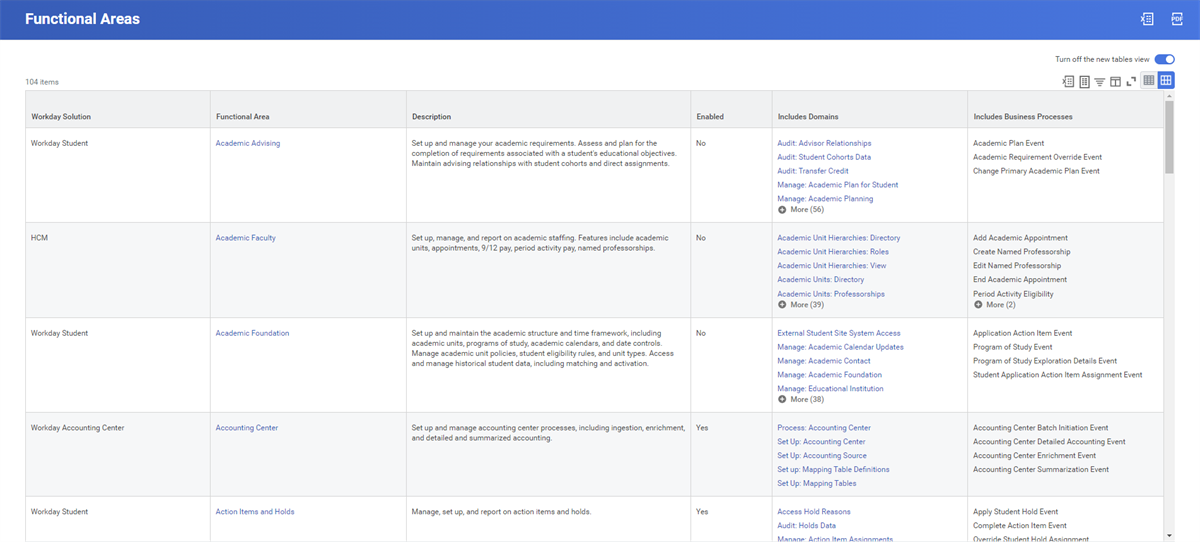
Functional Areas Report
What's New in Workday Report and Workday Community
Run the
What's New in Workday
report and use Workday Community to be sure you have the latest information on Workday capabilities.This report is filterable and shows (among other things):
- Workday Release
- Feature
- Feature Description
- Community Post (when applicable)
- Functional Areas
- Setup Effort
- New Functionality Title and description
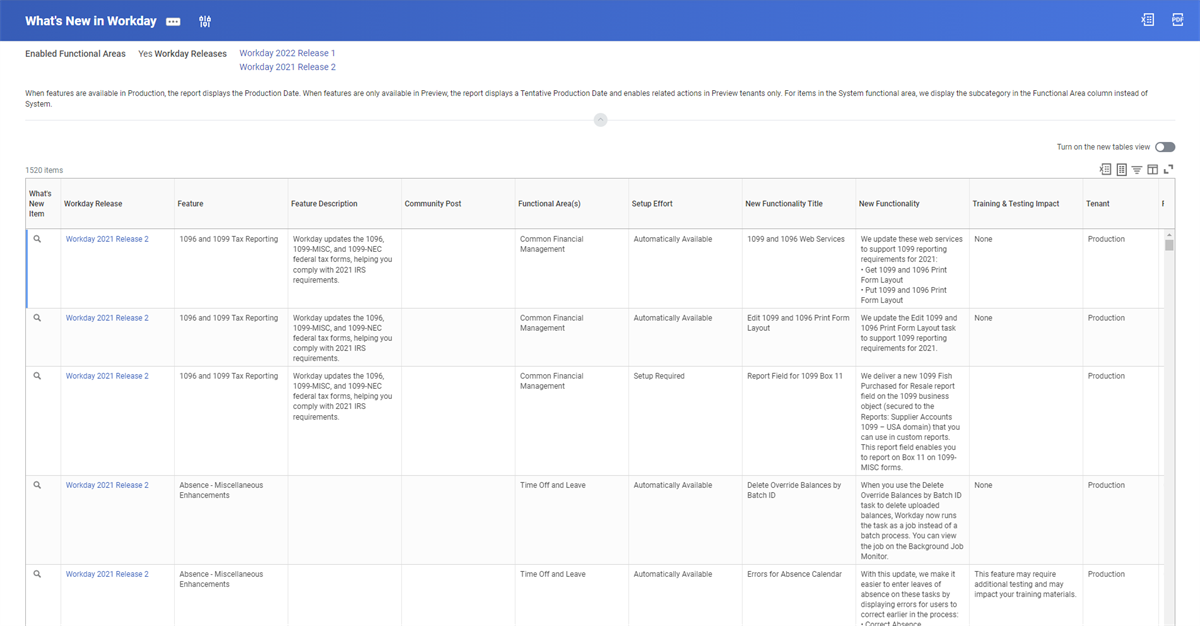
What's New in Workday Report
If it has been a few releases since your organization has adopted any new features, this report can bring you up to speed.
Workday Touchpoints Kit
In addition to the
Functional Areas
report, Workday Pros can access the Workday Touchpoints Kit on Workday Community.Use the kit to access:
- Touchpoints Diagrams
- Design Heatmaps
- Organizational Details
The Touchpoints Diagrams displays the touchpoints between Workday functional areas. Starting with a product area, choose the desired functional area to review the touchpoints between the selected functional area and other functional areas and external entities.
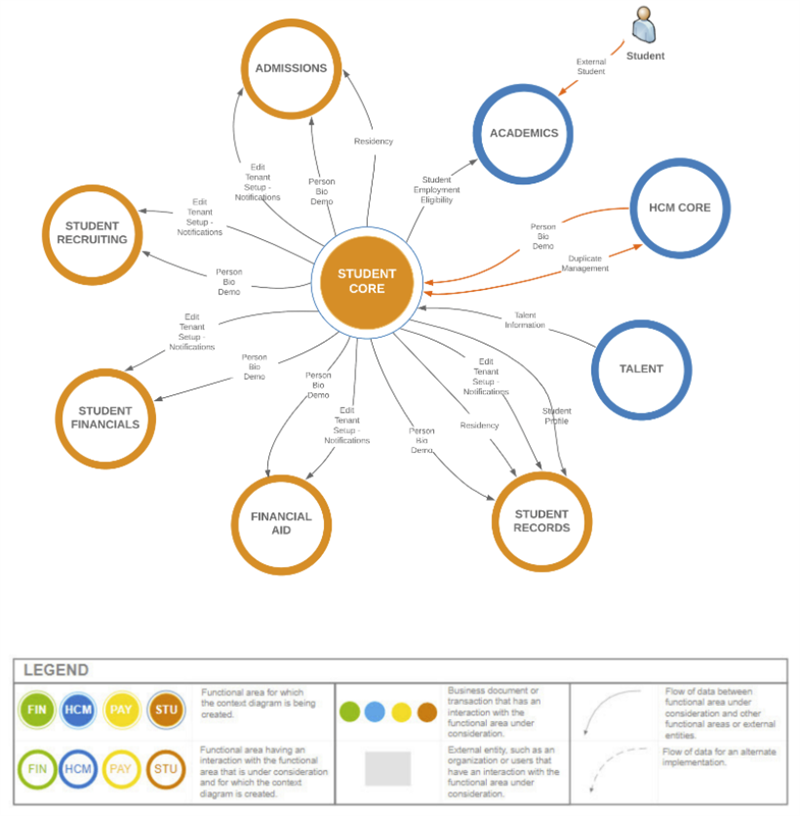
Touchpoints Diagram
Business Objects and Business Processes
Focus on smaller functional touchpoints within Workday, like business objects and business processes. What objects and processes will your app encounter at all points of the user experience?
Business Objects in Workday
Most entities in Workday are objects. Objects hold data. For example, a single instance of an object represents a worker. Objects can be related to other objects. These relationships are what make navigating in Workday easy. A position, an address, and compensation are all objects that are related to a worker.
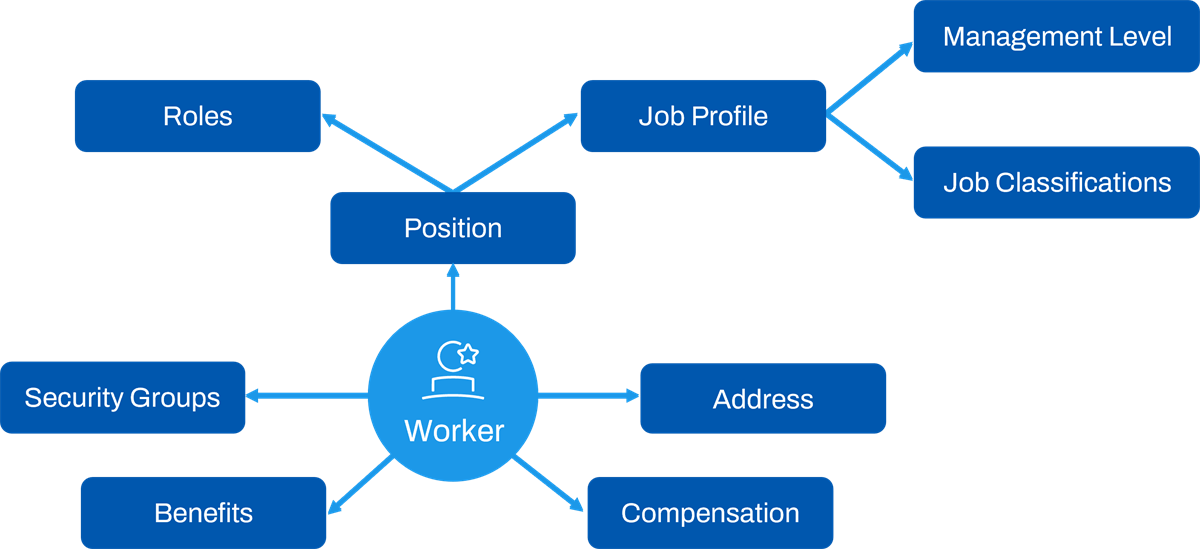
Business Object Diagram
Business Object Details Report
The
Business Object Details
report can help you understand and navigate the Workday object model. This report shows how business objects relate to each other and shows which data sources are available. This information is valuable when outlining data elements that your Workday Extend app may need to interact with.When running this report, select which business object you want to view.
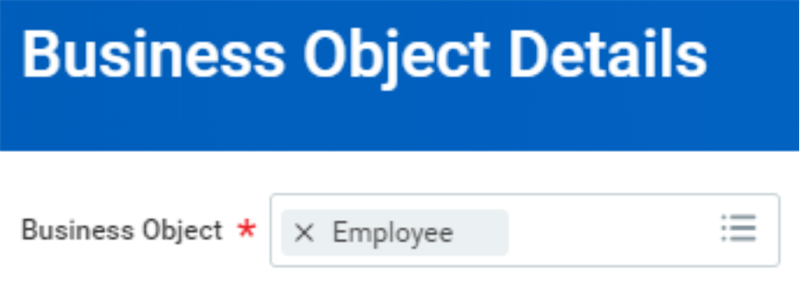
Business Object Details Report
This report contains up to four tabs: Fields, Related Business Objects, Data Sources, and Reports. If the business object does not contain data for one of these tabs, the system hides the tab.
Business Processes
The Workday business process framework connects systems and people to mimic real-life business workflows. You can:
- Connect your data, security, and organizational structures.
- Keep processes consistent across Workday applications.
- Create centralized audit trails.
A business process controls what needs to happen, who does it, and when they do it to accomplish a transaction in Workday.
- What: Tasks, actions, and subprocesses
- Who: Workday security groups
- When: Defined time frame and order
Some common business processes help you hire workers, generate expense reports, and review data entered in Workday.
Functional Areas Report
Recall that you can use the
Functional Areas
report to view functional areas in Workday. Use this report to also view the business process types in each functional area.Workday Extend Business Processes
With Workday Extend, you can design business process types that:
- Extend the Workday business process framework to create new business processes.
- Process app data by capturing approvals and triggering orchestrations.
- Are fully reportable and auditable.
Note
: You can extend the Workday business process framework by creating brand-new business processes. However, you cannot customize Workday-delivered business processes by adding Extend pages into an existing business process, for example.Introduction to SOAP APIs
Along with REST APIs, Workday also has a large library of SOAP (Simple Object Access Protocol) APIs that interact with core Workday data. This API library is more extensive and comprehensive than the Workday REST API library.
Documenting where your app data is coming from will define whether you use REST APIs or SOAP APIs to access data. Your developer will use this information to make that determination.
Use the
Public Web Services and Related Operations
report to view SOAP API groups and corresponding web services. You can filter this report and use each Web Service Operation's Related Actions to get more information.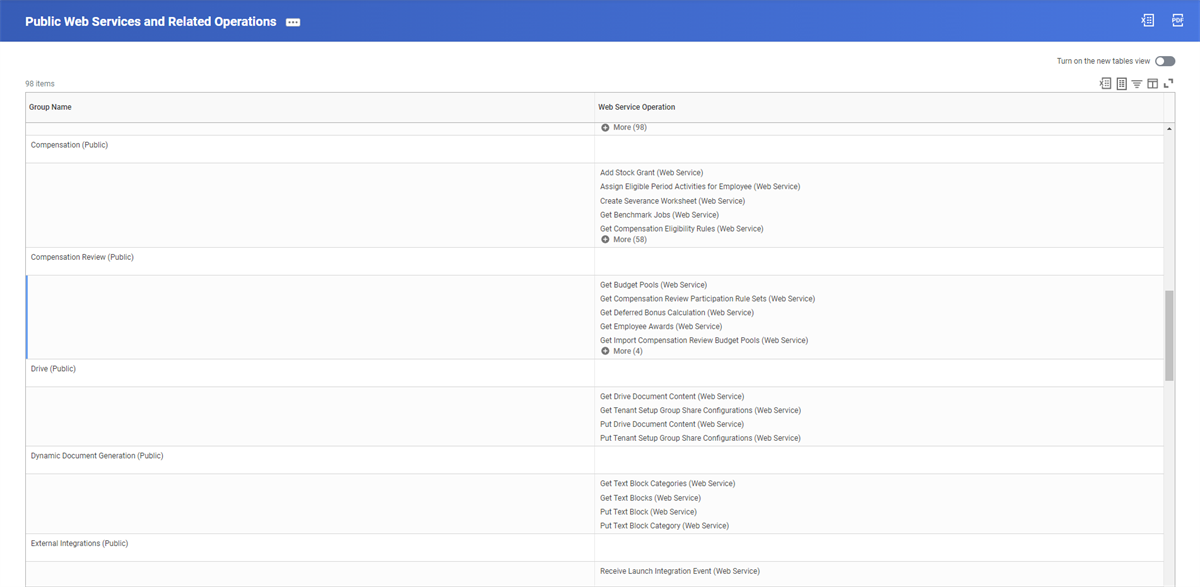
Public Web Services and Related Operations Report
Workday REST APIs and API Explorer
When considering functional areas, it is important to understand the configuration components, or Application Planning Interfaces (APIs), that will provide one or more services to your app. Use APIs when you would like to manipulate data, as opposed to just extracting and viewing data.
Recall that APIs allow two applications to talk to each other. Each time you use an app to check the weather, for example, your device is retrieving the information using an API. In Workday, tasks use Workday REST APIs to find data and to bring it back to Extend apps.
The API Explorers also display functional areas, similar to the
Functional Areas
report, but the list is pared down. The API Explorers list only functional areas that support APIs.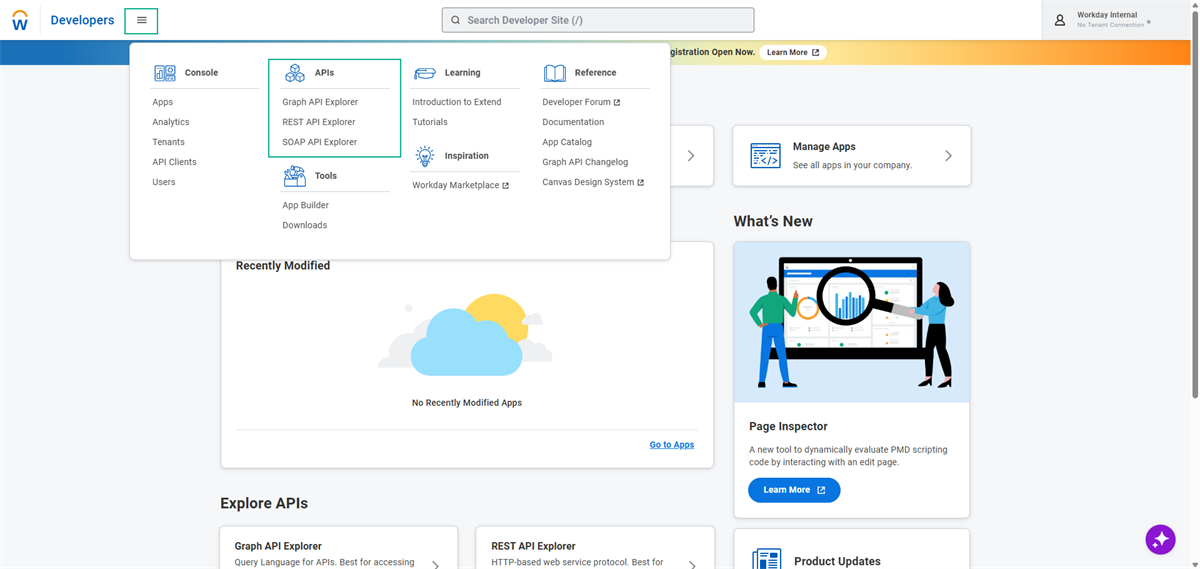
Once you identify the functional area for your app, be sure to use the API Explorer to confirm the supported APIs. Also, confirm that the API returns the specific data you would like available in your app. Your developer will determine the best way to get the data you need, so be sure to collaborate.
Important
: Once you decide on functional areas, identifying Workday tasks will help identify necessary APIs. Collaborate with your developer to translate these tasks into APIs.Third-Party REST Services
Recall that REST is an acronym for Representational State Transfer. REST is a more current protocol used by web services that can send lightweight chunks of data. Third-party REST services, or APIs, send lightweight chunks of third-party data. Workday can use a REST API call to seamlessly pull third-party data without the need to recreate it from scratch.
Important
: Once you document the data that your app will use, work with your developer to decide if the data is an appropriate size for REST services to accommodate. Also, your developer can help you identify when you can use third-party REST APIs.One of the benefits of using third-party REST services is that you do not need to recreate data that already exists. Third-party data requires less time and resources when considering both the app build and maintenance.
Third-Party APIs and Authentication
If your app requires third-party data, third-party APIs will need an authentication method. Authentication is the process of validating someone's identity, and it is the best way to protect your organization's data.
Note
: Third-party authentication can be challenging, so be sure to discuss this early in your design planning.After you work with your developer to determine what third-party APIs your app needs, continue partnering. Your developer can identify the required authentication type and explain any challenges.
Security Groups and Tasks
Consider Workday security groups and what tasks each group will complete in the app.
Account for personas and their actions. These personas have role assignments in Workday, and security groups encompass these roles. For example, you may include an employee as one of your personas. An employee may interact with the app in the "Employee" role, but also as a part of the "Employee" and "Employee as Self" security groups.
Once you identify security groups for each persona, review each narrative. Then, note the tasks that each group will access in Workday to complete these narratives.
A task is a step that you must complete in Workday. You can use global search to locate tasks, and they can be either standalone or part of a business process.
For example, the Employee as Self security group may sign up for an education assistance program in the app. This action will require the
Apply for Education Assistance
task.Research existing Workday tasks to use in your app. If you are unsure about the needed tasks, work with your functional expert.
If you need additional tasks that do not appear in Workday, consider custom or model component tasks, which we will discuss later.
User Access Points
You can configure tasks to enable various entry points to your app.
When deciding on user access points, consider how easy the app is to access and how intuitive it is to use. If you are designing something that is time sensitive, like an open enrollment app, you may want to place the app in a Home page announcement, rather than in the worker profile. This placement requires one selection and ensures the app does not get buried.
Perhaps you are building an app that requires collecting data on the go. In this case, you may want to design a simple app. Users can access the app on a mobile device, but also have a more detailed view on a browser.
Think about the user experience when determining user access points. These considerations will help your developer determine whether a custom task or a model component task is appropriate.
Custom Tasks
Most Workday users run custom tasks and reports on a daily basis. Custom tasks can be created to allow your users to run Workday Extend apps. This way, the user does not have to remember any app URLs.
Create custom tasks in Workday using the
Create Custom Task
task.Model Component Tasks
Model component tasks, or context-free tasks, are tasks that use the model component framework, and are an additional way to extend tasks. Model component business objects can have model component tasks applied to them as a Related Action.
Model component tasks are easy to embed throughout Workday. You can add these tasks to a To Do step in a business process, to an announcement, or as a worklet link, among other things. These tasks can do most things that custom tasks can, and they are searchable in Workday.
Note
: There are use cases for using either custom tasks and model component tasks. Work with your developer to identify which is appropriate for your app.Chapter Summary
In this chapter, you learned:
- Configuration requires less maintenance and resources than code.
- TheFunctional Areasreport, the Workday Touchpoints Kit, and the API Explorer are useful tools to identify relevant functional areas and Workday REST APIs for your app.
- Noting the business objects and business processes that your app will touch helps identify relevant Workday tasks.
- Determining the Workday roles and tasks required for your app will help your developer determine APIs.
- Third-party APIs call on existing third-party data.
- Creating tasks makes app access easy.