
Data Touchpoints
Overview
The data you want to store inside the Workday object model and how you want to report on that data influence your app's design. You will construct your data model around identified data touchpoints. We will explore the various ways you can access the data needed for your reporting requirements. Then, we will identify what those reporting requirements are. Lastly, we will discuss security considerations.
Objectives
By the end of this chapter, you will be able to:
- Determine required fields.
- Determine if custom domains are necessary.
- Create a list of domains.
- Create a list of security groups needed for each domain.
- Determine security strategy for data access.
- Describe RaaS and WQL.
- Define any needed calculated fields.
Data Model Design
Recall that app components are the building blocks of Workday Extend apps.
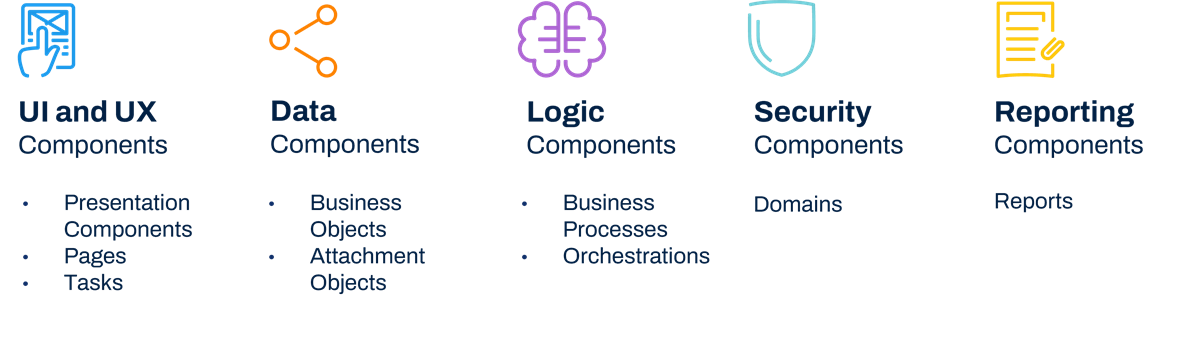
These blocks fall into the following categories:
- UI/UX
- Data
- Logic
- Security
- Reporting
App Components
Model Components
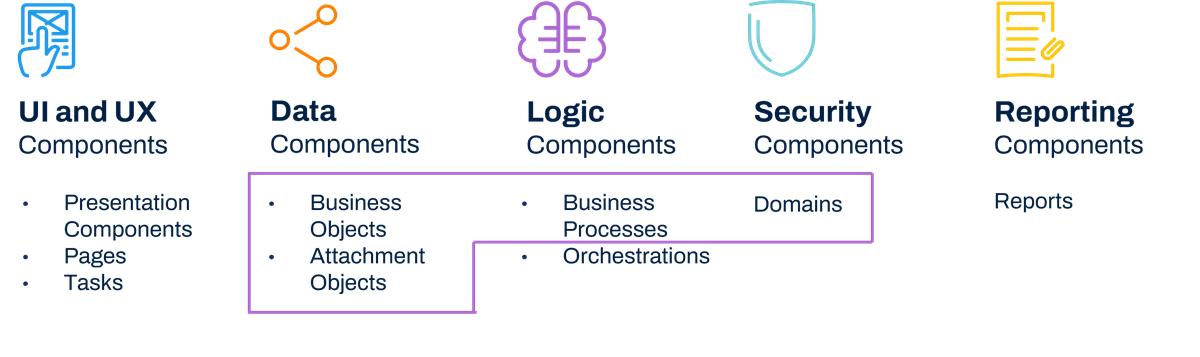
Model components are an element of app components. Model components allow you to extend the Workday model to store, process, and secure app data. We will focus on these components in this section.
Using model components, you can determine how your data design will appear and how you can store data so that it does what you need it to do. Once you decide how you will store your app data, you can consider needed business processes.
The model components are:
- Business objects
- Attachment objects
- Business processes
- Security domains
Model Components
Model Component Data Objects
Business Objects
A model component business object is a set of custom fields that you can configure to suit your organization's needs. Model component business objects and attachment objects allow you to store app data.
The objects can reference one another or reference Workday-delivered business objects. Workday creates a report data source (RDS) for each model component business object and provides complete REST APIs to track those objects.
Each model component business object has its own security. You manage security for both objects and fields at the model component business object level, as fields inherit security from the object level.
Attachment Objects
Attachments can store information, or files. However, Workday is not a document management system, so be aware of attachment volumes.
Model Component Security Domains
Model component security domains directly control business objects and fields. Model component security domains allow you to:
- Extend the Workday configurable security model to secure app data.
- Configure security policies in the same manner as the Workday application.
- Use existing security groups and roles to simplify access controls.
- Provide page-level security.
Once you define app data and app components and create domains, you can configure security policies in Workday.
To configure security, you must secure objects to a domain. However, Workday has preconfigured security for existing domains in the system. Model component domains secure model component business objects.
If you need to grant a smaller group or different subset of users security to an object, an existing domain may not work. You can create model component domains to secure these objects.
Even if you have a model component domain, you can use existing security groups and roles to simplify access control.
Data Design in the Developer Tenant
Design as much of your data model in a Developer tenant as possible. When in a Developer tenant, you can make any needed changes to a model component business object, such as: adding, deleting, renaming fields, etc.
The challenge with a Developer tenant is that they contain no real data. Because of this challenge, you may want to build your data model in an Implementation tenant, which contains real data. However, you cannot make any changes to your model components once you push your data design to an Implementation tenant.
Reporting and Object Dating Restrictions
Workday Extend business objects do not support effective dating.
Workday Extend business objects that target a Workday-delivered business object have a one-way object relationship. This means when creating reports, you must assign your Workday Extend business object as the data source. This allows you to traverse the object model graph from the Workday Extend business object toward the Workday-delivered business object.
Reporting Considerations
Important
: When building out your data model and app architecture, make sure you consider your reporting requirements!Reporting requirements are a large part of what will drive your data model. When building reports, if your data model includes one-to-many parent-child relationships, you must base your data source on the child object.
With this reporting structure, you need to consider the following constraints:
- The report will not be able to access other child objects.
- The report cannot identify parent objects without a child instance.
Other options to run reports on Workday Extend business objects include Prism and composite reports.
Reporting - Data Model Example
In the following examples, consider two ways of reporting for a three-object data model. The objects are:
- Event
- Roster
- Poster Attachment
With these three objects, we would like the app use a roster to invite people to a specified event and include the poster attachment in the invitation.
Data Model Example 1
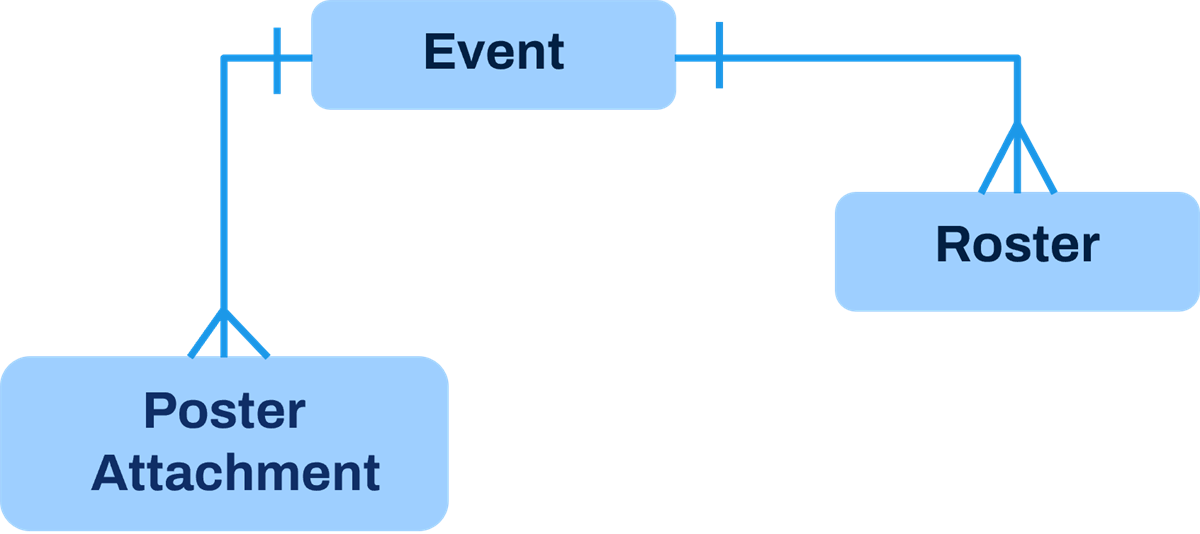
Based on this data model, you:
- Cannot build an advanced (RaaS) report to include both children objects.
- Cannot answer which Events do not have Poster Attachments or Roster.
Data Model Example 2
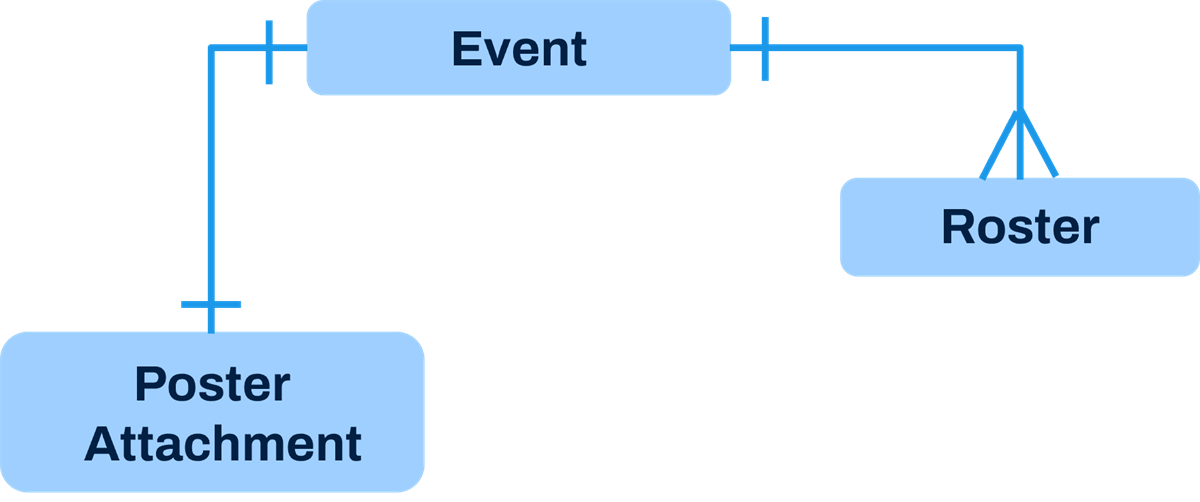
Based on this data model:
- There is one attachment per request.
- The report based on the Roster data source will include Attachment and Event business objects.
Many-to-Many Relationship - Joiner Objects
In this example, we use a joiner object as an intermediary to allow for a many-to-many relationship.
Consider this facilities management scenario. We have a badge that will open more than one door, and each door will honor more than one badge.
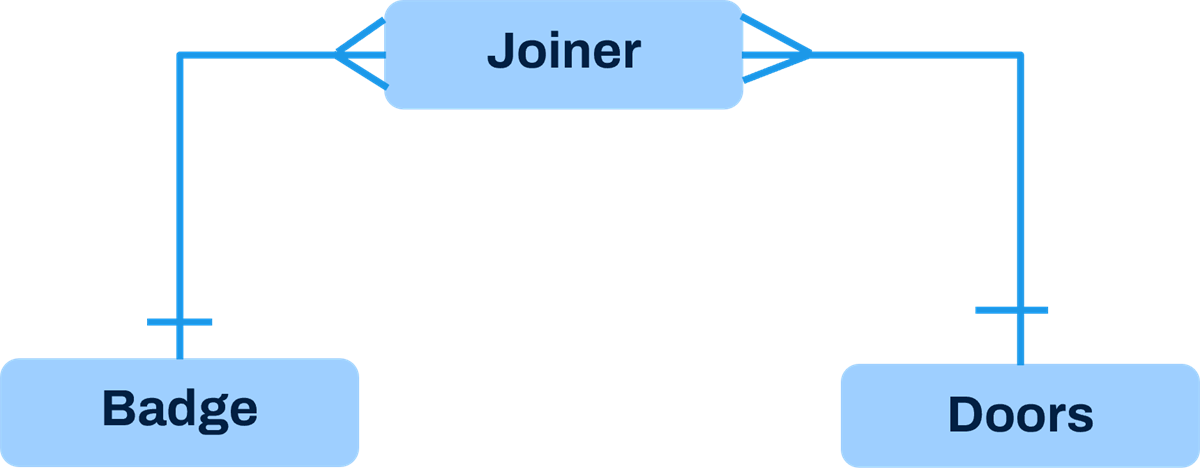
Based on this data model:
- Each door honors many badges, and each badge opens many doors.
- Use the joiner object as the datasource to build the report.
Security as a Design Consideration
To ensure proper security, you need to know the primary use cases for both reporting and business process routing during the design phase. This information will help determine target attributes, domains, and security groups so that you have appropriate app security.
Target Attributes
The target attribute of a business object lets you reference another business object or a Workday-delivered business object. By referencing another business object, you can extend data that is available to your data model.
When you define a field in a business object with a target attribute, you have the option of securing data from that target object. Your developer can set up this attribute to enable constrained security access. You can set this up on only one instance field on a business object, so apply this to the instance that needs the most security.
Security Examples
Let's explore an example of how app design affects security.
Consider an app that can collect and report on individual performance surveys and feedback. Since this data is sensitive, managers should only be able to view feedback for their team members. Workers should only be able to view feedback for themselves.
App Design A - Minimal Security
In this first example, the app has one domain and no target attribute defined on a business object. So, all users could view all performance feedback for every other user. Because security was not constrained at the domain or target attribute level, there is no way to differentiate who should view what.
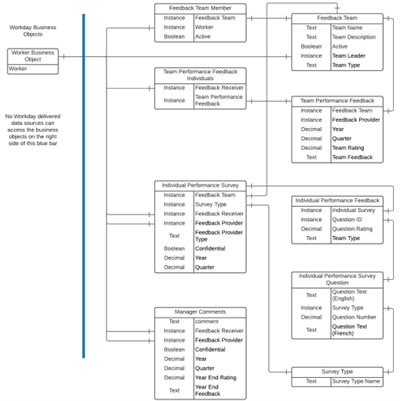
Minimal Security Example
App Design B - Optimal Security
In this next example, the design distinguishes business objects that need constrained security access from those business objects that do not. Those business objects that do not have constrained security are visible for all users to view.
The design:
- Groups business objects that do not need constraints in a new domain that contains just these objects.
- Enables constrained access on the instance needing the most security.
Since you can identify only one target attribute, the Feedback Receiver is the target attribute. This target attribute allows only constrained users, like managers, to run needed reports.
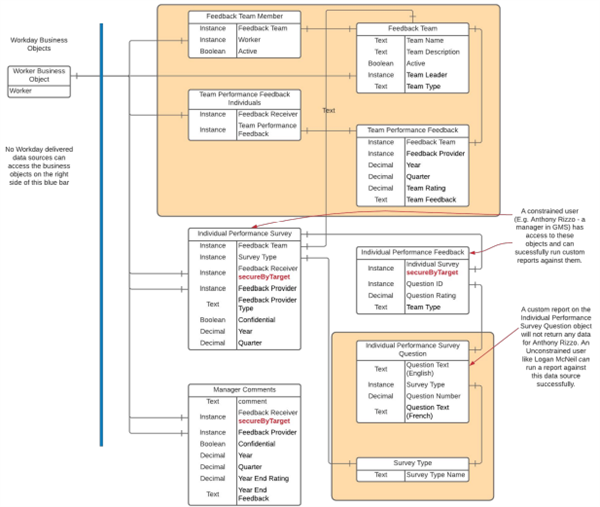
Optimal Security Example
Running Reports and Security
Determine what data you would like Workday to report on, and what business objects you need to run these reports. Once you have established the objects, define who needs access and to what fields specifically. This information will drive your security model.
Are the right users in the right groups? What domains do users have access to? Can they view, modify, or run reports as needed? Too much security may prevent certain security groups from accessing needed reports or report fields. However, too little security may allow the wrong users to access privileged reporting information.
Data Reporting Tools and Report Data Sources
Introduction to RaaS and WQL
There are additional reporting tools in Workday that can retrieve core data to use in an Extend app: Reports as a Service (RaaS) and Workday Query Language (WQL).
Recall that the API Explorer shows the functional areas that support APIs. This tool also shows what data each API returns so you can verify this data is what you expect. Consider RaaS and WQL when an API does not return the data you need. Your developer will help you identify the appropriate data source, but it is useful to understand the additional ways you can pull in data.
Reports as a Service (RaaS)
You may need to access Workday data that is not available using the REST APIs. RaaS may help in this situation. RaaS is a read-only solution. You can use RaaS to read and display data on a page. You cannot use RaaS to update Workday data.
You can turn Workday Report Writer custom reports into an API. Enable the report as a web service to make this report a Report as a Service (RaaS).
Workday Query Language (WQL)
Workday Query Language (WQL) is comparable to Structured Query Language (SQL). SQL accesses relational databases, whereas WQL accesses the Workday object graph. WQL supports a subset of the features available in SQL. WQL allows you to interact with Workday data in three useful ways. With WQL:
- You can perform specific searches of your organization's Workday data.
- You have more flexibility over how you programmatically export Workday data.
- You can explore available data sources and data source filters and fields.
WQL accesses data from Workday data sources and fields. WQL uses the same security as reporting to leverage data source, row-level, and field-level security. Users must have access to the WQL for Workday Extend domain, which is a subset of the Workday Extend domain, to execute WQL statements.
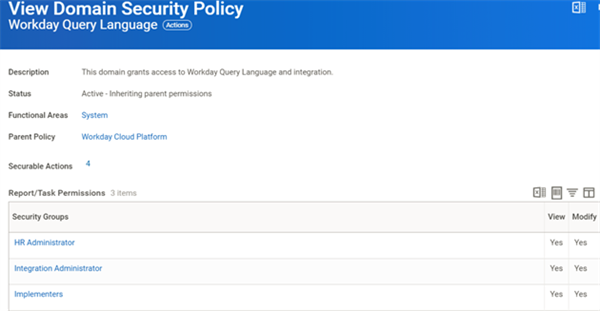
Access Needed to Execute WQL Statements
In Workday, you can convert a custom report (RaaS) to WQL.
There are advantages to this conversion:
- WQL does not save a report to the Workday tenant.
- You can build reports programmatically.
- WQL uses stable URLs.
You can run the
Convert Report to WQL
task to make this conversion. Note that deciding whether to use RaaS or WQL is a technical decision that your developer will make.Additional Data Tools
Prism and Workday Studio are also data transformation tools, though they may not be readily available to you. They each have their own SKU, but if you have access, these tools are useful if there is no other way to design the data model you need.
Report Data Sources
Workday defines and delivers the data sources in the system. Workday delivers zero, one, or multiple data sources for each business object. The report data source is the view or selection of instances of a given primary business object; this is essentially the starting data for your report.
With the exception of composite reports, you must select a single report data source when creating a report. This determines the primary business object for the report. The report displays one row for each instance of the primary business object.
For example, let's say you create a report with All Active Employees as the report data source. The primary business object for the report then is Employee. The report shows one row for each instance of Employee. Notice that Alain DuBois only appears once in the table. His dependents display as "sub-rows" and appear as a group under the Dependents heading.
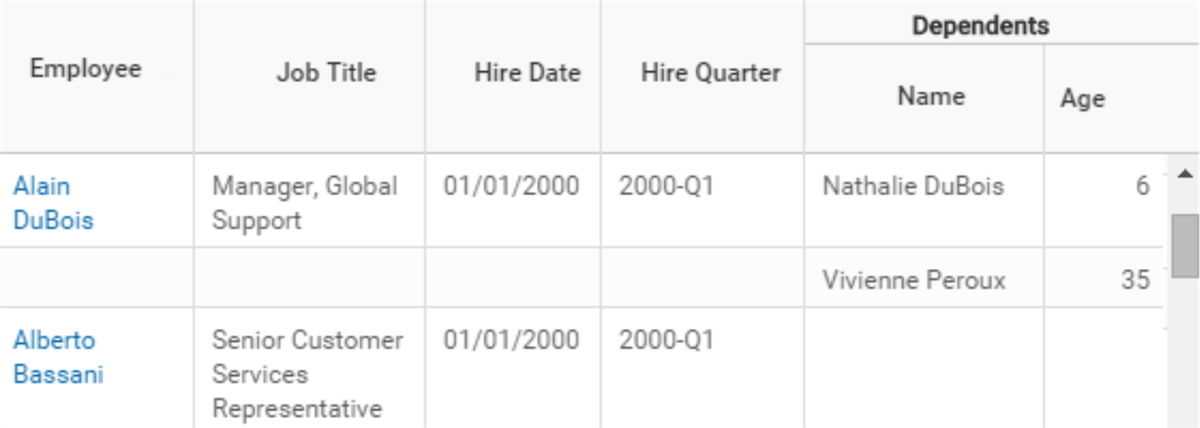
Example of a report using the All Active Employees data source
If you create a report with All Dependents as the report data source, then the primary business object is Dependent. The report shows one row for each instance of Dependent. Notice that Alain DuBois appears twice in the table (once for each dependent).
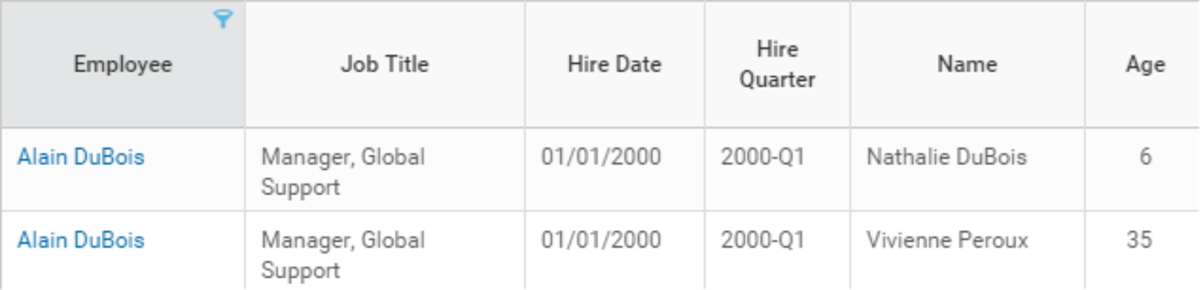
Example of a report using the All Dependents data source
Both data sources let you access the same information, but the information displays differently. You need to understand how users want to view, sort, and filter the data in order to pick the best report data source for the report.
Each data source has an association with a primary business object, and has its own security. The defined access for a data source controls whether a user can create or run a custom report that uses that data source. Each data source has a list of permitted security groups. You must have access to a permitted security group to create a report using the data source or run the report. In addition, you can only share a report with users who have access to the report's data source.
There are three types of data sources:
- Standard
- Indexed
Required Fields for Reporting
Data storage and how you want to report on that data influence your design. Think about what you would like to learn from your data. Decide on the various reports, analytics, and key metrics you would like the data to provide.
Once you have these requirements, drill down to the fields you will need to run these reports. Your developer will use these report fields to distinguish which ones already exist in Workday and which ones may be new model component fields. Your developer will also use this list to determine how to store data and to diagram how the data model will appear.
Calculated Fields
Calculated fields are field definitions that you configure to manipulate, transform, retrieve, and derive values based on existing data.
You do not have to include a new field to capture data, provided calculated fields can generate that data and you need the data for reporting only. Users may enter the data for this reporting, or app logic may generate the data. You can also use calculated fields in RaaS and, therefore, in WQL to pull the data into the app.
Model Component Business Processes
Workday-delivered business processes route tasks to authorized users based on their membership security groups and organization hierarchy.
Model component business processes extend the Workday business process framework. You can process app data and capture approvals and denials, plus trigger orchestrations. You can fully report and audit business process events.
Business Processes as a Design Consideration
Once you have determined what business processes you need for your app, you will consider who needs to interact with these business processes and at what capacity. Who will initiate, review, and approve steps in the business process, for example? Build these rules into your design.
Your data model drives how a user interacts with your app through the different stages of a transaction life cycle: initiation, create, submit, view. Workday delivers two app design approaches to how or when data is persisted in the tenant.
Model | Description |
|---|---|
Workday HCM - Event-centric | Business process driven and typically results in an object being created. For example, the hire event is completed before a worker object can be created. |
Workday Financial Management -
Event-peripheral | Users are mainly interested in and interact with invoices or expense reports, not actual business processes. |
Model Component HCM Model
In this example, an object is created with proposed fields or proposed changes to a field. This triggers the business process where the proposed changes can be approved, revised, or denied.
Once the approver accepts the proposed changes, the business process is marked complete and an integration or orchestration kicks off the final step to persist data into a final object.
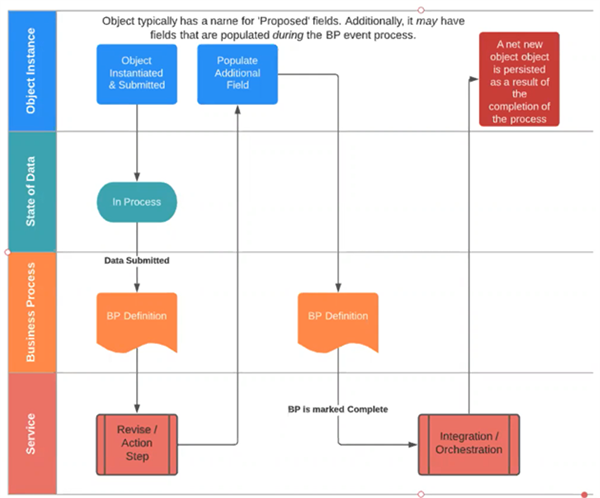
Model Component FIN Model
In a typical Workday Financial Management transaction, a user initiates a request and data persists to the business object immediately. There is often a status field to indicate the state of the data, and a business process is needed to approve or deny the object. An example of this is the Create Customer Contract transaction.
- Data is persisted to a contract business object immediately. A status field indicates the state of the data, or contract.
- A business process is triggered for approval or denial. The contract (object) status updates immediately.
- An amendment that creates a "Version2" is essentially another instance of the object, maintaining a history of the object.
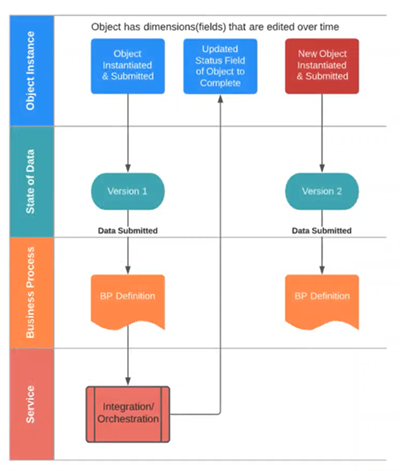
Chapter Summary
In this chapter, you learned:
- Model components determine your data design.
- Model component business objects store app data, and model component security domains extend the Workday security model to secure app data.
- Reporting requirements, and who can access what, inform your security model.
- Additional reporting tools, such as RaaS and WQL, can be useful when data is not available through REST APIs.
- Workday defines and delivers data sources, and each data source is associated with a primary business object and has its own security.
- Required fields, both existing and custom, will help determine how your app stores data.
- Workday delivers two app design approaches to how and when data is persisted in the tenant: the Workday HCM (event-centric) model and the Workday Financial Management (event-peripheral) model.