
Student Financials Business Processes and Configurable Security
Overview
The Workday business process framework lets you define and deploy business processes to suit the way your institution works. You can choose the tasks that compose a business process and the order in which a business process completes them. You can create variations of behavior within a business process using business intelligence, as well as different configurations of the same business process for different organizations.
The configurable security framework provides a comprehensive model for access across Workday user interface pages, custom reporting, business processes, and integrations. The framework supports access to data in various organization types and across multiple locations.
Configurable security enables customers to modify or accept the delivered Workday default security groups and security policies that control view and modify access to Workday. You can configure which security groups and roles participate in a business process and which security groups are granted access to tasks and reports.
Objectives
By the end of this chapter, you will be able to:
- Describe the business process framework and configuration options.
- Make basic modifications to steps in a business process.
- Add configuration options to a business process.
- Explain the structure of configurable security and its implications to system users.
- Identify types of security groups.
Configurable Business Processes
A business process includes tasks that when executed in order, cause a business event to occur. The business process definition specifies the security group responsible for each task or step in the process. The business process also notifies the workers in these groups and gets feedback on when each step is complete. Steps can also be conditional.
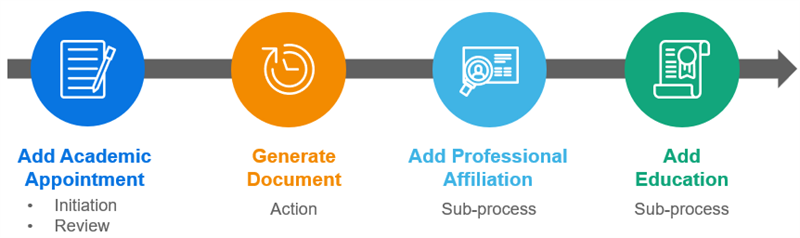
Workday includes many predefined business processes that the system identifies as default definitions. These default business processes provide customers with examples of business process definition configurations. The defaults are editable and users should update them to meet specific requirements.
Business Process Framework
The business process framework uses security groups to control who performs the activities that make up a business process. All activities are associated with security groups and not specific people. Therefore, workers can move in and out of those security groups and positions without disrupting the business process logic.
Business process definitions determine:
- Who approves or defines something that happened.
- What additional tasks are needed, and who completed them.
- Who needs to know something happened.
- Any additional system events that Workday needs to initiate.
Create business processes using a combination of: Approvals, approval chains, to-dos, checklists, and actions.
An action can be a single task or a subprocess. Within the process, defined conditions determine which steps the system initiates. You can also notify a Workday user or email address that a step has begun or been completed. Business process notifications can also indicate that a particular review response was selected (e.g., approved, denied, canceled).
Business Process Terminology
The following table lists common business process terminology and their definitions.
Term | Definition |
|---|---|
Business Process Definition | The list of steps (tasks) that comprise the business process and the security groups responsible for completing them. Workday includes several predefined business processes for different purposes. These are called default business process definitions. |
Business Process Instance | A business process that the initiator has started. For example, the Student Application Create Event business process definition becomes an instance when the initiator uses it to create a student application. |
Business Process Type | A business process delivered by Workday that can be automated using a workflow (e.g., Student Onboarding Event, Program of Study Event, Student Payment Event). |
Event | A transaction that occurs within your company, such as creating a program of study or admitting a student. Workday business processes represent how Workday should respond to one of these events. |
Initiator | The user that initiates the business process instance. |
Security Group | A group of people with specific responsibilities and permissions. When a business process runs, the step or task is sent to members in the security group configured for that step. In a role-based security group, the step includes all the workers in that role in the organization of the business process target. |
Target | The object affected by the business process. For example, for business processes that deal with a student record, the target is the student. For business processes that deal with a program of study, such as a create or edit event, the program of study is the target. Since the target determines the organization, it controls which business process custom definition Workday uses. |
Task | A business process step that a user must complete. For example, task alert notifications are triggered by steps in a business process. |
Business Process Definition Overview
Business process definitions include many different characteristics. The header section of the business process definition contains the following:
- The effective date
- The security groups allowed to initiate or kick off the business process event.
- A button to launch a visual representation on the process flow.
The body of the business process definition includes the following tabs of information:
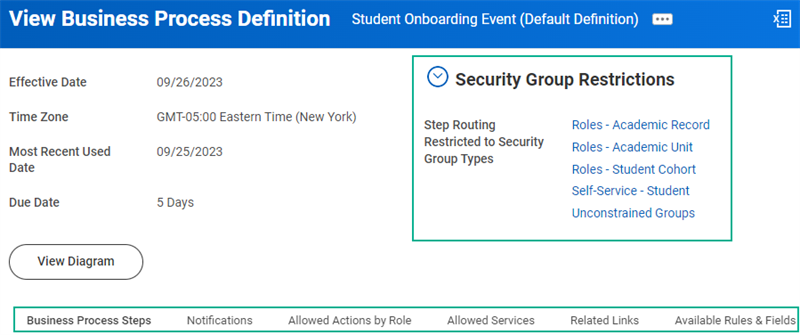
Business Process Definition Tabs
The following table provides a brief explanation of what is contained in each tab of the business process definition:
Term | Definition |
|---|---|
Business Process Steps |
|
Notifications |
|
Allowed Actions By Role | List of actions (i.e., review, sub-processes) allowed in the business process. |
Allowed Services | List of services (i.e., Create Workday Account) allowed in the business process. |
Related Links | Links to external web pages. |
Available Rules & Fields | List of fields and rules that can be used in a conditional rule. |
Business Process Steps
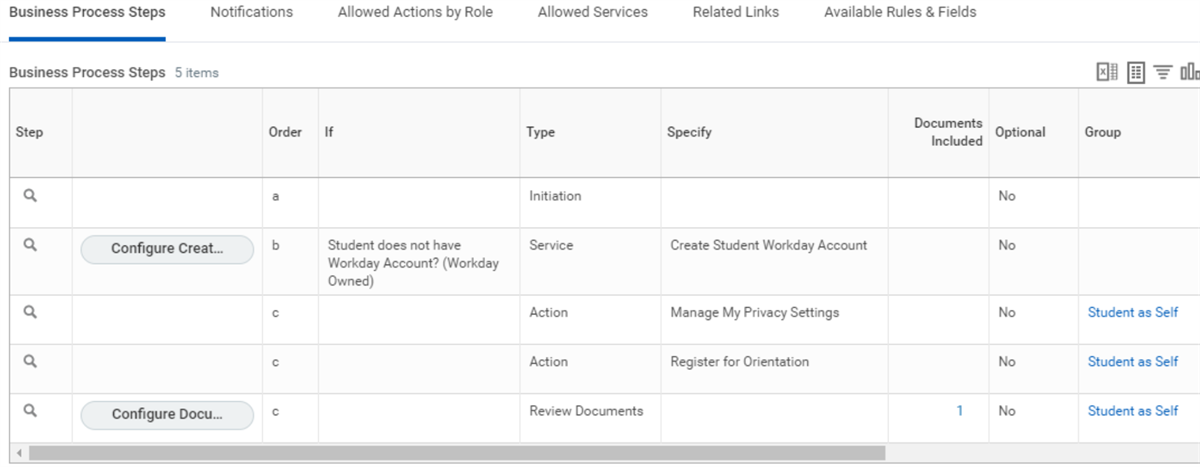
The business process steps identified in the business process definition represent the flow of the task controlled by that business process. These steps determine when a task is reviewed or approved, when an additional action will take place, or when a To Do step is executed. These steps also define which security groups are responsible for completing each step and by when.
Student Financials Business Processes
The following is a list of the business processes available in the Student Financials functional area:
Business Process | Description | Initiating Actions |
|---|---|---|
Pending Student Refund Event | Configure this business process to generate refunds for students when their refundable payments, financial aid awards, and sponsor contracts exceed their total charges, resulting in a credit balance. |
|
Pending Student Sponsor Refund Event | Configure this business process to enable you to refund a sponsor's overpayment. |
|
Return of Title IV Worksheet Event | Configure this business process to enable users to create worksheets that calculate the amount of Title IV funds to return when a student withdraws. You can also add this subprocess to the Student Institutional Withdrawal Event business process. The subprocess automatically sends you an Inbox item to create a Return of Title IV worksheet when a student withdraws. |
|
Student Acceptance Fee Payment Event | Configure this business process to record Admissions acceptance fees. |
|
Student Application Fee Payment Event | Configure this business process to record application fee payments from prospective students. |
|
Student Charge Event | Configure this business process to allow users to manually post and approve charges for a student on an ad hoc basis via the Apply Student Charge task. This enables you to select a due date, amount, worktags, and other details that differ from what Workday automatically assigns with the nightly Assign Student Charges job or when you use the Mass Assign Student Charge Items task. |
|
Student Charges Writeoff Event | Configure this business process to write off past due student charges. You can also configure the business process to apply holds when you write off student charges. |
|
Student Credit Memo Event | Configure this business process to refund students for charges that originated in your legacy system. |
|
Student Deposit Event | Configure this business process to deposit student payments in Workday. |
|
Student Disbursement Payment | Configure this business process to disburse financial aid payments and student sponsor contracts. |
|
Student Fee Group Event | Configure this business process to define course fees and additional fees to assign as a group. You can assign the grouped fees together instead of defining fees for each course or course section individually. |
|
Student Payment Event | Configure this business process to record student payments in Workday. Workday recommends that you add an action step for Record Private Scholarship Payment to notify your financial aid office. |
|
Student Sponsor Payment Application Event | Configure this business process to record sponsor payments and apply them to the invoices generated for the student sponsor contracts. |
|
Student Waiver Payment Event | Configure this business process to record student payment waivers. |
|
Configurable Security
Workday application data is accessible only through group-based security. The Workday Object Management System (OMS) enforces this security. As such, Workday users gain access when you assign them to a security group with access to certain data or a business process.
Components of Configurable Security
Consider and configure these components when setting your institution's security settings:
Component | Description |
|---|---|
Security Groups | Groups of users who need to perform actions or access data. |
Domains | Defined tasks and reports that are functionally similar. |
Domain Security Policies | Rules that dictate which security group can view or modify data within the domains. |
Business Processes | Workday-delivered processes. |
Business Process Security Policies | Rules that dictate which security groups can participate in the business process and how they can participate. |
Configurable Security Framework
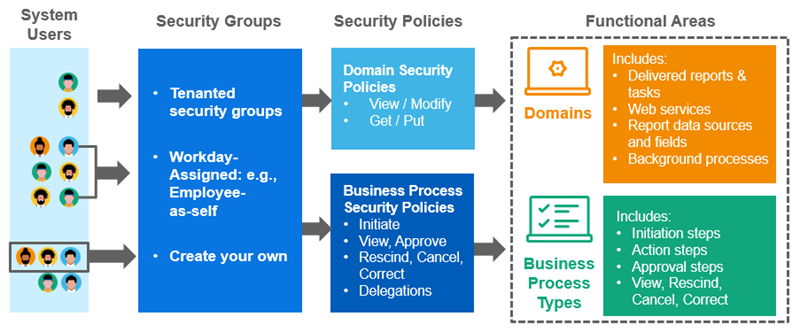
Configurable security allows you to provide system users with access to reports, tasks, and business process steps. You give security groups permissions to domain and business process security policies. When you make users members of security groups, they gain access to these securable items.
Functional Areas
Workday delivers product applications in functional areas. Some examples of functional areas in Workday Student include Academic Foundation, Student Recruiting, and Student Records. Each functional area houses a list of domains and business process types. Workday controls how the functional areas are delivered and cannot be changed.
The
Functional Areas
report shows a top-down view of the Workday-delivered functional areas and the domains and business process types in each.Note
: Depending on the scope of your Workday deployment, Workday does not enable all functional areas. Use the Maintain Functional Areas
task to enable or disable functional areas.Security Groups
A security group is a collection of system users, which Workday uses to grant access to specific parts of the system. Group users explicitly (e.g., user-based) or derive membership from other relevant information about the user. This information includes the user's role assignment, job profile, or organization membership.
When configuring security in Workday, first identify users via a security group. You can then add or remove the security group from a desired Security Domain or Business Process Security Policy. Doing so grants or denies access to the set of users in the security group to that particular area of Workday.
Domain Security
The security domain is one of the primary security mechanisms in Workday. Each security domain controls access to a set of tasks, reports, and web services. Every domain uses a security policy to control which security groups can view or modify the items secured to each domain.
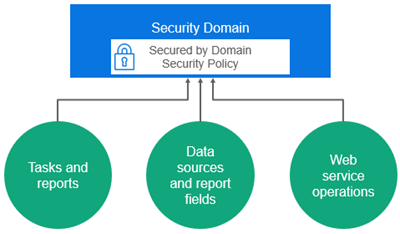
Now, explore each of these aspects of domain security.
Domain Security Policies
Every domain has its own domain security policy. Domain security policies determine which security groups can access the items in the domain. Remember, you configure security access at the domain level, not item-by-item. Users with access to a domain can access all items secured in that domain. However, you can determine whether users have view, or view and modify access to those items.
Domain Security Permissions
Define domain security for report, task, or integration permissions. For report and task permissions, you designate permissions for security groups to either view, or view and modify, tasks within the policy. For integration permissions, you designate permission to get, or get and put, data.
For example, you can assign which security group or groups should set up application groupings or access a student's academic requirement progress or financial aid data. Edit the security policy for the domains to accomplish this configuration.
Domains contain securable items that require either view or modify permissions to access the item. You can grant a security group with view only access, or with view and modify permissions to a given domain security policy.
View Only Access
View-only grant users with access to the domain items designated with "View" as the permission required. These items are typically reports and report fields. Security groups with view-only permissions cannot access any domain items that require modify permissions.
Modify Access
Modify permissions grant users with access to the "Modify and View" permission items. Security groups with modify permissions, therefore, have access to all of the domain items.
Accessing Domain Security Policies
You can view domain security policies using the
Domain Security Policies for Functional Area
report. To determine which domain an item is in, use the View Security for Securable Item
report.Business Process Security
Business processes represent the events or transactions that the system can automate using the Workday business process framework. There are many business process types in the system, and each business process type has an associated business process security policy. This business process security framework is one of the primary methods of securing tasks and approvals in the system.
Business Process Types
Workday represents most of the tasks and transactions you use by a type of business process. For each delivered business process type, configure one or more business process definitions with the steps required to complete that type of transaction.
Student Business Process Type Examples
Some business process types commonly used in Workday Student include:
- Program of Study Event
- Course Section Event
- Student Recruiting Campaign Event
- Student Onboarding Event
- Student Application Create Event
- Student Charge Event
Business Process Step Security
On each business process definition, define the steps required to complete the transaction. Examples of business process steps include approvals and actions. Steps in a business process definition route to security groups, not individual users. Configurable security allows you to control which security groups can, for example, initiate, approve, act on, or cancel each type of business process.
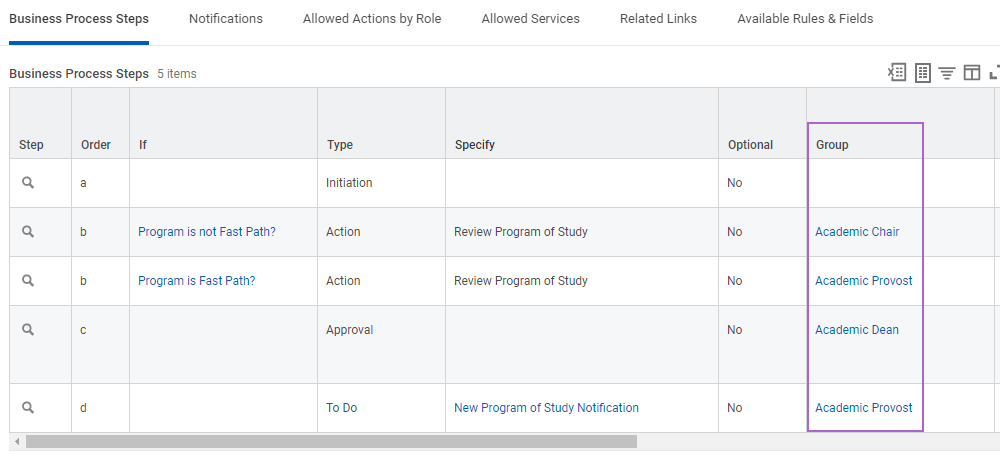
Business Process Security Policies
Each business process type has its own security policy. In these business process security policies, you can configure which security groups can:
- Initiate the business process.
- Perform allowed actions.
- Approve, rescind, or cancel an event.
Business process security policies allow you to configure the following types of permissions:
- Who Can Start the Business Process (including what actions initiate the business process)
- Who Can Do Action Steps in the Business Process
- Who Can Do Actions on Entire Business Process
- Who Can View All
- Who Can Approve
- Who Can Cancel
- Who Can Rescind
- Who Can Manually Advance
- Who Can Deny
A business process security policy also allows you to delegate a specific business process to others. In the example below, there are multiple initiating actions for the given business process type. You can configure the permitted security groups for each initiating action, controlling who can start this business process via what action. Initiating actions can also include web services.
Note
: If you have multiple copies of your business process definitions for a given business process type (e.g., multiple Program of Study Event business process definitions for different academic units), there is only one business process security policy for the business process type (e.g., Program of Study event). Each definition uses the same business process security policy configuration.Accessing Business Process Security Policies
Use the
Business Process Security Policies for Functional Area
report to view business process security policies. You can also use a business process definition's Related Actions to view the relevant business process security policy for that business process type. Select Business Process Policy > View when using the business process definition's Related Actions.Security Policy Change Control
Workday records the date and time as you modify, enable, and disable security policies and functional areas. This record acts as a time stamp. Workday security evaluates the security configuration as of a time stamp, ignoring any security changes made afterwards. As you make changes, Workday saves them as inactive, pending changes until you activate them.
To activate security changes, use the
Activate Pending Security Policy Changes
task. When you activate them, Workday records the time stamp. If you discover a problem with your security configuration that you cannot quickly fix, use the Activate Previous Security Timestamp
task. This task activates a previous time stamp while you make corrections. Business Process Security Policies with Pending Changes
and Domain Security Policies with Pending Changes
allow you to view security policies with pending changes.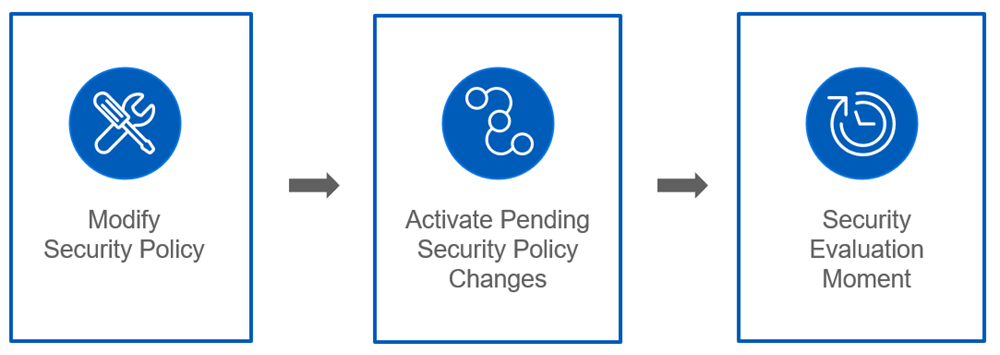
User Proxy
Workday enables you to configure proxy access in nonproduction environments, such as Sandbox. This allows defined groups to act on behalf of another user. This functionality allows users to test business process and security configurations before moving them into production. Security Administrators can create proxy access policies specifying:
- The security groups that have proxy access to Workday.
- On whose behalf users can act once they sign in.
- The security groups that users cannot proxy into.
When you act on a user's behalf in Workday, you can perform any action that user can access. Use the
Start Proxy
and Stop Proxy
tasks to sign in to and terminate proxy sessions.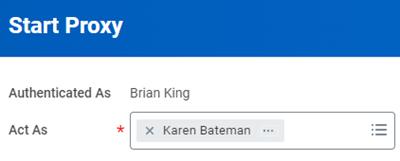
Note
: In this course, you can use proxy access to easily change sign-in credentials to ease testing and activities. In your own production tenant, you will likely not have this ability.Security Reports
The following table lists the most commonly used security reports for managing business process type security policy settings and domain security policies.
Report | Description |
|---|---|
Functional Areas | View all functional areas with their domains and business processes. View security policies and access-related actions to view and edit them. |
Business Process Security Policies for Functional Area | View the security configuration for each business process security policy in the specified functional area. Edit permissions. |
Domain Security Policies for Functional Area | View the security configuration for each domain security policy in the specified functional area. Edit permissions. |
Action Summary for Security Group | View all domain security policies and business process security policies that use the specified security group. View all the policies that grant access to the security group, their functional areas, and the details for the securable items to which access is granted. |
Security Analysis for Securable Item and Account | Select a system user and view the permissions they have for a specified action, report, or other security item. Displays which security policies and groups grant that access. View how a specific user can access a specific action and helps you troubleshoot security issues. |
View Security Group | View all details about security group membership, the security policies in which the group is used, the permissions it has, and the functional area. Audit the permissions granted to workers or other security groups through a security group. |
Domain Security Policy Summary | View every domain with its current security configuration. Check security policies and perform Related Actions. |
View Security for Securable Item | View which domain a securable item is associated with and what security groups grant access to a securable item. Troubleshoot incorrect security access. |