
Configurable Security Framework
Overview
This chapter introduces the main components of the configurable security framework, including how access is configured to items secured in either domains or business processes. To access a secured item, a user must be a member of a security group with permissions to a security policy for the domain or business process containing that item. You will use reports to assess item security, analyze domain permissions and inheritance, and discover how business process security policies impact initiation and routing of a business process.
Objectives
By the end of this chapter, you will be able to:
- Define the components of the configurable security framework.
- Determine the security policy for an item.
- Navigate domain and business process security policies.
- Distinguish the access granted by View vs. Modify permission to a domain.
- Identify the granularity of access that can be configured in a business process security policy.
- Explain the purpose of authentication.
Configurable Security Framework
The Workday configurable security framework enables your organization to control what a user can see and do in Workday. The framework provides a tenant-wide model for access across Workday, from tasks, to reports, business processes, dashboards, and integrations.
When a user signs into a Workday tenant, their account is associated with many security groups. What the user can do in Workday is based on the configured permissions for each of those security groups.
Note
: The Global Navigation Menu button, located in the upper-left corner of the screen, is also referred to as the Menu button throughout this course.Security Groups
A security group allows you to grant Workday access to a collection of system users. Users become members of security groups by:
- Administrators assigning users to security groups manually.
- Deriving membership based on their information, such as their role assignments, job profiles, or organization memberships.
- Workday automatically assigning the user to a Workday-assigned security group, such as All Users or Employee As Self. Workday determines their members criteria and maintains the members in each. You cannot create, edit, or delete these security groups.
Security groups gain access to Workday data through permission to secured items rather than permission to the data itself. Secured items include such things as tasks, reports, dashboards, reporting items, and business process actions.
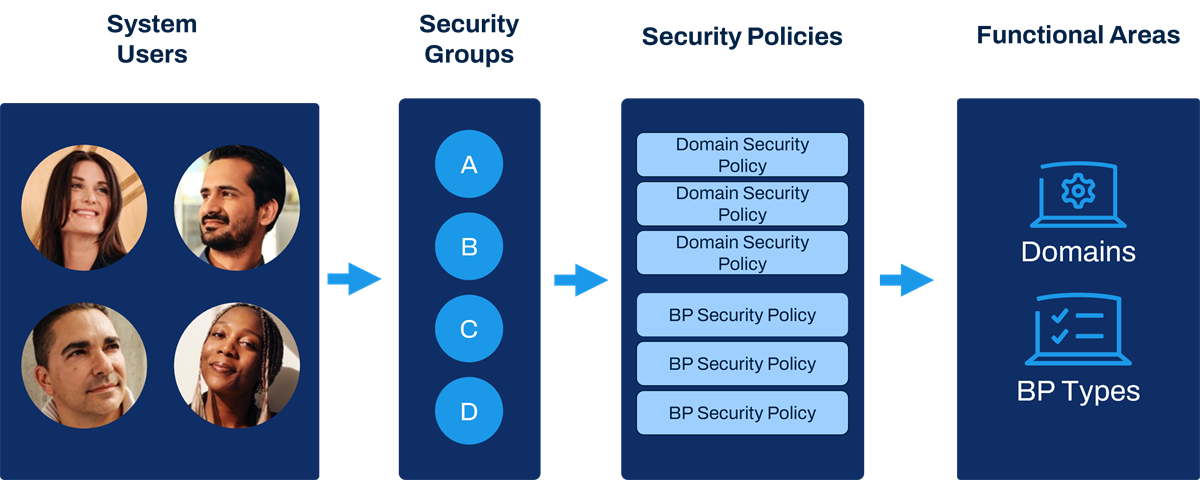
The Workday configurable security framework.
Functional Areas
The Workday application is delivered in functional areas (e.g., Staffing, Benefits, Core Compensation, Financial Accounting, Procurement). Functional areas contain domains and business process types.
Domains
Domains are collections of items that share the same security (e.g., tasks, delivered reports, report data sources, web service operations). Workday determines the secured items within each domain, and a given item may be in more than one domain. You cannot change the delivered items within each domain. Domains can be in one or more functional areas.
Business Process Types
Business process types represent events or transactions in Workday. Workday determines the available business process types. You can configure the business process definition steps, such as approvals and actions, and which security group each step routes to.
Security Policies
Security groups gain access to domains and business process types in Workday via security policies. Add security groups to a domain security policy to grant access to the secured items within the domain. Add security groups to a business process security policy to grant ability to participate in (e.g., initiate, rescind, approve) that type of business process.
How Does a User Get Access to a Secured Item?
To access a secured item, a user must be a member of a security group with permissions to a security policy for the domain or business process containing that item.

How Does a User Get Access to a Secured Item?
View Security for Securable Item
The
View Security for Securable Item
report shows how Workday secures a given item. To quickly locate this report, in the Search box, try entering the shortcut "secura."Enter a string of text, with a minimum of three characters, in the Securable Item report prompt. The report returns items matching the text string, grouped into sections (e.g., Tasks, Reports, Report Fields, Data Source Filters, Data Sources). Select the View Security button to view the security policy for an item and the currently configured security groups.
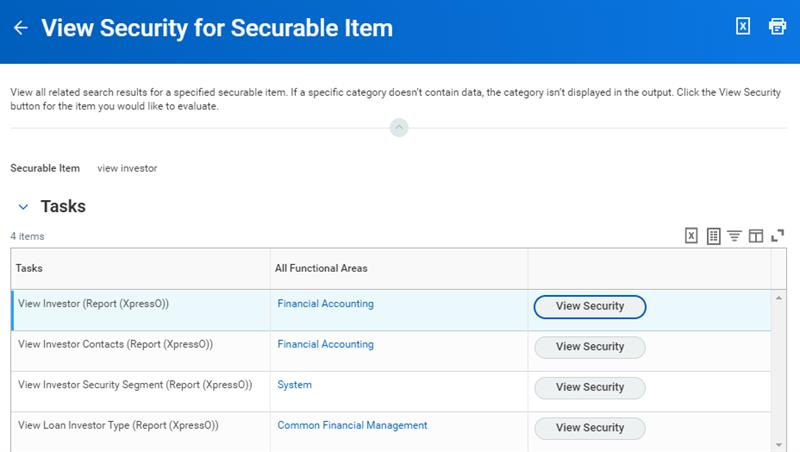
View Security for Securable Item report.
Items are either secured to domains or business process types. However, an item can be secured to more than one domain. You can drill into the details and also edit the permissions of the security policy from this report.
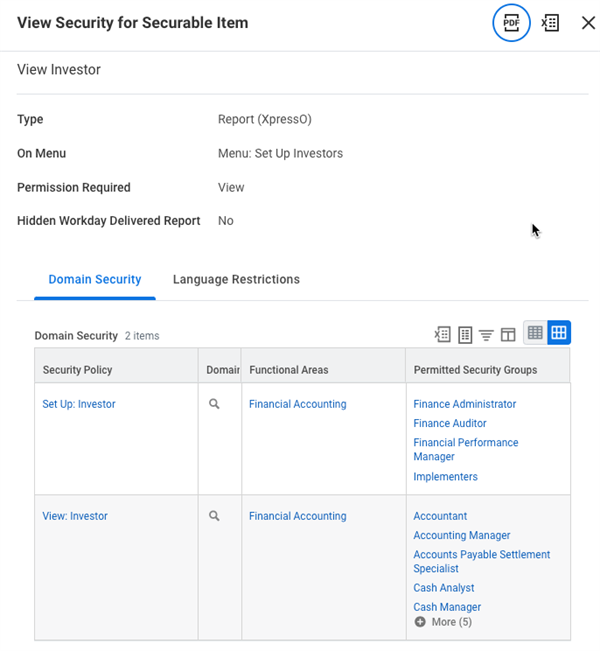
View Security for Securable Item example.
Security Analysis for Securable Item and Account
The
Security Analysis for Securable Item and Account
report shows how a given user is able to access a securable item (e.g., report, task). Enter the securable item and the user account. The results display the security groups and security policies that give the user access to the item.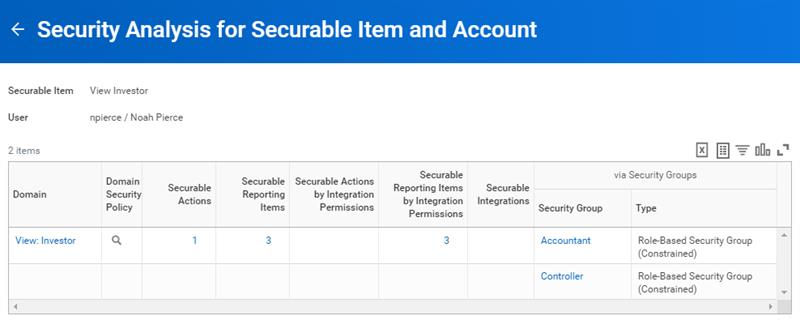
Security Analysis for Securable Item and Account report.
What Can Be Configured?

Configurable security is the bridge between customer-defined security groups and Workday-defined content groups.
What Can Be Configured: | What Cannot Be Configured: |
|---|---|
|
|
Note
: Workday provides 200 custom domains in the System functional area that allow you to configure security permissions for custom items, such as custom dashboards and custom objects.Enabling Functional Areas
Depending on the scope of your Workday deployment, not all functional areas will be enabled. For example, your deployment may occur in multiple phases. One of these phases could include deployment of the Advanced Compensation functional area. This would require you to enable the new functional area and any security policies for secured items you want to provide access to.
Use the
Maintain Functional Areas
task to enable or disable functional areas. This task displays the Workday-delivered functional areas and the domains and business process types in each. Select the checkbox under the Enabled column to enable or disable a functional area.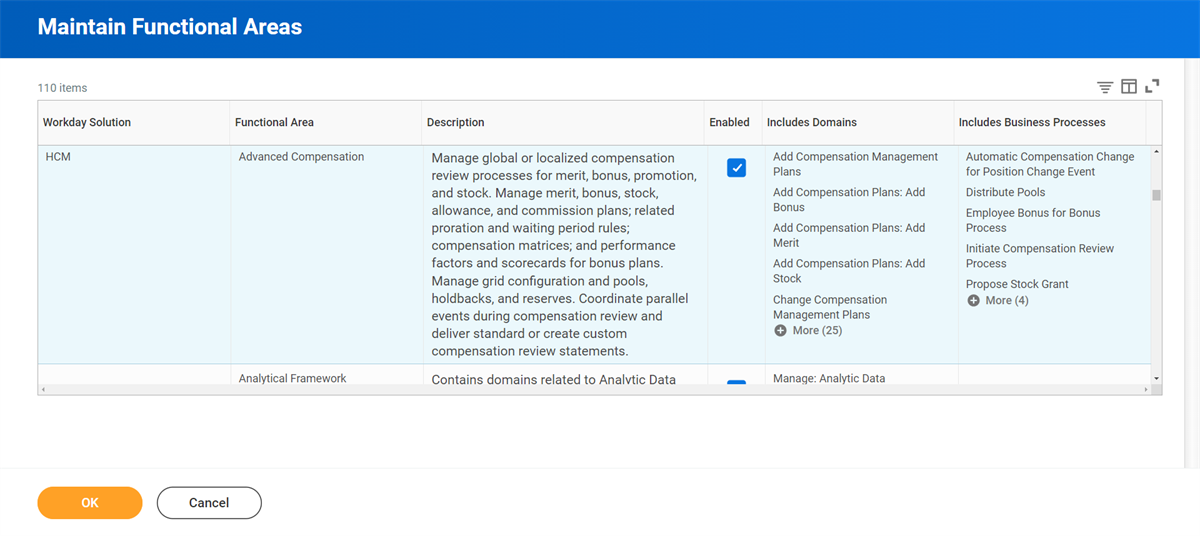
Report
: You can also use the Functional Areas
report to access an overview of the Workday-delivered functional areas and the domains and business process types in each.Enabling New Domains
If there are new domains delivered as part of a release update, you may need to create the domain security policy, enable it, and configure permissions. Similarly, you can also disable or suspend security policies.
Important
: While Workday may release a new domain in an existing functional area, we rarely deliver new domains already enabled or with security groups in place. We give you the framework. You decide if, when, and how you want to uptake that framework.When Workday pre-enables new domains, we will specify whether you must set up permissions. If we ran conversions to set up the permissions, we will share our default assumption of access as a starting point. That way, you can decide if you need to take further action.
Enabling New Business Process Types
If there are new business process types delivered in an update, you may need to create the business process security policy and set up the permissions. You will also likely need to create the default definition.
Steps to Enable Functional Areas and Security Policies
The steps to enable functional areas and security policies are as follows:
- Access theMaintain Functional Areastask. Select theEnabledcheckbox for the functional areas you want to use.If a functional area does not display on theMaintain Functional Areastask, access theCreate Functional Areatask. You can specify the name of an existing domain group without a functional area to create the functional area.
- Access theDomain Security Policies for Functional Areareport. From the domain security policy'sRelated Actions,selectDomain Security Policy > Enable.
- Access theBusiness Process Security Policies for Functional Areareport. From theRelated Actionsmenu of the business process type, selectBusiness Process Policy > Edit.
- Activate your changes to security policies via theActivate Pending Security Policy Changestask.
Domain Security Policies
Domain security policies allow you to configure which security groups can access the items in a domain. You can also determine what type of access each security group has to those items (e.g., view-only vs. modify permission).
An item may belong to more than one domain. Use the
Secured Items in Multiple Domains
report to see which items are secured to more than one domain.View vs. Modify Permission for Reports and Tasks
You can configure two levels of security group permissions in a domain security policy for reports and tasks:
- View permission: Provides access only to domain items that require View permissions, such as report fields and data sources. View permission does not provide access to domain items that require Modify permissions.
- Modify permission: Provides access to the domain items that require Modify permissions, as well as the items requiring View permissions. Members of security groups with Modify permissions, therefore, can access all of the domain items that require View or Modify permissions.
Example
: Suppose there are 10 items in a domain (3 requiring Modify permissions and 7 requiring View permissions). If you assign a security group View permission to the domain, members of that security group can only access 7 of the items. If you assign another security group Modify permission to the domain, members of that security group can access all 10 items.Get vs. Put Permission for Integrations
Integration permissions are different from report and task permissions. You can configure two levels of security group permissions in a domain security policy for integrations and other web service operations:
- Get permission:Provides access only to domain items that require Get permissions (e.g., access to extract data from Workday via a web service operation).
- Put permission:Provides access to integration domain items with Put permission (e.g., access to load data into Workday via a web service operation) as well as items with Get permissions. Members of security groups with Put permission, therefore, can access all integrations in the domain.
Note
: Some domain actions and reporting items will show a permission of View Get. This permission indicates that security groups with Get permission can also access actions and reporting items requiring View permission, via integrations.View a Domain Security Policy
View a domain security policy by selecting Domain > View Security Policy from the domain's Related Actions.
Workday groups the domain items into categories:
- Securable Actions:Include items such as delivered reports and tasks.
- Securable Reporting Items:Include items needed for custom reporting such as data sources, data source filters, and report fields.
- Securable Integrations:Include web service operations secured in the given domain.
Select each count of securable items to view the details of each item and the permission a user needs to access it.
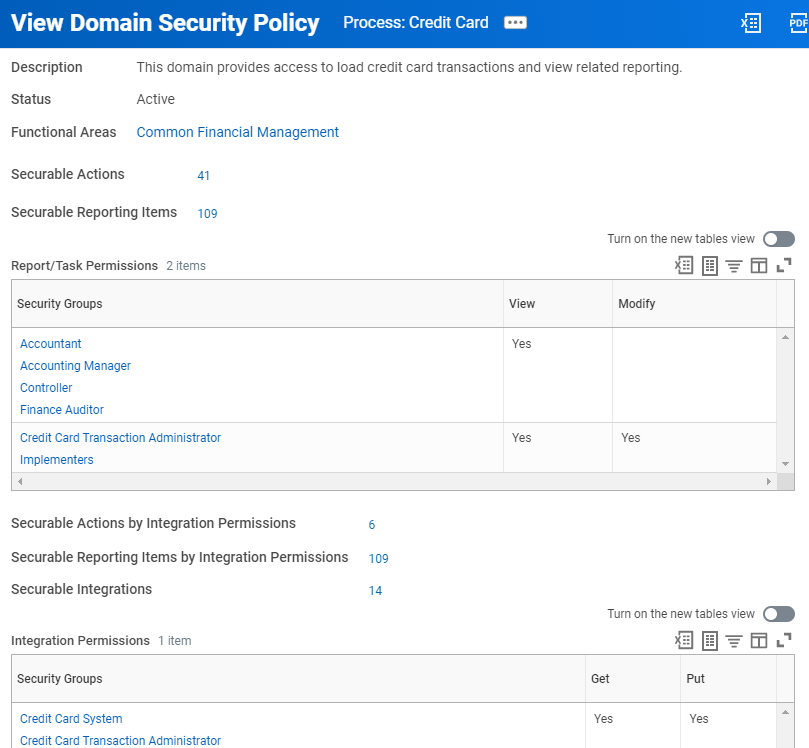
The Process: Credit Card domain security policy with the counts of secured actions, reporting items, and integrations.
Inheritance
Some domains have a hierarchical relationship, with a parent domain and a child domain (or subdomain). Workday uses these parent-child relationships when common security access is likely.
Report
: The Domain Security Policies for Functional Area
report shows all the domain security policies for a given functional area, including the domain parent-child relationships of each.If a subdomain security policy requires the same permissions as the parent, you can choose to inherit the parent policy permissions. If the child policy requires different permissions, you can override the parent permissions. If a domain is inheriting permissions, its Status field says "Active - Inheriting parent permissions." If it is not inheriting, the status shows "Active." Select the Override Parent Permissions button to edit the security groups specified or to adjust their access to View vs. Modify permission.
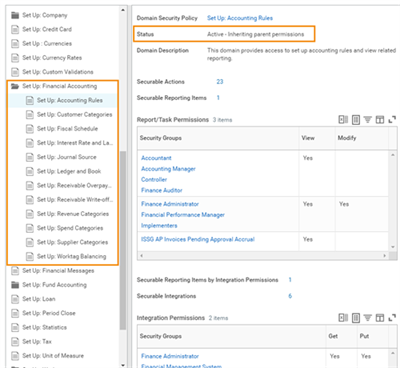
The Set Up: Accounting Rules domain inherits permissions from the parent domain.
Business Process Security Policies
Business process security policies allow you to configure the following types of permissions for the business process type:
- Who can start the business process (including what actions initiate the business process).
- Who can do action steps in the business process.
- Who can delegate an action to others.
- Who can do actions on an entire business process.
- Who can view all.
- Who can approve.
- Who can cancel.
- Who can rescind.
- Who can manually advance.
- Who can deny.
View a Business Process Security Policy
To view a business process security policy, from the business process definition's Related Actions, select Business Process Policy > View.
In the following example, there are multiple initiating actions for the given business process type, with different security groups assigned to each. Initiating actions can also include web services.
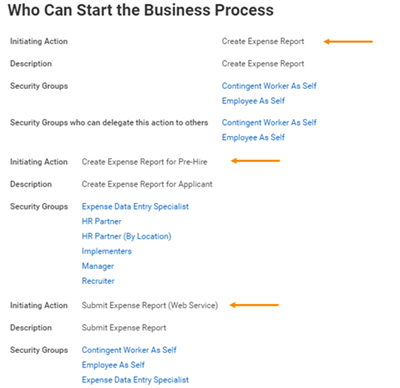
Some of the available initiating actions for the Expense Report Event business process type.
Multiple Business Process Definitions
You can have multiple business process definitions for a given business process type, but they will share a single security policy. Each definition can route steps to different security groups, as long as they are included in the security policy for the business process type.
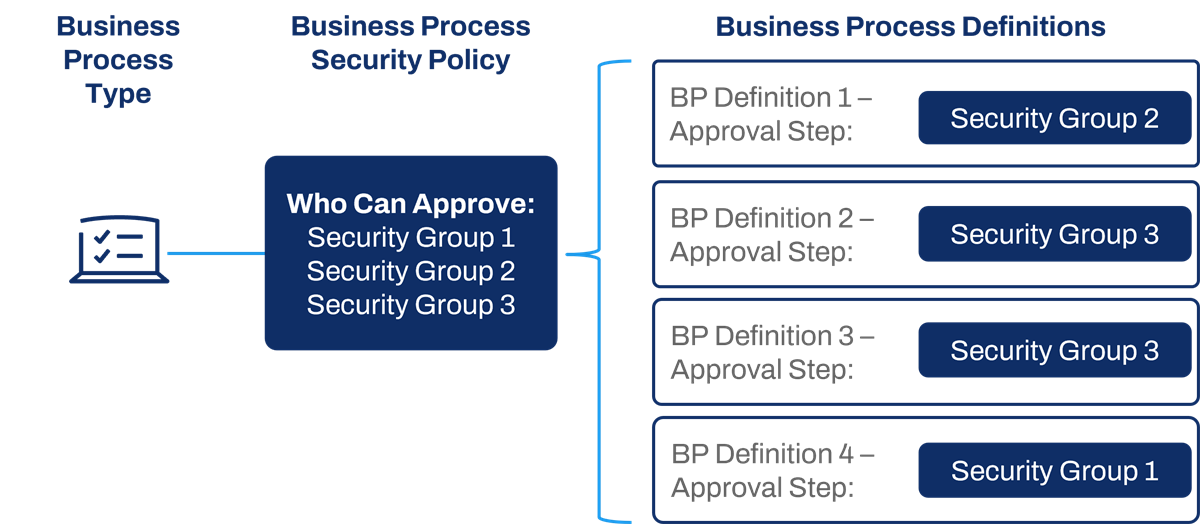
Multiple business process definitions, of the same type, share one security policy, but each may route steps to any included security group.
Example
: The Hire business process security policy lists both the Benefits Partner and Compensation Partner security groups as approvers. The Hire definition for IT Helpdesk may route an approval to the Benefits Partner, while the Hire definition for Sales may route to the Compensation Partner.Authentication Partnership
An authentication strategy aids in the prevention of phishing attempts and other unauthorized access.
At Workday, multiple players work together to secure a customer tenant:
- The Workday Development and Product teams develop new functionality to protect customers against new phishing schemes.
- Customer Success Managers provide guidance to customers after go-live.
- Integration consultants work with customers to configure tenants with the latest functionality and prepare you to maintain tenant security health.
There are three ways you can help keep your organization's data safe:
- Prevent: Develop a well-designed authentication strategy in your tenant.
- Detect: Monitor account activity with reports and alerts.
- Respond: Take appropriate action if an incident occurs.
Key Authentication-Related Definitions
Term | Definition |
|---|---|
Authentication | The process of validating someone's identity. |
Authentication Policy | The rulebook for who can access the Workday tenant, how, and under what conditions. |
Authorization | The tasks and data that a user can access once authenticated into the tenant. In Workday, we call this configurable security. Authorization is different from authentication. |
Multifactor Authentication (MFA) | MFA adds an extra layer of security when users attempt to sign in to a system. Workday recommends multifactor authentication for all users. It is relatively easy to steal a password or answer a challenge question. It is more difficult to also gain access to a mobile phone or replicate a fingerprint. |
Single sign-on (SSO) | The functionality that enables users to sign in to one third-party web application, which automatically authenticates the user into other web applications. |
Single Assertion Markup Language (SAML) | The language (or standard) that the web applications use in a single sign-on (SSO) configuration to communicate messages to one another about a user's identity. |
Security Administrator Authentication Tasks
Integration consultants own authentication configuration for a customer tenant. This covers configuration for a multitude of areas including authentication policies and single sign-on (SSO).
Security administrators may need to collaborate with integration consultants on certain areas of authentication configuration, such as:
- Enabling authenticator applications setup and backup codes
- Setting up and managing trusted devices
- Configuring access restrictions
- Authentication rule order
Resource/Glossary
: For more information on authentication, refer to the Authentication section in the Authentication and Security administrator guide on Workday Community.Additional Training
: Visit the Workday Learning Center to check out courses on authentication.Maintain Users
Security Administrators may need to assist with tasks related to maintaining users in Workday.
Note
: While the majority of customers use single sign-on (SSO) and will not sign in via username and password, maintain users tasks may still apply to terminees and pre-hires without SSO access. For example, a terminee may need to access a Workday tenant to update contact information, access paystubs, or download tax documentation.Edit Workday Account
The
Edit Workday Account
task allows you to manage certain settings for specific Workday-managed accounts, including changing user names and resetting passwords for users.Edit Tenant Setup - Security
The
Edit Tenant Setup - Security
task allows you to configure how users can reset and change passwords for their Workday accounts.Below are the steps for configuring password reset for users:
- Run theEdit Tenant Setup - Securitytask.
- Select theEnable Security Emailscheckbox to enable Workday to send security-related email notifications to users, and select one of the preferred email destination options.Example: If you want users to receive password reset email notifications at their home email address only if they do not have a work email address set up on their Workday account profiles, select theSend to work email, else home emailemail destination option.
- Select theEnable Forgotten Password Resetcheckbox. When you select Enable Forgotten Password Reset, you can require a user to enter a passcode sent over email or SMS to verify their identity.
- Access theEdit Tenant Setup - Notificationstask and verify that there are no email channel restrictions set up in theGeneral Notification Restrictionsgrid for your tenant environment.
After you have configured password reset for users, they can reset their Workday password by selecting the Forgot Password link on the Workday sign-in page.
Password Rules
Use the
Maintain Password Rules
task to configure tenant-wide password rules for accounts that Workday manages. Users must comply with these rules when they change or reset their Workday password. These rules include Number of Failed Password Reset Attempts Allowed and Failed Signon Attempts Before Lockout.Note that:
- Changes to password rules take effect immediately.
- Password rules only apply to permanent passwords, not temporary passwords.
User Activity Logging
You can enable Workday to log user activity and create a logging record. A logging record can help you better protect personal data against security threats by enabling security administrators to view user activity over a certain time period. You can also download user activity and export it to an external processing system for analysis. Enable user activity logging via the
Edit Tenant Setup - System
task to log all instances of user activity in Workday:- Run theEdit Tenant Setup - Systemtask.
- Under the User Activity Logging section, select theEnable User Activity Loggingcheckbox.
Use the
View User Activity
report to view user activity in Workday over a selected time period. Alternatively, use the User Activity data source to create a custom report that includes specific fields you want to monitor.Configure Templates for Security Emails
Email templates enable you to define the branding elements, layout, and content to include in various email notifications generated by Workday when required by a business process. This includes security-related emails, such as Workday password resets.
Use the
Create Email Template
task to set up an email template. Use the Maintain Email Templates
task to activate a template or set a template as the default. You should have a Workday-delivered template that works for most uses.Chapter 1 Summary
- Workday delivers the application grouped in functional areas, which include domains and business process types.
- Delivered items, such as tasks, reports, and web services, are secured in either a domain or a business process type.
- Workday determines which domain or business process type a given item is secured in.
- You control which users can access secured items by configuring security groups to the corresponding security policy.
- Security is configured to items, not to the data itself.
- Authentication is the process of validating someone's identity and determines access to the system.