
Prism Analytics Overview
Overview
This chapter introduces Prism Analytics in Workday. This chapter outlines the flow of ingesting data into the Data Catalog, transforming the data, and then publishing it to Workday reports. It also highlights the security domains that enable users to view the Data Catalog, create datasets, and publish Prism data sources.
Objectives
By the end of this chapter, you should be able to:
- Identify the primary use cases for Prism Analytics.
- Order the phases of the Prism Analytics process flow.
- Define terminology relating to Prism Analytics.
- Identify the security requirements to create, manage, and publish datasets.
Prism Analytics Overview
Prism Analytics is a data hub that enables you to blend Workday data with high volumes of non-Workday data to uncover new insights in your Workday reports, dashboards, and Discovery Boards. It provides the ability to ingest, blend, and transform Workday data with external data and publish the output as a new Prism data source. This functionality enables business leaders to gain a full perspective of their financial and people performance and effectively drive their business results. You can securely distribute these insights to executives and managers using existing Workday report, dashboard, or scorecard functionality.
Prism Analytics Use Cases
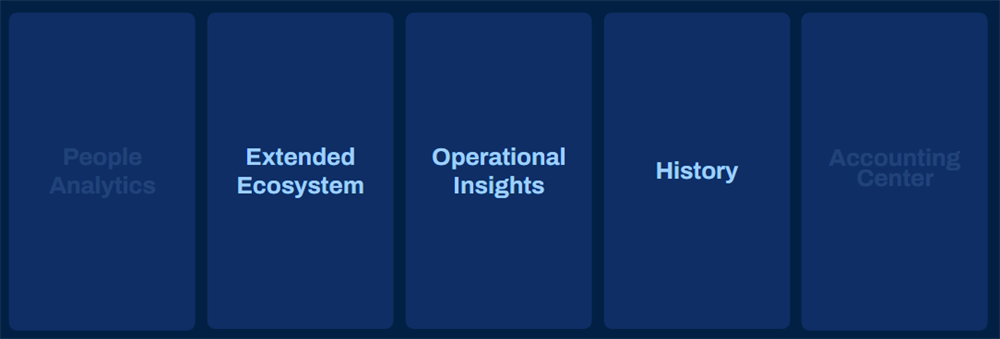
These three key categories commonly leverage Prism Analytics:
Category | Function | Common Examples |
|---|---|---|
Operational Insights
| Includes data from third party, industry, or home-grown applications for company-specific decision support on topics as wide ranging as capacity planning, sales performance, and deep profitability analysis. | Policies and claims data for insurance, point of sale data for hospitality, and loan data for banks |
Extended Ecosystem
| Includes pulling in data from subsidiary, contract labor, or third-party Finance and HR applications. | Contingent labor data, time tracking data, survey data, planning, or financial data, stock vesting data. Workday also uses Prism to power applications such as People Analytics and Accounting Center. |
History | Enables long-term historical trends by bringing in data from legacy applications such as PeopleSoft, ADP, SAP, or Oracle's E-Business Suite. | People history and financial history. Once you have the data you need from your legacy systems, you can retire them to reduce costs. |
You can identify potential use cases with careful consideration around data that needs to be aligned with reporting requirements.
- Evaluate your external systems to determine what data, when blended with Workday data, provides the greatest insight and decision support.
- Identify data or metrics used across your organization and define additional data points that would help make better decisions.
- Review the current effort performed to compile and analyze data for your organization. Explore external tools such as Excel or your data warehouse. Document the analysis that is the most complex, time-consuming, or fraught with errors.
Terminology
The following table lists and defines terms used throughout this course:
Term | Definition |
|---|---|
Data Catalog | The data catalog is the central location where users can access and create Prism datasets. These datasets can include internal data from both Workday and external systems. |
Dataset | A dataset object associates with raw source data, the processing defined on the data, or both. |
Derived Dataset | A derived dataset defines transformations and calculations on other datasets or tables (metadata only). |
Table | A table stores and represents data in a tabular format. Tables have a user-defined schema and only contain data valid against that schema. |
Workday Calculated Field | A new field definition you create on a Workday business object. The field is a derivation of existing data based on calculation parameters. The system determines the field value at runtime. You can create a Workday calculated field and add it to a report using Report Writer for later use in Prism-enabled advanced reports. |
Prism Calculated Field | A new field definition as a derivation of existing data that you can create in a Prism dataset. Workday determines its value at the time you publish the dataset. |
Report Data Source | Workday delivers data sources for reporting on business objects. Data sources can be standard or indexed and include real-time data. Data sources also represent the number of instances, starting selection, or filter view of instances coming into the report. |
Prism Data Source | A type of Workday data source you create from a published Prism dataset. Workday optimizes Prism data sources for scale and performance and updates the data only when you republish it. |
Publish | The process to create or update a Prism data source (for reporting) from a Prism dataset. |
Pipeline | A container of stages that models the flow of how data transforms. Derived datasets can contain one or more pipelines. Every dataset has a primary pipeline. Within a derived dataset, you can use pipelines to transform multiple datasets together. |
Stage | A pipeline object that takes in data, transforms it in some way, and outputs modified data. A stage performs a single computational function, such as joining data with a join transformation or parsing data from the dataset source with a parse stage. |
Lineage | The dataset lineage displays dataset dependencies, allowing you to trace a dataset's origin back to its tables. |
Process Flow
The following summarizes the flow of ingesting data into Prism Analytics through publishing to Workday reports:
- Acquire data: Load external data via sFTP, REST API, file upload, or import Workday data from a custom report. You can schedule this step depending on your source.
- Transform data: Add transformation stages to manage fields, filter data, blend data using joins or unions, and aggregate data. Add Prism calculated fields to perform functions.
- Publish data source: Configure domain security for the Prism data source and publish it for use in Workday reports. Publishing is also schedulable.
- Report on Prism Analytics data: Create custom reports, dashboards, and discovery boards using the Prism data source.
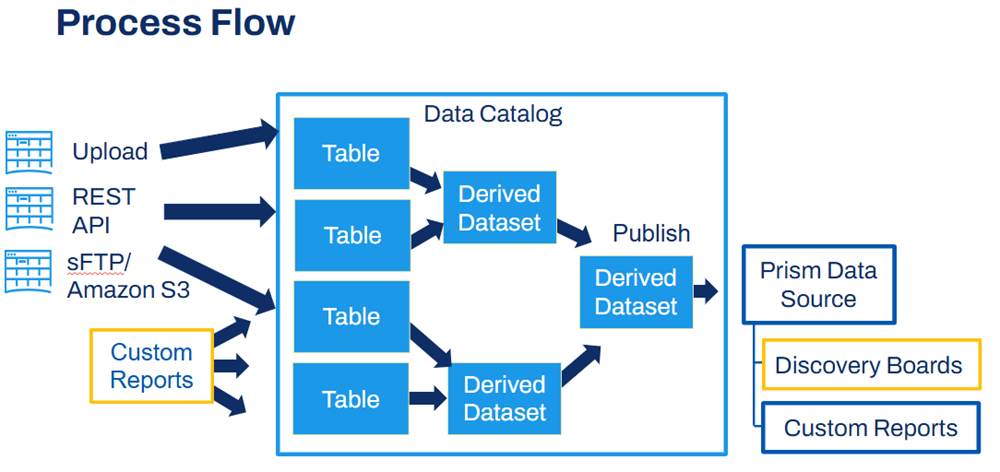
Flow of ingesting data into Prism Analytics
Prism Security Overview
Prism Analytics is a functional area that includes several security domains. These security domains allow for access to the Data Catalog and to tasks that let you create datasets and tables, as well as publish and secure Prism data sources. You must configure permissions to these domains to ensure that your Prism project team members have access to the needed functionality.
Prism domains require a special type of security group called Prism Access Security Groups. For example, you do not add the Prism Data Administrator security group directly to the domain permissions. You instead add the Prism Data Administrator security group to the corresponding Prism Access Security Group type for that domain.
Here are some of the available domains and what they enable:
Security Domain | What it Enables |
|---|---|
Prism Datasets: Create | Ability to create a dataset. |
Prism Datasets: Manage | Ability to view or modify all datasets. |
Prism Datasets: Owner Manage | Ability to share and delete all datasets. |
Prism Datasets: Publish | Ability to publish datasets. |
Prism: Manage Data Source | Ability to view or edit Prism data source security. |
Prism: Tables Create | Ability to create a table. |
Prism: Tables Manage | Ability to view or modify all tables and schema. |
Prism: Tables Owner Manage | Ability to share and delete all tables. |
Prism: Manage Connection | Ability to create, edit, view, and test Prism sFTP connections and Amazon s3 connections. |
Chapter Summary
- Prism Analytics allows you to model, transform, and combine external data with Workday data for distribution via custom reports to report consumers.
- The phases of the Prism Analytics process flow include data acquisition, data transformation, publishing, and reporting. All but reporting take place in the Data Catalog.
- When you publish a dataset, you create a Prism data source containing the data. To refresh the data, you must reimport the latest data into Prism and republish.
- You can schedule data acquisition and publishing.
- There are several security domains and key security groups that you must configure to allow for the creation, management, and publishing of datasets in the Data Catalog.