
Settlement
Overview
Workday Cash Management consists of banking, settlements, and bank reconciliation tools that enable you to actively manage and optimize the cash flow for your organization.
Workday automates administrative and control activities, such as bank statement reconciliation, while providing embedded business intelligence. Using Workday Banking and Settlement, companies can automate the coordination and control of cash flow activity.
Objectives
By the end of this chapter, you will:
- Identify the required security groups for bank setup and settlement creation.
- Create a settlement run for paying supplier invoices and customer refunds.
- Print a sample check for the supplier you are paying.
Security Policies
As you deploy Workday, you will configure security policies to ensure the appropriate security groups have the right permissions. We cover the following security groups, domains, and business processes in this chapter.
Security Groups
Settlement Specialist
: This role-based security group can perform settlement functions across all payment categories for assigned organizations (e.g., Supplier, Expense, Credit Card, Ad Hoc, and Payroll).Domains
Topic | Functional Area | Domain |
|---|---|---|
Banking & Settlement | Banking and Settlement | Process: Settlement Set Up: Settlement |
Business Processes
- Print Checks Task
- Settlement Run Event
Cash Flow
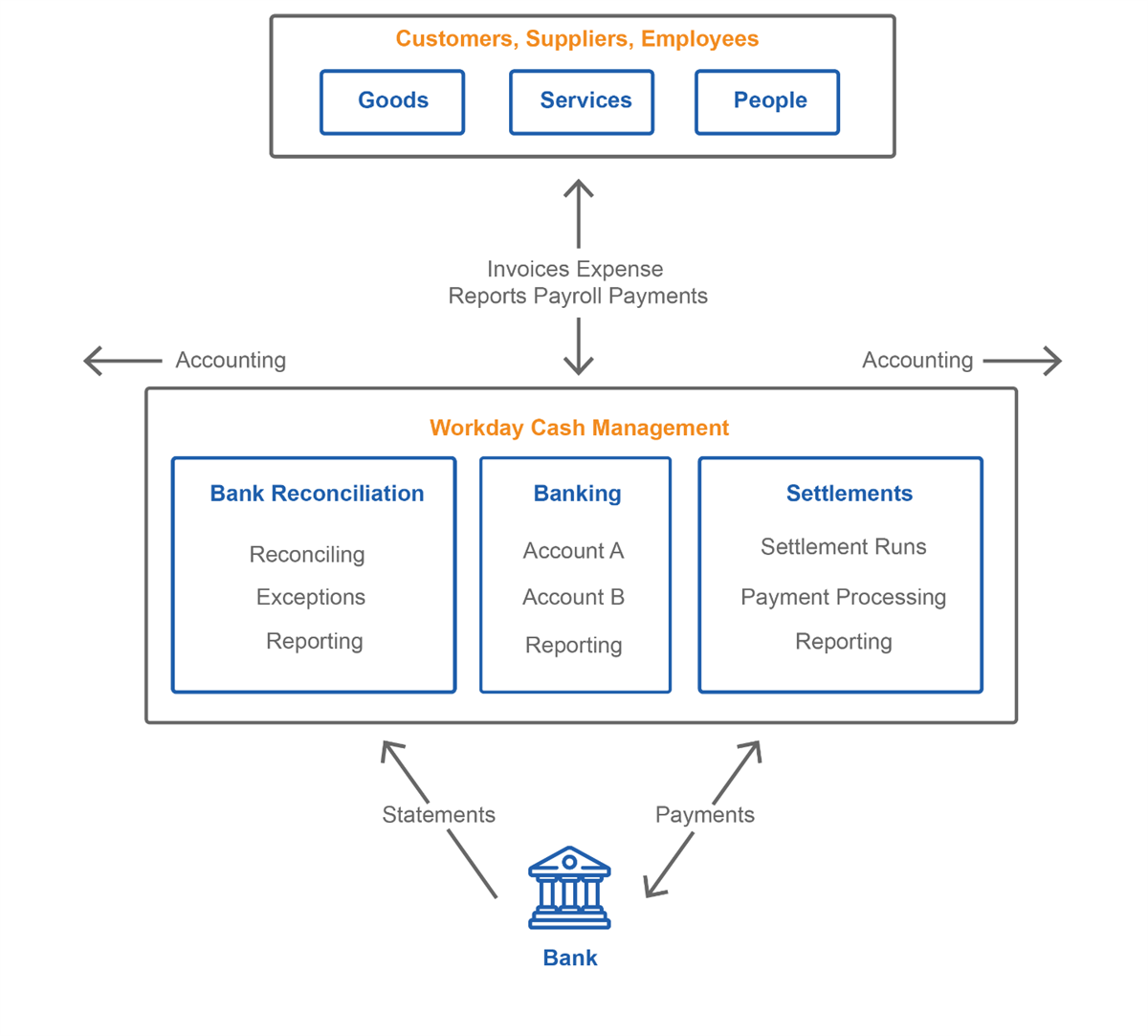
This diagram illustrates the flow of cash in and out of Workday:
Key features and functionality
The key features of Workday Banking and Settlement include:
- Invoices, expense reports, payroll data, and payments flow in and out of Workday Banking and Settlement for transactions involving goods, services, and people. You receive supplier invoices, expense reports, payroll data, and customer payments. You send out customer invoices, expense report reimbursements, payroll payments, and supplier payments. These transactions post to the bank accounts in your Workday banking system of record.
- Through settlement processing, you settle payments for these transactions. Payments flow between the bank accounts at the financial institution and settlement processing in Workday. For money owed, you can run check print processing to make payments, or you can use electronic or other forms of payment.
- Through bank reconciliation processing, you can reconcile bank statement lines against account transactions. You can also manually enter or upload (recommended) these bank statements into Workday for reconciliation.
- Both settlements and bank reconciliation produce accounting data, which Workday Banking and Settlement passes to Workday Financial Accounting.
- You can perform reporting within and across the banking, settlements, and bank reconciliation tools at any time to view and analyze your cash data.
Settlement Overview
Settlement
Workday delivers a single-settlement engine to manage all payments generated across your organization's entire business for any purpose. The result is a rationalized approach to cash visibility and management that improves upon traditional approaches.
Feature | Description |
|---|---|
Single Settlement Engine | Workday provides a single settlement engine to cover all disbursements, making settlement more efficient with increased control. Disbursements include payroll, payables, direct debits, refunds, customer credit card, and expense reimbursement. |
Settlement Analytics | Workday settlement processing provides a view across all of your outstanding in-flows and out-flows, providing the tools necessary to make accurate decisions about funding, paying, and collecting money. Real-time drill-downs provide dimensional analysis of the outstanding settlements, which provide hard-to-find details in a few selects. |
Multiple Payment Methods | Workday Banking and Settlement support electronic payment processing (e.g., ACH, EDI, ISO20022), including payment returns, as well as paper checks and positive pay. |
Support for Ad Hoc Cash Transactions | Workday Banking and Settlement provides facilities the ability to capture and manage "nonbank" cash. These include petty cash, in-person customer payments, one-time payments, payments from employees, and acceptance of hard currency payments. |
Business Process | Workday Banking and Settlement use the unique business process framework to capture approvals and automate routings, integrations, and reports from bank statement reconciliation through settlement and payment release. |
Reporting | Workday provides detailed reporting, including the ability to drill into, across, and through the operational transactions-the "raw materials" of cash information. |
The unified banking model in Workday allows you to settle all incoming and outgoing payments in one place through a common settlement infrastructure. Within this unified infrastructure, you can use security to grant access to only the types of payments that apply to your uses. You also have a better overall picture of the financial in-flows and out-flows of your enterprise. From payroll to supplier and customer payments, you have the analytic data necessary to make informed decisions.
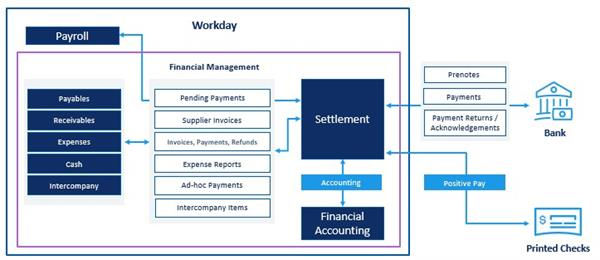
Within a settlement run, you can include any combination of these unpaid open items and pending payments:
- Supplier invoices and adjustments from payables
- Customer invoices, payments, and refunds from receivables
- Expense reports from expenses
- Ad hoc payments from cash accounts
- Intercompany items
- Pending payments from regular and off-cycle payroll
When ready, process the settlement run to settle payments. Workday interacts with banks to send outbound payments and receive inbound payments.
From a settlement, you can initiate check printing, and Workday can send positive pay data to the bank.
For electronic payments (including credit card), the banks send Workday payment acknowledgments based on the integration associated with the bank account definition in Workday.
Once the settlement processing completes payments, it generates the accounting entries associated with each payment and sends it to financial accounting in Workday.
Note
: Before you settle payments, you can create prenote runs that preauthorize bank accounts by verifying account and routing information for workers, suppliers, and customers.Settlement Dashboard
Using the Settlement Dashboard as a home base enables you to quickly create and manage settlement runs. You can also analyze and report on all of your recent settlement activity. The Settlement Dashboard is configurable. Attach additional tasks, reports, and visualizations to aid in settling payments, increasing efficiency.
You can create the settlement dashboard as an application on the user's home page.
Settlement Run Date
Specify when you want to settle payments.
- The settlement process retrieves only the unpaid items whose dates fall before this date.
- The process also settles the selected items in the run using this date as the payment date on checks and advices.
- For electronic payments, the payment date is the date that you process the settlement run.
- If you generate the payment outside of the settlement run, payroll, ad hoc payments, and customer payments use the date on the associated transaction as the payment date.
Selecting Items for Settlement
You can select items for settlement manually or add filters using the Auto Select Filters option on the Create Settlement Run page. Here, Workday provides predefined filters for many common settlement run scenarios. For example, you can select All Available Supplier Invoices to quickly process a large number of supplier invoices.
You can define custom filters to determine which open payments to include in the settlement run. For example, you can create a custom filter to pay Tier 1 suppliers before Tier 2 suppliers using the Supplier Invoice payment source and supplier categories and groups. Or you can define a custom filter to include multiple payment sources such as supplier invoices, ad hoc payments and customer refunds.
Check Print Task
Workday delivers three business form layouts for checks and advices. Each form contains a metadata XLS style sheet that defines the default placement of fields, company logo, and signature on checks and advices. The business form layout that Workday employs at print time depends on whether the printout is a financial check, payroll check, or pay slip.
To customize the default configuration of checks and advices, you can create check print layouts. Based on the check or advice stock you have selected, you can configure a layout to:
- Print checks at the top, middle, or bottom of the page.
- Establish the print location of items such as dates, payee names, and addresses.
- Specify the placement of additional fields necessary to print on blank check stock.
- Elect to print the company logo and signature on the check.
- Elect to print the company name on the remittance.
- Define both financial and payroll-specific check options.
Business form layouts assume the use of preprinted check stock. If you opt to use the default business form layout configuration, rather than define your own check print layouts, you must use preprinted check stock. To use blank check stock, you must use check print layouts to configure the additional fields.
Note
: Users can issue a positive pay file to the bank. It is a business process in Workday setup during integrations.Stop Payments
You can use a payment status of "Stopped" to reflect that you have placed or requested a stop payment to the bank. You can annotate a stopped payment status by adding notes and uploading additional, supporting documentation.
- TheStop Paymenttask is a Related Action off a completed payment with a payment method of "Check" or "Manual". The payment reconciliation status must be "unreconciled"
- TheResumetask is a Related Action off a stopped payment, which will cancel stop item and put payment status back to complete.
Note
: The "Stop Payment" feature is a manual indication in Workday that you placed a request with the bank to stop a payment. It does not generate any accounting or send a file to the bank to actually stop a payment.