
Reporting
Overview
Workday delivers the gamut of financial reporting. User-defined, real-time query provides insight whenever and wherever you need it. And, as with all information in Workday, reports will render in tabular or graphical format for display or download.
Additionally, Workday Report Writer helps you create reports to run directly from your Home page or the Favorites application. As with all Workday actionable reports, you can drill into objects to obtain additional information and use related tasks to perform authorized actions on items within that report. With all reports, you can download the results to an Excel spreadsheet or a PDF document.
Objectives
By the end of this chapter, you will be able to:
- Identify the required security groups necessary to run financial reports.
- Understand custom objects and custom fields in Workday.
- Configure the Close and Consolidation Hub.
- Understand how to copy and configure a standard report.
Security Policies
As you deploy Workday, you will configure security policies to ensure the appropriate security groups have the right permissions. This chapter covers the following security groups, domains, and business processes:
Security Groups
- Accounting Manager:This role-based security group can open/close ledger periods and years for assigned companies. Correction authority for financial accounting business processes.
- Accountant: This role-based security group performs accounting functions for assigned companies. Examples include creating journals, allocations, receipt accruals, depreciation, and intercompany settlements. Approval authority for financial accounting business processes.
Domains
- Report Execution
Custom Objects and Custom Fields
You can extend Workday business objects by creating custom object definitions based on the business object and adding custom fields. Custom objects enable you to record additional data for which there is no Workday-delivered field. You can define custom fields associated with key business objects such as Worker, Cost Center, Customer, and Supplier. The information captured in these fields is available across applications in many Workday tools, including Report Writer. Custom fields are available for use in condition rules and calculated fields. You can reference custom fields in business processes.
To define a custom field in Workday, you begin with an existing business object in the Workday object model. You then define a custom object that extends the existing business object. Finally, you define custom fields as attributes of the custom object.
For Example, if you wanted to capture shoe size for your workers, you would first extend the Custom Object
Worker Shoes
from the Workday delivered Business Object, Worker
. Then you would create the Custom Fields Shoe Size
and Shoe Type
from the Custom Object.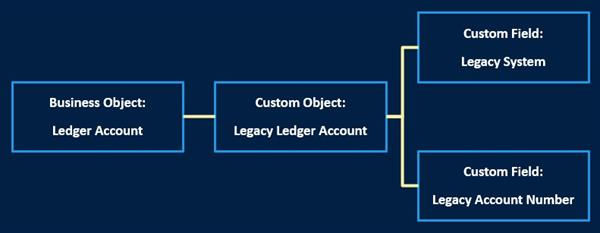
reporting chapter custom objects
These custom fields will be available for custom reports, condition rules, calculated fields, and for reference in business processes.
Configuration Requirements
In addition to organization and financial accounting setup, complete the following required configuration to run an Income Statement and Balance Sheet in Workday:
- Map Standard Aliases: Configure this task for the standard reports and Workday delivered metrics to run. To run the Income Statement and Balance Sheet, complete the required configuration for this task for the business object Ledger Account Summary. Before configuring this task, be sure to build comprehensive Ledger Account Summaries per the client's requirements.
- Account Translation Rule Set: Account Translation Rule Sets are a Workday delivered method of restating ledger currency balances in financial statements by applying an appropriate exchange rate. There are multiple Account Translation Rule Sets configured in the Unified tenant.
Close and Consolidation Hub
Workday delivers the Close and Consolidation hub which centralizes key close and consolidation reports and tasks. The hub provides users visibility over the close and consolidation process and reduces navigation to individual tasks and reports. The Close and Consolidation hub delivers the following sections:
Section | Field Description | Report or Task Name |
|---|---|---|
Overview | Ledger Period Status Note: You can configure more cards to be displayed from Maintain Hubs | Ledger Period Status Close in Progress - Activity Group Status Consolidation Data |
Close Tasks | Intercompany Reconciliation Journal
Allocations
Revaluation
Equity Pickup
Noncontrolling Interest
Account Certification | Intercompany Elimination Out of Balance Report
Create Journal
Schedule Allocation Run
Run Revaluation
Equity Pickup
Run Noncontrolling Interest
Run Account Certification Sets |
Period Close | Update Ledger Status
Schedule Ledger Update
Ledger Period Close Status
Ledger Period Journal Status | Mass Update Ledger Period Status
Schedule Mass Update Ledger Period Status
Ledger Period Close Status - Time Period
Ledger Period Journal Status |
Financial Reports | Consolidated Trial Balance
Income Statement
Balance Sheet - Consolidated
Balance Sheet - Not Consolidated
Quarterly Cash Flow Statement
Balance Sheet Retained Earnings Reconciliation
Income Statement Retained Earnings Reconciliation | Consolidated Trial Balance
Income Statement
Balance Sheet - Consolidated
Balance Sheet - Non Consolidated
Quarterly Cash Flow Statement
Balance Sheet Retained Earnings Reconciliation
Income Statement Retained
Earnings Reconciliation |
Balancing Reports | Consolidated Investment Analysis
Equity Analysis
Cash Flow Support
Cash Flow Support - Repeat | Consolidated Investment Analysis
Consolidated Equity Analysis
Quarterly Cash Flow Statement
Cash Flow Support - Repeat by Company |
Reports | Find Journals Find Journal Lines Year End Roll Forward Company Accounting CTA Analysis Company Ownership Details Consolidated Trial Balance | Find Journals
Find Journal Lines
Beginning Balance vs. Prior Year Ending Balances
Company Accounting Details
CTA Flux & Constant Currency Report - Quarter over Quarter
Company Ownership Details
Consolidated Trial Balance (by Company) |
Dashboards | Account Certification
Operational Analysis
Revenue Billing
Close Dashboard | Account Certification
Operational Analysis
Billing Reporting
Consolidate and Close |
Rules and Configuration | Provides navigation to setup and maintenance tasks for close and consolidation configurations. | Consolidations
Translation Rules and Currency Rates
Consolidation Data Mapping
Allocations
Transaction Matching
Account Certification and Reconciliation |
Suggested Links | Displays external links, tasks, reports, and dashboards configured for specific security groups or condition rules. |