
Multi-book
Overview
Many enterprises fall under the jurisdiction of several different authorities that require accounting and reporting of results according to different accounting principles. Examples include:
- Accounting Authority - U.S. GAAP by Financial Accounting Standards Board (FASB), International Financial Reporting Standards (IFRS).
- Regulatory Agencies - Department of Education (DOE), Federal Energy Regulatory Commission (FERC)
- Government or Statutory - Spain's Plan General de Contabilidad, Comptable Général
Workday Financial Management's multi-book functionality provides a method of reporting financial results based on multiple accounting principles.
For example, the Global Modern Services, Inc company reports Profit and Loss under both U.S. GAAP and IFRS GAAP principles. A hypothetical difference between the two accounting principles is the accounting treatment of certain prepaid expenses. Under
U.S. GAAP
in this example, Workday treats $3,000 of marketing costs as prepaid expense and recorded on the balance sheet as a current asset. Under IFRS GAAP
, Workday expenses the $3,000 immediately and decreases net income by $3,000. By recording this difference in the ledger using a book code of IFRS adjustments, Workday can report the Profit and Loss results under either GAAP method.Objectives
By the end of this chapter, you will be able to do the following:
- Configure book codes to record multi-book adjustments.
- Verify creation of the IFRS book.
- Create a new spend category to accommodate different accounting schemas.
- Prepare a manual adjustment journal for an IFRS book.
- Run financial reports for various books.
Security Policies
As you deploy Workday, you will configure security policies to ensure the appropriate security groups have the right permissions. This chapter covers the following security groups, domains, and business processes.
Security Groups
- Finance Administrator: This user-based security group creates and maintains all financial setup data, regardless of organization. Examples include financial institutions, financial accounting data, ledgers, journal sources, account control rules, fiscal schedules, items, and taxes. No approval authority.
- Accountant: This role-based security group performs accounting functions for assigned organizations. Views reports and transactions related to accounting journals for analysis and reporting. Assign this role to the company or company hierarchy level.
- Accounting Manager: This role-based security group can view reports and create transactions related to accounting journals for analysis and reporting and can open/close ledger periods and years for assigned organizations.
Domains
Topic | Functional Area | Domain |
|---|---|---|
Multi-book
| Common Financial Management Supplier Accounts Financial Accounting | Setup: Ledger and Book Setup: Spend Categories Setup: Accounting Rules Process: Supplier Invoice - View Reports: Financial Accounting |
Business Processes
- Supplier Invoice Event
- Accounting Journal Event
Book Code
In Workday, book codes tie to all accounting transactions. Workday records most operational transactions without a book code (blank book code), and you can post additional adjusting entries to optionally configured additional book codes.
Book Codes are for accounting and you must define one for each accounting basis for which you need to record adjustments. Book codes are user defined and you can name them based on your reporting requirements. The example book codes below show the various types of accounting or reporting methodologies that Workday supports. You can configure the following book codes to accommodate reporting for:
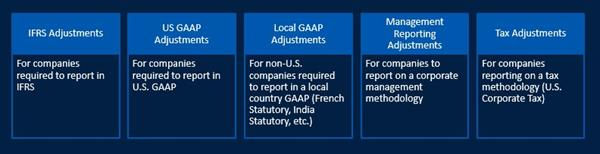
Figure 1: Example of Book Codes
Book
A book in Workday represents a particular accounting schema; therefore a book may represent an accounting book, GAAP, IFRS, or a Management Reporting book. Workday builds all books on a combination of book codes.
Group book codes together into books for financial reporting. A book can include multiple book codes, and a book code may belong to multiple books. A book rolls up activity from one or more book codes and may or may not include the blank book code.
Common Book
The common book represents a set of accounting transactions, which are primarily operational journals within Workday Financial Management. Operational journals do not include a specific book code value, so the book code value is blank (blank book code). Therefore, the resulting ledger balances are implicitly a part of a "Common Book."
Here is an example of how you could define book and book codes in Workday:
Book | Book Codes | Journal Source |
|---|---|---|
Common | "Blank" | Operational Journals Manual |
U.S. GAAP | "Blank" + USGAAP Adjustments | Manual |
IFRS | "Blank" + IFRS Adjustments | Manual |
Tax | "Blank" + Tax Adjustments | Manual |
Management | "Blank" + Management Adjustments | Manual |
Multi-Book for Assets
The multi-book for assets functionality provides the ability to automatically align asset books with accounting books. Multi-book for assets also allows you to post financial transactions for different accounting standards to meet industry or statutory accounting requirements. Map each Asset Accounting book to an Accounting Book, which allows you to report in different accounting and nonaccounting books.
You can enable this feature at the tenant level, and a Business Asset Consultant deploys the configuration. Once you enable multi-book Asset Accounting, you cannot turn it off. The Business Assets class covers the details for configuration.
Understanding the Common Book with Books and Book Codes
To illustrate how to use Book and Book Codes, assume Global Modern Services, Inc. (GMS) reports financial results under both U.S. GAAP and IFRS. Consider the following:
- Global Modern Services develops software internally.
- Under U.S. GAAP, expense both research costs and development costs as incurred.
- For IFRS, classify costs associated with the creation of intangible assets into research phase costs and development costs. Always expense costs in the research phase. Capitalize costs in the development phase if the situation meets certain criteria.
- To record and report under the two accounting principles, make accounting adjustments as required by journaling a specific book code - for example IFRS Adjustments. There is some ability to automate adjustments journal entries by enabling multi-book for assets. You can then run financial reports by book to reflect the respective accounting treatments.
Journal Processing with Book Code
Reporting using multi-book uses operational journals and manual journals. You will need to create manual journals as adjustments using the appropriate book code to achieve the desired statutory reporting.
Operational Journals
Operational journals inherently exclude a book code value (blank) and therefore fall into the common book (or the book defined for all blank book code journals).
An example is a Supplier Invoice for advertising expense. The related operational journal resulting from a supplier invoice will exclude the book code value (blank). When reviewing the Trial Balance, the advertising expense appears when selecting the book code of common book or by leaving it blank.
Note
: Under IFRS, you may need to expense advertising costs sooner than for U.S. GAAP rules. Under IFRS, expense advertising costs as incurred. Under U.S. GAAP, you can either expense or defer advertising costs depending on when the advertising first takes place. If deferred, you should create a Journal for your IFRS adjustment.Manual Journals
Use manual journals to record the adjustments for the other books. You can create a manual journal using the Create Journal task. In the journal header, you can select the book code after you have identified the Ledger to where you need the adjustment.
Book Code Usage Related to Journals
In addition to using Book Code in the header of a Journal for recording Book Code adjustments, Book Code is:
- Available in Custom Validations and Accounting Journal Event
- Available in journal drill downs and dimensional reporting
- Retained in reversal journals
- Included in the Copy Journal functionality
- Included in the Roll Forward Year-End Balance task (or beginning balances by book code)
- Included in Update and Mass Update Ledger Period Status to manage the close by Book Code.
Reporting with Book and Book Codes
To report multi-book adjustment journals, you can use the Book field in standard reports and the Book prompt field in financial statement reports.
Selecting the correct Book is important to ensuring that you have the correct results returned in your report. For example, if you are running the Find Journals standard report with a Book of US GAAP Book, the journals returned are only those with Book Codes of US GAAP Adjustments, and blanks. Conversely, if you change the report criteria to the Book of Common Book, then Workday returns only journals with a "blank" book code.
Default Book Code
When running a Standard report, Workday defaults the Book Code from the either of the following:
- Tenant Setup: Default reporting book
- Company Hierarchy: Supersedes tenant default
- Company: Supersedes tenant default
For example, if you configure tenant setup with common book only, the Trial Balance standard report will display "Common Book Only" as the Book. Data returned will be for the common book only. When selecting criteria for the report, you can change the default book.
Note
: Report Writer reports (delivered and custom) will always return all book codes. You will want to keep this consideration in mind when comparing custom reports with the trial balance. Custom reports can include filters or prompts to select the book code.Multi-book Chapter Summary
Workday Financial Management multi-book functionality provides a method of reporting financial results based on multiple accounting principles. Use book codes, books, and adjusting journal entries to accomplish this goal. The blank or common book contains operational transactions. You can then create additional books, combining the common book with other adjustment book codes to achieve the desired reporting standards.