
Modular Orchestration Design
Overview
A suborchestration is a series of steps that you can reuse across multiple orchestrations in the same app. For example, you can create a suborchestration that takes a JSON file as input, performs some transformation, and outputs the results as a CSV file, and then call those steps from multiple orchestrations. You can also call suborchestrations from other suborchestrations. In this chapter, you will explore techniques to use suborchestrations in order to make modules that can be reused within your app's orchestrations.
Objectives
By the end of this chapter, you will be able to:
- Design modular, reusable, and scalable orchestrations.
- Work with suborchestrations to simplify orchestrations.
Working with Suborchestrations
Suborchestrations break down workflows into modular components that handle specific tasks. These smaller workflows can be reused across multiple parent orchestrations, promoting consistency and reducing duplication. By isolating common processes, such as data validation or error handling, suborchestrations simplify maintenance and enhance scalability. This section explores how to define, create, and dynamically invoke suborchestrations in your integration designs.
Overview of Suborchestrations
A suborchestration is an orchestration in the same app that you call from other orchestrations. You define its inputs and outputs, build its logic, and expose it through a calling component. Suborchestrations break orchestration logic into smaller workflows that handle specific tasks. These workflows live in the same app and run when a parent orchestration calls them.
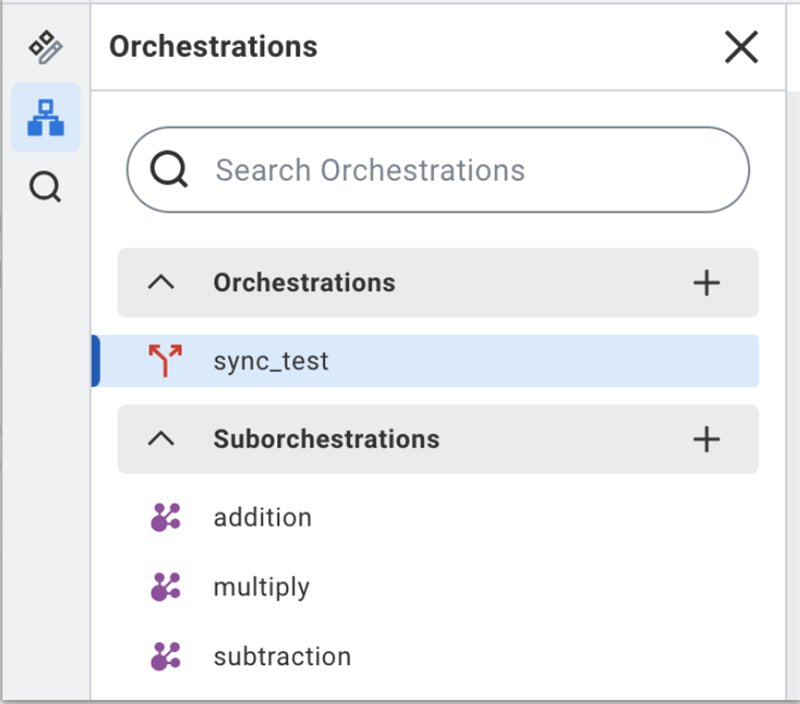
By moving repeatable tasks such as data filtering, validation, or outbound calls into suborchestrations, you:
- Reuse the same logic across orchestrations.
- Keep parent orchestrations shorter and easier to read.
- Centralize changes in one place instead of many copies.
Creating Reusable Suborchestrations
Parent orchestrations use the Call Suborchestration component to run this logic and pass data into it. At runtime:
- The calling orchestration runs until it reaches the Call component.
- The component passes the configured values to the suborchestration.
- The suborchestration processes those values and returns its outputs for downstream use.
A reusable suborchestration focuses on a single responsibility and exposes a clear interface. Common use cases include:
- Shared HTTP or SOAP call patterns with logging.
- Data filtering or transformation logic used in several flows.
- Common validation and status reporting steps.
Identify the Task
Select one clear task for the suborchestration. Examples:
- Filter a data set by location or status.
- Wrap an HTTP action with request and logging steps
- Validate input and return a pass or fail status.
For the chosen task, identify:
- Required inputs with their data types.
- Outputs that downstream steps will consume.
Configure the Suborchestration
After you define the task, configure the suborchestration in Orchestration Builder.
- In an existing orchestration, open the Orchestrations panel.
- In the Suborchestrations section, select the plus symbol and enter a name.
- Configure inputs on the Start step and outputs on the End step.
- On the canvas, add components between Start and End to implement the logic.
- Do not add Trigger Business Process or Send Workday RaaS Request components to suborchestrations.
- Save the app so the suborchestration and its interface are available to callers.
Keep the logic focused on the defined task. If the orchestration starts to mix unrelated responsibilities, split it into additional suborchestrations.
Integrate the Suborchestration
When the suborchestration is ready, integrate it into a parent orchestration.
- In the parent orchestration, open the Suborchestrations panel. Each suborchestration appears as a Call component such as Call FilterByLocation or Call OktaAction.
- Drag the relevant Call component onto the canvas in the correct position in the flow.
- In the component properties, provide a Value for each input Key that the suborchestration expects.
- Use expressions to pass values from previous steps or from orchestration inputs, such as a WorkerID or JSON payload.
- Use the list of outputs in the properties panel as a reference during mapping.
- Save the app. At runtime, the calling orchestration passes values to the suborchestration, which processes them and returns outputs for downstream steps.
Downstream steps reference suborchestration outputs like any other step outputs. For example, a later step can read the HTTP status or filtered data that the suborchestration returns and decide how to continue.
Dynamic Invocation of Suborchestrations
Dynamic invocation calls a suborchestration only when conditions at runtime require it. Instead of wiring a fixed path, you control when and how the suborchestration runs by:
- Passing input values that come from prior steps or orchestration inputs.
- Evaluating conditions before you call the suborchestration.
- Using the suborchestration outputs to choose the next steps.
To configure dynamic invocation in a parent orchestration:
- Drag the appropriate Call suborchestration component onto the canvas from the Suborchestrations panel.
- In the component properties, map each input to an expression that resolves at runtime, such as an orchestration input, a value from a previous step, or a loop item.
- Add a Branch on Condition step before the Call component, and route to the Call step only when the condition is true.
- After the suborchestration runs, use its outputs in downstream steps the same way you use outputs from any other step, for example to decide the next branch or to build an API request.
Use dynamic invocation when a single suborchestration must support several scenarios, for example:
- Error handling, where different inputs route to the same reusable recovery logic.
- Data processing, where parameters such as process type or region change how the suborchestration behaves.
- API integration, where the orchestration calls the same suborchestration only for certain records, or only when a flag indicates that external updates are required.
Troubleshooting Suborchestrations
Error handlers in loops and suborchestrations control how an orchestration reacts when a step fails. You use local error handlers on specific steps or loops, and a single global error handler for uncaught errors. Error handlers receive the same inputs as the protected step plus a processingError output that exposes error details such as location.
Inside the suborchestration
- Use step-level error handlers on risky steps such as external calls, complex expressions, or loops.
- For each handler, decide whether to:
- Propagate the error so the suborchestration’s global handler (or the parent) marks the run as failed.
- Handle the error locally and set outputs that describe the failure (for example, status = "FAILED", errorSummary, errorDetails).
- Keep the suborchestration’s outputs stable. Expose a small set of fields the parent can always rely on, such as:
- status (for example, SUCCESS, VALIDATION_FAILED, DOWNSTREAM_ERROR)
- errorSummary (short text)
- errorDetails (optional structured or long text)
At the Call Suborchestration step
- Attach a step-level error handler to the Call Suborchestration component in the parent flow.
- Use that handler to choose between:
- Treating any thrown error as fatal and stopping the parent orchestration.
- Converting the error into a controlled outcome by:
- Logging a clear message.
- Setting a flag (for example, isSuccess or SubflowFailed) for downstream branching.
- In downstream steps, never assume the call succeeded. Always branch on the suborchestration’s status or success flag before using its outputs.
Design guidelines:
- Keep error handling forimplementation detailsinside the suborchestration; surface only compact status information to the parent.
- Let theparent orchestrationdecide business impact: whether to stop, retry via another path, or continue with degraded behavior.
- Use consistent status values and field names across suborchestrations so parent flows can reuse the same branching patterns.