
Overview of Third-Party Payroll
Overview
In this chapter, you will explore the general components of the payroll processing framework and identify sources of payroll data. You will compare and contrast the different connector templates for third-party payroll connectors.
Objectives
By the end of this chapter, you will be able to:
- List the elements of the payroll processing framework.
- Describe how the elements of the framework impact payroll processing.
- Identify sources of payroll data.
- Differentiate between a Payroll Interface (PI) integration and a Payroll Effective Change Interface (PECI) integration.
Third-Party Payroll Connectors
Third-party payroll connectors allow you to manage payroll-related human resources data and send it to a third-party payroll provider. With third-party payroll connectors, you can:
- Configure built-in change detection to capture changes to employee data.
- Determine which data elements to include and when.
- Configure a payroll extract to deliver to an external system.
- Perform additional transformation to the output data.
Tip
:
Third-party payroll connectors provide a full set of integration features without requiring custom code. Because the interface is pre-tested and supported by Workday, you can reduce development and maintenance costs for your implementation.Third-party payroll connectors are packaged integration templates with a configurable set of HCM data across a range of categories. Because third-party payroll providers only need a subset of the employee data in Workday, these interfaces let you specify which data elements to include in payroll extracts, when to include them, and how to detect changes based on Workday transactions. When launched, the integration captures changes to employee data for a given pay group and pay period, and creates an output file in XML or CSV format based on your specifications. You can then deliver the output file to an external system, perform additional transformations to convert the file into another format, or use Workday audit reports to identify changes for manual data entry into an external system.
Payroll Interface
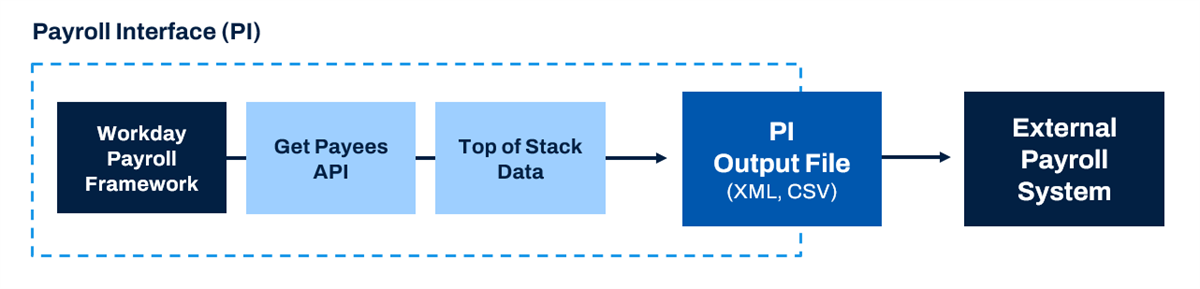
Payroll Interface (PI) is one of the third-party payroll connectors within Workday. This template is built based on the Get Payees web service. PI evaluates data changes using top of stack processing. PI reports on the net data changes, but not the sequence of changes.
Payroll Effective Change Interface
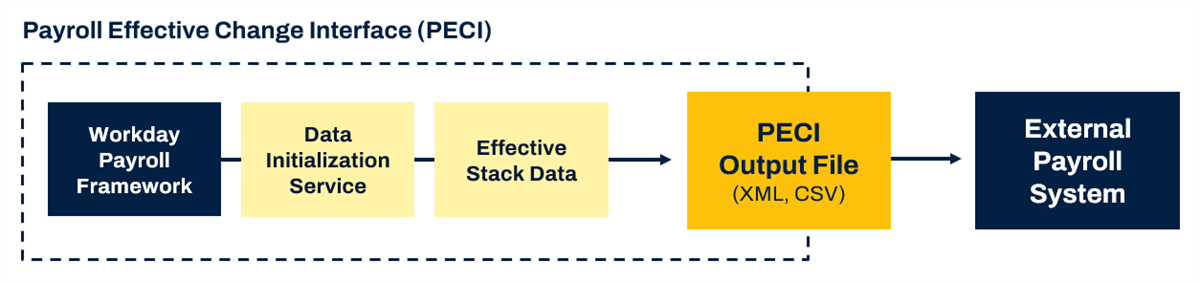
Payroll Effective Change Interface (PECI) serves the same purpose as PI but performs a more comprehensive evaluation of data changes to create an effective stack. PECI reports the data changes in the sequence in which they become effective and entered in Workday. PECI is not built based on a web service, but utilizes the DIS (Data Initialization Service), a framework built and maintained by Workday.
Making the Case for PECI
PECI and PI have different behaviors for processing and reporting changes to payroll data. Workday recommends that customers use PECI over PI in order to get the most detailed data. However, some vendors may require PI if they only support top of stack data.
Template | Stack Processing | Behavior |
|---|---|---|
PECI | Effective Stack | Integration reports all changes. |
PI | Top of Stack | Integration only reports net changes. |
Note
:
Workday will continue to provide essential maintenance for PI, but is no longer enhancing this template.Sources of Payroll Data
In order to calculate payroll, vendors must gather data from several sources. Many categories of data have the potential to affect payroll results.
Data Category | Examples |
|---|---|
Basic Biographical | Home and work addresses, government issued IDs |
Worker and Job | Pay rate type, employee type, time type |
Compensation | Compensation plans, allowance plans, bonus, merit |
Benefit Elections | Rates per elected plans |
Absence | Leave and time off taken |
Time Worked | Time entry from Time Tracking |
Withholding Orders | Recorded orders |
Payroll Tax Withholding Elections | Elections for federal, state, province, and local taxes |
Payment Elections | Payment types such as check or direct deposit |
Work Schedules | Pay per schedule |
Payroll Input | Adjustments or overrides |
Payroll-Related Events
When a change is made to worker data, Workday needs to share that information with the vendor so the appropriate action can be taken in the external payroll system. The following chart lists examples of events that could impact payroll and actions the vendor may need to take.
Event | Possible Actions |
|---|---|
Promotion | Change in compensation, position, and organization |
Address Change | Mail pay stubs to new address |
Hire | Initiate employee on payroll |
Transfer (With Pay Group Change) | Change in compensation |
Leave of Absence | Possible stop in payment |
Benefit Election | Change in earnings and deductions |
Payroll Processing Framework
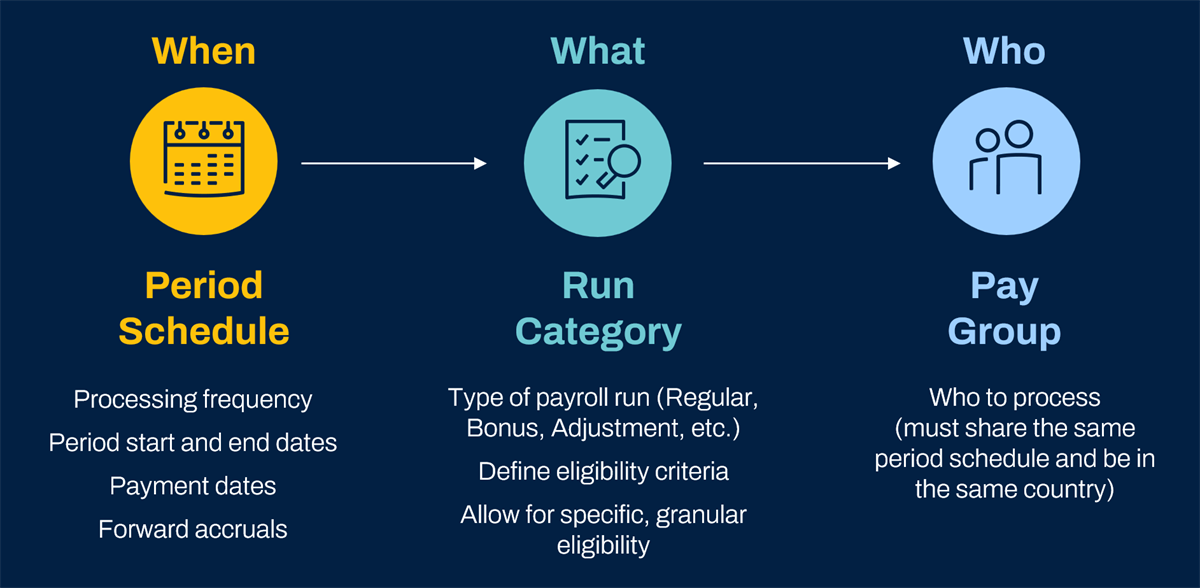
The Workday payroll processing framework is made up of period schedules, run categories, and pay groups. These elements determine when to process payroll, what data to include, and which workers to process it for.
Period Schedules
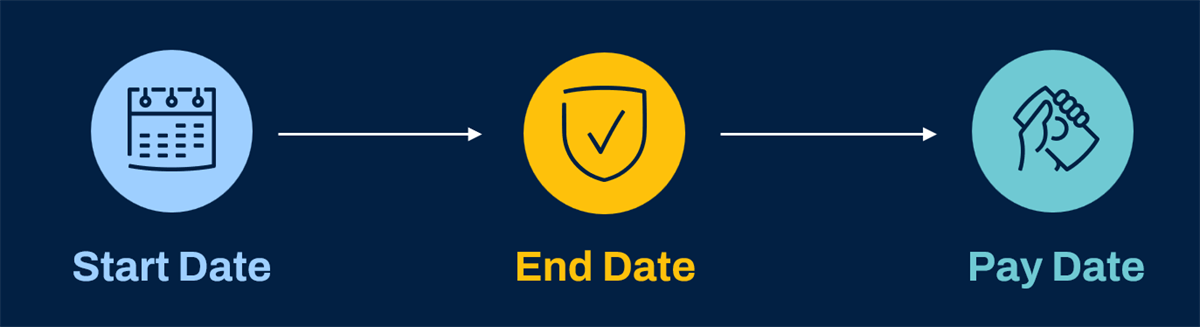
Period schedules control the employee pay cadence. They have start dates, end dates, and payment dates.
Period schedules define consecutive periods for payroll processing and time tracking. If configured, Workday Payroll, Workday Absence, and Workday Time Tracking can share period schedules. Shared schedules are appropriate only if the time and pay period dates match.
You can build period schedules in Workday or import them using Enterprise Interface Builder (EIB).
Note
: You can extend existing period schedules with the Generate Period Schedule Periods
task.Run Categories
When you calculate on-cycle or off-cycle payroll, Workday refers to the run category to determine who and what to process for the pay period. A run category specifies:
- What workers to process, based on status or other selection criteria.
- Taxation and processing rules, including minimum net pay amount (for net pay validations).
- Which pay components to process, including which to process automatically for terminated workers, workers on leave, and when making off-cycle payments.
Pay Groups
Workday uses pay groups to group workers for payroll processing. Consider the following:
- They are an organization type that is unique to payroll.
- They are associated with one country.
- Members can belong to different divisions, departments, companies, and supervisory organizations.
- Members share period schedules and run categories.
- Workers can only be assigned to one pay group unless using multiple job functionality.
Pay groups can also govern what payments workers can receive. You can make earnings and deductions available to workers in selected pay groups. For example, pay groups can help to define pay group eligibility for earnings, deductions, and other components of pay.
Note
: You can only have one run category per pay group defined as Regular.Example
: Although Workday runs tax filing by company, it processes workers by pay group. You may divide workers into pay groups by criteria, such as:- Shared period schedules.
- Shared work schedule.
- Exempt and nonexempt status.