
Functional Changes
Overview
The outputs from PECI integrations mirror how objects are related in Workday. Knowing the functional aspects will help you identify the correct configuration settings for integration services and field attributes. In this chapter, the activities and discussions around the Payee and Position objects will help you understand how to interpret the data in the output file, and will allow you to practice setting up the integration system configuration.
Objectives
By the end of this chapter, you will be able to:
- Identify how employees, contingent workers, and payees relate to one another.
- Configure integration field mapping for personal data within PECI.
- Predict XML structure based on field attribute configuration of PECI.
- Explain how name components relate to PECI and why they may vary between countries.
- Configure PECI integration attributes for address usage.
- Compare how Position field elements in PECI outputs correspond to fields in Workday.
- Configure PECI integration attributes to include specific organization types in the output.
- Describe how PECI integration maps drive which values Workday outputs for organizations.
Employee/Payee Object Overview
Workers
There are two worker categories: Employees and Contingent Workers.
- Employeestypically draw benefits, receive paychecks on a set frequency, and are more permanent in nature.
- Contingent Workersare temporary workers that are paid per unit of work and typically do not draw benefits from the company.
Important
: The Workday Payroll interface framework only supports employees, not contingent workers. In the context of Payroll, we use the Payee object. The Payee is an employee who gets paid.Payee/Position Object Model
Understanding how data relates to the employee object model will help you plan and configure your integration. In this next section, we will learn how integration attributes, services, field attributes, maps, and the XML output are organized around this object model.
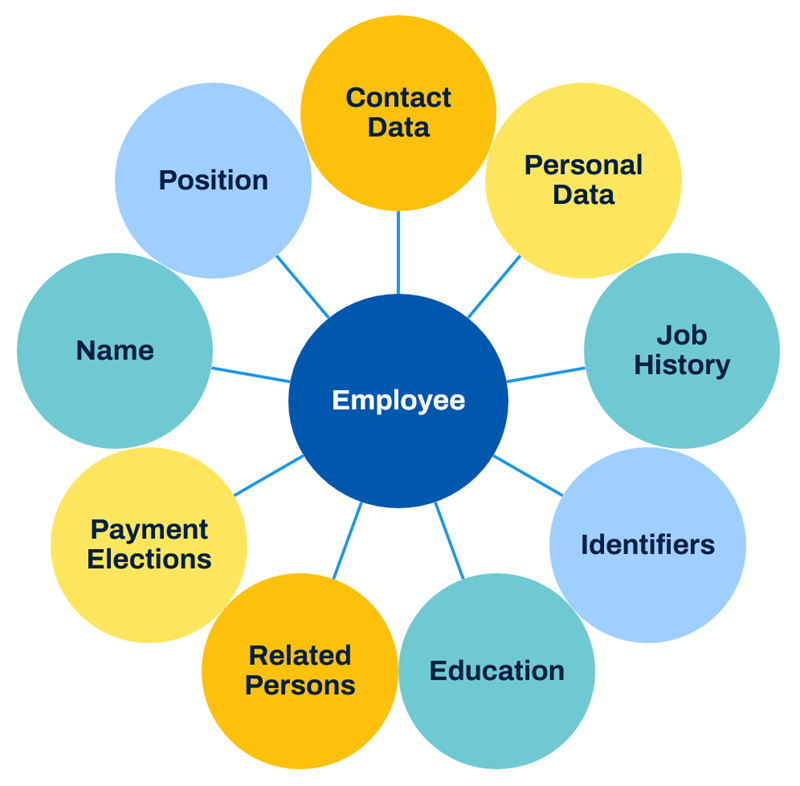
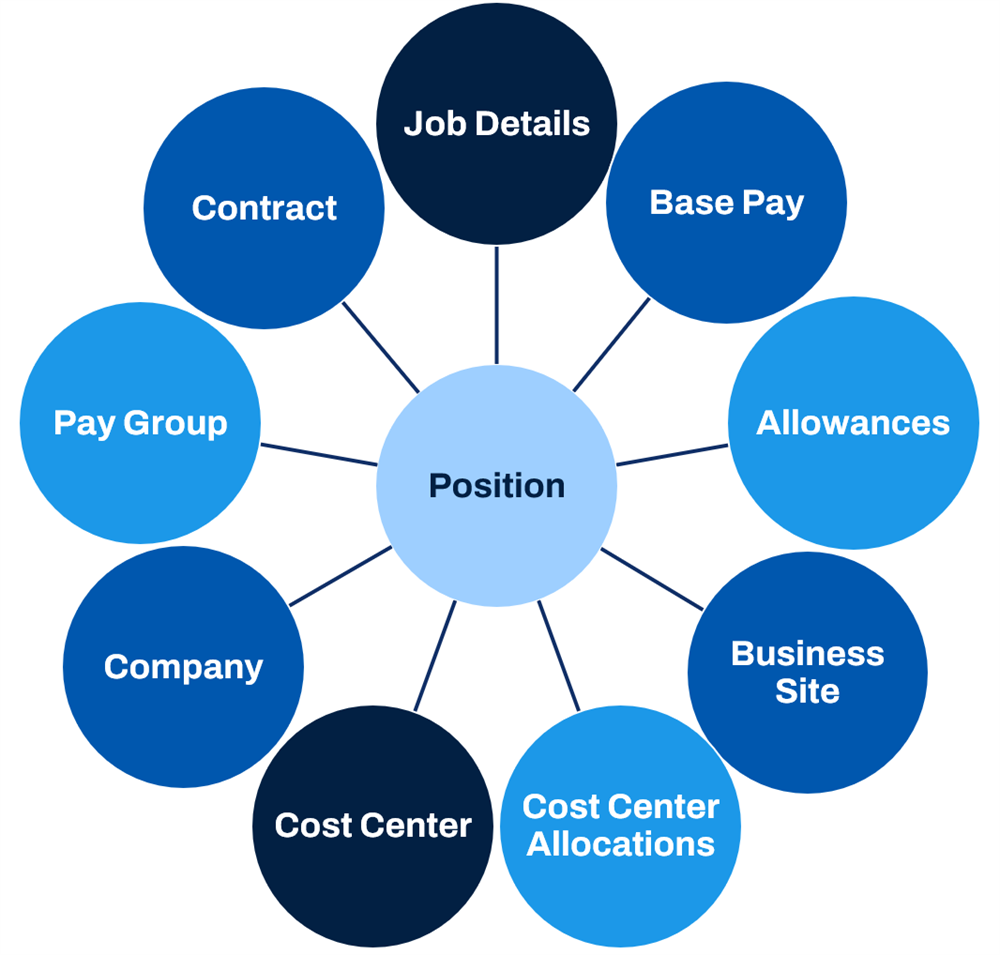
Each related object may also contain a grouping of other objects. The Position object, for instance, contains another grouping of data that will be useful in our payroll integration.
PECI Personal Data
Personal Data Sections
PECI uses three separate data sections for different types of personal data:
- Personal Data
- Person Communication Data
- Person Identification Data
Configure the data sections to be included in the output as well as the fields within each section and subsection using the
Configure Integration Field Attributes
task.Personal Data Integration Attributes
Several integration attributes within the PECI template relate to the configuration of personal data output. Configure attributes to define which type of phone, email, and address information to include in the output. You must define the address usage type for any included address data. Usage types may include values such as Business, Home, Work, etc. Specific usage types may be necessary, depending on the requirements of the payroll system.
Attribute | Description | Example Values |
|---|---|---|
Include Personal Data Section | Enabling this attribute includes the Personal data section when there is a change to the Personal Data Identification section. | Yes/No |
Include Person Identification Data Section | Enabling this attribute includes the Personal Identification data section when there is a change to the Personal Data section. | Yes/No |
Additional Name Types | The output will include the additional names of one of these types. | Formal, Maiden, Other, Preferred |
Phone Usage Type | The output will include the primary phone number for the selected types. | Academic Contact, Business, Home, Lockbox, Work |
Email
Usage Type | The output will include the primary email for the selected types. | |
Address
Usage Type | The output will include addresses with the selected types. | |
Address Usage | The output will include addresses with the selected usages. If there are none, then the output will include the primary address for the address usage types. | Mailing, Street Address, Shipping, Paycheck, etc. |
Personal Data Integration Maps
You can map many fields within the Personal Data sections to return values appropriate for the external payroll system. If you do not define a map, the integration will typically use a reference ID as its default value.
You would configure integration maps for PECI in the same way you would for PI and other integration system templates.
The two integration maps we will examine in this chapter are:
- Identifier Type
- National ID Type
PECI Personal Data Output
Data sections that are impacted by a change are reported within an Effective Change element. For example, the Person Communication data section outputs with the Address subsection containing a change to Address Line 1 and Line 2 for the Home usage type.
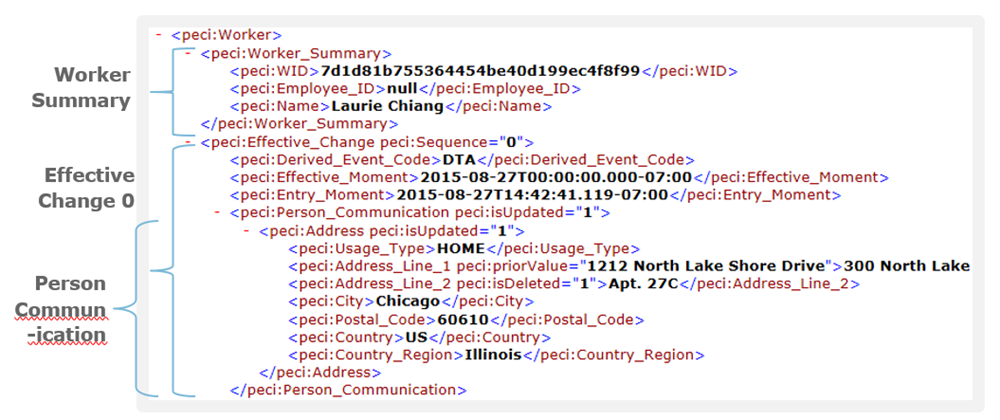
The output only includes data sections that are impacted by a change. Using a PECI integration attribute, you can opt to include the Personal Identification data section when there is a change to the Personal data section, and vice versa.
If there is a change to an instance within a multi-instance record, the output includes all instances.
Example
: If multiple address usage types are enabled using the attribute, and the fields' attributes are turned on, all instances would be output, even if there is only a change to one type of address.Compensation
Compensation elements link compensation and payroll. Examples of compensation elements include Salary, Hourly Pay, Commission, Bonus, and Car Allowance. The employer sets up plans that have a plan type. These plan types may or may not be derived from an element. When a compensation element is attached to a plan and the plan is assigned to an employee, Workday can determine which earnings to use to pay the employee for his or her compensation using the pay calculation process.
A compensation package consists of one or more plans. For example, you can create a package for Non-Management positions that includes specific salary, merit, stock, and bonus plans. A sales compensation package may be a different salary range, merit, stock, and bonus plan, but may also include a car allowance.
Payment Computation and Allowance
Compensation setup through packages and plans passes to the payroll system for payment. Some compensation elements might be a fixed amount distributed across a range of time while others are variable amounts awarded or paid on a pre-set date.
- Compensation elements such as salaries are paid in regular intervals using the pay periods. PECI takes the compensation in the plan and applies computation logic to output what the payee is due to be paid for each period.
- Compensation elements such as merit plans or bonuses are provided as separate one-time payments.
Understanding how Workday processes these distributions differently is key to understanding how and where the output file provides payment data.
PECI Position Data
The PECI Position Data section includes fields related to position details and organization information.
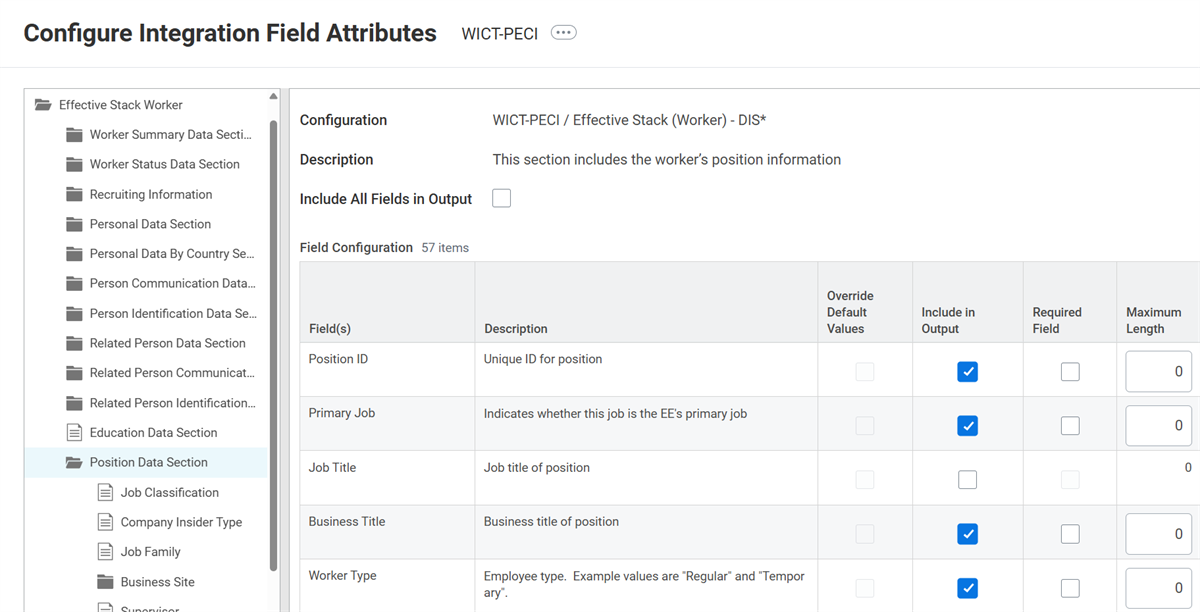
PECI Position Data Section fields and subsections.
Organizations
The Position Data section includes organization information. In order for the output to return organization data, you must enable the field and configure the Organization Type for Organization attribute to include the desired organization types. You may define integration maps for organizations if the external system requires different values. If you do not configure any maps, PECI will use the Organization_Reference_ID to indicate the organization.
PECI Time Off
Time Off
Short durations of absence, such as vacation (holiday) and sick time, are captured in the Time Off module. You can configure these durations to be included in the PECI extract under <peci:Time_Off_Earnings_and_Deductions>. Start date, end date, and number of paid hours appear under this element, and you can map them to the payroll system for employee reference, account balance tracking, etc. Similar to time tracking data, there is a separate section for time off corrections.
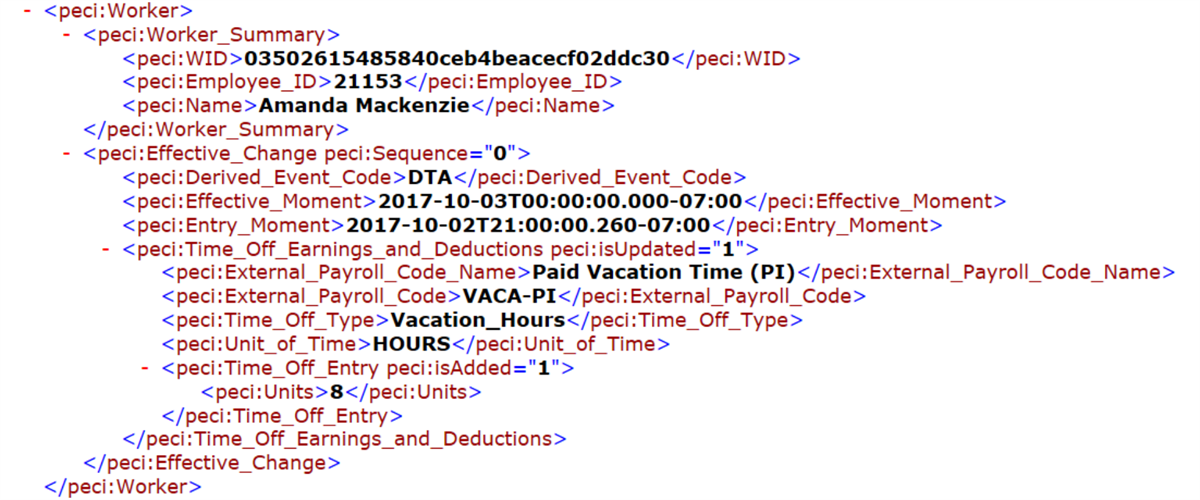
PECI XML output showing the Time Off element.
You must set up both time tracking and time off mapping by using the
Maintain External Payroll Earnings
task.PECI Time Tracking
Time Tracking
PECI only reports approved time events from the associated business process. For example, after you set up the time tracking earning on the
Maintain External Payroll Earnings
task and then approve the time block entries, the integration reports them in the Time Tracking data section. When you enter a time block entry and approve it for greater than one year ago relative to the processing period end date, the integration will not report it. To report the time block, make a prior period the current processing period so that the entry is within one year.Note
:- Since time tracking data is considered bulk data, Workday recommends creating a non-primary integration system that only processes time tracking data.
- For Payroll Effective Change Interface, you can include time tracking data in the extract under <peci:Time_Tracking>.
Troubleshooting Time Tracking
When working to understand why a time tracking entry may be missing from the integration output, there are several details to consider:
- You must set up the external earning before approving the associated time block.
- You must set up time tracking using theMaintain External Payroll Earningstask for the specified pay group.
- The integration only reports approved time events from the associated business process.
PECI One-Time Payment
You would report a one-time payment separately from a recurring payment in the payroll extract. This can include a:
- Spot bonus
- Referral incentive
- Severance pay
- Retention incentive
- Signing bonus
You would also map these payments using the
Maintain External Payroll Earning
s
task.PECI uses either the Compensation One Time Payment section or the Payroll One Time Payment section, depending on the type of one-time payment.
Troubleshooting One-Time Payments
PECI integrations solve the issue of transmitting data related to one-time payments to third-party payroll vendors. However, there may be times when the integration does not pick up the expected one-time payments. When one-time payments are missing from the output, ensure that the following requirements are met:
- External earnings for the pay groups have been correctly configured.
- The Full Snapshot launch parameter is disabled when the integration is launched.
- The integration is run as either ad hoc or a primary integration event.