Additional Tools
Overview
Workday offers a range of reporting and analytics tools that offers solutions beyond what we have learned in this course and in Workday Reporting. Use this chapter to build awareness of the range of tools offered so you can choose the right tool for your HCM use cases.
Objectives
By the end of this chapter, you will be able to:
- Describe how to use WDSetup and Customer Central to leverage preconfigured content.
- Identify the additional reporting and analytics tools offered by Workday.
WDSetup
WDSetup
WDSetup is an internal tenant that contains the factory default data Workday implementers use to build the customer's Foundation tenant. It contains configuration and setup data, but no worker or transactional data.
You can migrate preconfigured content from WDSetup using a feature called Configuration Catalog. This accelerates deployments and makes it easy to reuse locale-based content.
WDSetup houses the following preconfigurations:
- Tenant setup data
- Security groups, roles, and domain security policies
- Default business process configurations
- Country-specific HCM setup values
- Country-specific Absence plans
- Custom reports
- Integrations
These sample configurations in WDSetup are designed to provide a starting point for configuration and are not part of the Workday service.
Shared WDSetup
The Shared WDSetup tenant provides the ability to view the content housed in WDSetup. Shared WDSetup is accessible to all Workday Community users. The tenant can support up to 150 concurrent users and is available in English. Workday refreshes the tenant weekly to mirror the contents in the production version of WDSetup with occasional, minor exceptions.
Shared WDSetup does not:
- Cover all features available in Workday.
- Guarantee the content is current or conforms with regulatory and legal guidelines.
- Guarantee the configuration is 100% viewable or error-free, as delivered.
- Provide Workday-recommended or best practices configuration.
- Include data transfer tools as part of this service; content is view only.
Customer Central
Customer Central is a Workday tenant that is a hub for a customer's nonproduction tenants. It is free and automatically included in new deployments.
- Customers can use it to migrate prepackaged configuration into their nonproduction tenants, like integrations or reports. This is available through the Configuration Catalog feature.
- Implementers use Customer Central to manage tenant access for the various implementation tenants and load data into tenants. These tasks are available because of tools that live in Customer Central but are only accessible to implementers.
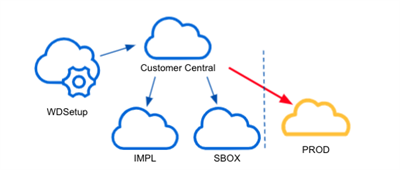
It is important to note that Customer Central does not house any customer data. It only provides a means for managing other tenants and access to the deployment tools.
Customer Central and WDSetup are not the same.
- You use a Customer Central tenant throughout a customer's deployment lifecycle and after deployment.
- You use WDSetup for accessing the factory default data to build the customer's Foundation tenant. It also serves as the data source for the Configuration Catalog.
Customer Central Setup
There are four foundational steps for the initial Customer Central setup.
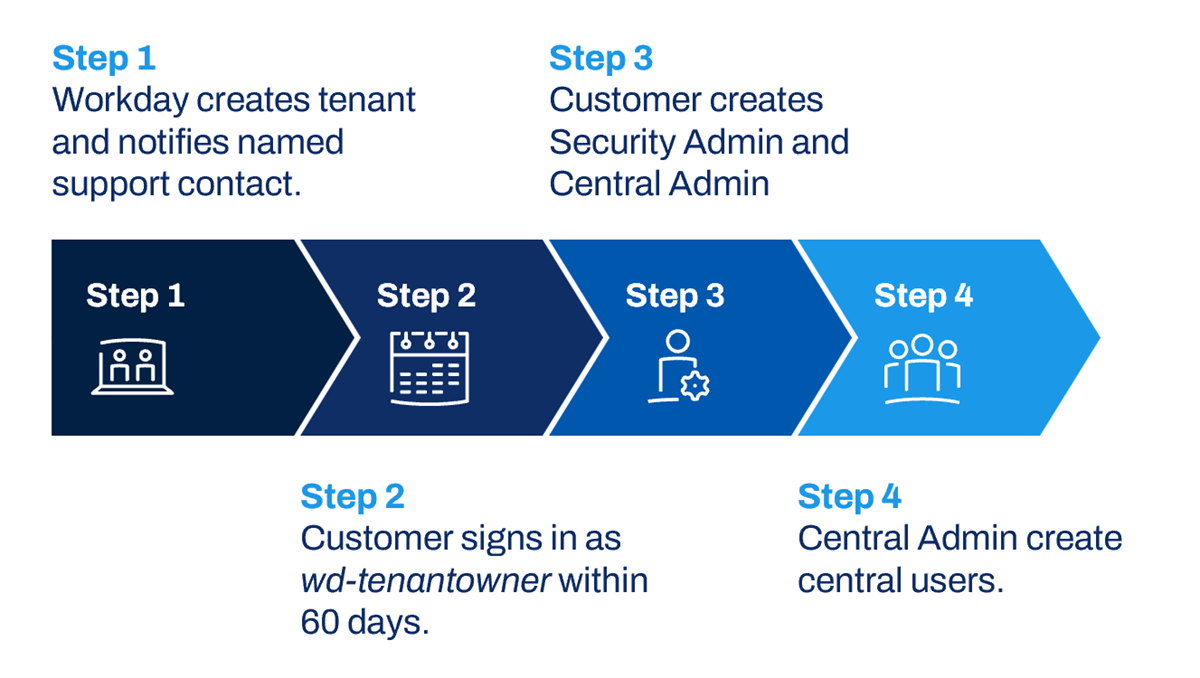
- Workday creates a Customer Central tenant for a customer and sends temporary wd-tenantowner credentials to the named support contact.
- The customer signs in to Customer Central as wd-tenantowner and completes the initial setup steps within 60 days.
- The wd-tenantowner user sets up the two main types of Administrator accounts: Customer Central Security Administrator (CCS) and the Customer Central Administrator (CCA).
- The Customer Central Administrator signs in to create the Customer Central users.
Workday strongly recommends that customers create at least one backup Security Admin and Customer Central Admin, who is a customer or customer-named support contact, to perform administration responsibilities after deployment. Workday also recommends that customers include an email address in the Customer Central User contact details. Workday uses this address when a user requests a password reset.
Note
: Select the Enable Forgotten Password Reset checkbox in Edit Tenant Setup - Security
task.To complete the setup:
- Create the Migration Administrator security group.
- Set up tenant security rules and settings.
- Enable foundry tenant access.
- Add nonproduction tenants to Customer Central.
- Set up tenant access for users.
The following tasks are optional:
- Disable Tenant Owner
- Enable Multi-Factor Authentication(recommended)
Customer Central User Model
Customer Central has a unique security model because it provides three levels of access. The access levels, or account types, are Security Administrator, Central Administrator, and Central User. A user's account type determines what they can do in Customer Central. These account types can be assigned to either customers or implementers.
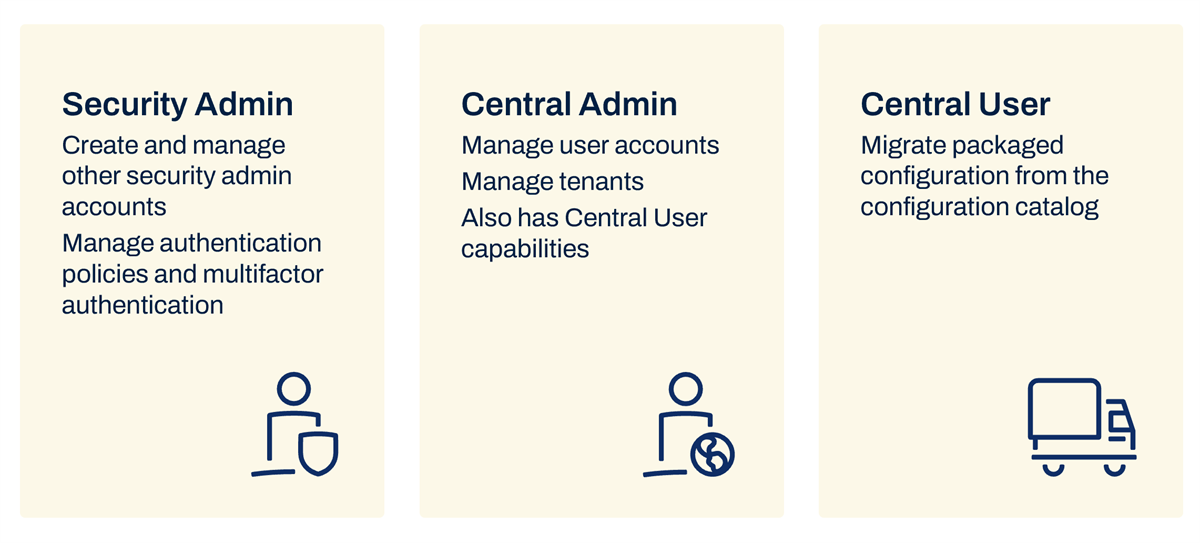
- Security Administrator account capabilities include:
- Set password rules.
- Monitor sign in reports.
- Perform other security tasks, such as resetting forgotten passwords.
- Create additional Security Administrators.
- Manage multifactor authentication.
- Central Administrator account capabilities include all those of a Central User, as well as:
- Create and manage user accounts.
- Manage tenants.
- Central User account capabilities include:
- Migrate preconfigured data from the configuration catalog, such as integrations or custom reports.
- Access deployment tools, such as foundation and migration recipes (only applies to Central Users who are also implementers).
Customer Central Administrators and Central Users have additional capabilities if they have implementer accounts. The Customer Central Security Administrator has the same capabilities whether they have a customer or implementer account.
Customer Central Tools
Customers must have a Customer Central tenant to access the tools listed in the table below.
Tool | Description |
|---|---|
Tenant Health Dashboard | The Tenant Health dashboard supports Implementation and Sandbox tenants and displays:
|
Object Transporter | Object Transporter is a tool that automates the migration of configuration data between tenants, including to your Production tenant. The Object Transporter displays the following sections:
|
Tenant Dashboard | The Tenant Dashboard worklet provides access to tenant and migration-related information that you can download. The dashboard also provides access to associated tenants and displays the following sections:
|
Configuration Catalog
The Configuration Catalog is a Customer Central feature that enables customers and implementers to migrate Workday-provided content to Implementation and Sandbox tenants.
The Configuration Catalog contains predefined configuration packages of factory default content sourced from WDSetup. Users can then modify the data to align with the customer's needs. Both implementers and customers can access the Configuration Catalog from the
Tenant Dashboard
worklet in Customer Central. Each configuration package description contains information that defines the applicable SKU, content details, and any required prerequisite data.Workday recommends thoroughly testing Configuration Catalog contents before migrating the content to a Production tenant. It is the responsibility of the implementer or customer to test and confirm that all configuration and reports meet your regulatory and business requirements.
Configuration Packages
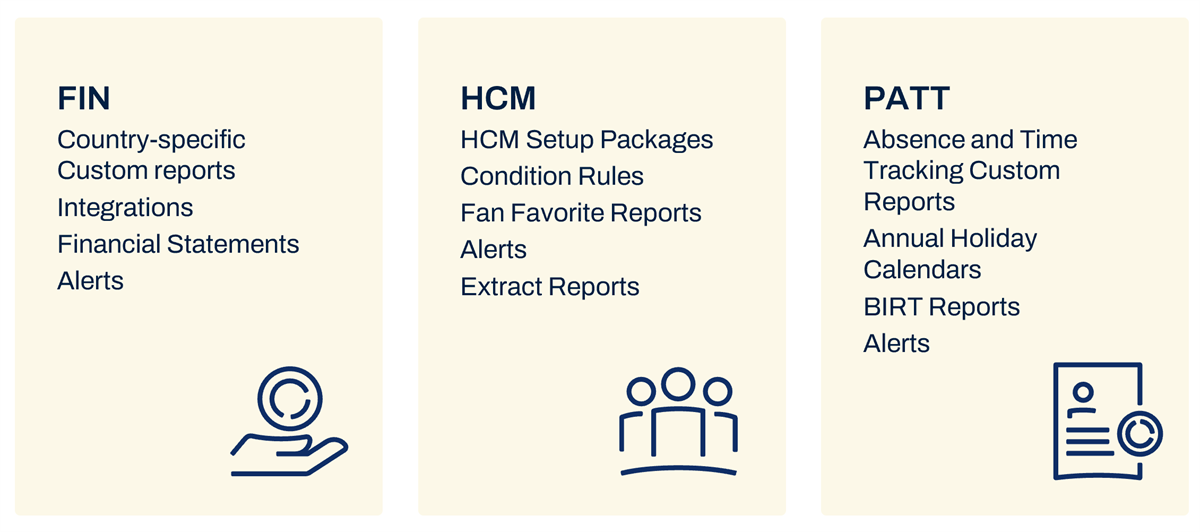
Workday groups the content into logical collections called configuration packages. The following image shows some examples. You can copy and edit the country-specific custom reports packages to meet local regulatory requirements. The HCM condition rules package includes common HCM condition rules and calculated fields. You can use these immediately in your business processes or modify to meet your requirements. For Payroll, Absence, and Time Tracking (PATT), the BIRT reports package includes country-specific report layouts.
Migration Tools
The following table describes the available migration tools and services and when to use them.
Term | Description | Use Cases | Considerations |
|---|---|---|---|
Object Transporter (OX) | Object Transporter is a Workday feature that allows the migration of certain types of objects and their dependencies between tenants. It performs dependency and prerequisite analysis and provides the user with a diff analysis when migrating objects. In the Workday Administrator Guide, search for Object Transporter to find detailed configuration and process steps. |
| Access Object Transporter through your Customer Central tenant. You must have a Customer Central tenant and active roles established for:
To avoid conflicts, run the following tasks to maintain consistent, static IDs:
|
iLoad | iLoad is a legacy conversion tool used to extract and load data using Web Services. The iLoad tool uses XML files or Excel spreadsheets to facilitate data extraction or loading. |
| You can only access the iLoad tool with an implementer account. Access password-protected spreadsheets or XML files from a Secure File Transfer Protocol (sFTP) site. |
Example
: A consultant needs to migrate multiple custom reports to a different tenant to use for the next tenant build. You can migrate an individual custom report, or create a configuration package to migrate multiple at once. OX will migrate the custom reports and any calculated fields they contain.Note
: Use OX whenever possible. Only specific implementation types are available for OX migration. The Object Transporter Supported Objects (OX)
report lists supported types that are available.Summary of OX vs iLoad
Consider the following when deciding which migration tool to use:
- Both use the same web services.
- Both migrate multiple instances.
- iLoad supports more object types.
- You can edit iLoad files before load.
- iLoad has a validation mode.
- OX is more efficient and easier to use.
Worksheets Overview
Worksheets is a spreadsheet technology in Workday that enables ad hoc data exploration, analysis, visualization, and collaboration with live, transactional data.
Workday users-employees, managers, and executives-can collaborate in the tool using secure, live Workday data. They can create new Worksheets workbooks and import spreadsheets to blend data and perform ad hoc analysis. Users do not need to be experts in Workday Report Writer to use Worksheets and work with Workday data, which allows your enterprise to more readily share and perform analysis on data with a wider audience.
Benefits of Worksheets for the Enterprise
Traditional enterprise spreadsheet applications have benefits and challenges. These are go-to tools that are intuitive and familiar and allow infinite complexity. It is common for customers to export their essential Workday data into a spreadsheet application to perform additional analysis. However, this can present some issues:
- Data quickly becomes outdated.
- The process lacks security controls.
- Emailing and communicating is cumbersome for teams.
The Power of Worksheets
We will demonstrate how Worksheets will allow your enterprise to go further together, by providing real-time data to your team, an application where you can share and communicate, and flexible tools to allow quick, ad hoc analysis so you can work smarter, evolve, and grow.
- Know: Worksheets brings clarity to empower better decision-making. You can gain complete, global visibility to your most important data across functional areas.
- Change: Support change with flexibility and speed. You can continually optimize the workforce as business needs evolve and respond quickly.
- Grow: Gain a competitive advantage to chart long-term success and achieve unprecedented results.
Unlock Data Across Workday System
Worksheets brings the familiar features and functions of spreadsheets into the Workday environment, enabling you to unlock your Workday data for analysis in a familiar and intuitive format.
There are many advantages to this model, including:
- Providing the ability to work with live Workday data.
- Allowing you to leverage Workday security for your data.
- Enabling your team to communicate and act on data through collaborative tools.
- Enabling your team to work from anywhere through mobile.
Worksheets delivers your most important data to those who need it most. This allows your users to take that data, perform ad hoc analysis, collaborate, and answer essential business questions. This takes your reporting requirements beyond the Workday Report Writer model, allowing those who may not typically use or be trained on Workday Report Writer to participate and collaborate on data both within and outside of Workday.
Workbooks can also use data within or outside of Workday, and you can share them with executives, managers, and other employees on the team.
Prism Analytics Overview
Prism Analytics is a data hub that enables you to blend Workday data with high volumes of non-Workday data to uncover new insights in your Workday reports, dashboards, and Discovery Boards. It provides the ability to ingest, blend, and transform Workday data with external data and publish the output as a new Prism data source. This functionality enables business leaders to gain a full perspective of their financial and people performance and effectively drive their business results. You can securely distribute these insights to executives and managers using existing Workday report, dashboard, or scorecard functionality.
Prism Analytics Use Cases
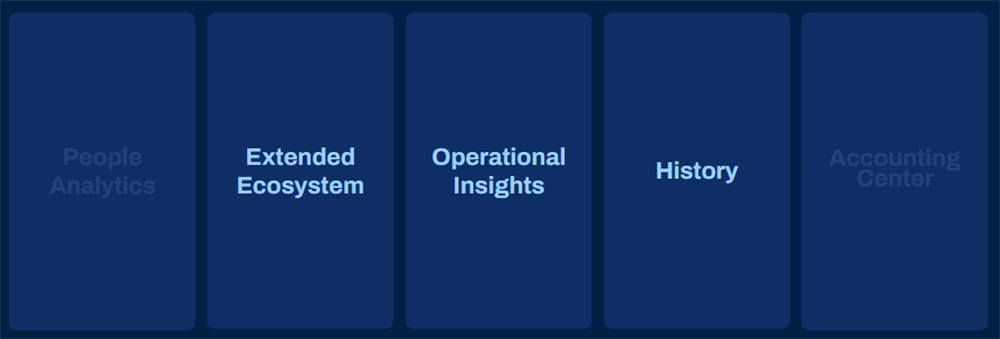
These three key categories commonly leverage Prism Analytics:
Category | Function | Common Examples |
|---|---|---|
Operational Insights
| Includes data from third party, industry, or home-grown applications for company-specific decision support on topics as wide ranging as capacity planning, sales performance, and deep profitability analysis. | Policies and claims data for insurance, point of sale data for hospitality, and loan data for banks |
Extended Ecosystem
| Includes pulling in data from subsidiary, contract labor, or third-party Finance and HR applications. | Contingent labor data, time tracking data, survey data, planning, or financial data, stock vesting data. Workday also uses Prism to power applications such as People Analytics and Accounting Center. |
History | Enables long-term historical trends by bringing in data from legacy applications such as PeopleSoft, ADP, SAP, or Oracle's E-Business Suite. | People history and financial history. Once you have the data you need from your legacy systems, you can retire them to reduce costs. |
You can identify potential use cases with careful consideration around data that needs to be aligned with reporting requirements.
- Evaluate your external systems to determine what data, when blended with Workday data, provides the greatest insight and decision support.
- Identify data or metrics used across your organization and define additional data points that would help make better decisions.
- Review the current effort performed to compile and analyze data for your organization. Explore external tools such as Excel or your data warehouse. Document the analysis that is the most complex, time-consuming, or fraught with errors.
People Analytics
Overview of People Analytics
People Analytics is a tool that automates insight discovery for a broad range of workforce questions. It surfaces prioritized insights in the form of key metrics and business questions along with their underlying drivers. It uses explanatory stories to help you understand these insights and act on the most critical trends and gaps in your workforce.
People Analytics is built on the Prism framework and relies on technology called augmented analytics. Storyteller, which is the nickname for augmented analytics uses pattern detection to identify important changes a human might miss. It uses graph processing to find connections across vast data sets. Machine learning algorithms then identify the most important insights for each user, and natural language generation explains the metric and trends in a simple and actionable story.
People Analytics specifically supports HR Business Partners and executives within an organization. Configuration choices (e.g., mapped fields, included or excluded populations) impact the content made available to these users. You can track key metrics and trends in these topic areas:
- VIBE Index™
- Diversity and Inclusion
- Organization Composition
- Retention and Attrition
- Hiring
- Talent and Performance
- Skills
Note
: You can only install People Analytics on a Prism-enabled tenant. However, People Analytics customers do not need to purchase Prism to use People Analytics.Customers can enable only 3 tenants with People Analytics and can deploy it in Implementation, Sandbox, or Production tenants. Preview tenants do not support People Analytics.
How People Analytics Addresses Data-Related Challenges
People Analytics helps organizations tackle three of the most pressing data-related challenges faced by HR teams: prioritization, data literacy, and scalability.
- Prioritization: People Analytics helps business leaders identify their top workforce-related opportunities and risks so they can prioritize and focus on these areas.
- Data literacy: People Analytics presents information in the form of stories, with clear narratives written in everyday language. This makes it easier to make sense of people data and to connect workforce analytics to actual business outcomes.
- Scalability: Typically, delivering analytics to the business is time- and labor-intensive, thus limiting the number of insights an HR analyst can generate. This could cause important patterns and trends to go undetected. The scalability feature frees analytical talent from repetitive, time-consuming work to focus on more strategic analyses.
Storyteller
Storyteller is an automated analytical engine that searches millions of combinations of data, makes connections between the combinations of data, and surfaces the most significant results in the form of stories. A story is a narrative summary of a data finding that answers a business question such as "What are key turnover trends?" Stories include a text summary, trending charts, detailed data, and a list of the most important drivers. Each story provides a significant under or overperformance in a metric.
Storyteller analyzes and evaluates the statistical significance of each view of the data. It clusters views based on several factors, such as similarity of problem, their hierarchical relationship, and the commonality of the underlying data. It then ranks each view based on the greatest impact to the related business question and displays the top ranked (most significant) views as stories. After determining the most significant stories, Workday enforces security and only displays the stories and data allowed according to the viewer's permissions.
The images below provide examples of how stories appear in People Analytics.