
Concept: Sharing Datasets Using Relax Sharing Rules
The relax sharing options work with table and dataset sharing permissions to determine which users can access a table or dataset. The kind of access users have determines their ability to:
- View the table or dataset.
- Make a copy of the table or dataset.
- Import the table or dataset into a derived dataset.
- Edit the table or dataset.
- Share the table or dataset with other users.
Scenario 1
In the first scenario, Beth Liu made multiple tables and datasets, and shared some of them with Norman Chan and Dawn Myers.
The Data Catalog includes these tables and datasets:
Table or Dataset | Owners | Viewers | Relax Sharing Rules Enabled | Prevent Relax Sharing on Derived Datasets Enabled |
|---|---|---|---|---|
Payrolls (table) | bliu | nchan | No | No |
Filtered Payrolls | bliu, nchan | dmyers | No | No |
Stock Grants (table) | bliu | None | No | No |
Filtered Stock Grants | bliu, nchan | dmyers | No | No |
Employee Grants | bliu | nchan, dmyers | No | No |
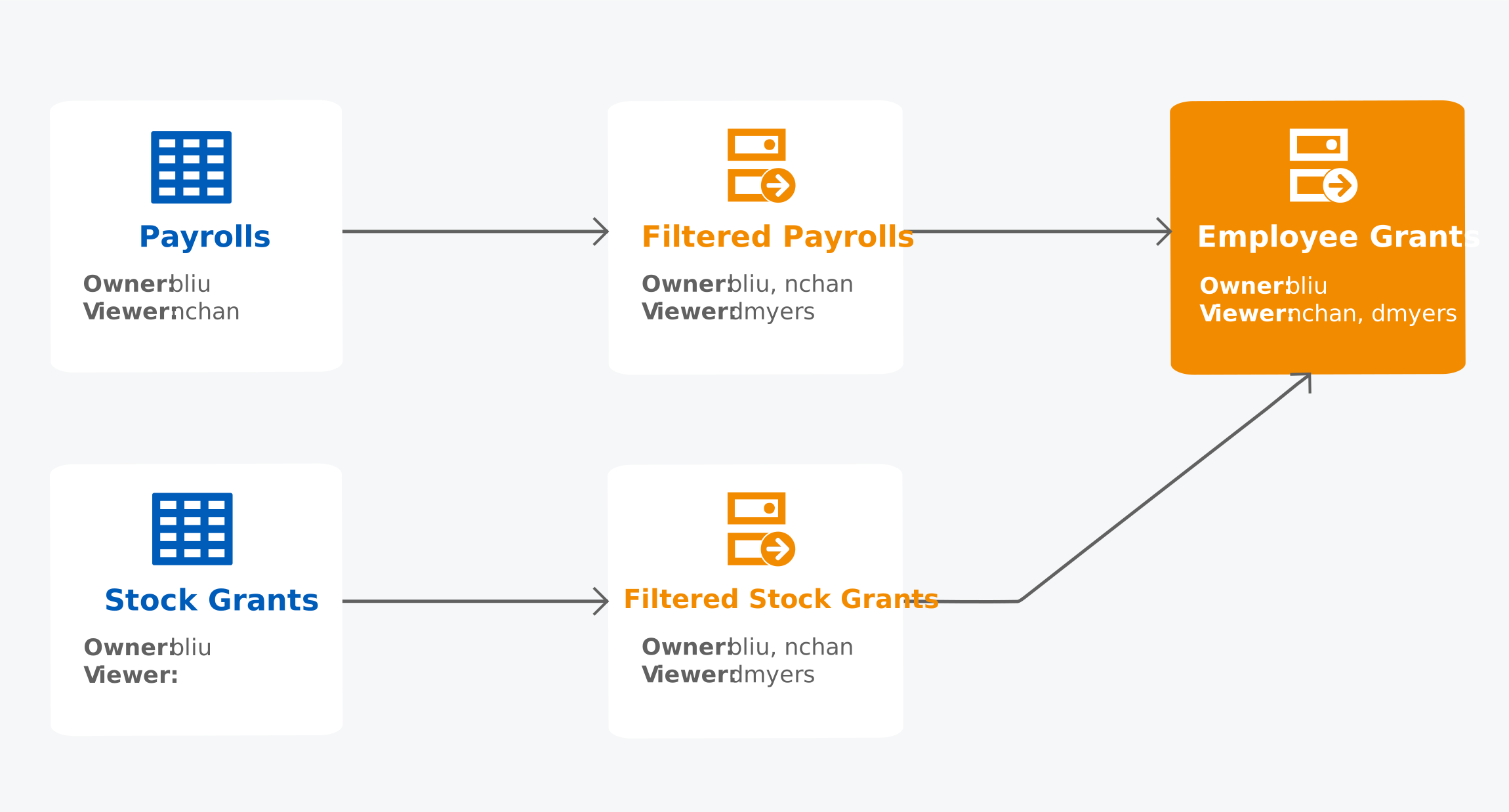
The dataset lineage for the Employee Grants dataset looks like this:
Beth Liu, Norman Chan, and Dawn Myers have this table and dataset access:
Table or Dataset | Beth Liu | Norman Chan | Dawn Myers |
|---|---|---|---|
Payrolls | Can share, edit, and view | Can view | No access |
Filtered Payrolls | Can share, edit, and view | Can edit, can view | No access |
Stock Grants | Can share, edit, and view | No access | No access |
Filtered Stock Grants | Can share, edit, and view | No access | No access |
Employee Grants | Can share, edit, and view | No access | No access |
Although Norman Chan is an owner of Filtered Payrolls, he can't share it with others because he only has View permission on the upstream dataset Payrolls.
Scenario 2
This scenario is based on the previous scenario. Beth Liu enabled the Relax Sharing Rules check box on the Filtered Payrolls and Filtered Stock Grants datasets.
The Data Catalog includes these tables and datasets:
Table or Dataset | Owners | Viewers | Relax Sharing Rules Enabled | Prevent Relax Sharing on Derived Datasets Enabled |
|---|---|---|---|---|
Payrolls | bliu | nchan | No | No |
Filtered Payrolls | bliu, nchan | dmyers | Yes
| No |
Stock Grants | bliu | None | No | No |
Filtered Stock Grants | bliu, nchan | dmyers | Yes
| No |
Employee Grants | bliu | nchan, dmyers | No | No |
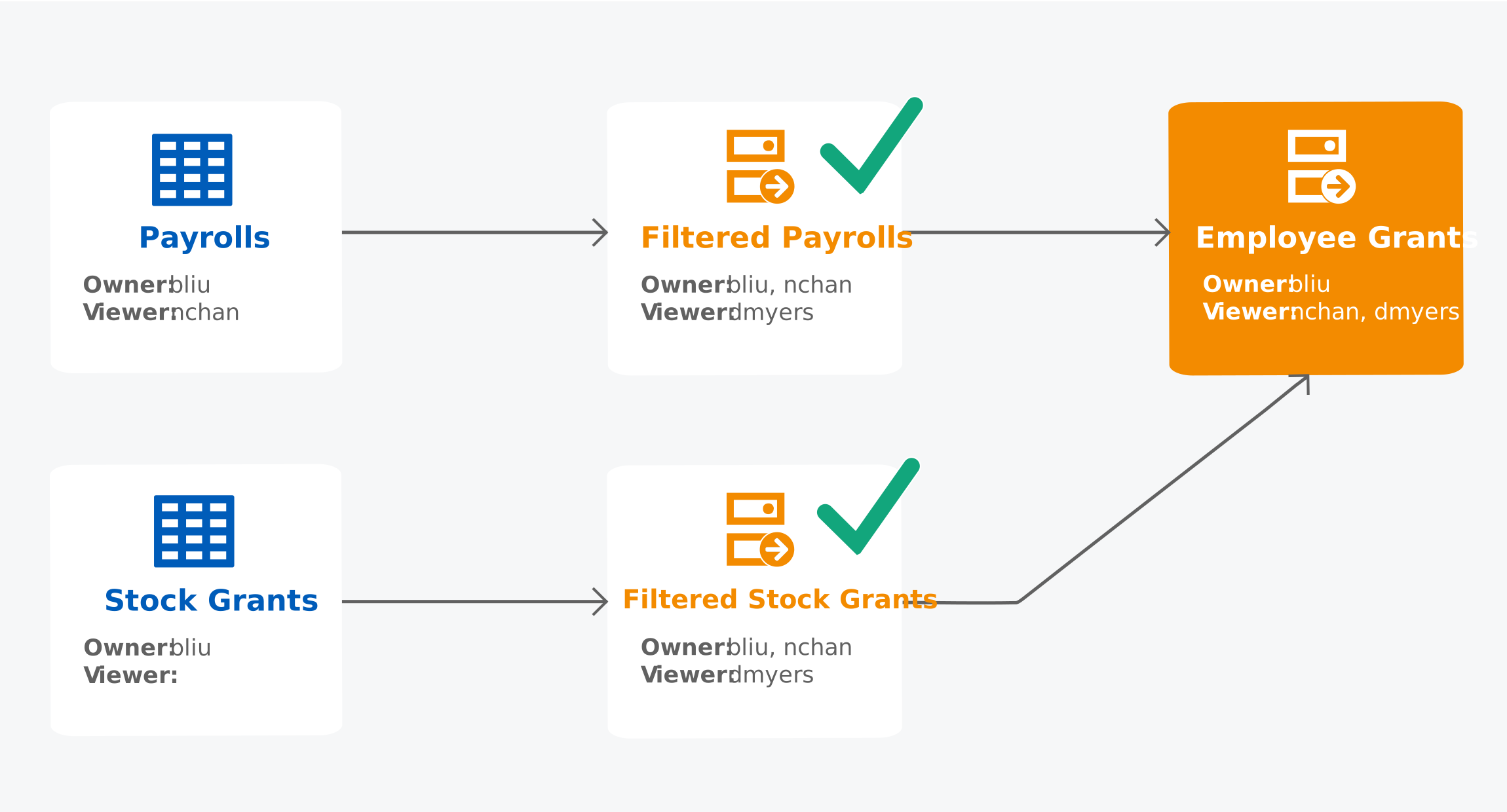
The dataset lineage for the Employee Grants dataset looks like this. The green check marks indicate that Relax Sharing Rules is enabled.
Beth Liu, Norman Chan, and Dawn Myers have this table and dataset access:
Table or Dataset | Beth Liu | Norman Chan | Dawn Myers |
|---|---|---|---|
Payrolls | Can share, edit, and view | Can view | No access |
Filtered Payrolls | Can share, edit, and view | Can share, edit, and view
| Can view
|
Stock Grants | Can share, edit, and view | No access | No access |
Filtered Stock Grants | Can share, edit, and view | Can share and view
| Can view
|
Employee Grants | Can share, edit, and view | Can view
| Can view
|
With Relax Sharing Rules enabled on Filtered Payrolls and Filtered Stock Grants:
- Norman can share Filtered Payrolls because he no longer needs owner permission on the upstream object Payrolls.
- Norman can share Filtered Stock Grants because he no longer needs owner permission on the upstream object Stock Grants, but he can't edit Filtered Stock Grants because he doesn't have viewer permission on the upstream object Stock Grants.
- Norman can view Employee Grants because he no longer needs viewer permission on all upstream objects.
- Dawn can view Filtered Payrolls, Filtered Stock Grants, and Employee Grants because she no longer needs viewer permission on all upstream objects.
Scenario 3
This scenario is based on the previous scenario. Norman Chan created a derived dataset titled DDS Norman by importing the Employee Grants dataset.
The Data Catalog includes these tables and datasets:
Table or Dataset | Owners | Viewers | Relax Sharing Rules Enabled | Prevent Relax Sharing on Derived Datasets Enabled |
|---|---|---|---|---|
Payrolls | bliu | nchan | No | No |
Filtered Payrolls | bliu, nchan | dmyers | Yes | No |
Stock Grants | bliu | None | No | No |
Filtered Stock Grants | bliu, nchan | dmyers | Yes | No |
Employee Grants | bliu | nchan, dmyers | No | No |
DDS Norman
| nchan
| None
| No
| No
|
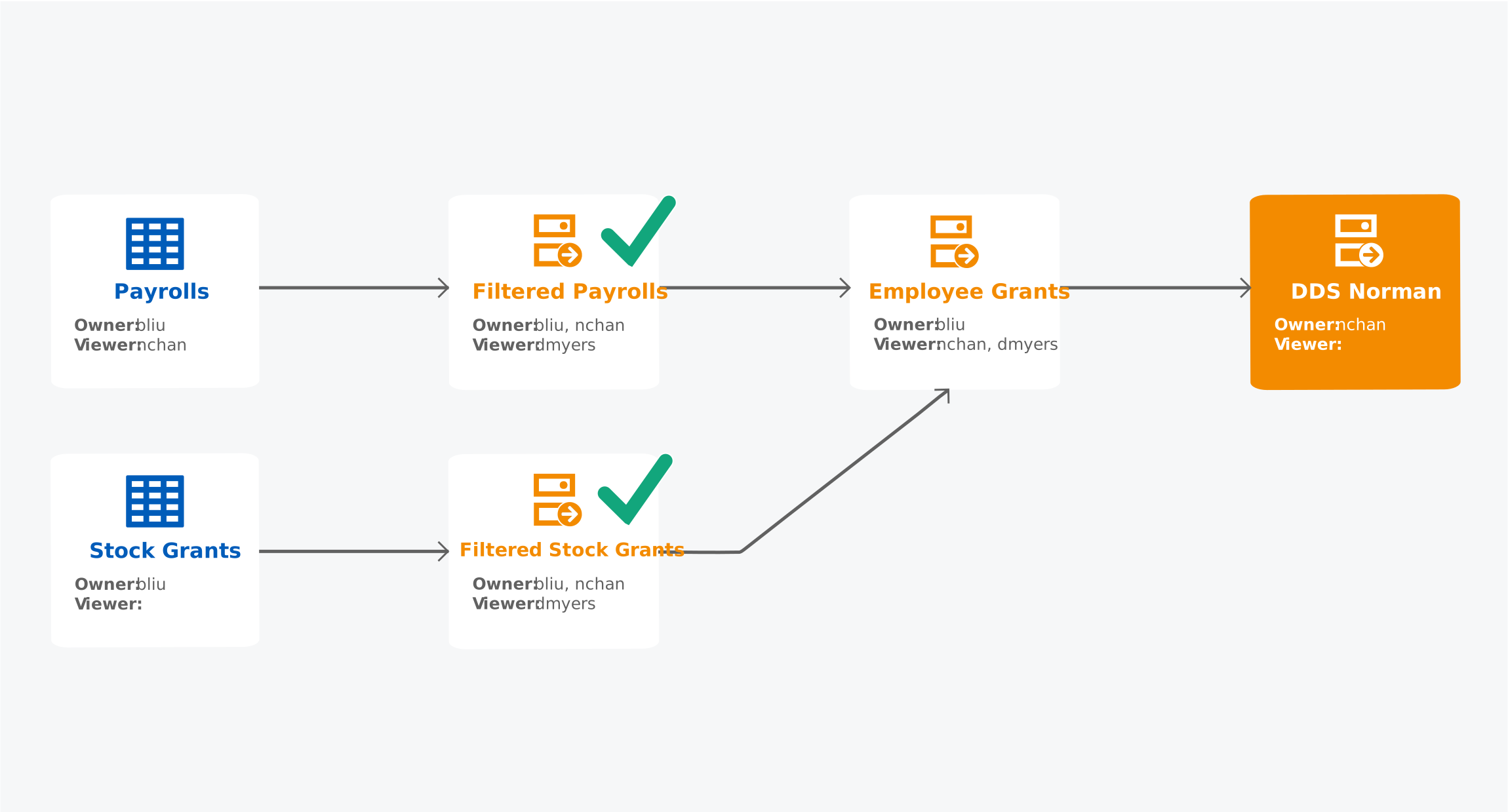
The dataset lineage for the DDS Norman dataset (as viewed by a Prism Data Administrator who can view all objects) looks like this:
Beth Liu, Norman Chan, and Dawn Myers have this table and dataset access:
Table or Dataset | Beth Liu | Norman Chan | Dawn Myers |
|---|---|---|---|
Payrolls | Can share, edit, and view | Can view | No access |
Filtered Payrolls | Can share, edit, and view | Can share, edit, and view | Can view |
Stock Grants | Can share, edit, and view | No access | No access |
Filtered Stock Grants | Can share, edit, and view | Can share and view | Can view |
Employee Grants | Can share, edit, and view | Can view | Can view |
DDS Norman
| No access
| Can edit, view
| No access
|
Norman Chan didn't share DDS Norman with Beth Liu, so Beth doesn't see it in her Data Catalog and she doesn't know that it exists.
Although Norman created DDS Norman (he's the owner), he isn't able to share it with other users because he only has Viewer permission on Employee Grants, not Owner permission. To share a dataset, you must have Owner permission on all upstream objects up until you reach a dataset or table with Relax Sharing Rules enabled and functional. On the dataset or table with Relax Sharing enabled, you only need Viewer permission.
Scenario 4
This scenario is based on the previous scenario. Beth Liu enabled the Relax Sharing Rules check box on the Employee Grants dataset.
Table or Dataset | Owners | Viewers | Relax Sharing Rules Enabled | Prevent Relax Sharing on Derived Datasets Enabled |
|---|---|---|---|---|
Payrolls | bliu | nchan | No | No |
Filtered Payrolls | bliu, nchan | dmyers | Yes | No |
Stock Grants | bliu | None | No | No |
Filtered Stock Grants | bliu, nchan | dmyers | Yes | No |
Employee Grants | bliu | nchan, dmyers | Yes
| No |
DDS Norman | nchan | None | No | No |
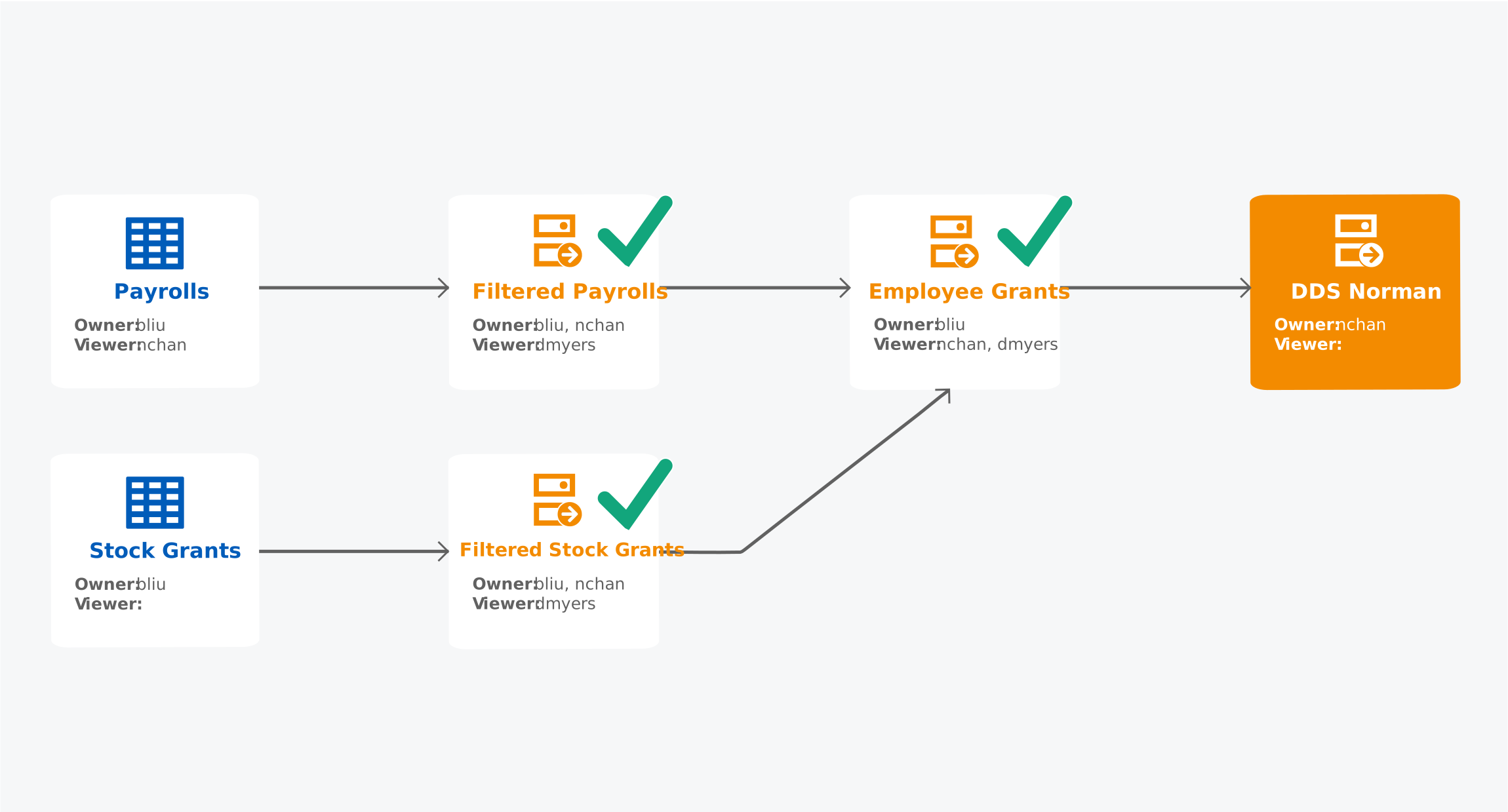
The dataset lineage for the DDS Norman dataset (as viewed by a Prism Data Administrator who can view all objects) looks like this:
Beth Liu, Norman Chan, and Dawn Myers have this table and dataset access:
Table or Dataset | Beth Liu | Norman Chan | Dawn Myers |
|---|---|---|---|
Payrolls | Can share, edit, and view | Can view | No access |
Filtered Payrolls | Can share, edit, and view | Can share, edit, and view | Can view |
Stock Grants | Can share, edit, and view | No access | No access |
Filtered Stock Grants | Can share, edit, and view | Can share and view | Can view |
Employee Grants | Can share, edit, and view | Can view | Can view |
DDS Norman | No access | Can share , edit, view | No access |
With Relax Sharing Rules enabled on Employee Grants (Norman has Viewer permission on Employee Grants), Norman can share DDS Norman with others.
Scenario 5
This scenario is based on the previous scenario. Norman Chan enabled the Relax Sharing Rules check box on DDS Norman, and shared DDS Norman with Dawn Myers, giving her Owner permission.
Table or Dataset | Owners | Viewers | Relax Sharing Rules Enabled | Prevent Relax Sharing on Derived Datasets Enabled |
|---|---|---|---|---|
Payrolls | bliu | nchan | No | No |
Filtered Payrolls | bliu, nchan | dmyers | Yes | No |
Stock Grants | bliu | None | No | No |
Filtered Stock Grants | bliu, nchan | dmyers | Yes | No |
Employee Grants | bliu | nchan, dmyers | Yes | No |
DDS Norman | nchan, dmyers
| None | Yes
| No |
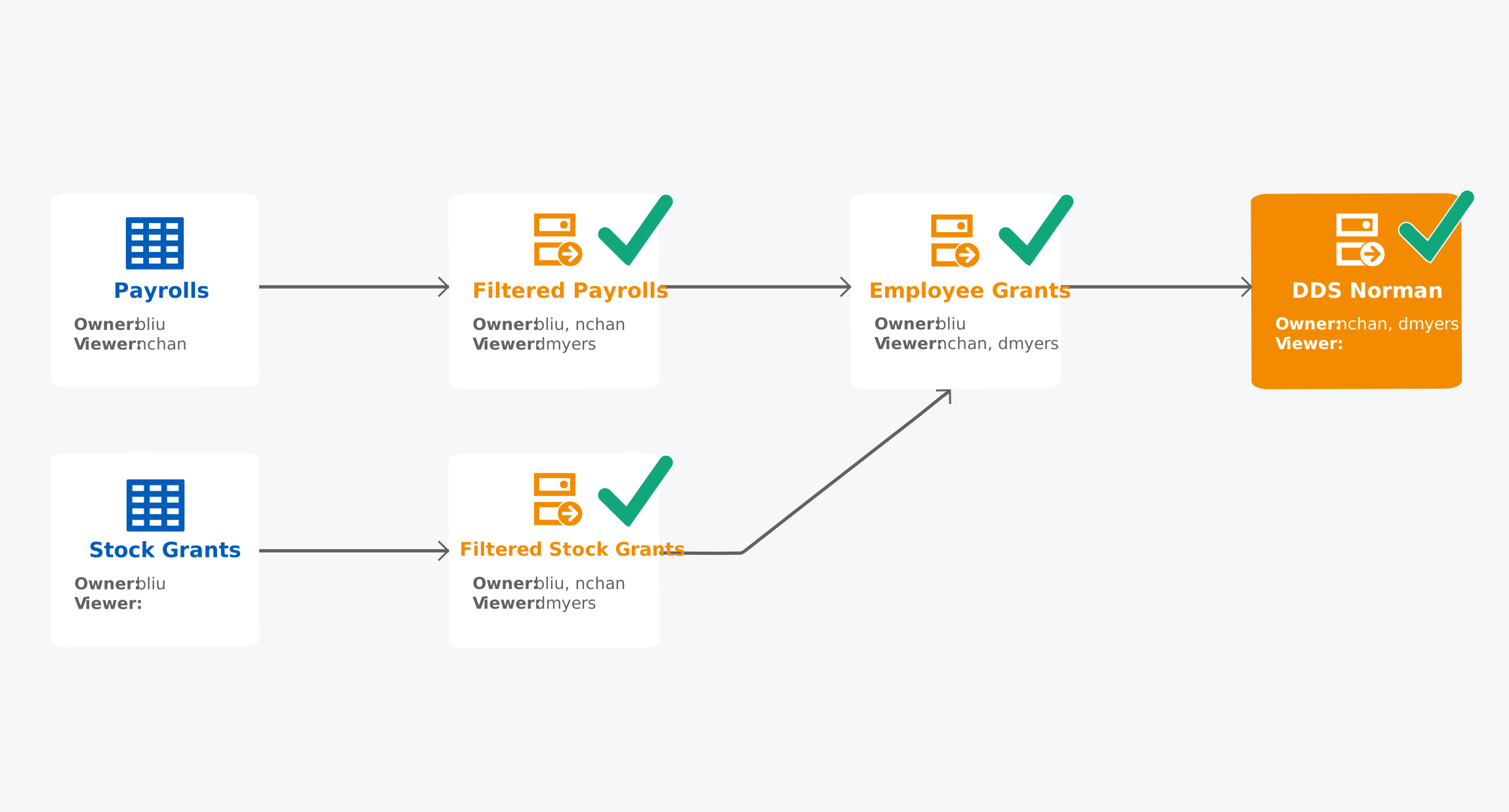
The dataset lineage for the DDS Norman dataset (as viewed by a Prism Data Administrator who can view all objects) looks like this:
Beth Liu, Norman Chan, and Dawn Myers have this table and dataset access:
Table or Dataset | Beth Liu | Norman Chan | Dawn Myers |
|---|---|---|---|
Payrolls | Can share, edit, and view | Can view | No access |
Filtered Payrolls | Can share, edit, and view | Can share, edit, and view | Can view |
Stock Grants | Can share, edit, and view | No access | No access |
Filtered Stock Grants | Can share, edit, and view | Can share and view | Can view |
Employee Grants | Can share, edit, and view | Can view | Can view |
DDS Norman | No access | Can share, edit, view | Can share, edit, view
|
With Relax Sharing Rules enabled on DDS Norman while giving Dawn Myers Owner permission, Dawn can share, edit, and view DDS Norman. Beth Liu is unaware that DDS Norman exists and that Dawn can share it with others.
Scenario 6
This scenario is based on the previous scenario. Beth Liu enabled the Prevent Relax Sharing on Derived Datasets check box on Filtered Stock Grants.
Table or Dataset | Owners | Viewers | Relax Sharing Rules Enabled | Prevent Relax Sharing on Derived Datasets Enabled |
|---|---|---|---|---|
Payrolls | bliu | nchan | No | No |
Filtered Payrolls | bliu, nchan | dmyers | Yes | No |
Stock Grants | bliu | None | No | No |
Filtered Stock Grants | bliu, nchan | dmyers | Yes | Yes
|
Employee Grants | bliu | nchan, dmyers | Yes | No |
DDS Norman | nchan, dmyers | None | Yes | No |
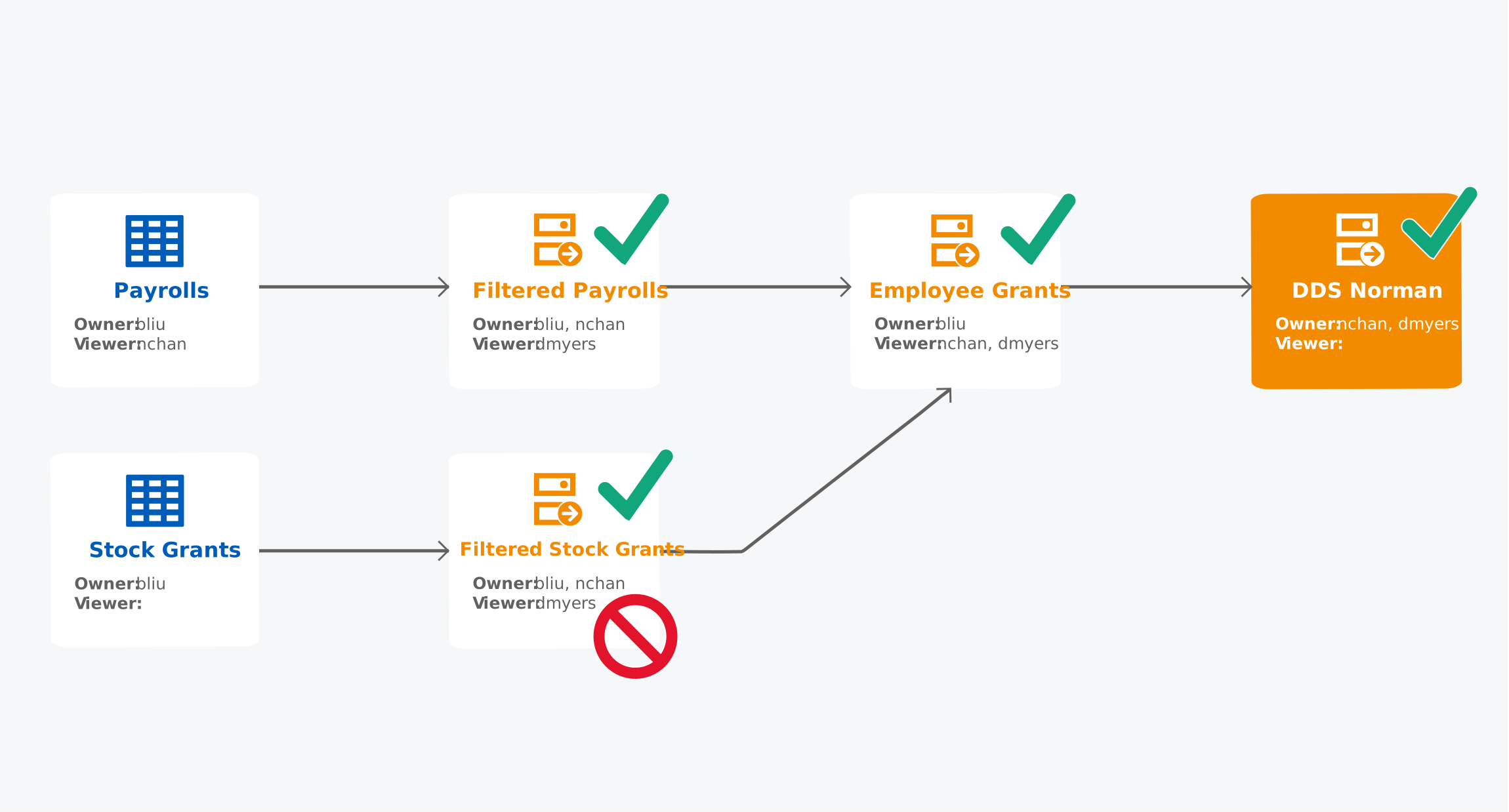
The dataset lineage for the DDS Norman dataset (as viewed by a Prism Data Administrator who can view all objects) looks like this. The red circle with the line through it indicates the dataset that has Prevent Relax Sharing on Derived Datasets enabled:
Beth Liu, Norman Chan, and Dawn Myers have this table and dataset access:
Table or Dataset | Beth Liu | Norman Chan | Dawn Myers |
|---|---|---|---|
Payrolls | Can share, edit, and view | Can view | No access |
Filtered Payrolls | Can share, edit, and view | Can share, edit, and view | Can view |
Stock Grants | Can share, edit, and view | No access | No access |
Filtered Stock Grants | Can share, edit, and view | Can share and view | Can view |
Employee Grants | Can share, edit, and view | Can view | Can view |
DDS Norman | No access | Can edit, view
| Can edit, view
|
Now that Prevent Relax Sharing on Derived Datasets is enabled on Filtered Stock Grants:
- Norman Chan can't share DDS Norman.
- Dawn Myers can't share DDS Norman.