
Steps: Manage Reimbursable Allowance Plans
You can link allowance plans to expense items and pay them out after you approve the expense report. This diagram illustrates the process flow for managing reimbursable allowance plans:
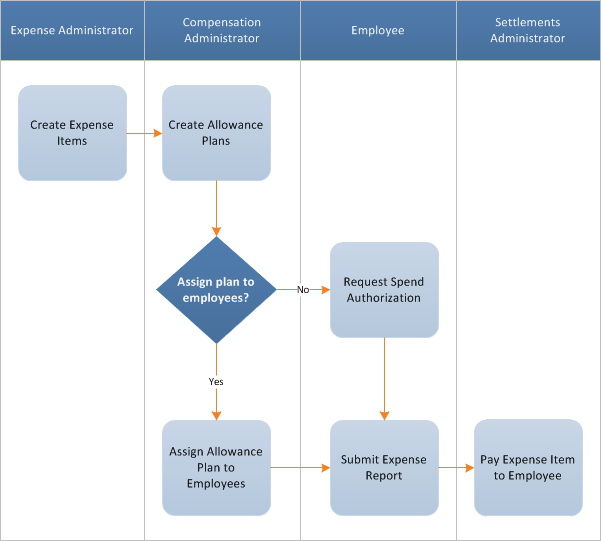
- Create an expense item for reimbursement accounts with anExpense Item Amount TypeofBased on Allowance Plan.
- SelectReimbursable.
- (Optional) Create Spend Authorizations.Employees without an assigned reimbursable allowance plan must create a spend authorization and select theExpense Itemassociated with anAllowance Plan. Employees must then submit their expenses for approval and allowance plan assignment.
- After you approve expense reports with reimbursement account expense items, include them in a settlement run to reimburse employees.
- (Optional) Access theView Reimbursable Allowance Plan Activityreport.Review an employee's activity for an assigned reimbursable allowance plan. You can configure this report to display onView Worker,Worker Profile, andTalent Profile.Security (in the Core Compensation functional area):
- Self-Service: Compensation
- Worker Data: Compensation by Organization