
Referentie: operatoren en functies voor voorwaardelijke opmaak
Syntaxisregels
Basissyntaxis:
first-expression comparison-operator second-expression
.
Voorbeeld: ([Quick Ratio] - 10) * 2 >= 19
- Een expressie kan verwijzen naar elke gegevensreeks in het diagram, inclusief gegevens van een rekening, berekening of aangepaste metriek. U moet t . insluitenDe naam van de gegevensreeks (niet de code) of de berekeningsnaam tussen haakjes. Evoorbeelds:[1000 Assets],[QuickRatio]. TNaam gegevensreeks geeft i . weern Gegevensinstellingen:
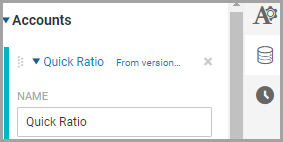
- Workday ewaardenexpressies van links naar rechts; expressies tussen haakjes eerst berekenen.
Vergelijking
Operator | Description | Syntax |
|---|---|---|
= | Checks if two values are equal. | [metric1] =
[metric2] |
<> | Checks if two values are not equal. | [metric1] <>
[metric2] |
< | Checks if the left value is less than the right value. | [metric1] <
[metric2] |
<= | Checks if the left value is less than or equal to the right
value. | [metric1] <=
[metric2] |
> | Checks if the left value is greater than the right value. | [metric1] >
[metric2] |
>= | Checks if the left value is greater than or equal to the right
value. | [metric1] >=
[metric2] |
BETWEEN | Checks if a value is between two other values. Minimum and
maximum values are included in the range. Use with the
AND operator. | [metric1] BETWEEN 0
AND [metric2] |
NOT BETWEEN | Checks if a value is not between the two other values. Minimum
and maximum values are included in the range. Use with the
AND operator. | [metric1] NOT BETWEEN
0 AND [metric2] |
AND | Compares two expressions and returns true if both expressions are
true. | ([metric1] >=
[metric2]) AND ([metric1] >= [metric3]) |
OR | Compares two expressions and returns true if either expression is
true. | ([metric1] >=
[metric2]) OR ([metric1] >= [metric3]) |
Wiskundig
Gebruik wiskundige operatoren voor de expressies.
Operator | Description | Syntax |
|---|---|---|
+ | Adds two values. | [metric1] +
[metric2] |
- | Subtracts two values. | [metric1] -
[metric2] |
/ | Divides two values. | [metric1] /
[metric2] |
* | Multiplies two values. | [metric1] *
[metric2] |
% | Calculates the remainder (modulus) when dividing two
values. | [metric1] %
[metric2] |
^ | Raises the value on the left to the power of the value on the
right. For example, 5^ 2 = 25. | [metric1]
^2 |
Berekeningsfuncties
Function | Description | Example |
|---|---|---|
min( expression ,
expression ) | Returns the smallest value of two expressions. | min([metric1],
[metric2]) |
max( expression ,
expression ) | Returns the largest value of two expressions. | max([metric1],
[metric2]) |
sin( expression ) | Returns the sine of a metric or expression. Used in
Trigonometry. | sin([metric1]) |
cos( expression ) | Returns the cosine of a metric or expression. Used in
Trigonometry. | cos([metric1]) |
tan( expression ) | Returns the tangent of a metric or expression. Used in
Trigonometry. | tan([metric1]) |
abs( expression ) | Returns the absolute value of a metric or expression. Use to
convert negative numbers to positive numbers. | abs([metric1]) |
sqrt( expression ) | Returns the square root of a metric or expression. | sqrt([metric1]) |
round( expression ) | Rounds a numeric value to the nearest whole number. The
mid-point is rounded up. Examples:
| round([metric1]) |
round( expression ,
digits ) | Rounds a numeric value to a specified number of digits.
Positive digits round to the specified number
of decimal places. Negative digits round to
the nearest multiple of 10. Examples:
| round([metric1],
1) |
floor( expression ) | Returns a numeric value rounded down towards zero.
Examples:
| floor([metric1],
2) |
floor( expression ,
expression ) | Returns a numeric value rounded down towards zero, to the
nearest multiple of significance. Examples:
| floor([metric1],
2) |
ceiling( expression ) | Returns number rounded up away from zero. Examples:
| ceiling([metric1]) |
ceiling( expression ,
expression ) | Returns number rounded up, away from zero, to the nearest
multiple of significance. Examples:
| ceiling([metric1],
2) |