
Referencia: colores de celda y leyenda de notaciones
Para un índice con vínculos a todos
Excel Interface for Planning
artículos, vaya a Uso Excel Interface for Planning
. Para obtener información sobre los colores de celda y las notaciones en las hojas web, vaya a Uso de hojas, que es ligeramente diferente.Las celdas y los datos de las celdas pueden tener diferentes colores de fondo y texto, estilos de fuente y notaciones de triángulo. Esto aporta información rápida sobre los datos.
Apariencia | Significado |
|---|---|
 White background with any text color | Change data if there is text of any color or if it is blank. |
 Gray background with any text color | Locked. The color or style of the text may indicate why. |
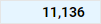 Blue background with any text color | Agrupaciones (totales) para cuentas, periodos, dimensiones personalizadas y divisiones. No puede editar estas celdas en Excel Interface for Planning , pero puede editar las celdas que se agrupan en esta celda. |
 Blue text with white or blue background | Unsaved data. |
 Green text with any background color | Actuals data. The background color tells you more about the data. |
 Bold text with any background color | Totals. |
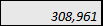 Texto en cursiva con cualquier color de fondo | Has a formula. The background tells you if you can change or replace the formula. |
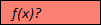 ¿Fondo rojo con f(x)? para texto. | Has a formula error. Or is missing data in the cells of a required column in modeled sheets. Adaptive Planning instancia en línea y haga clic en Hojas en el menú de navegación. |
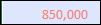 Texto rojo con cualquier color de fondo. | The formula, although correct, is referencing a cell with an error. Adaptive Planning instancia en línea y haga clic en Hojas en el menú de navegación. |
 Red triangle in the corner of cell with any color text or background | Has a note. |