
Concepto: tipos de hojas
Puede identificar el tipo de hoja por el contenido de la barra de herramientas, las filas y las columnas de la hoja.
Hay tres tipos de hojas, cada uno con distintas funcionalidades:
- Estándar
- Modelada
- Cubo
Las hojas le permiten consultar, introducir y actualizar datos, incluidos los datos de cifras reales del libro mayor, las previsiones y los presupuestos.
Hojas estándar
Hojas estándar contienen una cuadrícula simple de cuentas y periodos.
Ejemplos:
- Balance
- Hojas de flujo de caja
- Hoja de gastos
- Hojas de pérdidas y ganancias
- Hojas de ingresos
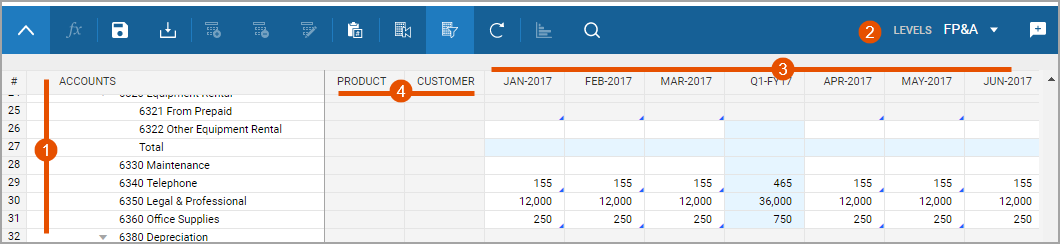
Option | Description |
|---|---|
1 | Accounts or levels populate down the rows. |
2 | Levels or accounts exist in the drop-down menu. Swap the rows with the drop-down menu. |
3 | Time populates across the columns. Change the time periods with Display Options . |
4 | Dimensions exist as columns with cells that have drop-down values. Not all standard sheets have dimensions. In order to select dimension, add a split. |
Standard sheets also have the
Add Split
, Delete Split
, and Rename Split
buttons in the toolbar. Hojas modeladas
Puede utilizar hojas modeladas para introducir datos basados en registros. Estas hojas tienen nombres de campo personalizados en las columnas y registros como filas. Las hojas modeladas contienen la lógica empresarial subyacente para el modelado de eventos financieros. Ejemplos:
- Depreciación de compras de capital.
- Salarios mensuales del personal.
- Ingresos generados por ventas.

Option | Description |
|---|---|
1 | Add Row and Delete Row buttons display in addition to, or instead of, the add, delete, rename splits buttons. |
2 | Labeled columns exist across the top and records list down the rows. The column types determine how you enter data. You can type in fields, or select from drop-downs. There are no row headers, only column headers. |
You can enter new information into existing rows or add new rows. Your admin can set a maximum number of rows a modeled sheet can display at once. If the sheet has a maximum, a message states how many rows of the total you can see. Use the filters to uncover different sets of data.
Hojas de cubo
Las hojas de cubo habilitan la entrada de datos multidimensionales en
unas cuantas cuentas en un conjunto de dimensiones potencialmente grande
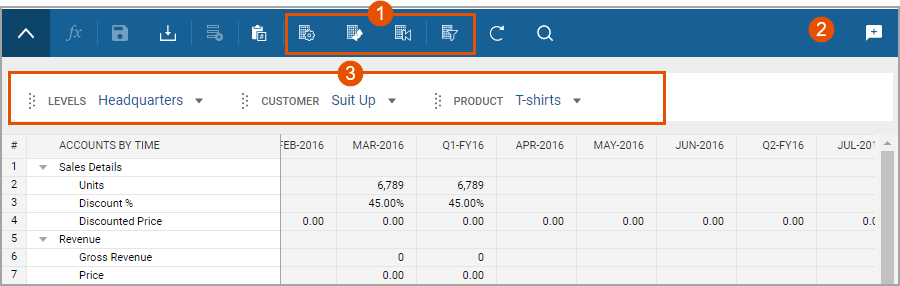
Option | Description |
|---|---|
1 | More display options exist in the toolbar. You can pivot the sheet to view data in multiple ways. |
2 | No level drop-down list exists in the toolbar. Levels are a dimension to use as filters, columns, or rows. |
3 | Alternative dimensions enable you to filter data, drag and drop into the columns and rows, and nest up to 5 dimensions in the rows. |
Merged cube sheets are entirely read-only. These sheets combine the data presence of other sheets to display calculated data.
Although the use case for cube sheets is modeling complex, multidimensional sales forecasting, you can use them for planning almost any multidimensional model.