
Swap from Oracle JDK to OpenJDK for On-Prem Data Connectors
- Verify you have local rights on your computer to install OpenJDK.
- Make a note of your On-Prem Data Connector Manager version.
You can swap from the Oracle JDK to an OpenJDK (Azul Zulu JDK) without uninstalling your On-Prem Data Connector. Swapping from Oracle can help you avoid the licensing fees associated with using the Oracle JDK. Before 2024R1, by default, the On-Prem Data Connector Manager installer installed the Oracle JRE if it didn't detect a valid JDK on your system.
We strongly recommend the Azul Zulu OpenJDK Azul Zulu OpenJDK Download.
These steps take place on your local computer.
- Stop theOn-Prem Data Connector Servicein the Windows Services Manager.
- Close theOn-Prem Data Connector Service Managerand theAdaptive Script Editor.
- Uninstall the Oracle JRE/JDK and restart your computer.
- Download and install an OpenJDK (.msi or .exe).
- Select these OpenJDK installation options in Custom Setup in the installation wizard:
- JAVA_HOME
- JAR Files Association
- Registry
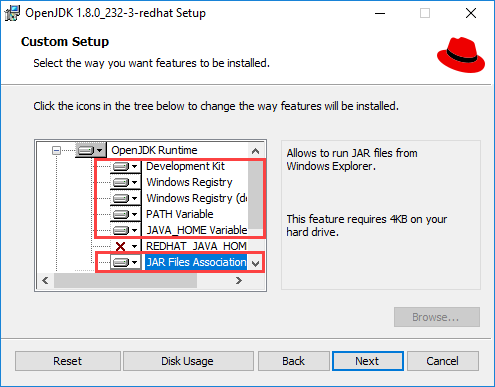
- Complete the installation.
- Restart your computer.
- Open the On-Prem Data Connector Manager and verify your existing On-Prem Data Connectors started.