
Connect a Data Agent to a Regional Authentication and API Gateway
- Verify you installed the Workday Adaptive Planning Data Agent Manager on your local computer.
- Obtain the username and password for an Adaptive Planning user on your instance.
- Security:Data Designerpermission.
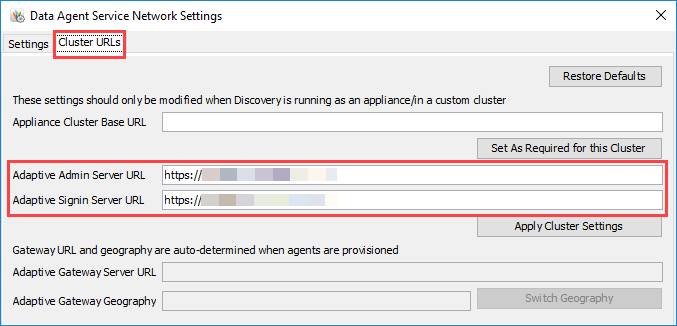
You can connect a data agent to a regional authentication and API gateway by updating the
Adaptive Admin Server URL
and Adaptive Signin Server URL
in the Adaptive Data Agent on your local computer.Based on the location of your Adaptive Planning instance, your authorization URLs and API endpoints can vary. For more information, see Reference: Adaptive Planning Authentication URLs and IP Addresses.
- Launch theWorkday Adaptive Planning Data agenton your local computer.For data agent versions 7.1.44 and older, launch theAdaptive Data Agenton your local computer.
- SelectDiagnose and Configure Networkin the sign-in dialog.
- Select theCluster URLstab.
- Enter the new URL in theAdaptive Admin Server URLandAdaptive Signin Server URLfields.
- SelectApply Cluster Settings.
- Close theDiagnose and Configure Networkdialog.
- Enter your username and password in theAdaptive Data Agent loginsign-in dialog and sign in.