
Referenz: Legende für Zellenfarben und Notationen
Für ein Inhaltsverzeichnis mit Links zu allen Elementen
Excel Interface for Planning
-Artikel wechseln Sie zu Verwenden Excel Interface for Planning
. Informationen zu Zellenfarben und Notationen in Web-Tabellenblättern finden Sie unter Tabellenblätter verwenden.Zellen und die Daten in den Zellen haben unterschiedliche Hintergrund- und Textfarben, Schriftstile und Dreiecksnotationen. Im Folgenden erhalten Sie auf einen Blick Informationen zu den Daten.
Anzeige | Bedeutung |
|---|---|
 White background with any text color | Change data if there is text of any color or if it is blank. |
 Gray background with any text color | Locked. The color or style of the text may indicate why. |
 Blue background with any text color | Rollups (Summen) für Konten, Zeit, benutzerdefinierte Dimensionen und Splits. Sie können diese Zellen in nicht bearbeiten Excel Interface for Planning , aber Sie können die Zellen bearbeiten, die ein Rollup zu dieser Zelle durchführen. |
 Blue text with white or blue background | Unsaved data. |
 Green text with any background color | Actuals data. The background color tells you more about the data. |
 Bold text with any background color | Totals. |
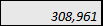 Kursiv formatierter Text mit beliebiger Hintergrundfarbe | Has a formula. The background tells you if you can change or replace the formula. |
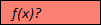 Roter Hintergrund mit f(x)? für Text. | Has a formula error. Or is missing data in the cells of a required column in modeled sheets. Adaptive Planning Instanz online und klicken Sie im Navigationsmenü auf Tabellenblätter. |
 Roter Text mit beliebiger Hintergrundfarbe. | The formula, although correct, is referencing a cell with an error. Adaptive Planning Instanz online und klicken Sie im Navigationsmenü auf Tabellenblätter. |
 Red triangle in the corner of cell with any color text or background | Has a note. |