Fügen Sie standardmäßig neue Versionen zu Berichtsparametern hinzu
Frage
Wie füge ich standardmäßig neue Versionen zu Berichtsparametern hinzu?Antwort
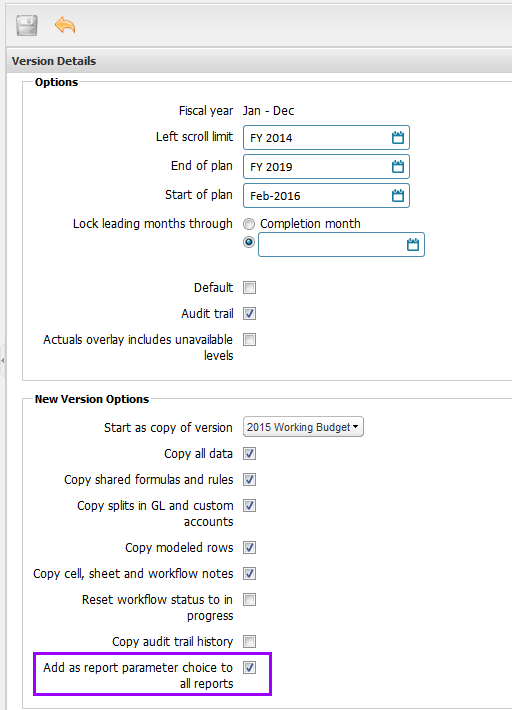
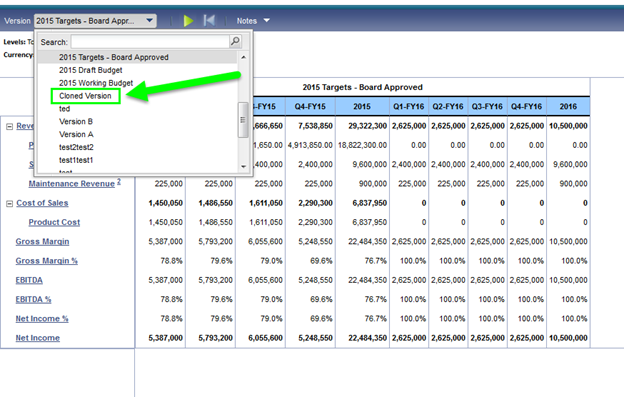
Wenn Administratoren eine Version klonen, kann die neue Version automatisch zu den Berichtsparametern hinzugefügt werden. Wenn das Kontrollkästchen Als Auswahl für Berichtsparameter zu allen Berichten hinzufügen aktiviert ist, wird die neue Version zu allen Berichten hinzugefügt, die „Version“ als Parameter haben. Wenn das Kontrollkästchen nicht aktiviert ist, wird die neue Version nur dann zu den Berichtsparametern hinzugefügt, wenn die Version derzeit in der Parameter-Dropdown-Liste des Berichts verfügbar ist. Bisher wurde keine Version zum Berichtsparameter hinzugefügt, wenn auf das Kontrollkästchen nicht geklickt wurde.