
Inserting Logic
Overview
Think of logic as the rules of your app. Logic improves process efficiency and maintains data integrity. In this chapter, we will examine a few ways your developer can insert logic. You will also document your app's business rules and identify the trigger (where and when) for each rule. Last, we will discuss how to estimate project sizes to appropriately plan for project management resources.
Objectives
By the end of this chapter, you will be able to:
- Provide examples of when PMD scripting, orchestrations, and data modeling is appropriate.
- Define rules and triggers for a use case.
- Estimate the resources required to build an app.
Writing Rules
Logic gives you the opportunity to automate rules for your processes. You will define what the rules are, and your developer will determine how to execute these rules.
Let's review ways your developer can enforce these rules.
Page Logic
PMD scripting turns static pages into dynamic pages and allows apps to be event driven. Developers can use PMD scripting to write scripts that execute as the user interacts with the page. Think of this as page logic.
For example, a user has purchased something and now the app is asking the user to specify their billing and shipping address. The user has the same billing and shipping address. So, rather than asking the user to enter in the same information twice, PMD scripting allows for a checkbox that asks if both addresses are the same.
If the user selects the box, the shipping address automatically copies to the billing fields. However, if the user does not select the box, all fields remain visible and the user must complete them.
Orchestrations
Recall that Workday Extend consists of five app-component building blocks: UI/UX, data, logic, security, and reporting. Process logic is a logic component.
With process logic, you can trigger business processes, map data, send notifications, define logic conditions, and interact with both Workday APIs and third-party APIs.
Workday Orchestrate
Workday Orchestrate enables developers to construct lightweight, event-driven processes and tasks within Workday Extend apps.
If your developer determines that your app will use SOAP APIs, Workday Orchestrate may be appropriate.
Flow Example
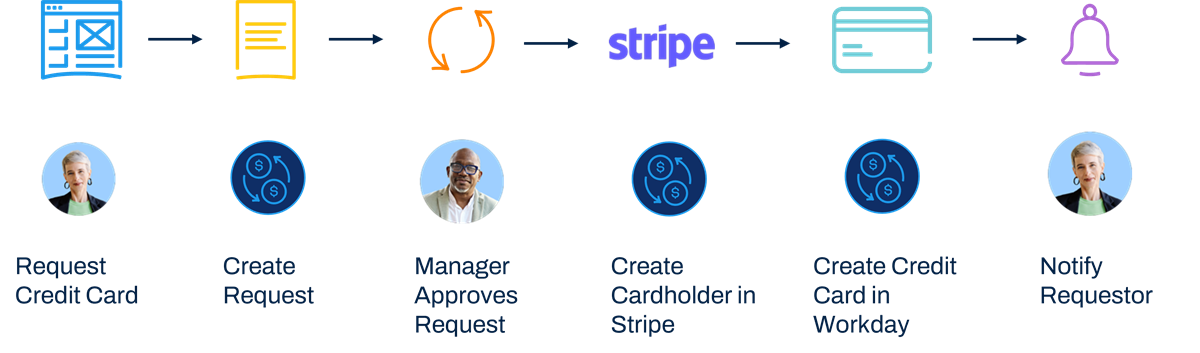
Orchestration Workflow
In this flow, a user makes a request for a credit card via an Extend app. The Extend page writes data to a business object and makes a call to invoke the orchestration.
From there, a business process is created to allow the manager to approve or deny the request.
An external API makes a call to Stripe to request the new card and to get card details. Data is then returned to the orchestration and the business object is updated.
At this point, a SOAP call to Workday is made to create the credit card and the business object is updated.
Then, the requester is notified of the status.
Workday Orchestrate
Workday Orchestrate enables developers to construct lightweight, event-driven processes and tasks within Workday Extend apps.
If your developer determines that your app will use SOAP APIs, Workday Orchestrate may be appropriate.
Project Sizes and Project Management
To determine the resources required to build your app, estimated project hours help determine project size.
To estimate these hours, here are some considerations:
- Base effort and pattern bucket: Base activity hours plus an analysis of functional requirements establishes a base bucket of hours for that pattern.
- Predictable add-ons: Based on the functional requirements, add on predictable items that are in scope and that require additional effort.
- Solution-specific add-ons: Identify additional effort needed and the typical amount of effort required for solution-specific needs.
Once you have an estimate, there are still aspects that will ultimately be subjective. For example, teams work at various paces, which may influence your estimate.
Predictable Add-Ons
Predictable add-ons include:
- Tenant migrations
- Additional business processes or business process actions
- Additional reports
- UI: tabs, save for later, or highly dynamic pages
- Additional or multiple attachments
- Translations
Solution-Specific Add-Ons
Solution-specific add-ons include:
- Orchestrations or integrations
- Workday Report Designer (BIRT)
- E-signature
- Data conversion
Chapter Summary
In this chapter, you learned:
- Logic can automate rules for your processes.
- Your developer can use PMD scripting, orchestrations, or data modeling to enforce these rules.
- You can estimate project hours based on project size and add ons.