
Consolidations
Overview
Workday consolidated reporting allows you to report financial information on companies included in company hierarchies. You can run consolidated reports throughout the period and include elimination information in reporting at any time.
Objectives
By the end of this chapter, you will be able to:
- Explain the concept of consolidations.
- Navigate the Close and Consolidation Hub
- Configure ownership details.
- Complete the configuration necessary to run consolidated reports.
Consolidation Overview
Financial consolidation is combining financial data from several business entities within an organization and rolling it up to a parent company. Consolidated financial statements present the results of operations, statement of cash flows, and financial position of the combined entity. Each company keeps separate accounting records but not for the consolidated entity. To determine the consolidated results, add the amounts for the individual affiliated companies together. Then make specific calculations and adjustments including the following:
- Elimination of intercompany transactions and balances
- Elimination of investments in subsidiaries and subsidiary capital stock
- Accounting for partial ownership
- Foreign currency translation
Consolidation Terminology
Term | Definition |
|---|---|
Company Hierarchy | A grouping of multiple companies or company hierarchies for reporting. |
Eliminations | Eliminating activity between affiliated companies. |
Noncontrolling Interest | The portion of a consolidated subsidiary that is not owned by the parent company. |
Equity Pickup | Task in Workday used to record a portion of the subsidiary's earnings on the parent's books. |
Types of Ownership
There are different methods of consolidation depending on the percentage of ownership a parent organization has in a subsidiary. The next section outlines different types of ownership and how firms generally account for them; however, the way organizations account for each type of ownership may vary.
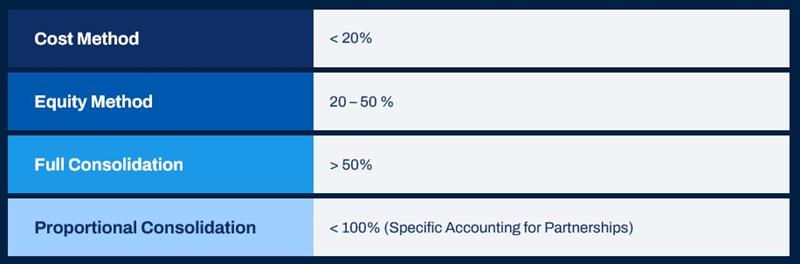
Types of Ownership
Organizations generally account for an investment in a subsidiary that represents ownership of 20% or less under the cost method. Organizations typically carry the investment at cost on the parent's books. Workday does not include the subsidiary in the consolidation hierarchy.
Organizations generally account for ownership of a subsidiary between 20% and 50% using the equity method. Workday does not include the subsidiary in the consolidation hierarchy and records a portion of the subsidiary's earnings on the parent's book each period.
You can use the Equity Pickup task to record this activity in the parent's book. Note that equity pickup is a way to record the equity method, but firms often use it for fully consolidated subsidiaries as well.
Full consolidation occurs when the parent has greater than 50% ownership or control of the subsidiary. Workday includes the subsidiary in the consolidation hierarchy. Subsidiary equity accounts that represent ownership will fully eliminate. Accounts that represent other comprehensive income may not eliminate entirely. Ownership less than 100% becomes noncontrolling interest (NCI).
Record the proportional method of consolidation by recording the owned percent of each subsidiary ledger account in the consolidated results. This method is common in partnerships but does not comply with most accounting guidance. Most believe it provides a more insightful and accurate picture of operations at a consolidated level. In Workday, accomplish this task using allocations and book codes.
Workday Consolidation Configuration
Complete the following configuration to produce consolidated financial reports in Workday:
- Intercompany profiles
- Company hierarchies
- Consolidation details
- Company ownership details
- Elimination rules
Establish intercompany profiles to allow for transactions between entities.
In Workday, a company hierarchy groups related companies for role assignment, multicompany processing, and consolidated reporting. To use consolidations, configure company hierarchies accordingly and assign all companies in the hierarchy the same account set. However, each company can have different company currencies and fiscal schedules as long as they share a common primary or alternate schedule.
Note
: Although the companies in the hierarchy can have different primary fiscal schedules, it is best practice that all companies in the hierarchy have the same primary fiscal schedule. Workday recommends this approach for budgeting and prompt selection.Consolidated Trial Balance
The
Consolidated Trial Balance
is a standard Workday report that displays the ending balance of all ledger accounts for each company included in the company hierarchy. When applicable, the report will include intercompany eliminations, equity pickup, and noncontrolling interest results.Close and Consolidation Hub
Workday delivers the Close and Consolidation hub which centralizes key close and consolidation reports and tasks. The hub provides users visibility over the close and consolidation process and reduces navigation to individual tasks and reports. The Close and Consolidation hub delivers the following sections:
Section | Field Description | Report or Task Name |
|---|---|---|
Overview | Ledger Period Status Note: You can configure more cards to be displayed from Maintain Hubs | Ledger Period Status Close in Progress - Activity Group Status Consolidation Data |
Close Tasks | Intercompany Reconciliation Journal
Allocations
Revaluation
Equity Pickup
Noncontrolling Interest
Account Certification | Intercompany Elimination Out of Balance Report
Create Journal
Schedule Allocation Run
Run Revaluation
Equity Pickup
Run Noncontrolling Interest
Run Account Certification Sets |
Period Close | Update Ledger Status
Schedule Ledger Update
Ledger Period Close Status
Ledger Period Journal Status | Mass Update Ledger Period Status
Schedule Mass Update Ledger Period Status
Ledger Period Close Status - Time Period
Ledger Period Journal Status |
Financial Reports | Consol Trial Balance
Income Statement
Balance Sheet - Consolidated
Balance Sheet - Not Consolidated
Quarterly Cash Flow Statement
Balance Sheet Retained Earnings Reconciliation
Income Statement Retained Earnings Reconciliation | Consolidated Trial Balance
Income Statement
Balance Sheet - Consolidated
Balance Sheet - Non Consolidated
Quarterly Cash Flow Statement
Balance Sheet Retained Earnings Reconciliation
Income Statement Retained
Earnings Reconciliation |
Balancing Reports | Consolidated Investment Analysis
Equity Analysis
Cash Flow Support
Cash Flow Support - Repeat | Consolidated Investment Analysis
Consolidated Equity Analysis
Quarterly Cash Flow Support
Quarterly Cash Flow Support - Repeat by Company |
Reports | Find Journals Find Journal Lines Year End Roll Forward Company Accounting CTA Analysis Company Ownership Details Consolidated Trial Balance | Find Journals
Find Journal Lines
Beginning Balance vs. Prior Year Ending Balances
Company Accounting Details
CTA Flux & Constant Currency Report - Quarter over Quarter
Company Ownership Details
Consolidated Trial Balance (by Company) |
Dashboards | Account Certification
Operational Analysis
Revenue Billing
Close Dashboard | Account Certification
Operational Analysis
Billing Reporting
Consolidate and Close |
Rules and Configuration | Provides navigation to setup and maintenance tasks for close and consolidation configurations. | Consolidations
Translation Rules and Currency Rates
Consolidation Data Mapping
Allocations
Transaction Matching
Account Certification and Reconciliation |
Suggested Links | Displays external links, tasks, reports, and dashboards configured for specific security groups or condition rules. |
Edit Consolidation Details
Use the
Edit Consolidation Details
task to update the consolidation-related setup for a company hierarchy. Setup requires a fiscal schedule, account set, and default reporting currency. Optionally, you can set up an account translation rule set (when company ledger currencies differ), a default reporting book, and a consolidating parent company.Note
: Workday requires a consolidating parent company to identify subsidiaries within a hierarchy and to successfully calculate any noncontrolling interest. When you define a consolidating parent for a hierarchy, Workday will perform the elimination of the parent company's investment and the subsidiary's equity and calculate any noncontrolling interest based on ownership percentage as defined on a company's ownership details.The
Audit Consolidation
task displays details of the consolidation structure for a company hierarchy. It allows you to identify and resolve potential issues before running consolidated reports.Edit Company Ownership Details
You can define ownership details for every company in a company hierarchy and use the effective date to accommodate ownership changes. Use the
Edit Company Ownership Details
task to define an owner company. The owner company can be an existing company in Workday, or you can create and select a third party. For each owner company, specify an ownership percentage or claim on assets percentage. The total for each must equal 100%. Workday calculates equity pickup based on the period end ownership percentage. You can configure noncontrolling interest to use either the ownership percentage or claim on assets percentage in its calculation. You can select the "No Owner Companies" checkbox if the company is a consolidating parent that does not have any owner companies.Chapter Summary
Consolidation allows reporting transparency for a group of affiliated companies. Workday automates this process, allowing you to quickly and easily run consolidated financial statements on demand. To ensure reporting accuracy, be sure you configure consolidation details properly.