
Lease Accounting
Overview
ASC 842 and IFRS 16 accounting standards will require lessees to recognize all leases, with few exceptions, as assets and liabilities on the balance sheet. The goal of the standard is to improve transparency and comparability between organizations. Workday helps users comply with requirements by streamlining a chaotic process. Workday provides one system for all accounting entries and enables a hands-off reconciliation process.
Objectives
By the end of this chapter, you will learn how to do the following:
- Understand key requirements of ASC 842 and IFRS 16.
- Describe the configuration necessary in Workday to comply with ACS 842 and IFRS 16.
Security Policies
As you deploy Workday, you will configure security policies to ensure the appropriate security groups have the right permissions. This chapter covers the following security groups, domains, and business processes.
Security Groups
- Finance Administrator: This user-based security group has unconstrained access to create and maintain all financial setup data. Examples include financial institutions, financial accounting data, ledgers, journal sources, account control rules, fiscal schedules, items, and taxes. No approval authority.
- Supplier Contract Specialist: This role-based security group performs supplier contract functions for assigned organizations. Examples include supplier contracts and recurring supplier invoices. Approval authority for procurement business processes.
- Controller: This role-based security group can view all financial operational data for assigned companies. Approval authority for all financial business processes.
- Accountant: This role-based security group performs accounting functions for assigned companies. Examples include creating journals, allocations, receipt accruals, depreciation, and intercompany settlements. Approval authority for financial accounting business processes.
Domains
Topic | Functional Area | Domain |
|---|---|---|
Lease Accounting
| Supplier Contracts | Setup: Supplier Contract Accounting Process: Supplier Contract - View Process: Supplier Contract - Reporting Contract - Expense Recognition Process: Supplier Contract - Initial Recognition of Lease |
Business Processes
- Supplier Contract Event
- Alternate Contract Supplier Event
Lease Accounting Key Elements
In a lease there are two key parties: the lessee and the lessor. The lessor is the owner of the building, land, or equipment. For a fee, they let the lessee use the building, land, or equipment. In Workday, the focus of lease accounting is on the Lessee, the party paying a fee in exchange for the right to use building, land, or equipment.
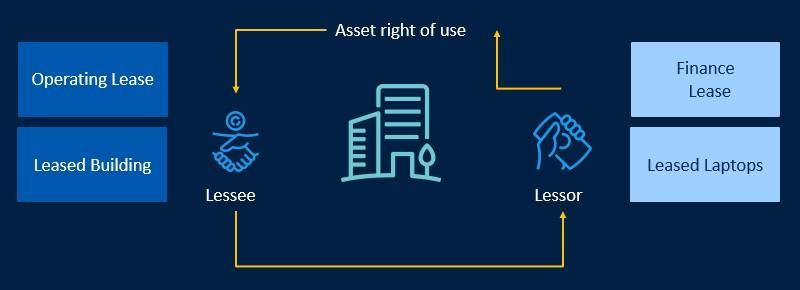
Operating versus Finance Leases
Operating leases are somewhat like renting. The lessee does not get the option to own the asset. The amount of the lease never totals what it would cost had they purchased the asset.
Finance leases often give the lessee the option to purchase the asset at the end of the lease (transfer of ownership occurs). Transfer of ownership is not a requirement to make a lease a finance lease but is a common indicator of a finance rather than operating lease. Often the amount of the lease payments comes close to the amount the lessee would have paid to purchase the item rather than lease it. An example of a finance lease is a leased laptop with a bargain purchase option allowing the lessee to purchase the laptop at a discounted price.
Lease Accounting Standards
U.S. GAAP lease accounting standards allow only the modified retrospective approach on the financial statements.
There are three key models to consider under ASC 842:
- Short-Term Operating leases (less than 12 months) can opt out of the new standard and do not need to report it on the balance sheet.
- Recognize Long-Term Operating leases (longer than 12 months) on the balance sheet.
- Accounting for finance leases remains unchanged.
IFRS lease accounting standards allow the full retrospective and modified approaches. There are only two key models to consider under IFRS 16:
- Short-Term Operating leases (less than 12 months) can opt out of the new standard and do not need to report it on the balance sheet.
- Treat Long-Term Operating leases (longer than 12 months) as finance leases.
Operating Leases Under ASC 842
U.S. GAAP standards require that accounting for long-term operating leases (longer than 12 months) must appear on the balance sheet. Workday functionality supports accurate accounting for this type of lease.
In the supplier contract, you must enter several additional pieces of information. Include lease payment amount, payment dates, initial direct costs, lessor incentives, right of use (ROU) asset, lease liability, and prepaid lease payment. Upon completion of the contract business process, Workday creates a journal that debits the ROU asset and credits lease liability. The data entered into the supplier contract allows you to generate a Supplier Invoice Schedule and installments. From the installments, you can generate a supplier invoice. The invoice will generate a debit to lease liability and credit to accounts payable.
An expense recognition schedule straight lines the lease expense over the lease term. The expense recognition schedule provides data on the lease including:
- Date
- Payment Amount
- Lease Expense
- Interest (amount, not expense)
- Initial Direct Costs
- Lessor Incentives
- ROU Amortization
- Lease Liability
- Amortization
- Remaining ROU Asset
- Remaining Lease Liability
Based on this schedule, you can generate installments and accounting.
Finance and Operating Lease Under IFRS 16
IFRS standards require that accounting for long-term operating leases (longer than 12 months) must appear on the balance sheet. Workday functionality supports accurate accounting for this type of lease.
In the supplier contract, Workday requires the same additional data entry as listed above for ASC 842. The only additional piece required beyond U.S. GAAP standards is Residual Value. Upon completion of the contract business process, the accounting process also functions much the same as it does under U.S. GAAP. A key difference is the data available in the Expense Recognition Schedule:
- Date
- Payment Amount
- Interest
- Principal
- Remaining Lease Liability
Another key difference is the ability to receive and register the asset using Related Actions from the supplier contract. Receiving and registering the asset allows for depreciation and accounting functions on the asset.
Lease Configuration Overview
Edit Tenant Setup
Select the Lease Accounting option in the Procurement Options section of the
Edit Tenant Setup - Financials
task to configure the contract types required. This field is multiselect and there are three options:Selection | Description |
|---|---|
Modified or full retrospective reporting | Represent operating leases under current and new standards. |
Operating lease IFRS | Record operating leases on the balance sheet under IFRS. |
Operating Lease US GAAP | Record operating leases on the balance sheet under U.S. GAAP. |
Note
: By selecting the options that apply, Workday will notify you of additional required configuration. In the procurement options section, selecting No Lease Accounting Items
will opt out of Lease Accounting.Business Assets is required configuration for Finance Leases and for Operating Leases under IFRS 16. In the
Edit Tenant Setup - Financials
task, select Enable multi-book Asset Accounting from the Business Assets Options section. Then complete the following additional configuration:- Maintain Asset Books
- Maintain Asset Book Rules
- Add Company Asset Books
- Maintain Company Asset Book Restrictions
Contract Types
Use the
Maintain Supplier Contract Types
task to create and maintain new types of contracts and enable flags for the items related to lease accounting. For example, you can make contract type selections to designate supplier contracts as:- Operating Leases.
- Short-Term Operating Lease.
- Financial Lease.
- Variable Payment (leaving variable payment cleared indicates the contract is fixed payment).
- Receiving or Non-Receiving.
Note
: You can create Operating and Financial Leases with Receive Contract Lines selected. This selection triggers the creation of a business asset and the associated depreciation schedule to meet the IFRS 16 accounting requirements.Accounts and Account Posting Rules
Configure the Account Posting Rules below for proper accounting for lease transactions. Use any required dimensions to drive the accounting to meet specific needs. At a minimum, define a default account for each posting rule.
- Lease Asset
- Lease Asset Contra
- Lease Expense
- Lease Liability
- Business Asset multi-book Settlement
You may need to create additional accounts in the Account Set.
Additional Configuration
Selection | Description |
|---|---|
Spend Category | For finance leases and operating leases (under IFRS 16), enable the Track Items and Lease checkboxes in the Asset Tracking section of the spend categories. Doing so allows you to create business assets from the contract. |
Ledger Periods | All future fiscal periods for lease contract activity should be in created or open status. |
Maintain Worktag Usage | Set up to include the worktag types for Supplier Contract and Alternate Supplier Contract for use on Accounting Journals. Doing so will pull lease contract worktags onto journal lines. |
Supplier Contracts | All lease contracts will require you to create a new Supplier Contract for the appropriate Lease Contract Type. You can create alternate supplier contracts to compare lease accounting transactions under different accounting methods. Workday creates supplier invoices from the original contract. |
Mass Update Lease Contract Installment | Use the Mass Update Lease Contract Installment to Available or Accounted Status task during data migration to avoid duplicate accounting for installments already posted. |
Lease Chapter Summary
ASC 842 and IFRS 16 accounting standards require lessees to recognize all long-term leases (over 12 months) as assets and liabilities on the balance sheet. Workday streamlines lease accounting in one system for all accounting entries to simplify the reconciliation process.
- Under ASC 842 - You must present operating leases longer than 12 months on the balance sheet.
- Under IFRS 16 - Treat operating leases longer than 12 months as finance leases.
Create leases as Supplier Contract using a specific Contract Type. You can create alternate supplier contracts to compare lease accounting transactions under different accounting methods and book codes. You can configure asset books for different reporting requirements.