
Create Benefits Connectors
Overview
This chapter describes how to create and configure common CCB integrations, including ANSI X12 834 v2, COBRA, and CCBs with payroll data.
Objectives
By the end of this chapter, you will be able to:
- Configure integration attributes, maps, and field overrides unique to CCBs.
- View the CCB integration transaction log.
- Create and configure CCB integrations with payroll data.
ANSI X12 834 v2 Template
The ANSI X12 834 V2 template is the most common CCB template. Use this template for integrations that require an 834 output file format. Do not use named vendor templates that produce 834 output files, as Workday does not enhance and will deprecate them.
Resource
: For more information, search for the Standard ANSI X12 834 page on Workday Community.Integration Services
Integration services for the ANSI X12 834 V2 template enable you to customize the end-to-end connector for a specific endpoint's requirements or for your testing plan. Few integration services for this template are optional. The main integration services include:
Integration Service | Purpose |
|---|---|
CCB ANSI X12 834 V2 Transformation* | Produces an 834 output file. |
CCB ANSI X12 834 V2 Loop 1000 Employer
| Includes integration attributes related to Loop 1000. |
CCB ANSI X12 834 V2 Loop 2000 Employee | Includes integration attributes related to Loop 2000. |
Transaction Log Service | Drives the change detection process by subscribing to different transactions. Unlike other templates, Workday preconfigures the transaction log, so you should not configure or modify it. |
CCB - Debug Service | Enables you to include or exclude specific workers and dependents from an integration event's launch parameters for simplified testing. |
CCB - Additional Filters | Includes a launch parameter prompt to filter by Organization. |
CCB - Sequence Generator | Enables you to configure a unique file name format for integration output. |
CCB - Delivery Service | Enables you to deliver documents to a target endpoint. |
Integration Document Retention | Enables you to set the duration to store files. The default is 30 days. |
File Transmission
In addition to the services above, the ANSI X12 834 V2 template includes services that offer five different options for file transmission. Your integration will output different data based on which of these services you choose to enable.
Important
: You may only enable one file transmission service at a time. If you select more than one file transmission service, Workday will display a warning.To select a file transmission option, enable one of the following services on the integration services grid.
Integration Service | Purpose |
|---|---|
CCB ANSI X12 834 V2 Changes Only | Reports new, changes, and terminations of coverage within the current benefit plan year. This service requires configuration of the Transaction Log Service. |
CCB ANSI X12 834 V2 Actives Only | Reports active enrollments only within the current benefit plan year. Does not include terminations of coverage. |
CCB ANSI X12 834 V2 Full File | Reports active enrollments within the current benefit plan year. Use the Ended Coverage History attribute to specify the number of days to include terminations of coverage. |
CCB ANSI X12 834 V2 Full File - Report All Ended Coverages Once | Reports active enrollments within the current benefit plan year and all terminations of coverage within the Effective Date and Update Date. |
CCB ANSI X12 834 V2 Full File - Report Ended Coverage Once by Plan Type | Reports active enrollments within the current benefit plan year and terminations of coverage within the Effective Date and Update Date when all plans for a Plan Type end. |
Integration Attributes
There are several integration attributes for the ANSI X12 834 template. You will be able to configure different attributes based on which integration services you enable.
The following list contains attributes for each of the three main integration services.
- CCB ANSI X12 834 V2 Transformation
- Enable Test Mode
- Include all INS segments in one Transaction Set
- Convert Output File to Uppercase
- EOL Character
- Header_ISAXX Elements
- Header_GSXX Elements
- TS_BGN08 - Action Code
- TS_REF38 - Master Policy Number
- TS_DTP01 - File Effective Date Qualifier
- TS_DTP03 - File Effective Date
- TS_QTY - Include QTY Totals
- CCB ANSI X12 834 V2 Loop 1000 Employer
- Loop 1000A - Sponsor Elements
- Loop 1000B - Payer Insurer Elements
- Loop 1000C - TPA Elements
- CCB ANSI X12 834 V2 Loop 2000 Employee and Dependent
- Benefit Plans
- Loop2000_INS02 - Identify Court Ordered Dependent
- Loop2000_INS03 - Report Termination Code Selection
- Loop2000_INS08 - Exclude Leave Status
- Loop2100_N3N4 - Postal Address Selection
- Loop2100_N3N4 - Consider Canadian address as foreign
- Loop2100_N3 - Enable Multiple Address Lines
- Loop2100_NM1_N3 - Remove Special Characters
- Loop2100_N404 - Send Three Character Country Code
- Loop2100_DMG07 - Country Code to exclude
- Loop2300_DTP349 - Include Future Coverage End Dates
- Loop2310 - Include Provider Information Segment
- Loop2310_NM108 - Provider ID Code Qualifier
- Loop2310_NM110 - Entity Relationship Code
- Loop2700 - Include REF Segments for Dependent
- Integration Document Retention
- Document Retention Policy
Each transmission file type service also includes one or more attributes.
Integration Maps
The simplest way to determine which integration maps you need to configure is to run the integration upon initial creation. The integration event's messages list which maps are essential for identifying data.
Important
: Providers may require additional maps beyond those that the integration template requires. Consult the vendor and the companion guide when configuring maps.Note the following integration maps for the ANSI X12 834 V2 template:
- Loop2000_INS02 - Individual Relationship Code
- Loop2100A_DMG03 - Gender Code
- Loop2100A_DMG04 - Marital Status Code
- Loop2300_HD03 - Insurance Line Code for Standard Loop
- Loop2300_HD05 - Coverage Level Code
Integration Field Overrides
For the ANSI X12 834 v2 template, field overrides reference 834 file loops, segments, and elements to guide you in configuration. If you configure a field override, the 834 file information provided indicates where the override values appear in the file.
The ANSI X12 834 V2 template includes extensible field overrides that allow you to report an extra Loop 1000 for Employer. Current loops include:
- Loop 1000A - Sponsor
- Loop 1000B - Payer
- Loop 1000C - TPA/Broker
Companion guides and providers do not specifically indicate when to use field overrides. Often, you will need to use field overrides when the provider requires a specific format and data for a value that is not directly available in Workday.
Note
: In some cases, you will need to use calculated fields with field overrides to populate data correctly.COBRA Templates
COBRA integrations notify providers if and when subscribers become eligible for COBRA coverage. The providers then send eligible subscribers information about their COBRA coverage.
COBRA integrations do not all use the same connector template; some use a provider-specific template, while others use WEX COBRApoint templates. The WEX templates use a standard COBRApoint format, so you can use this template for any provider that supports this layout.
Tip
: If you need to build a COBRA integration, verify with the provider if they use the COBRApoint format. If they do not, browse the CCB Catalog on Workday Community for a provider-specific COBRA template. Search Reference: Benefits ConnectorDates
COBRA integrations require certain dates regarding eligibility.
Date | Definition |
|---|---|
COBRA Eligible Date | The date a worker or dependent becomes eligible for COBRA coverage, often the day after the loss of coverage. |
Qualifying Event Date | The date of the event that caused a worker or dependent to lose regular benefit coverage. |
COBRA Coverage End Date | The date a worker or dependent's benefit coverage ends under COBRA. This is not the date their original coverage ends. |
Integration Files
COBRA integrations generate change-only files. The two main file types include different data:
- Initial Rights: Also known as General Notice, New Hire, or Department of Labor (DOL) files, these provide basic demographic data so the COBRA provider has a record of all active workers and dependents in case any qualify for COBRA coverage.
- Qualifying Events: Tell the COBRA provider that an employee recently qualified for COBRA coverage and provide employee and dependent benefit data.
Integration Services
COBRA integrations use many of the same integration services as other CCBs, including:
- WBN - Outbound Service (v2)
- WBN - Enrollment (v2)
- Transaction Log Service
- CCB - Debug Service
In addition, some COBRA integration templates include these services:
Integration Service | Purpose |
|---|---|
COBRA (Qualifying Events) or COBRA (Initial Rights) | Designates the integration is for either qualifying events or initial rights. |
Get Prior Plan Year Benefit Plans Data Initialization Service | Includes workers and dependents from the prior benefit year in the integration. |
CCB - Personal Data Service | Enables you to specify the order in which the integration searches for personal data to send to the endpoint, like addresses and phone numbers, using integration attributes. |
WBN - Launch Change File - Event Based | Designates the integration produces a change-only file, not a full file. |
Integration Attributes
COBRA integration templates have many of the same attributes as other CCBs, including:
- Benefit Plans
- Enable Test Mode
- Document Retention Policy
- End Coverage Configuration
Depending on the connector template, other COBRA integration attributes are:
Integration Attribute | Purpose |
|---|---|
Send Empty File | Sends an empty file to the endpoint if there is no data to report or if the data is not eligible to report. |
Send First Day Of COBRA | If FALSE, determines the first day of COBRA coverage based on the event date. If TRUE, determines the first day of COBRA coverage based on the start date. |
Bundle Plans Based on Group | If TRUE, assigns one value to multiple plans grouped using the Plan Bundle Name map. |
Integration Maps
For COBRA templates, the most notable integration maps concern:
- Qualifying events
- Enrollment relationships
- Coverage level
In addition, the Plan Bundle Name integration map works with related integration attributes to group benefit plans in the output file.
Report
: To locate COBRA qualifying events, which you need to configure maps for, run the COBRA Eligibility Reasons
report.Integration Field Overrides
For COBRA connector templates, integration field overrides are somewhat limited, since the data is often less varied than the data for other CCB templates. Field overrides often relate to:
- Client names
- Employee types
- Benefit plan names
- Plan bundle names
CCB Templates with Payroll Data
Because many benefit plans involve paycheck deductions, like a 401(k) plan that takes a percentage of every paycheck, some CCBs use benefit and payroll data. CCBs with payroll data behave differently depending on whether you use Workday Payroll or a third-party payroll provider:
Scenario | CCB Integration Behavior |
|---|---|
Workday Payroll | The integration sends actual contribution amounts for all plans recorded in Workday Payroll to the benefit provider. |
Third-party payroll provider | The integration sends estimated contribution amounts for plans without standard deductions, based on benefit plan configuration in Workday, to the benefit provider. |
If you use a third-party payroll provider, you can run a worker's
Current Benefit Elections
report to check their estimated contribution values and validate the integration output file.Security Note
: Integrations that use benefits and payroll data need ISUs with security permission to access both product areas.Payroll Data
The payroll data required for benefits end-to-end connectors depends on the type of benefit plan.
Some benefit plans have the subscriber predetermine a standard deduction from their check each pay cycle. CCBs that report on these benefit plans do not need payroll deduction information for each pay cycle, because the deductions are consistent for a longer period. These benefit plans include:
- Medical
- Dental
- Vision
- Life insurance
- Disability
- ADD
Other benefit plans allow subscribers to change their deduction each pay cycle. Because the subscriber has the opportunity to change their deduction, CCBs that report on these benefit plans need actual payroll deduction information for each pay cycle. These benefit plans include:
- FSA
- HSA
- Commuter/transit
- Defined contribution retirement plans (e.g., 401k, 403b)
For benefit plans that require actual payroll deduction information, some providers have separate templates for enrollment and actual payroll deductions. Others combine the two functions, like WEX CDex: FSA, HSA, HRA, and Commuter. You can determine how CCB with payroll data templates behave, and if they require actual payroll deduction information, in two ways:
- Review CCB resources on Workday Community.
- Determine if the integration template has the Include Payroll Balances integration service in Workday.
Retirement Plans
CCBs with retirement plan or loan repayment information behave differently from other benefits integrations with payroll data. Inbound integrations send retirement deferral and loan repayment data to Workday, most often if the customer uses Workday Payroll.
Term | Data Sent to Workday |
|---|---|
Retirement Deferral | The amount or percentage the worker decides to deduct from their pay check for their retirement savings account. |
Loan Repayment | The amount the worker decides to take out of their retirement savings account as a loan, when they need to repay it, when repayment ends, and if any of this data changes. |
Workday Payroll needs this data to properly deduct contributions from workers' pay checks each pay cycle.
Integration Services
CCB integrations with payroll data use many of the same integration services as nonpayroll CCBs, including:
- WBN - Outbound Service (v2)
- WBN - Enrollment (v2)
- Transaction Log Service
- CCB - Debug Service
In addition, some CCB integration templates with payroll data include these services:
Integration Service | Purpose |
|---|---|
Include Payroll Balances | Sends actual contribution amounts from Workday Payroll in the integration output file. If you use a third-party payroll provider, this service sends estimated contribution amounts based on Workday benefit plan configuration. This service also enables the Payroll Start Date and Payroll End Date launch parameters. The dates do not refer to an actual pay period. Instead, they refer to the date range from which the integration reports payroll information. If the parameter date range does not align with a payroll cycle, the integration output does not include records from any incomplete payroll cycles. |
Full File - Include Ended Coverage Once | Sends a full file of all current subscribers to the payroll-related benefit, as well as those whose coverage has ended since the last integration run. Once the integration reports a subscriber's ended coverage, the output file no longer includes them. |
CCB - Payroll Service: Additional Launch Parameters | Enables payroll-related launch parameters. |
Resource
: For more information on payroll dates and launch parameters, search for the Launch Parameters and Filtering CCB Output page on Workday Community.Integration Attributes
CCB integration templates with payroll data have many of the same attributes as other CCBs, including:
- Benefit Plans
- Enable Test Mode
- Document Retention Policy
- Ended Coverage History
- End Coverage Configuration
Depending on the connector template, CCBs with payroll data may also include the following attributes:
Integration Attribute | Purpose |
|---|---|
Use Payment Date | Uses the payment date instead of the period end date for the integration. |
CCB - Payroll Service: Additional Launch Parameters | Prepopulates the Payroll Start Date and Payroll End Date launch parameters with the selected field. |
Vendor Name | Provides vendor-specific functionality to the integration system, if needed. |
Dependent Unique Identifier | Required; determines which ID the integration uses for dependents. |
Exclude Employer Contribution, Exclude Leave Status, Exclude COBRA Status, and Exclude Retired Status | Excludes the named information from the integration output file. |
Combine Contribution Amounts | Combines two contribution sources into one value in the integration output file, like pre- and post-tax deductions. |
Integration Maps
Integration maps for CCBs with payroll data are generally straightforward. Integration templates often include integration maps used in other CCBs, like:
- Gender
- Marital Status
- Plan Name
- Enrollment Relationship
In addition, CCBs with payroll data have integration maps related to the new payroll data, including:
- Employer Contribution Level
- Pay Cycle Frequency
- Election Amount Indicator
- Combine Enrollment Records
- Payroll Period End Date and Payroll Period Start Date
- Compensation Source Code and Compensation Period
Integration Field Overrides
Integration field overrides for CCBs with payroll data relate to both benefits and payroll data, as expected. In addition to other CCB overrides, some payroll-related integration field overrides are:
- Hold Payroll Deduction Flag
- Hold Employer Contribution Flag
- Final Payroll Process Date
- Primary Reimbursement
- Payroll Frequency Effective Date
- Alternate Reimbursement
Important
: To validate which fields to use for field overrides, you can view an individual worker's payroll data from their worker profile. In the Pay section, view Payment Elections, Tax Elections, and Input. You can also use the Related Actions of objects to find information about them, like pay cycles for pay groups.Benefits Connector v2 Template
You can use the Benefits Connector V2 template whenever an industry standard or proprietary template for a benefits provider isn't included in the CCB catalog. This template outputs data in simple XML format to send to any benefits provider. Keep in mind that you may need to transform the XML output to meet provider specific requirements.
- Benefits Connector V2 supports the following benefit plan types:
- Health Plans (Medical, Dental, Vision, Drug)
- Health Savings Plan (HSA)
- Flexible Spending Account (FSA)
- Life and Disability
- Retirement Savings Account
- Additional Benefits
Note
: Only use this template when other CCB templates do not meet your needs.Integration Services
Benefits Connector integrations use many of the same integration services as other CCBs, including:
- CCB - Sequence Generator
- CCB - Delivery Service
- CCB - Additional Filters
- CCB - Debug Service
- Transaction Log Service
- Integration Document Retention
Transmission File Types
Similar to other CCBs, you can choose to export a full file or a changes only file based on which service you enable.
- CCB Benefits Connector v2 Full File: Reports the most recent benefits enrollment data on or before the Effective Date.
- CCB Benefits Connector v2 Changes Only: Reports new, changes, and terminations of coverage within the current benefit plan year. This service requires you to enable and configure the Transaction Log to detect which types of transactions should be reported on the output file.
Integration Attributes
There are several integration attributes for the Benefits Connector V2 integration service:
- Benefit Plans (Required for Launch)
- Include Benefit Eligible Employees
- Organization Type for Organization One
- Organization Type for Organization Two
- Organization Type for Organization Three
- Enable Test Mode
- Perform Character Translation
You will be able to configure additional attributes based on which transmission file type service you enable.
Field Attributes
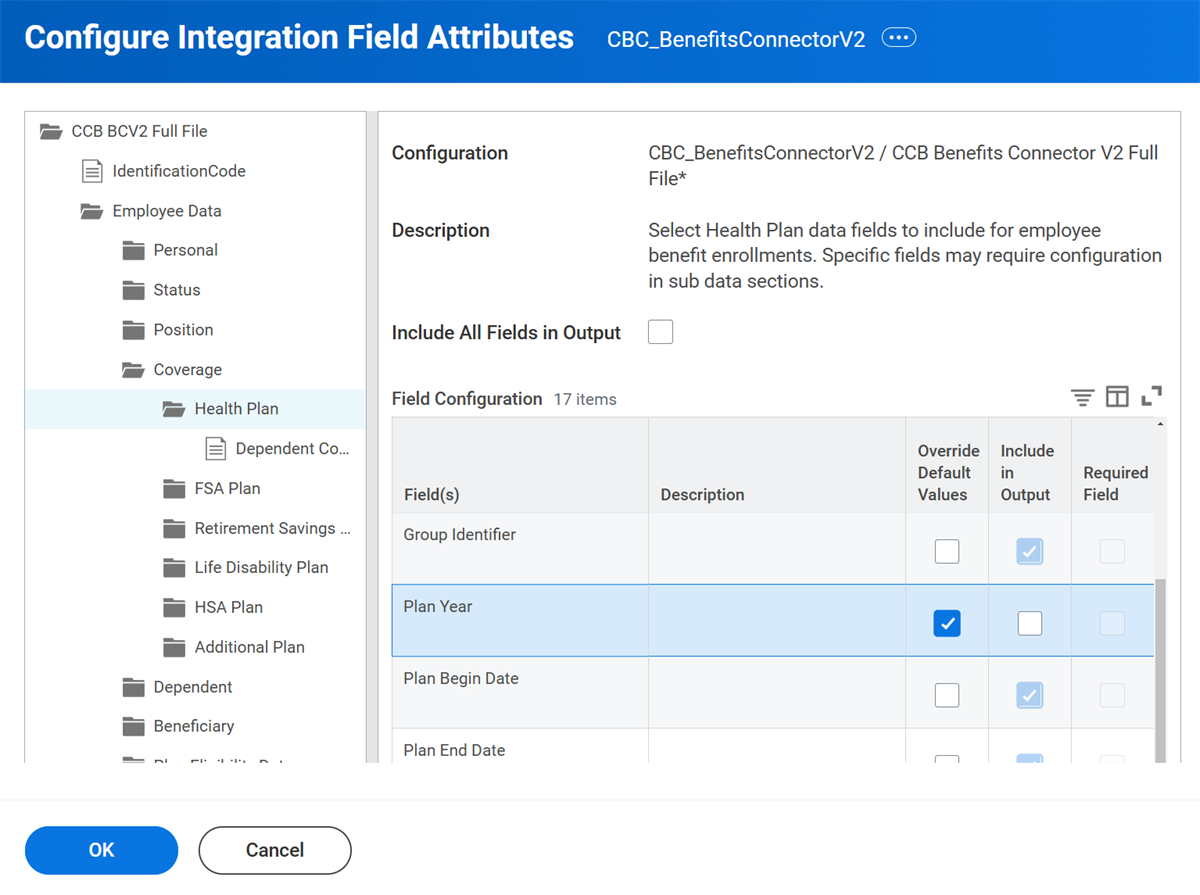
The Benefits Connector V2 template works differently than other outbound CCB integrations. This template contains field attributes that allow you to choose which fields to include or exclude in the output file.
There are separate data sections for worker data, benefits coverage, payroll activity, dependents and beneficiaries. Most fields in each data section are included by default. Use the Override Default Values check box to de-select individual fields or an entire data section.
Resource
: For more information about the Benefits Connector V2 template, search for Benefits Connector on Workday Community.